
1. Introduzione
This manual provides detailed instructions for the installation, operation, and maintenance of your Tenveo 4K NDI PTZ Camera (Model VX20M-4KN). Please read this manual thoroughly before using the product to ensure proper functionality and to prevent damage.
The Tenveo VX20M-4KN is a professional-grade PTZ camera designed for high-quality video production, live streaming, and conferencing. It features 4K UHD resolution, 20X optical zoom, AI auto-tracking, and multiple output interfaces including NDI, HDMI, 3G-SDI, and USB3.0.
2. Informazioni sulla sicurezza
- Non esporre la fotocamera alla pioggia o all'umidità.
- Non smontare la fotocamera. Per qualsiasi intervento di manutenzione, rivolgersi a personale qualificato.
- Assicurarsi che l'alimentazione sia adeguata ai requisiti della telecamera.
- Evitare di posizionare la fotocamera alla luce diretta del sole o vicino a fonti di calore.
- Pulisci la fotocamera con un panno morbido e asciutto. Non utilizzare prodotti chimici aggressivi.
- Assicurare una ventilazione adeguata attorno alla telecamera per evitare il surriscaldamento.
- For optimal clarity, place the camera at least 2.5 meters (8.2 feet) away from the subject.
3. Contenuto della confezione
Verifica che tutti gli articoli elencati di seguito siano inclusi nel tuo pacchetto:
- Tenveo 4K NDI AI PTZ Live Streaming Camera (VX20M-4KN)
- Telecomando IR
- Adattatore di alimentazione CC 12V
- Cavo USB3.0
- Montaggio a parete con viti
- Manuale dell'utente (questo documento)
4. Prodotto finitoview
The Tenveo VX20M-4KN camera offers advanced features for professional video production. Key components and interfaces are detailed below.

Figure 4.1: Key Features and Interfaces of the Tenveo 4K NDI PTZ Camera.
4.1. Caratteristiche principali
- Qualità video 4K UHD: Captures crisp 4K@30fps video using an 8.29MP 1/2.8" CMOS sensor.
- Zoom ottico 20X: Provides clear magnification from wide angle to close-up without quality loss. Optimal focusing distance is 2.5m (8.2ft).
- Monitoraggio automatico dell'intelligenza artificiale: Features AI Humanoid & Face Auto-Tracking for smooth following of presenters. Supports Presenter Mode and Auto-Framing Mode.
- NDI-Certified: Ensures superior video quality, low latency, and stable IP video streaming with precise PTZ control. Note: NDI output does not support audio transmission.
- Interfacce multiple: Simultaneous video output via HDMI (4K 30fps), 3G-SDI (1080P 60fps), USB3.0 (4K 30fps), and IP NDI Streaming (1080P 30fps).
- Alimentazione su Ethernet (PoE): Supports IEEE802.3af for combined power and data over a single Ethernet cable.
- Tally Light & Status Display: Professional Tally Light (PGM Red/PVM Green/Other White) and an integrated status indicator screen for IP address, resolution, and frame rate.
- Integrazione audio: 3.5mm audio Line in and Line out interfaces.
4.2. Camera Dimensions and Movement

Figure 4.2: Camera Pan, Tilt, and Zoom Capabilities.
- Gamma Pan: 350° (±175°) with speeds from 0.1°/s to 100°/s.
- Gamma di inclinazione: 180° (±90°) with speeds from 0.1°/s to 80°/s.
- Preselezioni: Up to 255 programmable presets for rapid scene switching.
5. Impostazione
5.1. Installazione fisica
The Tenveo VX20M-4KN camera supports various mounting options:
- Posizionamento sul desktop: Posizionare la telecamera su una superficie stabile e piana.
- Montaggio del monitor: Securely attach to a monitor using appropriate accessories (not included).
- Montaggio a parete: Use the provided wall mount and screws for secure installation.
- Montaggio a soffitto: Install using a compatible ceiling mount (not included).
Ensure the camera is placed in a location free from vibrations to maintain stable image quality.
5.2. Connessioni
Connect the camera using the appropriate cables for your setup. The camera offers multiple output options.

Figura 5.1: Collegamenti del pannello posteriore.
- Collegamento elettrico: Connect the DC 12V power adapter to the camera's power input. Alternatively, if using PoE, connect an Ethernet cable from a PoE-enabled switch to the LAN port.
- Uscita video:
- HDMI: Connect an HDMI cable for 4K 30fps video output.
- 3G-SDI: Connect an SDI cable for 1080P 60fps video output.
- USB 3.0: Connect the provided USB3.0 cable to a computer for 4K 30fps video output.
- LAN (streaming NDI/IP): Connect an Ethernet cable to a network switch for NDI or other IP streaming protocols (1080P 30fps).
- Connessione audio: Use the 3.5mm Line In/Out jacks to connect external audio mixing consoles or microphones.
- Connessioni di controllo:
- RS232/RS485: For connecting to a PTZ controller or other control systems.
- LAN: For IP-based control via Web UI or PTZ controller.
5.3. Network Configuration (IP Search Tool)
To configure network settings and access the camera's web interface, use the Tenveo IP Search Tool.
Video 5.1: Instructions on how to use the Tenveo IP Search Tool for network configuration.
- Download and install the Tenveo IP Search Tool (refer to the official Tenveo website for the latest version).
- Ensure your computer and the camera are connected to the same network.
- Launch the IP Search Tool. It will automatically scan and list all Tenveo devices on your network.
- From the tool, you can assign static IP addresses and access the camera's web management interface with a single click.
- Nota: This function supports Tenveo Cameras V1.2.02 and Tenveo PTZ Controller V5.4.6 or later versions.
6. Funzionamento
6.1. Basic Controls (Pan, Tilt, Zoom)
The camera can be controlled via the IR remote, Web UI, or a dedicated PTZ controller.
Video 6.1: Demonstrating PTZ camera control for live streaming applications.
- Pan: Ruota la telecamera orizzontalmente (sinistra/destra).
- Inclinazione: Regolare la telecamera verticalmente (su/giù).
- Ingrandisci: Adjust the optical zoom for wider or tighter shots.
6.2. Monitoraggio automatico dell'intelligenza artificiale
The camera's AI auto-tracking feature can automatically follow a presenter or frame multiple participants.
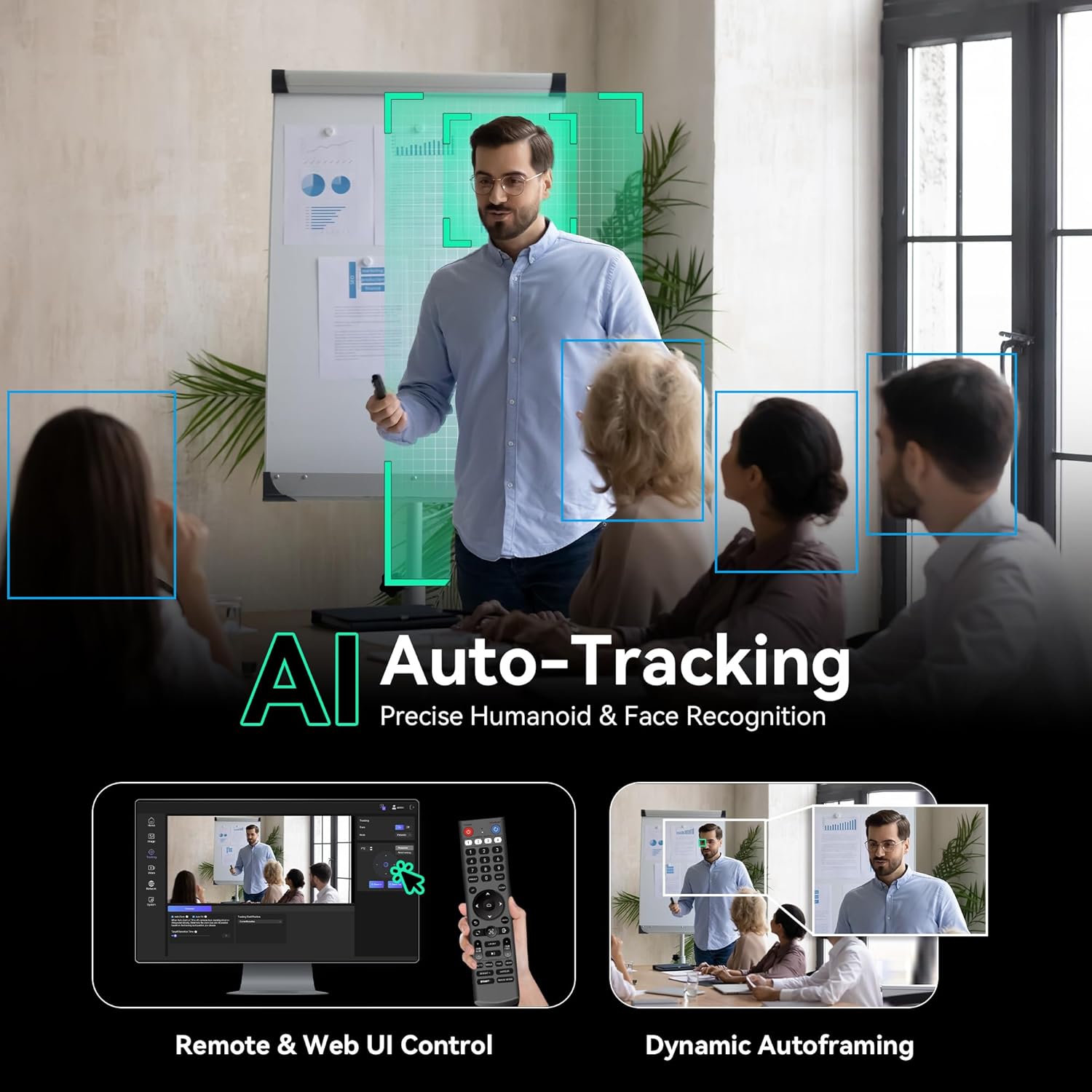
Figure 6.1: AI Auto-Tracking in action, showing presenter tracking and auto-framing.
Video 6.2: Demonstration of Tenveo AI Humanoid & Face Auto-Tracking capabilities.
- Modalità Presentatore: The camera identifies and follows a single presenter. It maintains tracking even if the subject is momentarily obscured.
- Auto-Framing Mode: Keeps all participants within the view, suitable for group discussions.
- Attivazione: Can be enabled/disabled via the IR remote or Web UI.
6.3. Preselezioni
Save up to 255 camera positions (pan, tilt, zoom) as presets for quick recall during an event.
- Presets can be managed via the IR remote, Web UI, or a compatible PTZ controller.
- The IR remote supports up to 10 presets.
6.4. Tally Light & Status Indicator
The camera features a professional Tally Light and a status indicator screen for real-time information.

Figure 6.2: Tally Light and Status Indicator Display.
- Luce di conteggio:
- Red (PGM): Camera is live/on-air.
- Green (PVM): Camera is in preview modalità.
- White (Other): Indicates other states or standby.
- Status Indicator Screen: Displays the device's IP address, current resolution, and frame rate, aiding in setup and troubleshooting.
7. Connectivity & Streaming
The Tenveo VX20M-4KN supports various connectivity options and streaming protocols.

Figure 7.1: NDI|HX Integration for Live Production.
- NDI|HX2: Full NDI certification for high-quality, low-latency IP video streaming and control.
- Protocolli supportati: RTSP, RTMP, VISCA over IP, SRT.
- Compatibilità: Works with popular streaming software such as Zoom, Teams, OBS, vMix, and YouTube.
- UVC Compatible: Plug-and-play functionality on Windows 10/11, MacOS, Android, and Linux.
- Codifica: Supports H.264/H.265 for efficient streaming and recording.

Figure 7.2: Multi-Camera Live Production Connection Diagram.
For detailed instructions on using NDI tools with Tenveo PTZ cameras, refer to the following video:
Video 7.1: Guide on how to use NDI Tools with Tenveo PTZ Cameras.
8. Risoluzione Dei Problemi
This section addresses common issues you might encounter. For more complex problems, please contact Tenveo support.
| Problema | Possibile causa | Soluzione |
|---|---|---|
| Nessuna uscita video. | Incorrect cable connection, wrong input selected on display, camera not powered on. | Check all cable connections (HDMI, SDI, USB, LAN). Ensure the camera is powered. Select the correct input source on your display device. |
| La telecamera non risponde ai comandi. | IR remote battery low, incorrect control protocol, network issue for IP control. | Replace IR remote batteries. Verify control protocol settings (VISCA, IP). Check network connection and IP address for Web UI/PTZ controller. |
| AI Auto-Tracking not working correctly. | Subject too far/close, poor lighting, multiple subjects confusing AI, outdated firmware. | Ensure subject is within optimal distance (min 2.5m). Improve lighting conditions. Try Presenter Mode for single subjects. Check for firmware updates. |
| Scarsa qualità dell'immagine (sfocata, rumorosa). | Incorrect focus, low light, dirty lens, camera too close to subject. | Adjust focus (auto/manual). Ensure adequate lighting. Clean the lens with a soft cloth. Maintain optimal focusing distance. |
| NDI output has no audio. | NDI output of this camera model does not support audio transmission. | This is expected behavior. Use the 3.5mm Line Out for audio output and integrate it separately into your streaming workflow. |
9. Specifiche
| Caratteristica | Dettaglio |
|---|---|
| Marca | Tenveo |
| Numero di modello | VX20M-4KN |
| Tecnologia del sensore fotografico | CMOS (1/2.8-inch, 8.29 MP) |
| Risoluzione di acquisizione video | 4K (3840x2160) a 30 fps |
| Zoom ottico | 20x |
| Lunghezza focale minima | 4.95 millimetri |
| Lunghezza focale massima | 99 millimetri |
| Viewangolo di ing | 63 gradi |
| Pan Range | 350° (±175°) |
| Gamma di inclinazione | 180° (±90°) |
| Tecnologia di connettività | 3G-SDI, HDMI, USB3.0, LAN (NDI/PoE) |
| Interfacce audio | 3.5mm Line In, 3.5mm Line Out |
| Protocolli di rete | RTSP, RTMP, VISCA over IP, SRT, NDI|HX2 |
| Codifica | Formato H.264/H.265 |
| Alimentazione elettrica | DC 12V or PoE (IEEE802.3af) |
| Peso dell'articolo | 1.7 chilogrammi |
| Stabilizzazione dell'immagine | Ottico |
| Dispositivi compatibili | Personal Computer, Smartphone, Tablet, Laptop |
10. Garanzia e supporto
Tenveo is committed to providing high-quality products and customer service.
- Garanzia: This product comes with an industry-leading 3-Year Manufacturer's Warranty.
- Garanzia soddisfatti o rimborsati: Enjoy a 30-Day No-Questions-Asked Money-Back Guarantee.
- Supporto tecnico: Lifetime Technical Support is provided.
- Contatto: For any questions or assistance, please contact Tenveo customer service. Remote setup assistance and free online training are available.