Introduzione
This manual provides detailed instructions for the safe and effective use of your Digitek DSL 555 RGB Portable LED Stick Light Wand. Please read this manual thoroughly before operating the device and retain it for future reference.
Cosa c'è nella scatola
Verificare che tutti i componenti siano presenti al momento del disimballaggio:
- Luce del bastone
- Porta del granaio
- Cavo di ricarica di tipo C.
- Custodia A Sacchetto
Prodotto finitoview
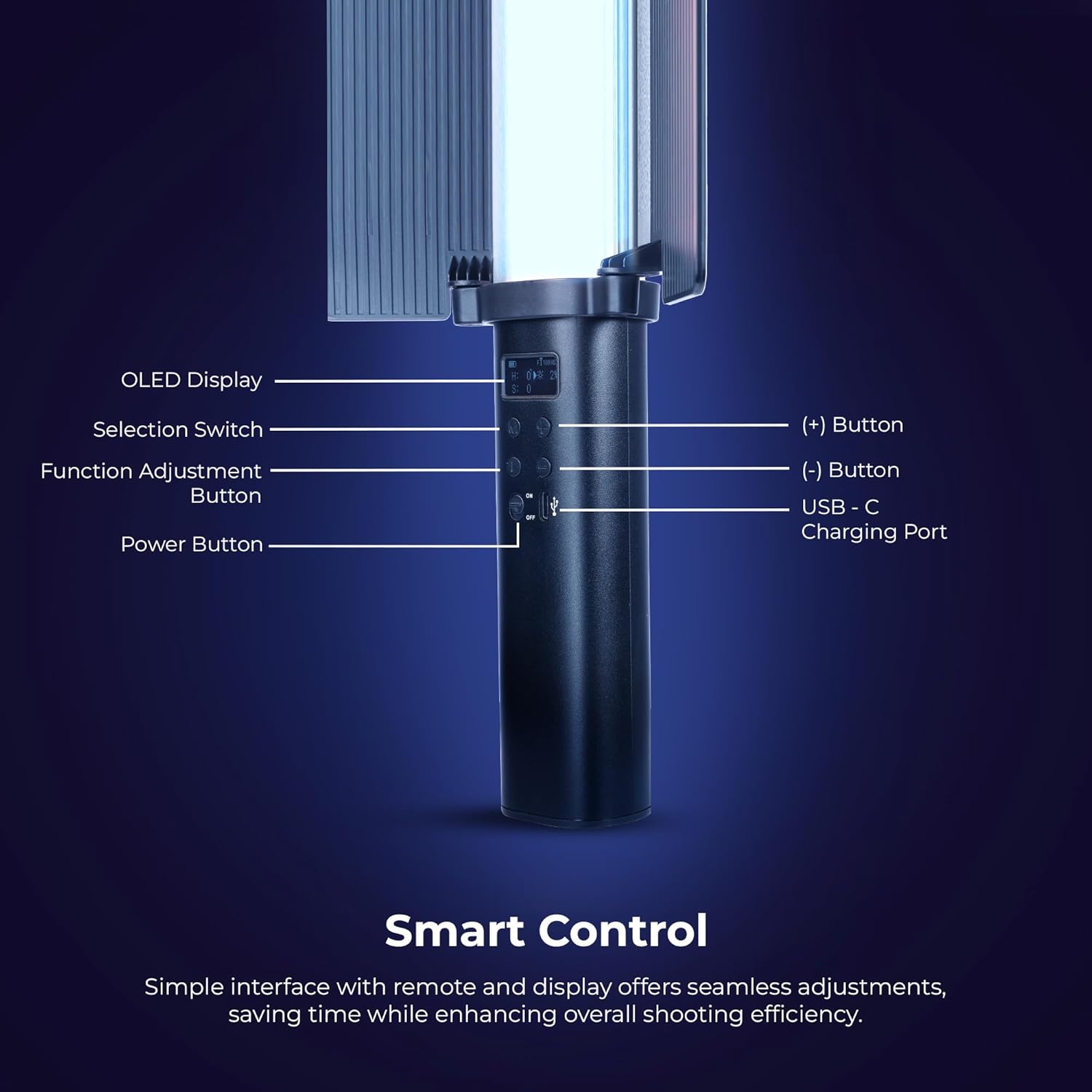
Immagine: Dettagliato view of the Digitek DSL 555 RGB control panel with OLED display and buttons.
The Digitek DSL 555 RGB is a versatile LED stick light designed for photography and videography. It features a robust 38W output, dual color temperature (2500K-9900K), full RGB color control, and 24 special effects. The device includes an OLED display for easy adjustments and supports app control for enhanced functionality.
- Display OLED: Mostra le impostazioni correnti.
- Selection Switch: Navigates menu options.
- Function Adjustment Button: Confirms selections and changes modes.
- Pulsante (+): Aumenta i valori o sposta verso l'alto.
- Pulsante (-): Diminuisce i valori o naviga verso il basso.
- Porta di ricarica USB-C: For power input and charging.
- Pulsante di accensione: Accende o spegne il dispositivo.
Impostare
Caricamento del dispositivo

Immagine: Digitek DSL 555 RGB with USB-C Charging Port and Battery Details.
Connect the provided Type-C charging cable to the USB-C port on the light wand and plug the other end into a compatible USB power adapter (not included). The OLED display will indicate charging status. A full charge provides approximately 1.5 hours of operation.
Attaching the Barn Door

Immagine: Digitek DSL 555 RGB with Removable Barn Door and HSI Color Adjustment.
Align the barn door accessory with the light panel and slide it into place until it securely clips onto the light wand. The barn door helps to shape and control the light output.
Montaggio
The DSL 555 RGB features a 1/4-inch universal mounting thread at its base. This allows for attachment to tripods, light stands, or other compatible rigs for stable positioning during use.
Istruzioni per l'uso
Accensione/spegnimento
Premere e tenere premuto il tasto Pulsante di accensione located on the handle to turn the light wand on or off.
Basic Adjustments (Button Control)
- Utilizzare il Interruttore di selezione to cycle through different modes (CCT, HSI, FX).
- Premere il tasto Function Adjustment Button to select a parameter within a mode (e.g., color temperature, brightness, hue).
- Utilizzare il (+) E (-) Buttons to adjust the selected parameter's value.
Color Temperature (CCT Mode)
In CCT mode, adjust the color temperature from 2500K (warm light) to 9900K (cool light) using the (+) and (-) buttons. This mode also allows for RGB adjustments.
Regolazione della luminosità
The light intensity can be adjusted from 1% to 100% in any mode. Use the (+) and (-) buttons to set the desired brightness level.
HSI Color Mode
The HSI mode offers full creative control over colors:
- Hue (H): Adjust from 0-360 degrees to select any color in the spectrum.
- Saturation (S): Adjust from 0-100% to control the purity of the color.
- Intensity (I): Adjust from 0-100% to control the brightness of the color.
Special Effects (FX Modes)

Immagine: Digitek DSL 555 RGB showcasing various special effects modes.
The DSL 555 RGB includes 24 pre-programmed special effects such as Strobe, Police, Flame, Firework, and more. Navigate to FX mode using the Selection Switch and choose your desired effect.
Dual-Sided Brilliance

Immagine: Digitek DSL 555 RGB demonstrating Dynamic RGB and Natural Bi-Color sides.
The light wand features two distinct sides: one for dynamic RGB lighting and the other for natural bi-color (2500K-9900K) output, offering versatile lighting options.
Controllo dell'app
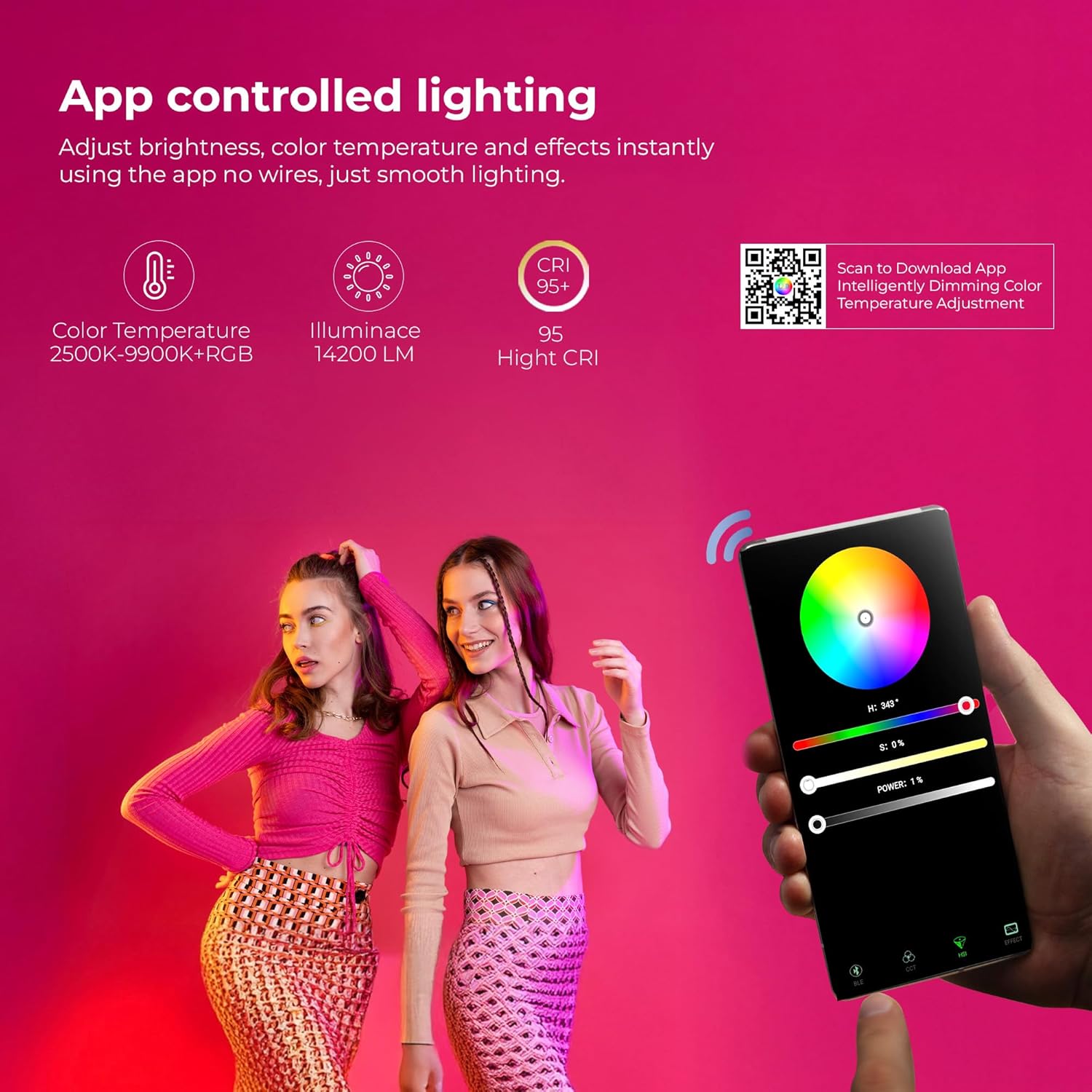
Immagine: Digitek DSL 555 RGB App Control Interface and QR Code for Download.
For advanced control, download the official app. Scan the QR code provided on the product packaging or visit www.ledlyd.com to download the application. The app allows for remote adjustment of brightness, color temperature, and effects.
Manutenzione
Pulizia
Wipe the light wand with a soft, dry cloth. Do not use abrasive cleaners or solvents, as these may damage the surface or internal components.
Magazzinaggio
When not in use, store the light wand in its carry bag in a cool, dry place away from direct sunlight and extreme temperatures.
Cura della batteria
Per prolungare la durata della batteria, evitare di scaricarla completamente frequentemente. Caricare il dispositivo regolarmente, anche se non viene utilizzato per periodi prolungati.
Risoluzione dei problemi
- La luce non si accende: Ensure the device is charged. Connect to a power source using the Type-C cable.
- Problemi di connettività dell'app: Ensure Bluetooth is enabled on your mobile device. Restart both the light wand and the app. Refer to the app's help section for specific pairing instructions.
- Emissione luminosa non uniforme: Check for any physical damage. Ensure the battery is adequately charged.
Se i problemi persistono, contatta l'assistenza clienti per assistenza.
Specifiche

Immagine: Key Features of Digitek DSL 555 RGB LED Stick Light Wand.
| Potenza in uscita | 38W |
| Luminanza | Fino a 14200LM |
| Temperatura del colore | 2500K – 9900K + RGB |
| CRI (indice di resa cromatica) | RA> 95 |
| Regolazione della luminosità | Dal 1% al 100% |
| Durata della batteria | Circa 1.5 ore |
| Porta di ricarica | USB di tipo C |
| Opzione di montaggio | 1/4” Universal Mount |
| Dimensioni del prodotto | 3 x 5 x 59 cm (circa) |
| Peso dell'articolo | 2 kg |
| Paese di origine | Cina |
Garanzia e supporto
Per informazioni sulla garanzia e supporto tecnico, contattare il produttore:
Produttore: IMS Mercantiles Limited
Indirizzo: 704, 7th floor, Ring Road Mall, Sec-3, Rohini, Delhi 110085
Customer Helpline (Toll Free): Numero di parte 1800-123-544-444
E-mail: support@digitek.net.it
Conservare la ricevuta d'acquisto come prova d'acquisto per eventuali reclami in garanzia.