
1. Introduzione
The Benewake TF02-Pro is an advanced single-point LiDAR sensor designed for stable, accurate, and high-frequency distance measurement. It features enhanced anti-interference capabilities, ensuring reliable performance even under strong ambient light conditions (up to 100Klux). This makes it suitable for a wide range of industrial and commercial applications requiring precise and dependable ranging.
Key features include a detection range of 0.05m to 40m, high accuracy, an ultra-fast response rate up to 1000Hz, and robust IP65 protection for challenging environments. It supports multiple communication interfaces for flexible integration.
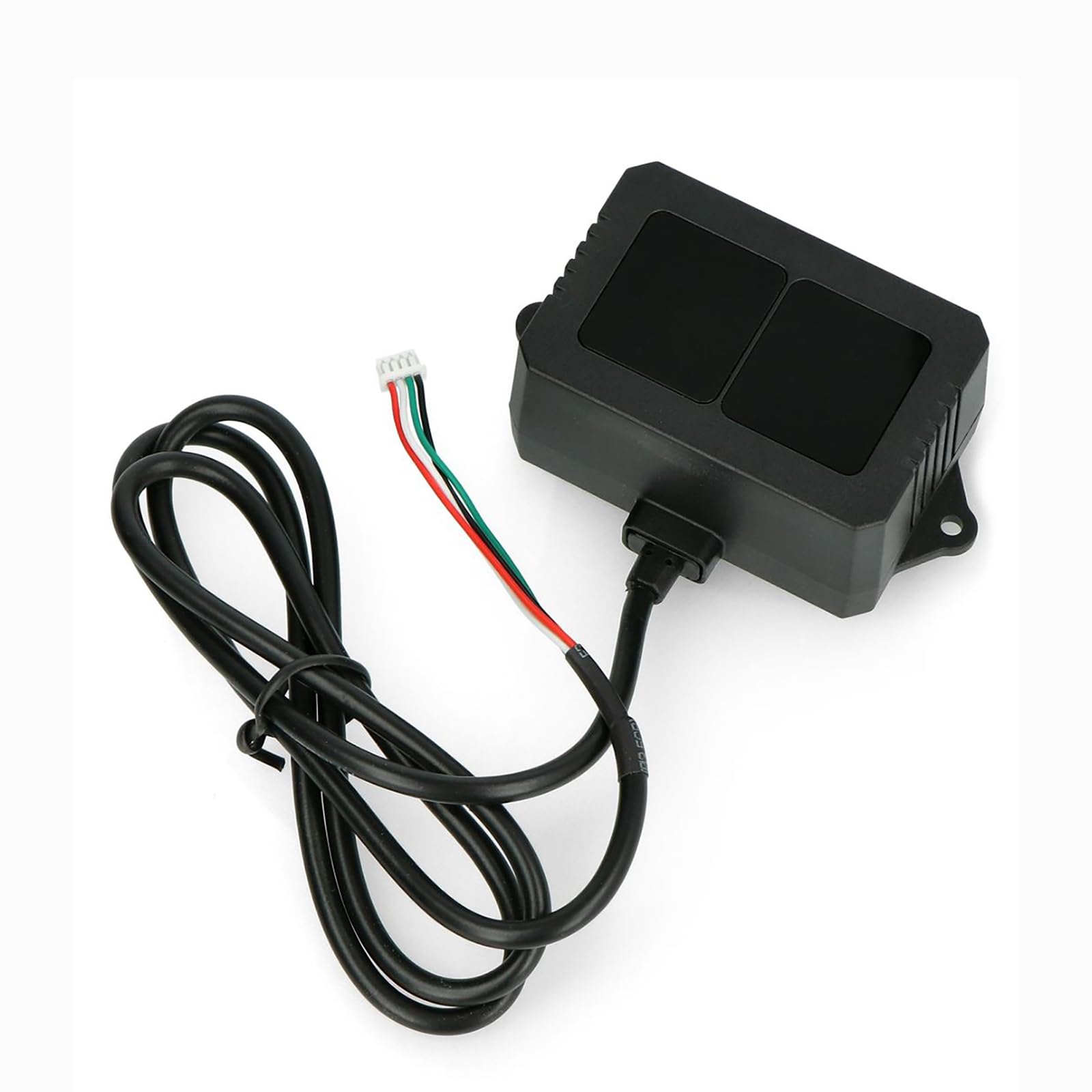
Figure 1: Benewake TF02-Pro LiDAR Sensor. This image shows the compact design of the TF02-Pro sensor, highlighting its robust enclosure and integrated cable connection.
2. Contenuto della confezione
Verificare che tutti gli articoli siano presenti nel pacco:
- 1 × TF02-Pro LiDAR Sensor
- 1 × 80cm Cable (Wiring: Red: 5V+, White: RXD/SDA, Green: TXD/SCL, Black: GND)

Figure 2: TF02-Pro LiDAR Sensor as packaged. The sensor is securely placed within its protective packaging, ready for installation.
3. Impostazione
3.1 connessione fisica
Connect the TF02-Pro sensor using the provided 80cm cable. Ensure correct wiring according to the pinout:
- Rosso: Power Supply (5V to 12V DC)
- Nero: Terra (GND)
- Bianco: RXD (UART Receive) / SDA (I²C Data)
- Verde: TXD (UART Transmit) / SCL (I²C Clock)
The sensor is pre-calibrated with default settings for immediate use. Mount the sensor securely in the desired location, ensuring a clear line of sight for accurate ranging.
3.2 Interfaccia di comunicazione
The TF02-Pro supports UART, I²C, and I/O communication protocols. Select the appropriate interface based on your application requirements.
UART Interface Details
| Parametro | Valore |
|---|---|
| Default Baud rate | 115200 |
| Bit di dati | 8 |
| Smettila un po ' | 1 |
| Parità | Nessuno |
I²C Interface Details
| Parametro | Valore |
|---|---|
| Velocità di trasmissione massima | 400 kbps |
| Modalità Master / Slave | Schiavo |
| Indirizzo predefinito | 0x10 |
| Intervallo di indirizzi | 0x01~0x7F |

Figure 3: Communication Interface details for UART and I²C. This image provides a visual representation of the communication parameters for integrating the TF02-Pro sensor.
4. Istruzioni per l'uso
4.1 Acquisizione dati
Once connected and powered, the TF02-Pro will begin outputting ranging data according to its default settings. Data can be read via the selected communication interface (UART or I²C).
4.2 Configurazione dei parametri
The TF02-Pro allows for configurable parameters to optimize performance for specific applications. These parameters include:
- Frequenza dei fotogrammi: Adjustable from 1Hz to 1000Hz (default 100Hz).
- Baud Rate: For UART communication.
- Formato di output: Data can be configured to output in HEX or string format.
- Modalità I/O: Specific settings for I/O operation.
Configuration can be performed using simple commands sent via the communication interface or through the dedicated PC software provided by Benewake. The PC software offers real-time data visualization and an intuitive interface for parameter tuning.
4.3 Aggiornamenti firmware
The TF02-Pro firmware is upgradable. Remote updates can be performed using Benewake’s dedicated tool, ensuring your sensor benefits from the latest improvements and features.

Figure 4: TF02-Pro LiDAR Sensor with key features. This image illustrates the sensor's capabilities, including its 40m range, 1-1000Hz frequency, and optimized algorithm for accuracy.
5. Manutenzione
The TF02-Pro is designed for durability with an IP65 protection rating, making it dust and water-resistant. To ensure optimal performance and longevity:
- Pulizia: Periodically clean the optical window with a soft, lint-free cloth. Avoid abrasive materials or harsh chemical cleaners that could scratch the lens.
- Condizioni ambientali: While robust, avoid exposing the sensor to extreme temperatures outside its specified operating range (-20°C to 60°C) or prolonged submersion in water.
- Ispezione dei cavi: Regularly inspect the cable for any signs of wear, damage, or corrosion.
6. Risoluzione Dei Problemi
If you encounter issues with your TF02-Pro LiDAR sensor, consider the following troubleshooting steps:
- Nessuna potenza/Nessuna uscita:
- Verify that the power supply (5V-12V DC) is correctly connected and providing adequate voltage.
- Controllare tutti i collegamenti dei cavi per verificarne il corretto posizionamento e la continuità.
- Letture imprecise:
- Ensure the optical window is clean and free from obstructions.
- Confirm the target object is within the specified detection range and has sufficient reflectivity.
- Check for strong external light sources directly interfering with the sensor, although the TF02-Pro has strong ambient light resistance.
- Problemi di comunicazione:
- For UART, verify the baud rate, data bits, stop bits, and parity settings match the sensor's configuration.
- For I²C, ensure the correct slave address (0x10 default) and transmission rate are used.
- Test with the Benewake PC software to confirm basic communication.
- Funzionamento intermittente:
- Controllare eventuali collegamenti allentati o fluttuazioni di potenza.
- Assicurarsi che la temperatura di esercizio rientri nell'intervallo specificato.
If problems persist, refer to the official Benewake technical support resources or contact your vendor.
7. Specifiche tecniche
| Parametro | Valore |
|---|---|
| Operating Range (90% reflectivity) | 0.05m – 40m |
| Operating Range (10% reflectivity) | 0.05m – 13.5m |
| Accuracy (0.05-5m) | ±5cm |
| Accuracy (5-40m) | ±1% |
| Risoluzione a distanza | 1 centimetri |
| Repeatability (1σ, 0.1-35m@90% reflectivity) | <2cm |
| Frequenza dei fotogrammi | Adjustable 1-1000Hz (Default 100Hz) |
| Resistenza alla luce ambientale | Up to 100Klux |
| Campo di View (campo visivo) | 3° |
| Sorgente luminosa | VCSEL (850nm) |
| Sicurezza fotobiologica | Class 1 (EN60825) |
| Alimentazione elettrica | Corrente continua 5V – 12V |
| Corrente media | ≤200mA |
| Corrente di picco | 300mA |
| Consumo energetico | ≤1W |
| Livello di comunicazione | LVTTL (3.3 V) |
| Interfaccia di comunicazione | UART, I²C, I/O |
| Dimensioni (L×W×H) | 69 mm × 41.5 mm × 26 mm (2.72" × 1.63" × 1.02") |
| Peso | 50 g (con cavo) |
| Materiale di recinzione | PC/ABS |
| Livello di protezione | Grado di protezione IP65 |
| Temperatura di esercizio | -20°C a 60°C |
| Temperatura di conservazione | -30°C a 80°C |
| Lunghezza del cavo | 80 centimetri |
| Origine | Pechino, Cina |
| Teoria | Tempo di volo (TOF) |

Figure 5: Dimensional drawing of the TF02-Pro LiDAR Sensor. This diagram provides precise measurements of the sensor in millimeters.
8. Applicazioni
The Benewake TF02-Pro LiDAR sensor is versatile and suitable for various applications, including:
- Smart Traffic Systems: Vehicle detection, toll collection, and parking management.
- Material Level Monitoring: Bulk solid/liquid measurement in silos or containers.
- UAV Navigation: Obstacle avoidance and altitude control for unmanned aerial vehicles.
- Smart Parking: Space occupancy detection and guidance systems.
9. Garanzia e supporto
9.1 Informazioni sulla garanzia
The Benewake TF02-Pro LiDAR Sensor comes with a garanzia di un anno dalla data di acquisto, coprendo difetti di fabbricazione e malfunzionamenti in condizioni di normale utilizzo. Si prega di conservare la prova d'acquisto per eventuali reclami in garanzia.
9.2 Supporto tecnico
For technical assistance, software downloads, or further inquiries, please refer to the official Benewake website or contact their technical support team. Access to comprehensive software and technical support resources is available to assist with integration and operation.