
ZEBRONICS Pixaplay 35
Zebronics Pixaplay 35 Android Smart LED Projector User Manual
Model: Pixaplay 35
Introduzione
This manual provides detailed instructions for the setup, operation, and maintenance of your Zebronics Pixaplay 35 Android Smart LED Projector. Please read this manual thoroughly before using the product to ensure proper functionality and to prevent damage.
Informazioni importanti sulla sicurezza
- Non ostruire le aperture di ventilazione. Garantire un flusso d'aria adeguato attorno al proiettore.
- Evitare l'esposizione diretta degli occhi alla lente del proiettore quando lamp è acceso.
- Utilizzare solo l'alimentatore fornito con il dispositivo.
- Tenere il proiettore lontano da acqua, umidità e temperature estreme.
- Non tentare di smontare o riparare il proiettore da soli. Per qualsiasi intervento di assistenza, rivolgersi a personale qualificato.
Prodotto finitoview
The Zebronics Pixaplay 35 is a compact Android Smart LED Projector designed for versatile home entertainment. It features 4K UHD support, 4000 lumens brightness, and a 240° tilt mechanism for flexible projection.
Contenuto della confezione
- Projector - 1 Unit
- Telecomando
- Power Adapter - 1 Unit
- Cavo HDMI
- QR Code Guide - 1 Unit
- Cotton Swab Pack - 1 Unit
Componenti del proiettore

Figura 1: Frontale-superiore view of the Zebronics Pixaplay 35 projector with its remote control.
The projector features a compact design with a lens at the front, ventilation grilles on the sides, and various ports at the rear for connectivity. The included remote control allows for easy navigation and settings adjustment.
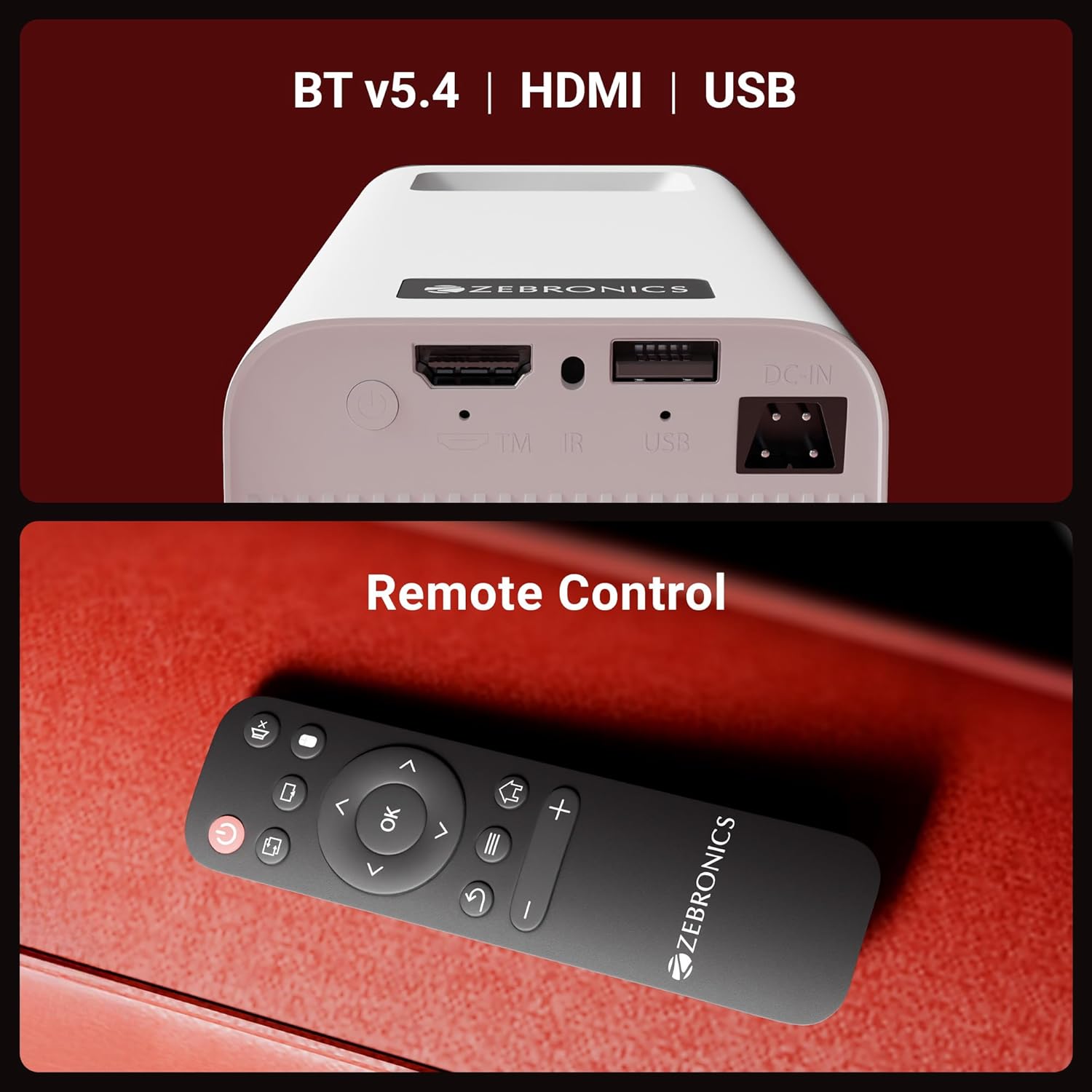
Figura 2: Posteriore view of the projector highlighting the connectivity ports (DC-IN, USB, HDMI) and the remote control.
The rear panel includes a DC-IN port for power, a USB port for media playback, and an HDMI port for connecting external devices. An IR receiver is also present for remote control operation.
Istruzioni di installazione
1. Posizionamento
Position the projector on a stable, flat surface. The 240° tilt mechanism allows you to adjust the projection angle for optimal viewing on a wall or screen. Ensure there are no obstructions in front of the lens or around the ventilation areas.

Figura 3: The projector's 240° tilt mechanism allows for flexible positioning and projection angles.
For best results, project onto a smooth, light-colored surface. The projector can create a screen size of up to 254cm (100 inches).

Figura 4: The projector can display images up to 254cm (100 inches) diagonally, creating a large viewesperienza di acquisizione.
2. Collegamento elettrico
Connect the provided power adapter to the DC-IN port on the projector and then plug it into a power outlet.
3. Accensione iniziale
Press the power button on the projector or the remote control to turn on the device. The projector will boot up and display the Android smart interface.
Istruzioni per l'uso
Telecomando
Utilizza il telecomando in dotazione per navigare nell'interfaccia del proiettore, regolare le impostazioni e controllare la riproduzione multimediale. Assicurati che le batterie siano inserite correttamente.
Regolazione della messa a fuoco
Rotate the focus wheel located near the lens to achieve a clear and sharp image on your projection surface.
Adattamento trapezoidale automatico
The projector features automatic vertical keystone correction. This function automatically adjusts the image to be rectangular even if the projector is placed at an angle. Manual adjustment may be available in settings for fine-tuning.
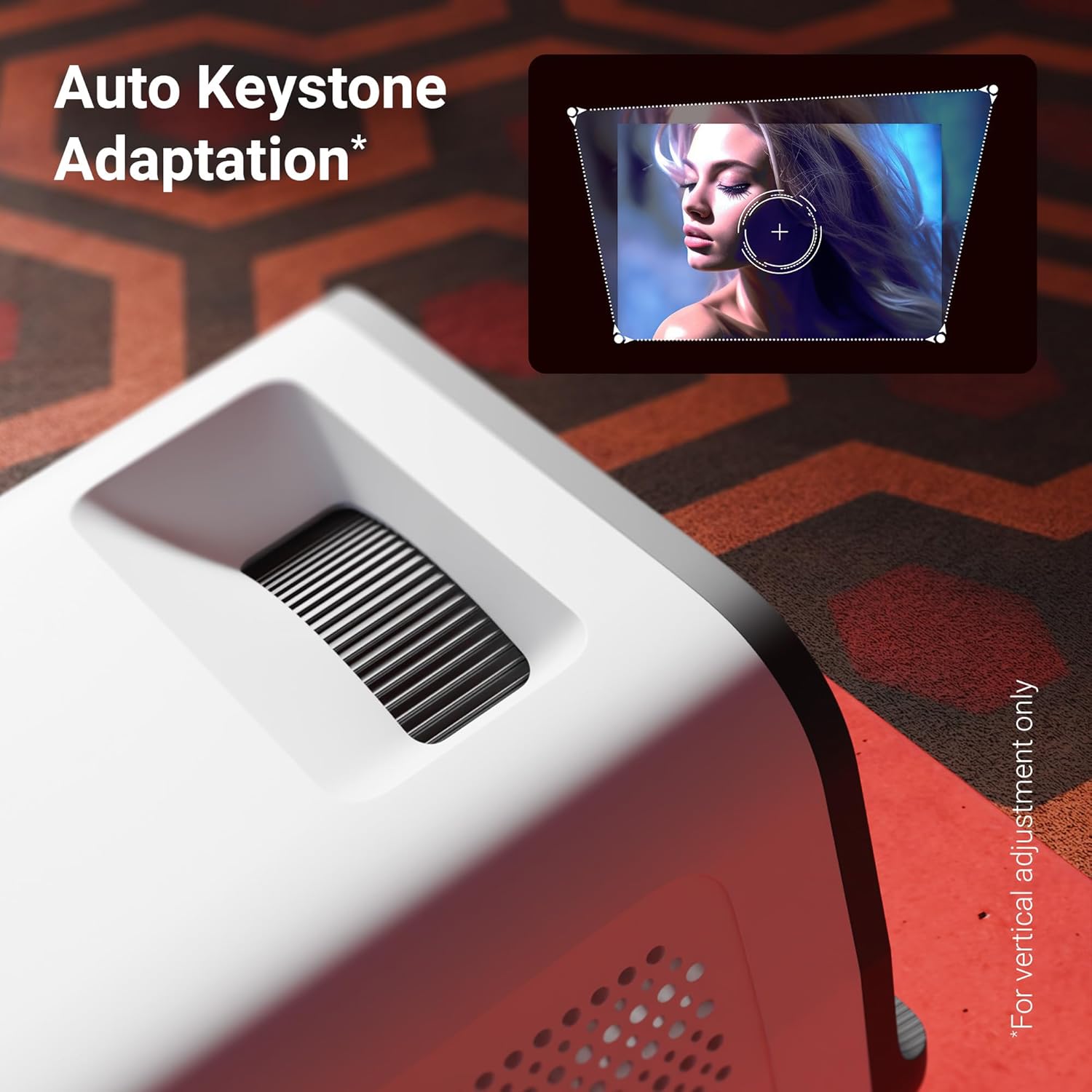
Figura 5: The auto keystone adaptation feature corrects vertical image distortion automatically.
Connettività
- HDMI: Collega dispositivi esterni come laptop, console di gioco o lettori Blu-ray tramite un cavo HDMI. Seleziona la sorgente di ingresso HDMI dal menu del proiettore.
- USB: Inserire un'unità USB nella porta USB per riprodurre i contenuti multimediali file(foto, video, musica) direttamente dall'unità.
- Bluetooth v5.4: Pair Bluetooth audio devices like speakers or headphones for enhanced sound. Access Bluetooth settings in the Android interface.
- Wi-Fi (2.4 GHz e 5 GHz): Connect the projector to your home Wi-Fi network to access online content, streaming apps, and firmware updates.
- Miracast & iOS Screen Mirroring: Wirelessly mirror the screen of your Android or iOS smartphone/tablet to the projector. Follow the on-screen instructions for pairing.
Funzionalità intelligenti (sistema operativo Android)
The projector runs on an Android operating system, allowing you to download and use various OTT (Over-The-Top) applications like Netflix and Prime Video directly on the device. Navigate the app store to install desired applications.
Caratteristiche principali
- Supporto 4K UHD: Experience high-resolution content with support for 4K Ultra HD input, delivering sharp and detailed images.
- Luminosità dei lumen 4000: Il LED lamp provides 4000 lumens, ensuring bright and clear visuals for an immersive viewesperienza di acquisizione.
- Up to 254cm (100") Screen Size: Project large images suitable for home theater setups.
- 240° Tilt Mechanism: Offers flexible projection angles, reducing glare and improving viewcomfort.
- Auto Keystone Adaptation: Automatically corrects vertical image distortion for a perfectly rectangular picture.
- Altoparlante incorporato: Integrated speaker provides audio output for convenience. External audio can be connected via Bluetooth or other ports.
- 30,000-hour LED Lamp Vita: Il LED a lunga durata lamp ensures extended usage without frequent replacement.
- Processore Quad-Core: Enhances performance and responsiveness for smooth operation of the Android OS and applications.
- Wi-Fi dual-band: Supports both 2.4GHz and 5GHz Wi-Fi for stable and fast wireless connectivity.
- Miracast & iOS Screen Mirroring: Seamlessly cast content from Android and iOS devices.

Figura 6: Sopraview of key features including brightness, connectivity, and processing power.

Figura 7: The projector includes a built-in speaker for integrated audio playback.
Manutenzione
- Pulizia delle lenti: Use a soft, lint-free cloth or the provided cotton swab to gently clean the projector lens. Do not use abrasive cleaners.
- Ventilazione: Regularly check and clean the ventilation grilles to prevent dust buildup, which can affect performance and lifespan.
- Magazzinaggio: Quando non viene utilizzato per lunghi periodi, conservare il proiettore in un luogo fresco e asciutto, al riparo dalla polvere e dalla luce solare diretta.
Risoluzione dei problemi
| Problema | Possibile causa | Soluzione |
|---|---|---|
| Nessuna immagine visualizzata | Alimentazione non collegata; Sorgente di ingresso errata; Copriobiettivo inserito. | Ensure power is connected and unit is on. Select correct HDMI/USB input. Remove lens cap. |
| L'immagine è sfocata | Messa a fuoco non regolata; proiettore troppo lontano/vicino allo schermo. | Adjust the focus wheel. Reposition the projector for optimal distance. |
| Nessun suono | Volume troppo basso; Disattivato; Dispositivo audio esterno non connesso/associato. | Alza il volume. Attiva l'audio. Controlla la connessione Bluetooth o il cavo audio esterno. |
| Il telecomando non funziona | Batteries low/incorrectly inserted; Obstruction between remote and projector. | Replace batteries. Ensure clear line of sight to IR receiver. |
| Problemi di connessione Wi-Fi | Password errata; Router troppo lontano; Interferenza di rete. | Verify Wi-Fi password. Move projector closer to router. Try connecting to 2.4GHz or 5GHz band. |
Specifiche
| Marca | ZEBRONICI |
| Modello | Zeb-Pixa Play 35 |
| Tecnologia di visualizzazione | GUIDATO |
| Tipo di visualizzazione | 4K UHD Support |
| Risoluzione nativa | 1280 x 720 pixel |
| Luminosità dell'immagine | 4000 lumen |
| Rapporto di contrasto dell'immagine | 1000:1 |
| Proporzioni | 16:10 |
| Tecnologia di connettività | Bluetooth v5.4, HDMI, USB, Dual-band Wi-Fi (2.4GHz & 5GHz) |
| Dispositivi compatibili | Laptops, Smartphones, Tablets, Gaming Consoles, Blu-ray Players, Media Streaming Devices |
| Dimensioni del prodotto | Dimensioni: 10.5 x 8.8 x 16.5 cm |
| Peso dell'articolo | 355 grammi |
| Tipo di montaggio | Supporto da tavolo |
Garanzia e supporto
The Zebronics Pixaplay 35 Projector comes with a Garanzia di 1 anno from the date of purchase. For warranty claims, technical support, or service inquiries, please contact Zebronics customer service. Refer to the QR Code Guide included in your package for contact details or visit the official Zebronics websito.
Produttore: Zebronics India Private Limited