
Introduzione
The Qanba Sapphire Arcade S1 is a high-performance leverless arcade controller designed for precision and responsiveness in fighting games. This officially licensed product is compatible with PlayStation 5, PlayStation 4, and PC, offering a seamless gaming experience across multiple platforms. This manual provides essential information on setting up, operating, customizing, and maintaining your S1 controller.

Figura 1: Fronte view of the Qanba Sapphire Arcade S1 Leverless Controller.
Prodotto finitoview
The Qanba Sapphire S1 features a robust design with advanced components to enhance your gaming performance. Key features include:
- Cherry Silver Switches: Equipped with high-speed and precise Cherry Silver switches for optimal input.
- 18 pulsanti programmabili: Fully programmable buttons allow for customization of key stroke sensitivity and key assignments.
- Illuminazione LED RGB: Vibrant RGB LED lighting system on buttons and side panels for an immersive gaming environment.
- 3 Button Assignment Profiles: Easily switch between three customizable button layout profiles with a single touch.
- Design ergonomico: Includes an ergonomic memory foam wrist rest for comfort during extended gaming sessions.
- Cavo USB di tipo C staccabile: Ensures portability and durability.
- Display Head-Up (HUD): Provides visual feedback for button inputs.
- Customizable Artwork: The top plate artwork can be changed to personalize your controller.
- Tappetino antiscivolo: Full-surface anti-slip mat on the bottom for stable placement on laps or desks.
- Shoulder Strap Attachment Points: Per un trasporto comodo.
- Jack audio da 3.5 mm: Stereo headphone/microphone jack (PC not supported).

Figura 2: lato view of the controller showcasing the RGB LED lighting.

Figura 3: In basso view of the controller, highlighting the anti-slip mat.
Impostare
- Collegare il cavo USB: Connect the detachable Type-C USB cable to the controller and your gaming system (PlayStation 5, PlayStation 4, or PC).
- Select Platform Mode: Use the MODE switch on the controller to select the appropriate platform (PS5, PS4, or PC).
- Collega e usa: The controller is designed for plug-and-play functionality. No driver installation or complex settings are required for immediate use on supported platforms.
- Connessione audio (opzionale): For audio output and microphone input (PlayStation only), connect a 3.5mm stereo headset to the dedicated jack on the controller.
Istruzioni per l'uso
Controlli di base
The Qanba Sapphire S1 features standard PlayStation input buttons, directional buttons, and additional function buttons:
- Pulsanti di ingresso: Triangle, Circle, Cross, Square, R1, R2, R3, L1, L2, L3, M1, M2, M3, C.
- Pulsanti direzionali: Left, Down, Right, Up.
- Touchpad/Touchpad Button: For in-game touchpad functions.
- Crea pulsante: Functions as the SHARE button when connected to PlayStation 4.
- Pulsante Opzione: Functions as the OPTIONS button when connected to PlayStation 4.
- Pulsante PS: PlayStation system button.
Function Switches and Buttons
- Interruttore MODE: Toggles compatibility between PlayStation 5, PlayStation 4, and PC.
- Button Map Profile Switch (1/2/3): Selects between three saved button mapping profiles.
- LED Switch (LED/OFF): Turns the main LED lighting on or off.
- Touchpad Click Switch (TP/C): Configures touchpad click functionality.
- Interruttore BLOCCO/SBLOCCAGGIO: Disables certain buttons to prevent accidental inputs during gameplay.
- GLOW Button: Cycles through various ambient light modes for the RGB LEDs.
- Tasto muto: Mutes the microphone connected to the 3.5mm jack (with LED indicator).

Figure 4: Control panel showing the button mapping profile interruttori.

Figure 5: Head-Up Display (HUD) providing visual feedback for button presses.
Personalizzazione
Adjustable Button Stroke
The Qanba buttons feature a 3-level adjustable stroke. Use the included tool to modify the button stroke to your preferred sensitivity. This allows for fine-tuning the feel of each button press.
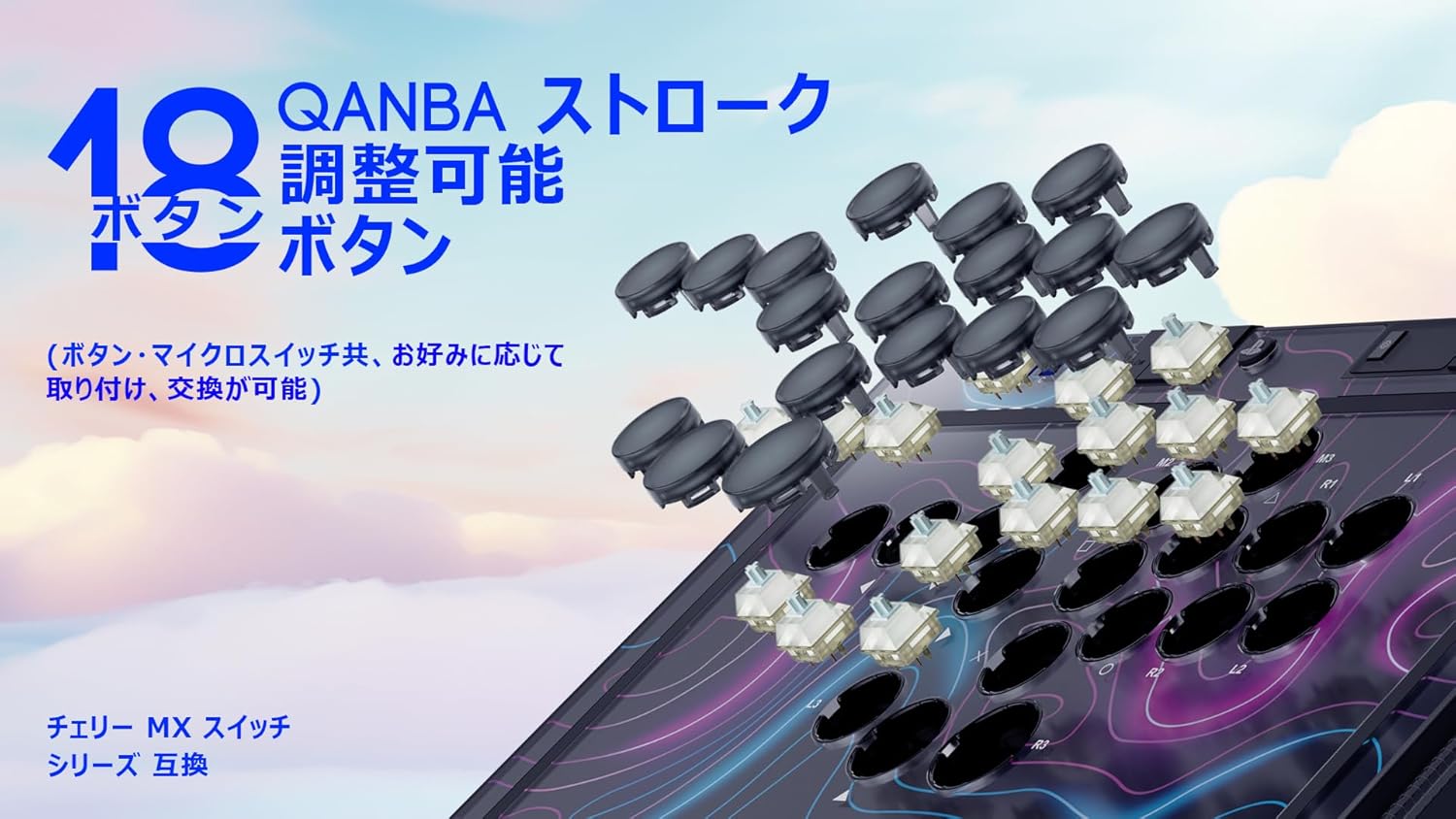
Figure 6: Illustration of the adjustable stroke buttons and swappable micro switches.
Swappable Micro Switches
The controller supports hot-swappable Cherry Silver Axis micro switches. A tool is included for easy replacement. Refer to the product's sub-images or official website for a list of compatible switches.
Customizable Artwork
The top plate artwork can be customized. Carefully remove the top panel to replace the artwork with your preferred design. Ensure all components are securely reassembled after customization.

Figura 7: Esploso view showing the customizable top plate artwork.
Interchangeable Wrist Rest
The included plastic wrist rest is detachable and can be replaced with the ergonomic memory foam wrist rest for enhanced comfort during long gaming sessions.

Figure 8: The ergonomic memory foam wrist rest.
Manutenzione
- Pulizia: Utilizzare un panno morbido e asciutto per pulire la superficie del controller. Evitare l'uso di detergenti abrasivi o solventi.
- Magazzinaggio: Conservare il controller in un luogo fresco e asciutto, lontano dalla luce solare diretta e da temperature estreme.
- Cura del cavo: Handle the detachable USB-C cable with care to prevent damage. Avoid sharp bends or excessive pulling.
- Button and Switch Maintenance: If switches are replaced, ensure they are properly seated to prevent damage.
Risoluzione dei problemi
Problemi comuni e soluzioni
- Il controller non risponde:
- Ensure the USB-C cable is securely connected to both the controller and the gaming system.
- Verify the MODE switch is set to the correct platform (PS5, PS4, or PC).
- Prova a connetterti a una porta USB diversa.
- Button Mapping Issues:
- When changing button mapping profiles, always remove the blanking caps from the buttons first. The controller cannot enter button mapping setting mode with the blanking caps attached.
- Ensure button mapping is not accidentally set on the blanking caps.
- Modalità SOCD:
- For advanced SOCD (Simultaneous Opposing Cardinal Directions) modes, update the controller firmware to VS1.21 or later. This update enables additional modes such as Up-Priority and Last Input Priority. Refer to the official Qanba support websito per le istruzioni sull'aggiornamento del firmware.
- Luci LED non funzionanti:
- Check the LED switch to ensure it is not set to OFF.
- Press the GLOW button to cycle through different lighting modes.
- Audio Issues (PlayStation only):
- Ensure your 3.5mm headset is fully plugged into the jack.
- Check the MUTE button to ensure the microphone is not muted.
Specifiche
| Caratteristica | Dettaglio |
|---|---|
| Numero di modello | S1 |
| Dimensioni del prodotto | Dimensioni: 26 x 36.6 x 3 cm |
| Peso del prodotto | 1.6 kg |
| Compatibilità | PlayStation 5, PlayStation 4, PC |
| Pulsanti | 18 programmable, adjustable stroke buttons |
| Interruttori | Cherry Silver Axis (hot-swappable) |
| Connettività | USB di tipo C staccabile |
| Audio | 3.5mm Stereo Headphone/Mic Jack (PS only) |
| Illuminazione | RGB LED (buttons & side panels, 5 modes) |
| Target di età | 12 anni e più |
| Paese di origine | Cina |
| Data di rilascio | 2025/10/9 |
Garanzia e supporto
Informazioni sulla garanzia
The Qanba Sapphire Arcade S1 Leverless Controller comes with a 1-year warranty provided by the official Japanese distributor. This warranty covers manufacturing defects and malfunctions under normal use.
Assistenza clienti
For any initial defects, malfunctions, or technical assistance, please contact the official Japanese support team. They are available to provide assistance in Japanese.
For further support, please visit the official Qanba websito o contattare il distributore locale.

Figure 9: The controller with an optional shoulder strap for portability.

Figure 10: Close-up of the anti-slip pads on the controller's bottom surface.