
Introduzione
This manual provides essential information for setting up, operating, and maintaining your Roku 32-Inch Select Series 1080p Full HD Smart TV. Designed for a delightful streaming experience, this TV offers excellent picture quality, clear sound, and automatic updates. Please read this manual thoroughly before using your television.
Cosa c'è nella scatola
Verificare che tutti i componenti siano presenti nella confezione:
- Roku 32-Inch Select Series 1080p Full HD Smart TV
- Telecomando
- Supporto (2 pezzi)
- Stand Screws (4 pieces)
- Cavo di alimentazione
- Manuale dell'utente (questo documento)

Image: Contents of the Roku TV box, showing the television, remote control, two stand pieces, and four screws.
Istruzioni di installazione
1. Fissaggio del supporto TV
- Carefully place your TV face-down on a soft, clean surface to prevent damage to the screen.
- Allineare i pezzi del supporto con i fori delle viti nella parte inferiore del televisore.
- Secure each stand piece with two screws using a Phillips head screwdriver. Do not overtighten.
2. Collegamento di alimentazione e dispositivi
- Collegare il cavo di alimentazione all'ingresso di alimentazione del televisore e poi a una presa a muro.
- Connect your external devices (e.g., cable box, gaming console, Blu-ray player) to the available HDMI ports on the back of the TV. This model features 3 HDMI ports.
- For older devices, use the AV input ports (yellow, white, red).
- An optical audio output is available for connecting to soundbars or home theater systems.
- A USB port is provided for media playback.

Immagine: Posteriore view of the Roku TV displaying HDMI, AV, Antenna, USB, Optical, and Headphone ports.
3. Accensione iniziale e connessione di rete
- Premere il pulsante di accensione sul telecomando o sul televisore.
- Segui le istruzioni sullo schermo per selezionare la lingua e connetterti alla rete Wi-Fi.
- Activate your Roku account or create a new one. This is required to access streaming channels and features.
Istruzioni per l'uso
1. Roku OS Interface
The Roku OS provides a simple and intuitive home screen for accessing all your entertainment. Easily navigate between streaming apps, live TV, and connected devices.

Image: The Roku TV home screen with a menu on the left and app icons on the right, including Netflix, Disney+, Apple TV, and Roku Channel.
2. Voice Remote
Your Roku TV comes with a voice remote for convenient control. Use your voice to search for content, launch apps, and control playback.
- Ricerca vocale: Press the voice button and speak your command (e.g., "Find comedies," "Open Netflix").
- Scorciatoie dell'app: Pulsanti dedicati consentono un rapido accesso ai servizi di streaming più diffusi.
- Controllo del volume: Regolare il volume utilizzando i pulsanti laterali.
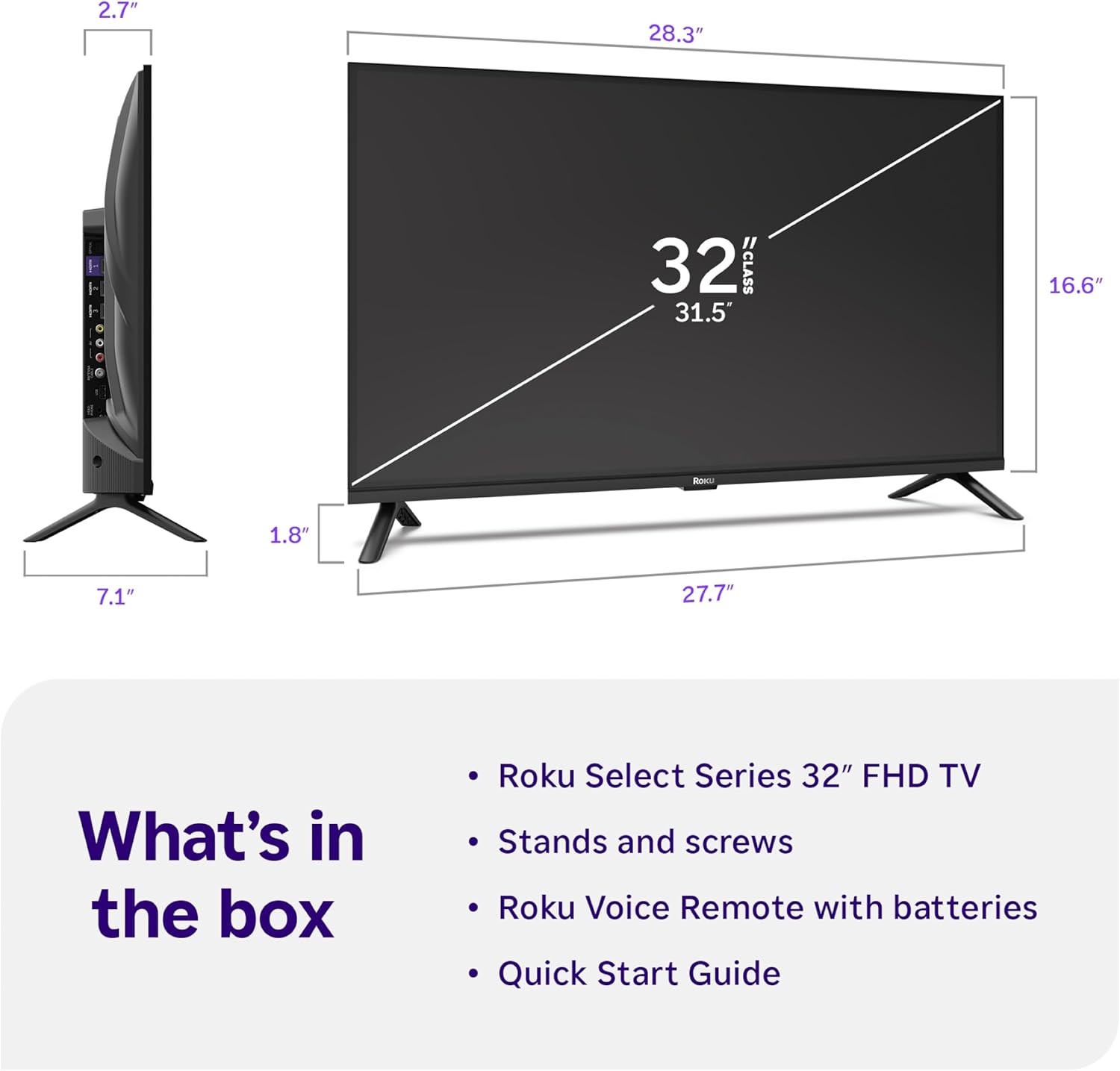
Image: Close-up of the Roku Voice Remote, highlighting buttons for TV power, volume, mute, voice search, instant replay, options, and dedicated app shortcuts.
3. Streaming Apps and Live TV
Access thousands of streaming channels, including Netflix, Disney+, Hulu, Prime Video, and Apple TV+. The Roku Channel also offers free live TV and on-demand content.

Image: A vibrant Roku TV home screen displaying a selection of popular streaming applications and recommended shows.
4. Impostazioni immagine
Ottimizza il tuo viewing experience with various picture settings:
- Roku Smart Picture: Automatically adjusts picture mode for optimal viewing.
- Modalità immagine: Choose from presets like Movie, Sports, Vivid, Standard, or Low Power.
- Personalizzazione: Adjust brightness, contrast, sharpness, color, and tint for a personalized picture.
5. Impostazioni audio
Migliora la tua esperienza audio:
- Audio Dolby: Enjoy clear speech and louder sound.
- Modalità audio: Select from Standard, Dialogue, Movie, Music, or Night mode.
- Bluetooth Headphone Mode: Connect your wireless headphones to listen without disturbing others.

Image: A child wearing wireless headphones while watching the Roku TV, demonstrating the Bluetooth Headphone Mode.
6. Integrazione della casa intelligente
Your Roku TV is compatible with various smart home ecosystems:
- Controllo vocale: Use Roku Voice, Siri, Alexa, or Google Assistant for hands-free control.
- Utilizzo di Apple AirPlay: Effortlessly share videos, photos, and music from your Apple devices.
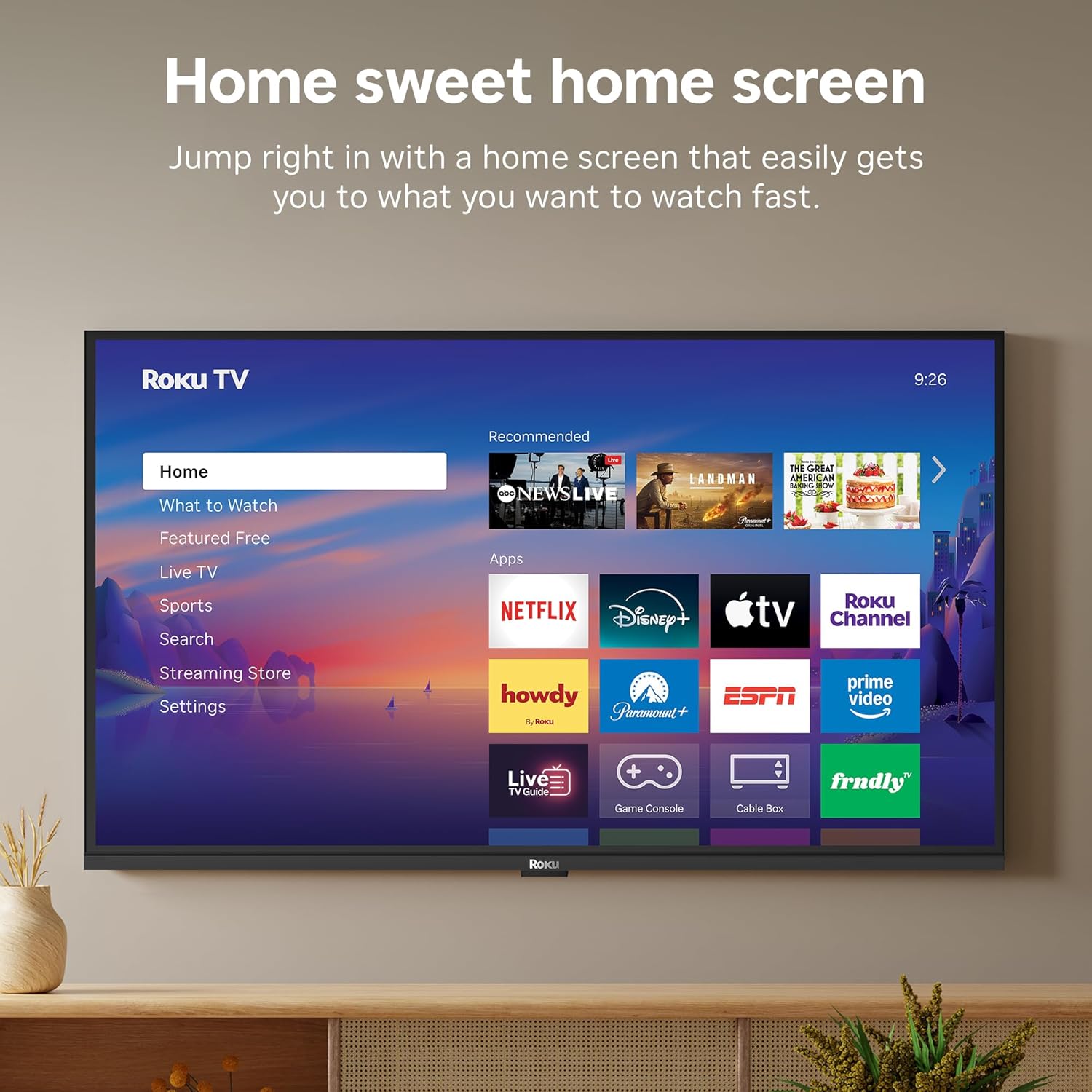
Image: The Roku TV screen displaying smart home compatibility logos for Roku Smart Home, Apple AirPlay, Apple Home, Alexa, and Google Home, with a smart speaker nearby.
7. Controllo genitori
Manage content access with built-in parental controls, including V-Chip technology, to ensure a safe viewing ambiente per i bambini.
Video ufficiale del prodotto
Video: Un oltreview of the Roku TV OS, demonstrating its user-friendly interface, app selection, and smart features. This video is provided by Roku, Inc.
Specifiche
- Dimensioni dello schermo:
- 32 pollici
- Risoluzione:
- 1080p Full HD
- Tecnologia di visualizzazione:
- GUIDATO
- Frequenza di aggiornamento:
- Frequenza 60 Hz
- Caratteristiche speciali:
- Bluetooth Headphone Mode, Dolby Audio, Voice Remote, Roku Smart Picture
- Tecnologia di connettività:
- Wifi bluetooth
- Interfaccia hardware:
- 3 HDMI Ports, 1 USB Port, S/PDIF (Optical Audio Out)
- Sistema operativo:
- Sistema operativo Roku
- Dimensioni del prodotto (P x L x A):
- 7.1"P x 28.3"L x 18.4"A
- Peso dell'articolo:
- 7.7 libbre (con supporto)
- Standard di montaggio VESA:
- 200 x 200 millimetri
- Numero modello:
- 32R3E5
- Codice UPC:
- 829610009469
Risoluzione dei problemi
If you encounter issues with your Roku TV, please refer to the following common solutions:
- Nessun potere: Assicurati che il cavo di alimentazione sia collegato saldamente sia al televisore che a una presa elettrica funzionante. Prova una presa diversa.
- Nessuna immagine/suono: Verify that the correct input source is selected on your TV. Check all cable connections (HDMI, AV, etc.) for looseness.
- Il telecomando non risponde: Replace the batteries in your remote control. Ensure there are no obstructions between the remote and the TV.
- Problemi di connessione di rete: Restart your Wi-Fi router and modem. Go to the TV's Settings > Network > Check connection to diagnose and reconnect.
- L'app non si carica: Restart the app. If the issue persists, try removing and reinstalling the app from the Roku Channel Store.
For more detailed troubleshooting, visit the official Roku support websito.
Manutenzione
Per garantire la longevità e le prestazioni ottimali della tua Roku TV, segui queste linee guida per la manutenzione:
- Pulizia dello schermo: Pulisci delicatamente lo schermo con un panno in microfibra morbido e asciutto. Per le macchie ostinate, dampImmergere il panno con acqua o con una soluzione detergente per schermi specificatamente studiata per dispositivi elettronici. Non spruzzare il liquido direttamente sullo schermo.
- Pulizia del corpo del televisore: Use a soft, dry cloth to wipe the exterior of the TV. Avoid abrasive cleaners or solvents.
- Ventilazione: Assicurarsi che le aperture di ventilazione del televisore non siano ostruite per evitare il surriscaldamento. Mantenere uno spazio adeguato attorno al televisore per la circolazione dell'aria.
- Aggiornamenti software: Your Roku TV automatically receives software updates. Ensure your TV is connected to the internet to receive the latest features and performance improvements.
- Gestione energetica: Scollegare il televisore dalla presa di corrente durante i temporali o quando si prevede di lasciarlo incustodito per lunghi periodi.
Garanzia e supporto
Informazioni sulla garanzia
Roku warrants the hardware of this device against defects in materials and workmanship under normal use for a period of one (1) year from the date of purchase ("Warranty Period"). If Roku determines that the device’s hardware is defective during the Warranty Period, Roku’s sole obligation, and your exclusive remedy, will be to either repair or replace the unit with either a new or rebuilt device, at its option. This warranty applies if the device is used in accordance with the provided documentation.
Important information about warranty returns and replacements is available on the Roku support site. You may also return a device for any reason, subject to the terms of the applicable return policy: 1) Within thirty (30) days from the date of purchase from Roku; or 2) within the applicable return period if purchased from an authorized reseller or distributor. Additional details regarding product returns can be found on the Roku support site.
Assistenza clienti
For further assistance, technical support, or to access the full range of support resources, please visit the official Roku support websito. Lì puoi trovare FAQ, guide alla risoluzione dei problemi e informazioni di contatto per il servizio clienti.