
1. Introduzione e oltreview
Thank you for choosing the EWEADN V102 Wired Keyboard. This 98-key compact keyboard is designed for both gaming and productivity, offering a blend of functionality, comfort, and dynamic aesthetics. It features a dedicated media knob, an integrated display screen, and customizable RGB backlighting. This manual provides essential information for setting up, operating, maintaining, and troubleshooting your new keyboard.
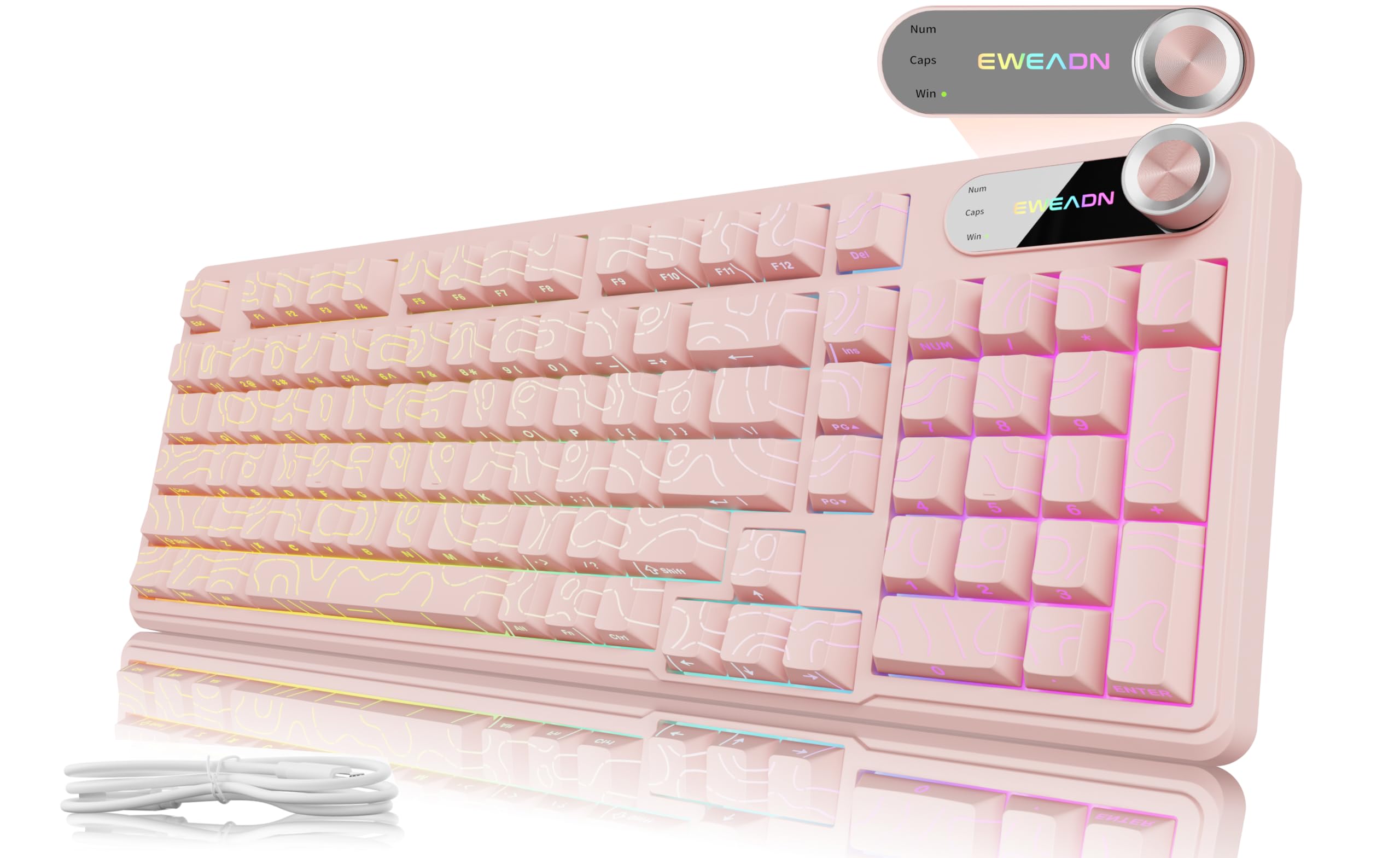
Figure 1: EWEADN V102 Wired Keyboard, Light Pink variant.
2. Cosa c'è nella scatola
Si prega di controllare il contenuto della confezione per assicurarsi che siano presenti tutti gli articoli:
- EWEADN V102 Keyboard x 1
- Cavo USB tipo C x 1
- Manuale di istruzioni x 1

Figure 2: Included USB Type-C cable for keyboard connection.
3. Istruzioni per l'installazione
- Collegare la tastiera: Plug the USB Type-C cable into the port on the keyboard and the other end into an available USB port on your computer or device. The keyboard is plug-and-play, requiring no additional drivers for basic functionality.
- Regola l'angolo di digitazione: La tastiera è dotata di 2 tastitage adjustable feet on the underside. Flip them out to achieve your preferred typing angle for enhanced comfort.
- Compatibilità del sistema: The EWEADN V102 is compatible with Windows, Mac, Android, iOS, Xbox, PS4, and PS5. For Mac users, switch to Mac layout by pressing FN+S. For Windows, press FN + LA.

Figure 3: Dual-System Connection for Windows and Mac layouts.

Figure 4: Adjustable typing angles for ergonomic comfort.
4. Istruzioni per l'uso
4.1 Manopola e schermo di visualizzazione dedicati
The smart rotary knob and built-in display screen provide intuitive control and real-time status updates:
- Backlight Mode Control: Press the knob once to cycle through 12 different RGB backlight modes.
- Regolazione della luminosità: Rotate the knob to adjust the backlight brightness (5 levels).
- Modalità multimediale: Presa FN + Knob to switch to multimedia mode. In this mode, rotating the knob controls volume, and pressing it mutes/unmutes audio.
- Schermo di visualizzazione: The screen shows the EWEADN logo and indicators for Caps Lock, Num Lock, and Win Lock status.

Figure 5: Smart Screen Display showing keyboard status.

Figure 6: Multi-Function Control Knob for lighting and multimedia.
4.2. Dynamic RGB Backlighting
Customize your keyboard's lighting with these shortcuts:
- Attiva/disattiva retroilluminazione: Premere FN + Backspace to turn the backlight ON/OFF.
- Cambia effetti di luce: Premere FN+INS to cycle through 12 stunning RGB lighting effects.
- Regola luminosità: Premere FN+PGUP per aumentare la luminosità, FN+PGDN per diminuire la luminosità (5 livelli).
- Regola la velocità dell'illuminazione: Premere Tasto funzione + "-" per diminuire la velocità, Tasto funzione + "+" per aumentare la velocità (5 livelli).

Figure 7: RGB Backlight controls and effects.
4.3. 98-Key Compact Layout
The 98% layout provides a full-featured experience, including a numeric keypad, while maintaining a compact footprint to save desk space.

Figure 8: Compact 98-key layout for efficiency.
5. Manutenzione
5.1. Spill Resistant Design
The EWEADN V102 keyboard features a spill-resistant design to protect against accidental liquid spills. In case of a spill, gently wipe the liquid off the surface and allow the keyboard to air dry completely before continued use. Avoid submerging the keyboard in water.

Figure 9: Spill-resistant design for enhanced durability.
6. Risoluzione Dei Problemi
If you encounter any issues with your EWEADN V102 keyboard, please refer to the following common troubleshooting steps:
- La tastiera non risponde: Ensure the USB Type-C cable is securely connected to both the keyboard and your device. Try plugging it into a different USB port.
- La retroilluminazione non funziona: Controllare se la retroilluminazione è spenta utilizzando FN + Backspace. Regola la luminosità con FN + PGUP/PGDN.
- Incorrect Key Layout (Mac/Windows): Verify that the correct system layout is selected (FN + LA per Windows, FN+S per Mac).
- Funzionalità della manopola: If the knob is not controlling lighting or multimedia as expected, ensure you are in the correct mode (press or hold FN + Knob to switch).
- Connessione intermittente: Ensure the cable is not damaged and try connecting directly to your device without any hubs or adapters.
If the problem persists after trying these steps, please contact EWEADN customer support for further assistance.
7. Specifiche
| Marca | EWEAD |
| Modello | V102 |
| Disposizione | 98-Key Compact |
| Connettività | Cablato (USB tipo C) |
| Retroilluminazione | Dynamic RGB (12 effects, 5 brightness levels, 5 speed levels) |
| Caratteristiche speciali | Dedicated Media Knob, Display Screen (Caps/Num/Win Lock), Spill Resistant, Adjustable Typing Angles |
| Dispositivi compatibili | Laptop, PC (Windows, Mac, Android, iOS, Xbox, PS4, PS5) |
| Peso dell'articolo | 2.25 libbre |
| Dimensioni del pacco | 17.56 x 6.97 x 2.36 pollici |
| Materiale | Plastica |
8. Garanzia e supporto
Your EWEADN V102 keyboard is covered by a return policy allowing returns or replacements within 30 days of purchase. For any product inquiries, technical support, or warranty claims, please contact EWEADN customer service.
- Supporto via e-mail: eweadnkeyboard@outlook.com
- Supporto online: Visit the EWEADN Store on Amazon and click 'Ask a question'.
Figure 10: EWEADN Customer Support Information.