
1. Introduzione
Welcome to your new xinwld A97 Pro Wireless Earbuds. These earbuds are designed to provide a high-fidelity audio experience with deep bass, advanced Bluetooth 5.4 connectivity, and effective environmental noise cancellation (ENC) for clear calls. This manual will guide you through the setup, operation, and maintenance of your earbuds.
Caratteristiche principali:
- Bluetooth 5.4: Per una connessione wireless stabile ed efficiente.
- HiFi Stereo Sound with Deep Bass: Delivers rich audio quality.
- Fino a 40 ore di riproduzione: Ascolto prolungato con la custodia di ricarica.
- 4 microfoni ENC con cancellazione del rumore: Ensures clear calls by reducing ambient noise.
- Resistenza all'acqua IP7: Protects earbuds from water splashes and sweat (earbuds only).
- Controlli touch intuitivi: Facile gestione di musica e chiamate.
- Display digitale a LED: Shows battery level of the charging case and earbuds.
2. Contenuto della confezione
Si prega di controllare la confezione per verificare la presenza dei seguenti elementi:
- Auricolari wireless xinwld A97 Pro (sinistro e destro)
- Custodia di ricarica
- Cavo di ricarica USB-C
- Manuale d'uso
- (Optional) Various Sizes of Eartips
3. Prodotto finitoview
Familiarize yourself with the components of your xinwld A97 Pro Wireless Earbuds.
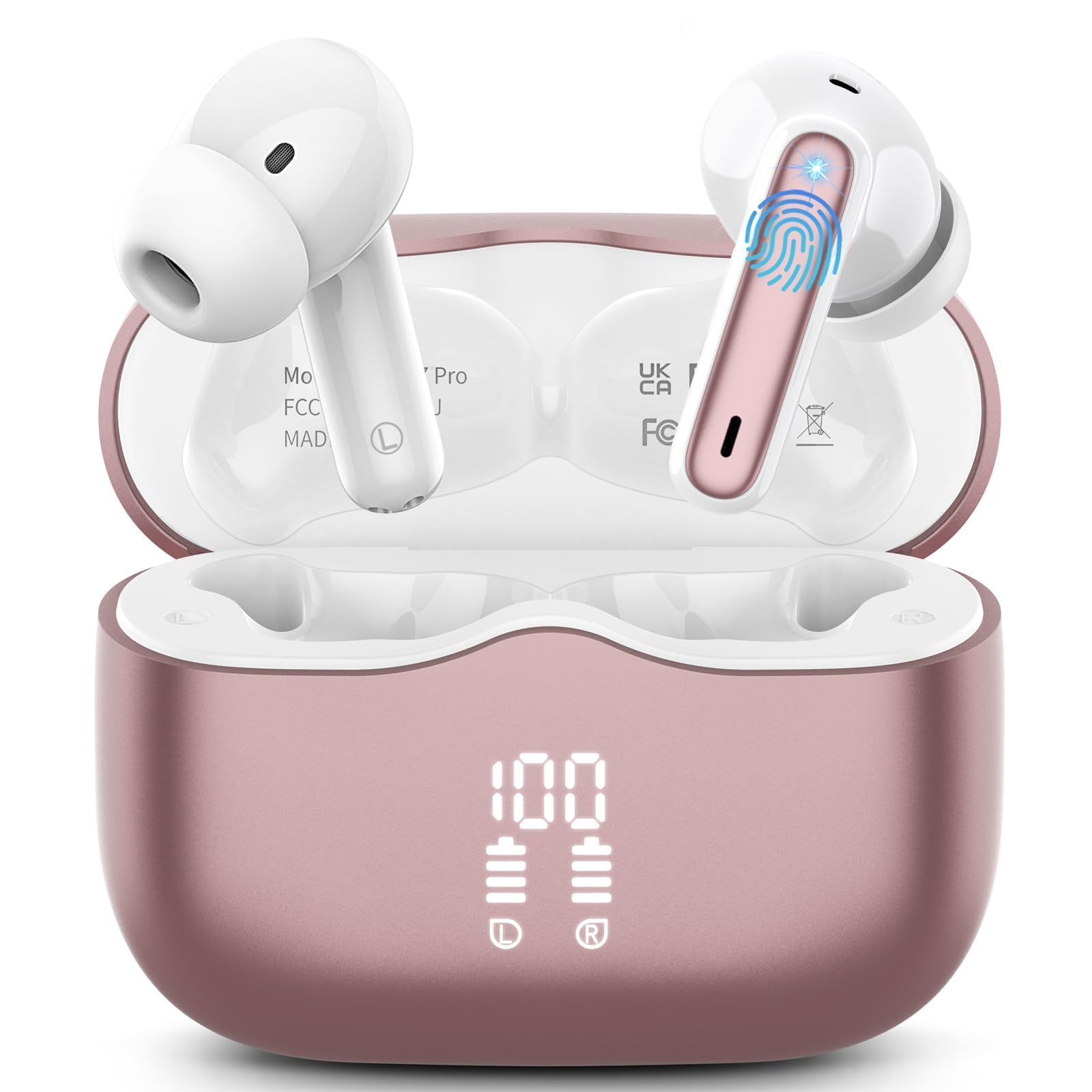
Immagine 1: xinwld A97 Pro Wireless Earbuds and Charging Case. The image shows the black earbuds placed inside their charging case, which features a digital LED display on the front indicating battery levels.
Componenti degli auricolari:
- Area di controllo touch: Per gestire la riproduzione, le chiamate e l'assistente vocale.
- Microfono: For calls and ENC functionality.
- Contatti di ricarica: Si collega alla custodia di ricarica per l'alimentazione.
- Auricolare: Provides comfort and sound isolation; replaceable.
Componenti della custodia di ricarica:
- Display digitale a LED: Shows the battery level of the case and charging status of the earbuds.
- Porta di ricarica USB-C: Per caricare la custodia.
- Slot di ricarica per auricolari: Holds and charges the earbuds when placed inside.
4. Guida all'installazione
4.1. Ricarica iniziale
Prima del primo utilizzo, caricare completamente gli auricolari e la custodia di ricarica.
- Posiziona entrambi gli auricolari nella custodia di ricarica.
- Collegare il cavo di ricarica USB-C alla porta di ricarica sulla custodia e l'altra estremità a un adattatore di alimentazione USB (non incluso).
- Il display LED sulla custodia di ricarica mostrerà la percentuale della batteriatage. The charging indicators for the earbuds will also be visible.
- Una volta caricata completamente, scollegare il cavo di ricarica.
4.2. Associazione con il tuo dispositivo
- Assicurati che gli auricolari siano carichi.
- Open the charging case. The earbuds will automatically power on and enter pairing mode, indicated by flashing lights.
- Sul tuo dispositivo (smartphone, tablet, ecc.), vai alle impostazioni Bluetooth e attiva il Bluetooth.
- Cercare available devices. Select "xinwld A97 Pro" from the list.
- Once connected, you will hear a confirmation sound, and the earbud indicator lights will turn off or flash slowly.
- Se l'associazione non riesce, riponi gli auricolari nella custodia, chiudi il coperchio, attendi qualche secondo e ripeti i passaggi.
5. Istruzioni per l'uso
5.1. Accensione/spegnimento
- Accensione: Apri la custodia di ricarica e gli auricolari si accenderanno automaticamente. In alternativa, tieni premuta l'area di controllo touch su entrambi gli auricolari per 3 secondi.
- Spegni: Place the earbuds back into the charging case and close the lid. They will automatically power off and begin charging. Alternatively, disconnect them from Bluetooth, and they will power off after 5 minutes of inactivity.
5.2. Indossare gli auricolari
Insert the earbuds into your ears and gently rotate them to find a comfortable and secure fit. Ensure the microphones are facing downwards for optimal call quality. Experiment with different eartip sizes (if included) for the best seal and sound.
5.3. Toccare Controlli
The xinwld A97 Pro earbuds feature intuitive touch controls on each earbud. The functions are generally mirrored on both earbuds unless specified.
| Funzione | Azione |
|---|---|
| Riproduci/Pausa musica | Tocca una volta su uno degli auricolari |
| Traccia successiva | Tocca due volte su uno degli auricolari |
| Traccia precedente | Triplo tocco su uno degli auricolari |
| Rispondi/Termina chiamata | Tocca una volta su uno degli auricolari |
| Rifiuta chiamata | Tieni premuto uno degli auricolari per 2 secondi |
| Attiva l'Assistente Vocale | Tieni premuto uno degli auricolari per 3 secondi |
| Controllo del volume | Control via your connected device (earbuds do not have direct volume control) |
5.4. Cancellazione del rumore ambientale (ENC)
The earbuds feature 4 ENC microphones to reduce ambient noise during calls, ensuring clearer conversations for both you and the person you are speaking with. This feature is automatically active during phone calls.
6. Manutenzione e cura
6.1. Pulizia
- Pulisci regolarmente gli auricolari e la custodia di ricarica con un panno morbido, asciutto e privo di lanugine.
- Do not use harsh chemicals, cleaning solvents, or strong detergents, as these may damage the product.
- Gently clean the charging contacts on both the earbuds and inside the case to ensure proper charging and connectivity.
6.2. Resistenza all'acqua (IP7)
The earbuds are rated IP7 water-resistant, meaning they can withstand immersion in water up to 1 meter for 30 minutes. This rating applies to the earbuds only, not the charging case.
- Non immergere la custodia di ricarica in acqua.
- Evitare di utilizzare gli auricolari in saune, bagni turchi o durante la pratica di sport acquatici.
- If the earbuds get wet, dry them thoroughly with a soft cloth before placing them back in the charging case to prevent damage to the charging contacts.
6.3. Conservazione
When not in use, store the earbuds in their charging case to protect them from dust, scratches, and accidental damage.
6.4. Cura della batteria
To prolong battery life, avoid fully discharging the earbuds and charging case frequently. Charge them regularly, even if not in constant use, to maintain optimal battery health.
7. Risoluzione Dei Problemi
In caso di problemi, fare riferimento alle seguenti soluzioni comuni:
7.1. Gli auricolari non si associano al dispositivo:
- Assicurati che il Bluetooth sia abilitato sul tuo dispositivo.
- Assicurati che gli auricolari siano carichi e fuori dalla custodia di ricarica.
- Try forgetting "xinwld A97 Pro" from your device's Bluetooth list and re-pairing.
- Riavvia il dispositivo.
- Riporre gli auricolari nella custodia, chiudere il coperchio, attendere 10 secondi, quindi aprirlo per rientrare in modalità di associazione.
7.2. Only one earbud working:
- Assicurati che entrambi gli auricolari siano carichi.
- Riposizionare entrambi gli auricolari nella custodia di ricarica, chiudere il coperchio e riaprirlo.
- Pulisci i contatti di ricarica su entrambi gli auricolari e all'interno della custodia.
7.3. Earbuds not charging:
- Assicurarsi che il cavo di ricarica sia collegato saldamente sia alla custodia sia alla fonte di alimentazione.
- Controllare che i contatti di ricarica sugli auricolari e all'interno della custodia siano puliti e privi di detriti.
- Prova un cavo USB-C o un adattatore di alimentazione diverso.
7.4. Poor sound quality:
- Assicurati che gli auricolari siano posizionati correttamente nelle orecchie.
- Per una migliore tenuta, prova auricolari di diverse dimensioni.
- Pulisci eventuali residui di cerume o detriti dagli ugelli degli auricolari.
- Ensure your device's volume is not too low.
- Avvicinati al dispositivo connesso per evitare interferenze.
8. Specifiche
| Caratteristica | Dettaglio |
|---|---|
| Marca | xinwd |
| Nome del modello | A97 Pro |
| Numero di modello | A97 |
| Tecnologia di connettività | Wireless (Bluetooth) |
| Versione Bluetooth | 5.4 |
| Posizionamento dell'orecchio | Nell'orecchio |
| Tipo di controllo | Controllo touch |
| Valutazione della resistenza all'acqua | IP7 (solo auricolari) |
| Tempo di gioco | Fino a 40 ore (con custodia di ricarica) |
| Microfoni | 4 microfoni ENC con cancellazione del rumore |
| Materiale | Plastica |
9. Garanzia e supporto
9.1. Informazioni sulla garanzia
Your xinwld A97 Pro Wireless Earbuds come with a limited warranty. Please refer to the warranty card included in your package or visit the official xinwld website for detailed warranty terms and conditions. The warranty period is typically 1 year from the date of purchase, covering manufacturing defects.
9.2. Assistenza clienti
For any questions, technical assistance, or warranty claims, please contact xinwld customer support through the following channels:
- E-mail: Please check your product packaging or the official xinwld website for direct customer support email.
- Websito: Visita lo Store xinwld su Amazon (for general inquiries or to find official contact information).
When contacting support, please have your product model (A97 Pro) and purchase details ready to expedite assistance.