
Toputure TP6
Manuale d'uso del tapis roulant pieghevole Toputure TP6
Modello: TP6
Introduzione
Thank you for choosing the Toputure TP6 Folding Treadmill. This manual provides essential information for the safe and efficient operation, maintenance, and troubleshooting of your new fitness equipment. Please read it thoroughly before initial use and keep it for future reference.
Importanti istruzioni di sicurezza
To reduce the risk of serious injury, read all instructions before using the Toputure TP6 treadmill. Keep this manual in a safe place for future reference.
- Posizionare sempre il tapis roulant su una superficie piana.
- Assicurare uno spazio libero adeguato attorno al tapis roulant (almeno 2 metri dietro e 0.6 metri su ciascun lato).
- Tenere i bambini e gli animali domestici lontani dal tapis roulant durante il funzionamento.
- Do not use the treadmill if you weigh more than 130 KG.
- Prima di avviare il tapis roulant, fissare sempre la clip di sicurezza ai vestiti.
- Consultare un medico prima di iniziare qualsiasi programma di esercizi.
- Non utilizzare il tapis roulant se il cavo o la spina sono danneggiati o se non funziona correttamente.
- Indossare calzature e abbigliamento sportivo adeguati.
Installazione e assemblaggio
The Toputure TP6 treadmill is designed for easy setup and does not require complex installation. It is ready to use out of the box.
Apertura del tapis roulant
- Estrarre con cautela il tapis roulant dalla confezione.
- Posizionare il tapis roulant piegato su una superficie piana e stabile.
- Lift the handrail assembly until it locks into the upright position.
- Secure the handrail assembly using the adjustment knobs.

Figura 1: Unfolding and securing the handrails of the Toputure TP6 treadmill.
Adjusting Handrails and Incline
The telescopic handrails can be adjusted in height from 82 cm to 115 cm and in angle from 95° to 105° to suit various user heights and exercise preferences.
- To adjust height: Loosen the adjustment knobs on the handrails, slide to the desired height, and tighten securely.
- To adjust angle: Use the angle adjustment mechanism at the base of the handrails to select between 95° and 105° positions.

Figura 2: Adjustable handrails for personalized comfort and support.
The treadmill also features three incline levels: 1%, 6%, and 12%. These can be manually adjusted to simulate different terrains and increase workout intensity.

Figura 3: Three incline levels for varied workout intensity.
Istruzioni per l'uso
Iniziare
- Collegare il cavo di alimentazione a una presa elettrica dotata di messa a terra.
- Attach the safety key to the designated area on the console and clip the other end to your clothing. The treadmill will not operate without the safety key in place.
- Salire sul tapis roulant, tenendosi ai corrimano per mantenere l'equilibrio.
- Press the START button on the console or remote control to begin your workout.

Figura 4: LED display and magnetic remote control for easy operation.
Adjusting Speed and Monitoring Progress
The treadmill offers a speed range of 1 to 12 KM/H. You can adjust the speed using the '+' and '-' buttons on the console or the remote control.
The multifunction LED display shows real-time data including time, calories burned, speed, and distance. This allows you to monitor your exercise status at a glance.
Smart APP Integration
Connect your treadmill to the sports APP via Bluetooth. The intelligent APP control allows you to record all your exercise data and share it. The enhanced device holder securely holds your phone or tablet, allowing you to enjoy media during your workout.
Modalità di allenamento
The 6-in-1 folding treadmill supports various scenarios:
- Modalità di camminata: Ideal for light exercise or warm-ups.
- Modalità brucia grassi: Ottimizzato per il consumo calorico.
- Office Work Mode: Use with a standing desk for active work.
- Modalità Addestramento Animali: Suitable for exercising pets.
- Modalità di esecuzione: For moderate to intense cardio workouts.
- Modalità di riabilitazione: Gentle exercise for recovery.

Figura 5: Versatile 6-in-1 functionality for various exercise needs.
Arresto del tapis roulant
To stop the treadmill, press the STOP button on the console or remote control. If the safety key is removed, the treadmill will stop immediately.
Manutenzione
Regular maintenance ensures the longevity and optimal performance of your Toputure TP6 treadmill.
Pulizia
- Pulire il tapis roulant dopo ogni utilizzo con un pannoamp panno per rimuovere sudore e polvere.
- Non utilizzare detergenti abrasivi o solventi.
Lubrificazione
The treadmill features lubrication holes for easy maintenance. Regular lubrication of the running belt is crucial for smooth operation and to prevent wear.
- Refer to the specific lubrication instructions provided with your treadmill for the correct type and amount of lubricant, and frequency of application.
- The unique design of the lubrication holes allows for easy identification of the lubrication position.
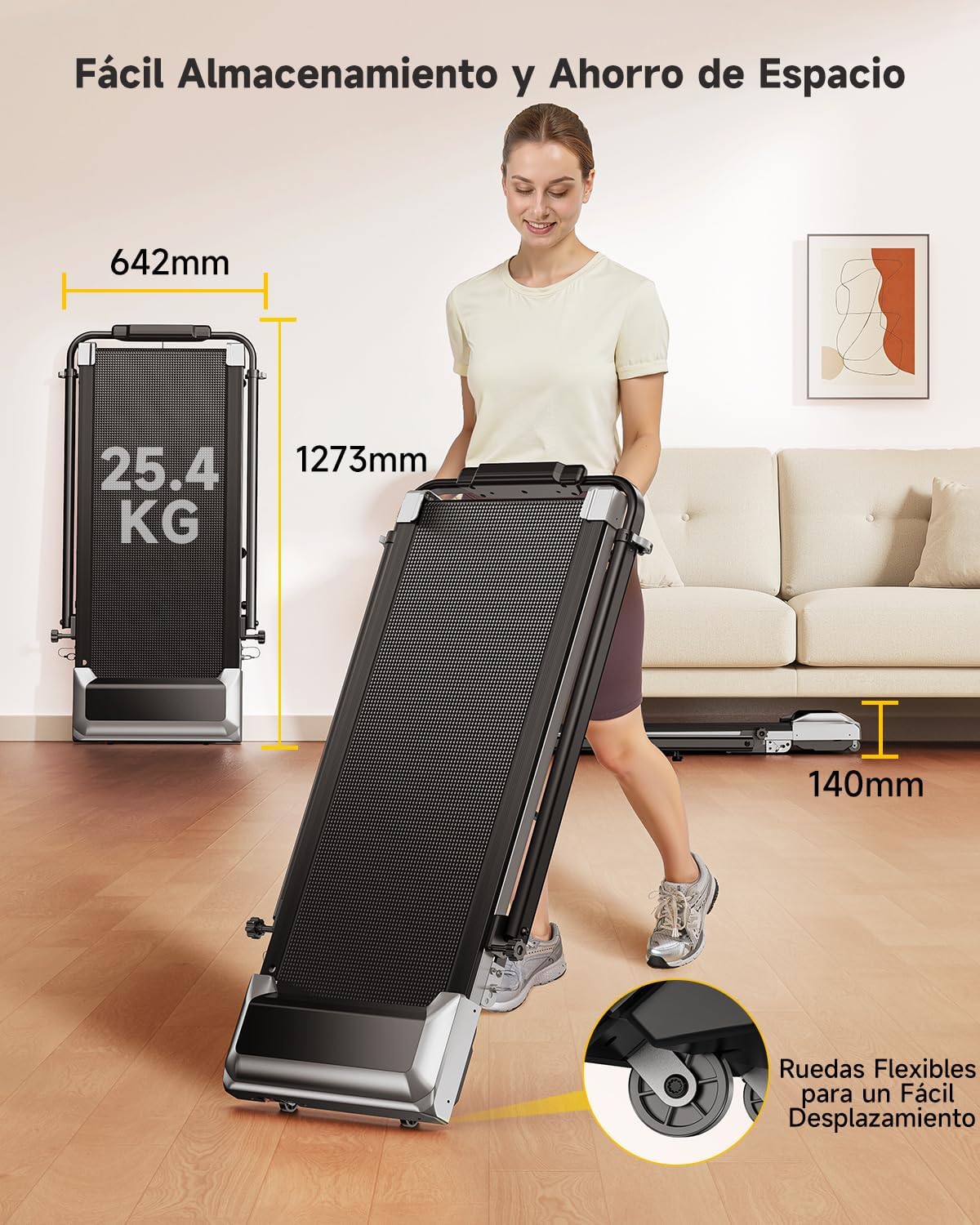
Figura 6: Lubrication holes for simplified maintenance of the running belt.
Regolazione della cinghia
If the running belt becomes misaligned or too loose/tight, it may need adjustment. Consult the detailed instructions in the full user manual for proper belt tensioning and centering procedures.
Risoluzione dei problemi
This section addresses common issues you might encounter with your Toputure TP6 treadmill.
| Problema | Possibile causa | Soluzione |
|---|---|---|
| Il tapis roulant non si avvia. | Cavo di alimentazione non collegato; Chiave di sicurezza non inserita; Interruttore di alimentazione spento. | Assicurarsi che il cavo di alimentazione sia collegato saldamente; Inserire la chiave di sicurezza; Accendere l'interruttore di alimentazione. |
| La cintura da corsa scivola o esita. | Cinghia troppo lenta; lubrificazione insufficiente. | Regolare la tensione della cinghia (fare riferimento al manuale completo); Lubrificare il nastro di scorrimento. |
| Rumore insolito durante il funzionamento. | Componenti allentati; disallineamento della cinghia; problema al motore. | Check and tighten all visible bolts and screws; Adjust belt alignment; If noise persists, contact customer support. |
| Letture del display imprecise. | Sensor malfunction; Calibration needed. | Ensure all connections are secure; Refer to the full manual for calibration steps or contact support. |
For issues not listed here or if solutions do not resolve the problem, please contact Toputure customer support.
Specifiche
| Caratteristica | Dettaglio |
|---|---|
| Marca | Toputure |
| Numero di modello | TP6 |
| Potenza motore | 2.5 CV |
| Gamma di velocità | 1 - 12 KM/H |
| Livelli di inclinazione | 1%, 6%, 12% (manual adjustment) |
| Superficie di corsa | Dimensioni: 40 x 100 cm |
| Peso massimo dell'utente | 130KG |
| Handrail Height Adjustment | da 82 cm a 115 cm |
| Handrail Angle Adjustment | Da 95° a 105° |
| Display | Multifunction LED (Time, Calories, Speed, Distance) |
| Connettività | Bluetooth for APP integration |
| Sistema di ammortizzazione | 7-layer anti-slip belt, 8 silicone shock absorbers, 2 soft rubber pads |
| Dimensioni del prodotto (L x P x A) | 127.3 x 64.2 x 13 cm (piegato) |
| Peso del prodotto | 25.4 kg |
| Materiale | Acciaio legato |

Figura 7: Compact design and transport wheels for easy storage and movement.
Video del prodotto
Treadmill Setup and Usage
This video demonstrates the setup process and general usage of a similar treadmill model, including unfolding, securing the handrails, and starting a workout. Note: This video features the FITFIU Fitness MC-160, which shares similar operational principles with the Toputure TP6.
Treadmill Features Overview
Questo video fornisce un overview of the features and benefits of a similar treadmill model, showcasing its compact design, ease of use, and various exercise capabilities. Note: This video features the FITFIU Fitness MC-160, which shares similar operational principles with the Toputure TP6.
Garanzia e supporto
For warranty information, product support, or to purchase replacement parts, please contact Toputure customer service. Keep your purchase receipt and model number (TP6) handy when contacting support.
The product includes a user manual in the box. Additional warranty information may be available upon product registration with the manufacturer.
Ask a question about this manual
Ask about setup, troubleshooting, compatibility, parts, safety, or missing instructions. Manuals+ will review the question and use this page’s manual context to help answer it.