
1. Introduzione
The ZTE U60 Pro MU5250 is a portable 5G Wi-Fi 7 router designed to provide high-speed internet connectivity on the go. It features an ultra-high-speed 5G-A network, the flagship Snapdragon X75 chip platform, and advanced Wi-Fi 7 technology. This device is equipped with a 10,000 mAh high-capacity battery, offering extended usage and the ability to function as a power bank for other electronic devices. Its 3.5-inch HD touchscreen allows for easy network management and traffic monitoring. The U60 Pro supports up to 64 simultaneous device connections and offers convenient NFC one-touch connectivity, intelligent AI scenes, and AI voice management for a fast, stable, and efficient internet experience.

Immagine 1.1: anteriore view of the ZTE U60 Pro MU5250, showing its 3.5-inch display with network information.
2. Impostazione
2.1 Contenuto della confezione
Prima di iniziare, assicurarsi che tutti i componenti siano presenti:
- ZTE U60 Pro MU5250 5G Pocket Wi-Fi 7 Router
- Adattatore CA
- Manuale dell'utente (questo documento)
2.2 Installazione della scheda SIM
To enable 5G connectivity, a compatible SIM card must be installed.
- Individuare lo slot per la scheda SIM sul lato del dispositivo.
- Using the provided SIM ejector tool (if applicable) or a small pin, gently press into the small hole next to the SIM tray to eject it.
- Place your 5G-enabled Nano-SIM card into the tray, ensuring proper orientation.
- Reinserire con cautela il vassoio della SIM nel dispositivo finché non scatta in posizione.
2.3 Accensione/Spegnimento
To power on the device, press and hold the power button located on the side until the screen illuminates. To power off, press and hold the power button until the power-off options appear on the screen, then select 'Power Off'.
2.4 Connessione Wi-Fi iniziale
After powering on, the device will automatically search for a 5G network. You can connect to the Wi-Fi network using one of the following methods:
- Collegamento manuale: On your device (phone, laptop, etc.), search for available Wi-Fi networks. Select the network name (SSID) displayed on the U60 Pro's screen and enter the password (also displayed on the screen).
- Connessione NFC One-Touch: For Android phones with NFC enabled, tap your phone against the NFC area on the U60 Pro. Your phone will automatically connect to the Wi-Fi network without requiring a password.

Image 2.1: Illustrates the NFC one-touch connection process for quick Wi-Fi access.
3. Istruzioni per l'uso
3.1 Interfaccia touch screen
The 3.5-inch HD touchscreen provides a minimalist user interface for managing the device. You can view network status, data usage, signal strength, battery level, and adjust basic settings directly from the screen. Swipe and tap gestures are used for navigation.
3.2 Collegamento di più dispositivi
The ZTE U60 Pro supports simultaneous connections for up to 64 devices, allowing multiple users to share the 5G network. Connect devices using the standard Wi-Fi connection method as described in Section 2.4.
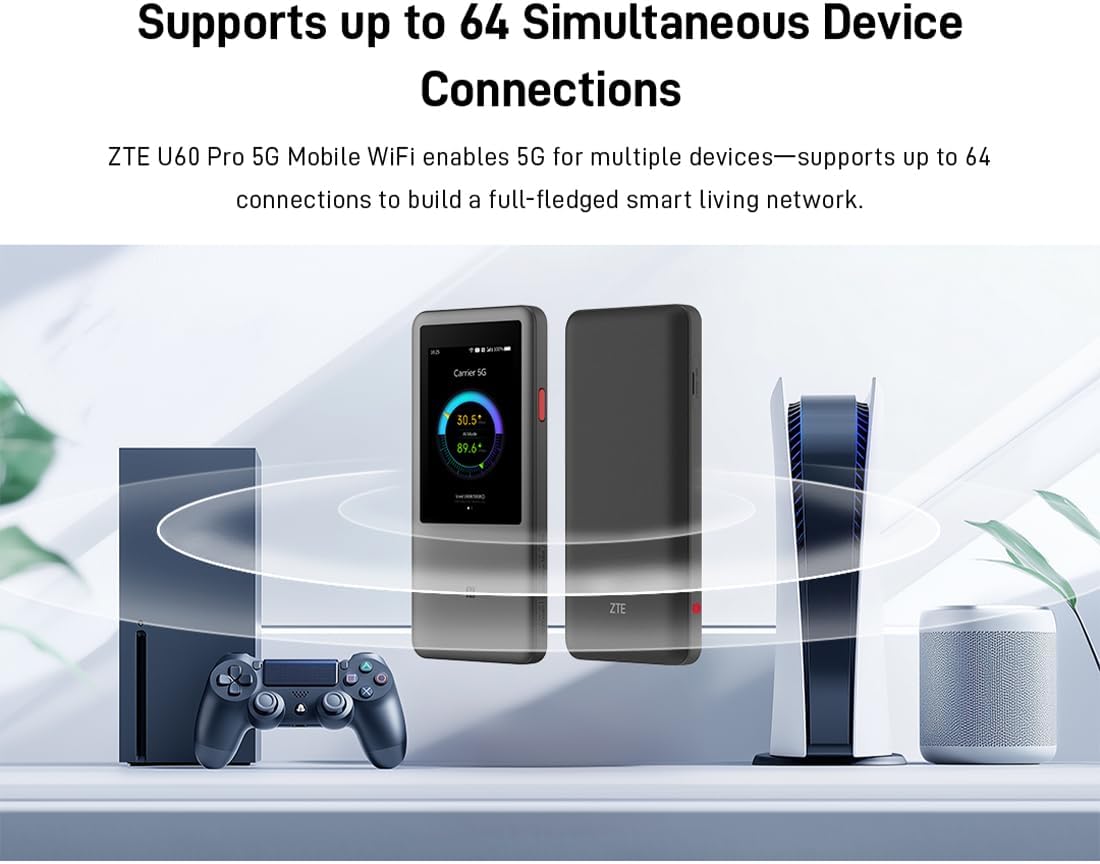
Image 3.1: The ZTE U60 Pro providing 5G Wi-Fi connectivity to various electronic devices.
3.3 AI Smart Scene Modes
The device features intelligent AI Scene technology with dynamic bandwidth allocation. It adjusts bandwidth and priority for applications based on user usage patterns to ensure smooth operation. Available modes include:
- Anchor Mode: Optimized for live streaming.
- Modalità conferenza: Prioritizes video conferencing applications.
- Modalità video: Enhances video playback and streaming.
- Modalità velocità: Maximizes overall network speed.
- Modalità di gioco: Reduces latency for online gaming.
3.4 AI Voice Management (via ZTE Smart Life APP)
The ZTE Smart Life APP enables effortless device management, including AI voice control. This feature allows for intelligent management of the router through voice commands. Download the ZTE Smart Life APP from your device's app store.

Image 3.2: The ZTE Smart Life APP interface demonstrating AI voice management capabilities.
3.5 Funzionalità del Power Bank
The U60 Pro can also serve as a power bank. With its 10,000 mAh battery and 18W reverse fast charging, you can charge other electronic devices by connecting them to the router's appropriate port (e.g., USB-C).
4. Manutenzione
4.1 Cura della batteria
The device is equipped with a 10,000 mAh battery. To maximize battery life:
- Evitare temperature estreme.
- Per una ricarica ottimale, utilizzare il caricabatterie rapido da 27 W in dotazione.
- Per una conservazione a lungo termine, caricare la batteria a circa il 50% e conservarla in un luogo fresco e asciutto.
4.2 Cura generale del dispositivo
To ensure the longevity and optimal performance of your ZTE U60 Pro:
- Mantenere il dispositivo pulito e privo di polvere. Utilizzare un panno morbido e asciutto per la pulizia.
- Evitare di esporre il dispositivo all'acqua o a umidità eccessiva.
- Non far cadere né sottoporre il dispositivo a forti impatti.
- Assicurare una ventilazione adeguata durante l'uso per evitare il surriscaldamento.
5. Risoluzione Dei Problemi
If you encounter issues with your ZTE U60 Pro, refer to the following common solutions:
5.1 Nessuna connessione di rete
- Controlla la scheda SIM: Ensure the SIM card is correctly inserted and activated with a 5G data plan.
- Potenza del segnale: Verify the signal strength indicator on the device's screen. Move to an area with better 5G coverage if the signal is weak.
- Riavvia dispositivo: Power off and then power on the U60 Pro.
- Impostazioni di rete: Check network settings via the touchscreen or ZTE Smart Life APP to ensure APN settings are correct (usually automatic).
5.2 Problemi di connettività Wi-Fi
- Password errata: Double-check the Wi-Fi password displayed on the U60 Pro's screen.
- Limite dispositivo: Ensure you have not exceeded the maximum of 64 connected devices.
- Restart Connected Device: Restart the device attempting to connect to the Wi-Fi.
- Riavvio del router: Restart the ZTE U60 Pro.
5.3 Velocità Internet lenta
- Potenza del segnale: Un segnale 5G debole comporterà velocità inferiori.
- Limite dati: Check if your data plan has a fair usage policy or if you have exceeded a data cap, which might throttle speeds.
- AI Scene Mode: Ensure the appropriate AI Scene mode (e.g., Speed Mode) is selected for your activity.
- Interferenza: Allontanare il dispositivo da altri dispositivi elettronici che potrebbero causare interferenze.
6. Specifiche
The following table details the technical specifications of the ZTE U60 Pro MU5250:

Image 6.1: The Snapdragon X75 Flagship Chip-set Platform, central to the router's performance.
| Caratteristica | Dettaglio |
|---|---|
| Marca | ZTE |
| Nome del modello | MU5250 |
| Numero modello articolo | MU5250 |
| Produttore | ZTE |
| Caratteristica speciale | 5G Connection, Wi-Fi 7, AI Scenes, Voice Control, Power Bank |
| Tecnologia di connettività | 5G, Wi-Fi |
| Generazione Wi-Fi | Wi-Fi 7 |
| Standard di comunicazione wireless | 802.11a, 802.11ac, 802.11b, 802.11g, 802.11n |
| Classe di banda di frequenza | Doppia banda |
| Frequenza | 5 GHz |
| Velocità di trasferimento dati | 4.29 Gigabits per second (Download) |
| Velocità massima di trasferimento dati in upstream | 3600 Megabits per second (Wi-Fi 7 Peak Throughput) |
| Numero di antenne | 9 (Omnidirectional 5G Array) |
| Copertura | Wide and complete (360° full-band coverage) |
| Metodo di controllo | Tocco |
| Sistema operativo | ZyNOS |
| Protocollo di sicurezza | WPA3 |
| Router Firewall Security Level | Di base |
| Batteria/e | 1 AAA - included (Note: Product description mentions 10,000 mAh, likely internal) |
| Peso dell'articolo | 435 grammi |
| Componenti inclusi | Adattatore CA |
| Dispositivi compatibili | Game Console, various Wi-Fi enabled devices |
| Usi consigliati per il prodotto | Streaming, Gaming, Outdoor/Travel, Small Office |
| Connettività Internet | SÌ |
| Modem Compatible | No (Functions as a standalone 5G router) |
| Compatibilità con la casa intelligente | Not Smart Home Compatible |
| Disponibilità dei pezzi di ricambio | Informazioni non disponibili |
| Aggiornamenti software garantiti fino al | Informazioni non disponibili |

Image 6.2: Highlighting the 5G ultra-high-speed network of the ZTE U60 Pro MU5250.

Image 6.3: Illustration of the 9 omnidirectional 5G antennas providing 360° full-band coverage.
7. Supporto e garanzia
7.1 Assistenza clienti
For further assistance, technical support, or inquiries not covered in this manual, please refer to the official ZTE support channels or contact your retailer.
7.2 Informazioni sulla garanzia
Warranty terms and conditions may vary by region and retailer. Please refer to the warranty card included with your product or consult your point of purchase for detailed warranty information.