
1. Introduzione
Grazie per l'acquistoasing the Mikado MD-SBT27 Bluetooth Soundbar Speaker. This portable soundbar features Bluetooth 5.3 connectivity, RGB lighting, an alarm clock, and support for TF cards and USB flash drives. Please read this manual carefully before using the product to ensure proper operation and to maximize its lifespan.
2. Informazioni sulla sicurezza
- Non esporre il dispositivo a temperature estreme, alla luce solare diretta o a elevata umidità.
- Evitare di far cadere o sottoporre il dispositivo a forti impatti.
- Non smontare, riparare o modificare il dispositivo autonomamente. Per qualsiasi riparazione, contattare personale di assistenza qualificato.
- Tenere il dispositivo lontano dall'acqua o da altri liquidi per evitare scosse elettriche o danni.
- Per caricare il dispositivo, utilizzare solo il cavo di ricarica e l'adattatore di alimentazione specificati (se inclusi).
- Pulire il dispositivo con un panno morbido e asciutto. Non utilizzare detergenti abrasivi o solventi.
3. Contenuto della confezione
Si prega di controllare la confezione per verificare la presenza dei seguenti elementi:
- Mikado MD-SBT27 Soundbar Speaker
- Cavo di ricarica di tipo C.
- Manuale d'uso
4. Prodotto finitoview
4.1 Front View e visualizzare
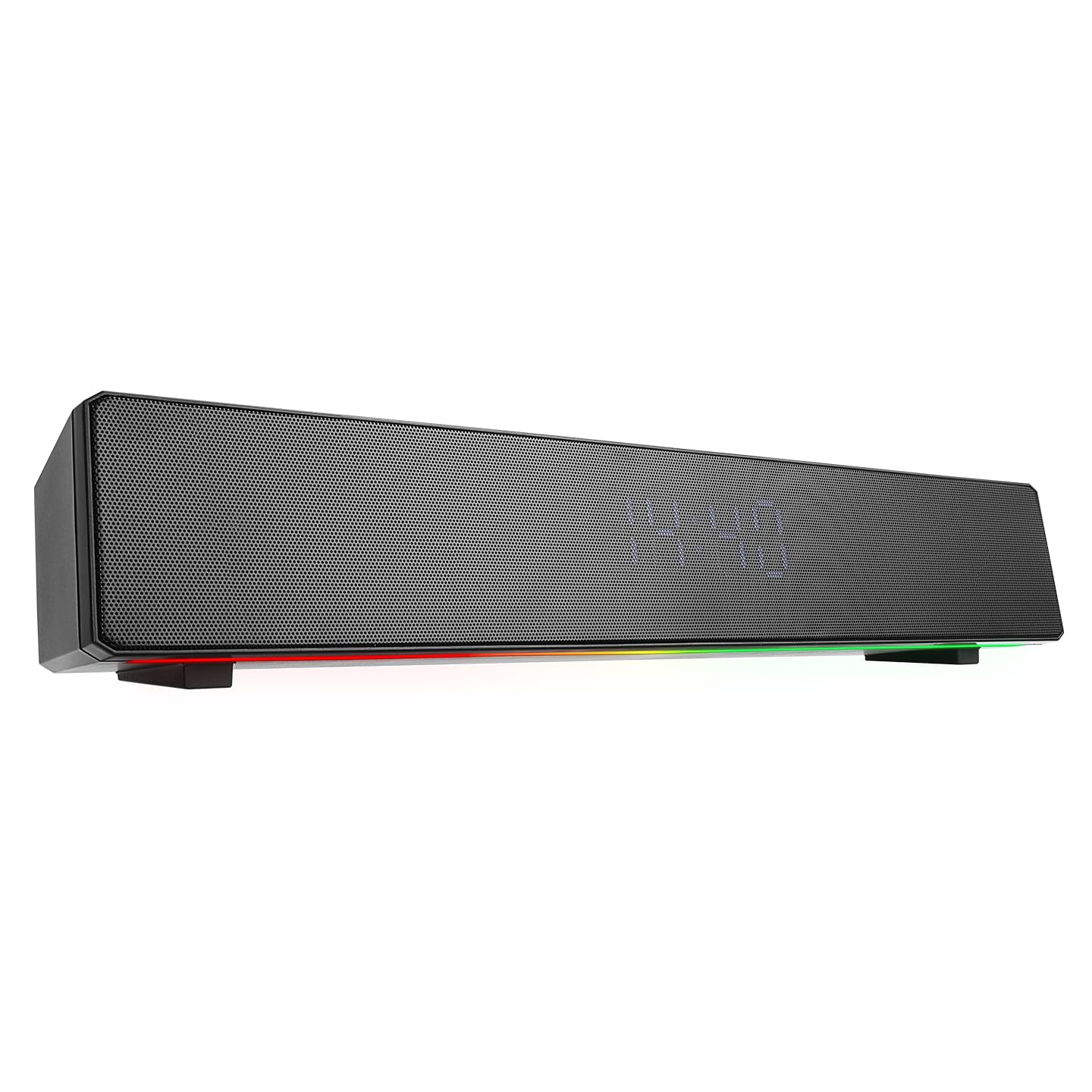
The front of the soundbar features a digital display for time and mode indicators, along with dynamic RGB lighting strips on both sides.
4.2 Controlli del pannello superiore

This image shows the control buttons located on the top surface of the soundbar.
- Pulsante di accensione: Press and hold to power on/off. Short press to play/pause in music mode, or answer/end calls.
- Pulsante M (Modalità): Premere brevemente per passare tra le modalità Bluetooth, scheda TF, USB e AUX.
- Traccia precedente / Volume giù (-): Pressione breve per la traccia precedente. Pressione prolungata per diminuire il volume.
- Traccia successiva / Volume su (+): Premere brevemente per la traccia successiva. Premere a lungo per aumentare il volume.
- Pulsante IMPOSTA: Used for setting the clock and alarm.
- Pulsante luce: Short press to change RGB lighting modes or turn off the lights.
4.3 Porte del pannello posteriore

The rear panel includes the power switch, audio input, and media ports.
- Interruttore OFF/ON: Interruttore di alimentazione principale del dispositivo.
- Porta AUX: Ingresso audio da 3.5 mm per il collegamento di dispositivi esterni.
- Porta USB: Per riprodurre l'audio da una chiavetta USB.
- TF/USB Slot: Slot for a TF (MicroSD) card.
- DC/5V (Type-C) Port: Charging port for the soundbar.
5. Impostazione
5.1 Ricarica della soundbar
Before first use, fully charge the soundbar. Connect the provided Type-C charging cable to the DC/5V port on the rear panel and the other end to a 5V USB power adapter (not included). The charging indicator (if available, usually on the display) will show charging status. A full charge takes approximately 2 hours and provides up to 4 hours of playback time.
5.2 Accensione/Spegnimento
- To power on: Flip the OFF/ON switch on the rear panel to ON. Then, press and hold the Pulsante di accensione on the top panel for a few seconds until the display lights up.
- Per spegnere: tenere premuto il tasto Pulsante di accensione on the top panel for a few seconds. For complete power off, also flip the OFF/ON switch on the rear panel to SPENTO.
6. Istruzioni per l'uso
6.1 Associazione Bluetooth
- Ensure the soundbar is powered on and in Bluetooth mode. If not, short press the Pulsante M (Modalità) until "BT" or a similar indicator appears on the display.
- Sul tuo dispositivo mobile (smartphone, tablet, computer), attiva il Bluetooth e cerca i dispositivi disponibili.
- Select "MD-SBT27" from the list of found devices.
- Once paired, the soundbar will emit a confirmation tone, and the display will indicate a successful connection.
6.2 Riproduzione tramite scheda USB/TF
- Insert a USB flash drive into the USB port or a TF card into the TF/USB slot on the rear panel.
- The soundbar should automatically switch to USB or TF card mode. If not, short press the Pulsante M (Modalità) per selezionare la modalità corretta.
- Utilizzare il Traccia precedente E Traccia successiva buttons to navigate your music.
- Premere il tasto Pulsante di accensione per riprodurre o mettere in pausa.
6.3 Modalità ausiliaria
- Connect one end of a 3.5mm audio cable (not included) to the AUX port on the rear panel of the soundbar.
- Connect the other end of the audio cable to the audio output of your external device (e.g., PC, MP3 player).
- Premere brevemente il tasto Pulsante M (Modalità) until "AUX" appears on the display.
- Controlla la riproduzione dal tuo dispositivo connesso.
6.4 Clock and Alarm Settings
- Impostazione dell'orologio: In standby mode or clock display mode, press and hold the Pulsante SET. The hour digits will flash. Use the Traccia precedente (-) E Traccia successiva (+) buttons to adjust the hour. Short press IMPOSTATO to confirm and move to minute adjustment. Repeat for minutes. Press IMPOSTATO di nuovo per uscire.
- Impostazione della sveglia: After setting the clock, short press the Pulsante SET. The alarm icon or "AL" will appear. Press and hold IMPOSTATO again. The alarm hour digits will flash. Adjust using Traccia precedente (-) E Traccia successiva (+). Pressione breve IMPOSTATO to confirm and move to alarm minute adjustment. Press IMPOSTATO again to activate/deactivate the alarm.
- Snooze/Interrompi sveglia: Quando suona la sveglia, premere brevemente il tasto Pulsante di accensione for snooze (if available) or any other button to stop the alarm.
6.5 Controllo dell'illuminazione RGB
Premere brevemente il tasto Pulsante luce on the top panel to cycle through different RGB lighting modes. Continue pressing to change patterns or turn the lighting off.
6.6 Controllo del volume
Premere a lungo il tasto Volume basso (-) pulsante per diminuire il volume. Premere a lungo il pulsante Volume su (+) pulsante per aumentare il volume.
7. Manutenzione
- Keep the soundbar clean by wiping it with a soft, dry cloth.
- Non utilizzare detergenti liquidi o spray direttamente sul dispositivo.
- Conservare il dispositivo in un luogo fresco e asciutto quando non viene utilizzato per lunghi periodi.
- Avoid blocking the speaker grilles to ensure optimal sound quality and prevent overheating.
8. Risoluzione Dei Problemi
| Problema | Possibile causa | Soluzione |
|---|---|---|
| Nessun potere | La batteria è scarica; l'interruttore di alimentazione è spento. | Charge the soundbar; Ensure the rear OFF/ON switch is ON and the Power button is pressed. |
| Nessun suono | Il volume è troppo basso; è stata selezionata una modalità errata; il dispositivo non è collegato correttamente. | Increase volume; Press 'M' button to select correct mode; Re-pair Bluetooth or re-connect AUX/USB/TF. |
| L'associazione Bluetooth non riesce | Soundbar not in pairing mode; Device too far; Bluetooth disabled on source. | Ensure soundbar is in Bluetooth mode; Move devices closer; Enable Bluetooth on your device. |
| La scheda USB/TF non funziona | Incorrect mode; Corrupted files; Unsupported format. | Press 'M' button to select USB/TF mode; Ensure files are in supported format (e.g., MP3); Try another USB/TF card. |
9. Specifiche
- Marca: Mikado
- Modello: Modello MD-SBT27
- Colore: Nero
- Illuminazione: Colore RGB
- Batteria: 2400mAh
- Versione Bluetooth: 5.3
- Risposta in frequenza: Da 35 Hz a 16 kHz
- Impedenza dell'altoparlante: 4ohm
- Connettività: Aux, Bluetooth, Type-C (for charging)
- Tempo di carica: Circa 2 ore
- Tempo di riproduzione: Up to 4 hours (depending on volume and features used)
- Utilizzo: PC, Phone, Sound Systems, Music Player
- Potenza in uscita: 10W
- Dimensioni del prodotto (LxAxP): Dimensioni: 420 mm x 70 mm x 70 mm
- Peso: 0.94 kg
10. Garanzia e supporto
This Mikado MD-SBT27 Soundbar Speaker comes with a Garanzia di 24 mesi dalla data di acquisto. Conservare la prova d'acquisto per eventuali reclami in garanzia.
The warranty covers manufacturing defects and malfunctions under normal use. It does not cover damage caused by misuse, accidents, unauthorized modifications, or improper maintenance.
For technical support, warranty service, or further inquiries, please contact your retailer or the authorized service center.