
1. Introduzione
The Vibeat OxyU Wrist Blood Oxygen Monitor is designed for continuous tracking of blood oxygen saturation (SpO2) levels and heart rate. This device is intended for sports and aviation use only and is not a medical device. It should not be used for diagnosis, treatment, or monitoring of any medical condition. Consult a medical professional for any health concerns.
2. Informazioni importanti sulla sicurezza
- This device is for sports and aviation use only. It is not intended for medical use.
- Non utilizzare questo dispositivo durante l'esame MRI.
- Do not store the device in the following locations: extreme temperatures, high humidity, direct sunlight, strong electromagnetic fields, or dusty environments.
- Non immergere il dispositivo in acqua o altri liquidi.
- Non pulire il dispositivo con acetone o altre soluzioni volatili.
- Non far cadere questo dispositivo e non sottoporlo a forti urti.
- Tenere fuori dalla portata dei bambini e degli animali domestici.
- If you experience discomfort or skin irritation, discontinue use and consult a doctor.
3. Contenuto della confezione
Verificare che tutti gli articoli siano presenti nel pacco:
- Vibeat OxyU Wrist Unit
- Finger Sensor (with cable)
- Cavo di ricarica
- Manuale d'uso
4. Componenti del dispositivo
The Vibeat OxyU consists of a wrist-worn main unit and a connected finger sensor.
- Wrist Unit: Displays real-time SpO2 and heart rate, stores data, and connects to the app.
- Sensore per le dita: A soft ring sensor that measures blood oxygen and heart rate.
- Porta di ricarica: Located on the wrist unit for power input.

5. Impostazione
5.1 Ricarica del dispositivo
Before first use, fully charge the Vibeat OxyU. Connect the charging cable to the wrist unit and a USB power source. A full charge provides approximately 12-16 hours of use.

5.2 App Installation (ViHealth App)
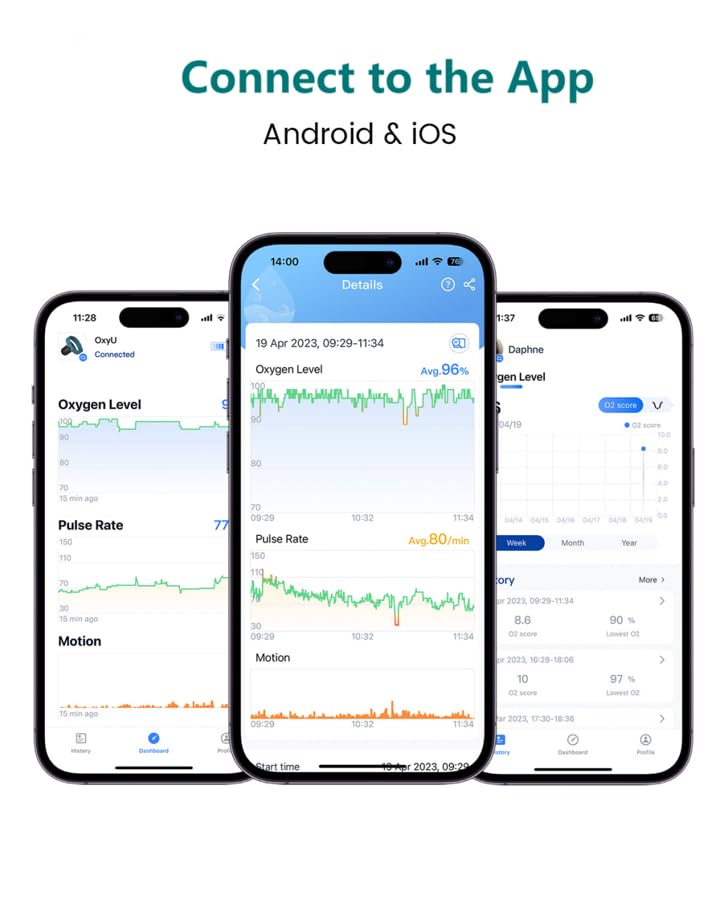
Download the "ViHealth" app from your device's app store (available for Android and iOS). This app allows you to view detailed data, manage settings, and export reports.
- Cercare "ViHealth" in the App Store (iOS) or Google Play Store (Android).
- Installa l'app sul tuo smartphone o tablet.
- Apri l'app e segui le istruzioni sullo schermo per creare un account o accedere.
- Abilita il Bluetooth sul tuo smartphone.
- In the ViHealth app, tap "Add Device" and select "OxyU" to pair.

6. Funzionamento
6.1 Indossare il dispositivo
Wear the wrist unit comfortably on your wrist. Place the finger sensor on your thumb or index finger. Ensure the sensor is snug but not too tight to avoid discomfort or restricted blood flow. The adjustable perimeter of the wristband is 16-23cm, and the probe cable length is approximately 22cm.


6.2 Starting Monitoring
Once properly worn, monitoring begins automatically. The device will display real-time SpO2 and heart rate readings. To wake the screen and view data, simply turn your wrist.
6.3 Notifiche in tempo reale
The OxyU can provide notifications if your blood oxygen level falls below a preset threshold. This threshold is customizable between 80% and 95% within the ViHealth app. Both the device and your connected phone will provide a reminder.


7. Gestione dei dati
7.1 App Data Synchronization
The OxyU stores up to 4 groups of data on the device, with each group capable of holding up to 10 hours of data. Data is automatically synchronized to the ViHealth app via Bluetooth when connected. It is recommended to upload data to the app promptly as the oldest data on the device will be overwritten by new recordings.

7.2 Viewing History and Detailed Data
Within the ViHealth app, you can view your history data in a list format. Click on any entry to see more detailed information, including trends for O2 score and lowest O2 over various periods (year, month, week).

Dettagliato views provide specific O2 and pulse rate data, including the amount of time spent with blood oxygen saturation below 90%.

7.3 PC Report Export
The ViHealth app offers a one-click export and sharing function for your data in PDF, CSV, or Binary formats. This allows you to manage and analyze your blood oxygen reports on a PC.

8. Manutenzione
- Pulizia: Wipe the device with a soft, dry cloth. If necessary, use a cloth lightly dampened with water or a mild disinfectant. Do not use abrasive cleaners or immerse the device in liquids.
- Magazzinaggio: Conservare il dispositivo in un luogo fresco e asciutto, lontano dalla luce solare diretta e da temperature estreme.
- Cura della batteria: Caricare regolarmente il dispositivo, anche se non lo si usa frequentemente, per preservare la salute della batteria.
9. Risoluzione Dei Problemi
If you encounter issues with your Vibeat OxyU, refer to the table below for common problems and solutions. For further assistance, contact customer support.
| Problema | Possibile causa | Soluzione |
|---|---|---|
| Il dispositivo non si accende | Batteria scarica | Carica completamente il dispositivo. |
| Letture imprecise | Improper sensor placement; excessive movement; cold fingers. | Ensure sensor is correctly placed and snug. Remain still during measurement. Warm hands if cold. |
| Impossibile connettersi all'app | Bluetooth off; device not paired; app issue. | Ensure Bluetooth is enabled on your phone. Re-pair the device in the app. Restart the app and device. |
| Data not syncing | Device not connected to app; app storage full (for older data). | Ensure device is connected via Bluetooth. Upload data to the app regularly to prevent overwriting on the device. |
| Screen not waking up | Dispositivo in modalità sospensione; batteria scarica. | Turn your wrist to activate the screen. Charge the device. |
Note: This troubleshooting section is based on common issues and general advice. For specific details, refer to the full user manual provided with your product.
10. Specifiche
| Caratteristica | Dettaglio |
|---|---|
| Nome del modello | OxyU |
| Marca | Vibrazione |
| Intervallo di misura (SpO2) | 70% - 100% |
| Tipo di batteria | 1 batteria ai polimeri di litio (inclusa) |
| Durata della batteria | 12-16 ore con una carica completa |
| Peso dell'articolo | 5 once |
| Dimensioni del pacco | 3.7 x 3.62 x 2.87 pollici |
| Wristband Adjustable Perimeter | 16-23 centimetri |
| Lunghezza del cavo della sonda | ~22 centimetri |
| Data Collection Frequency | Ogni 4 secondi |
| On-Device Data Storage | 4 groups, up to 10 hours each |
| Compatibilità delle app | Android 9.0 o superiore, iOS 11.0 o superiore |
11. Garanzia e supporto
For warranty information and customer support, please refer to the documentation included with your product or visit the official Vibeat website. You can also contact Vibeat customer service via the contact information provided in your product packaging or on their official store page.
Vibeat Store: https://www.amazon.com/stores/Vibeat/page/54349AC3-2656-494F-AB20-6407BA5F474D