
1. Impostazione
1.1 Disimballaggio e contenuto della confezione
Rimuovere con attenzione tutti gli articoli dall'imballaggio. Assicurarsi che tutti i componenti siano presenti prima di procedere con l'installazione.
- Roku Select Series 55" 4K TV
- Stands and screws
- Telecomando
- Manuale d'uso

Figure 1: Contents of the Roku Select Series 55-inch TV package.
1.2 Installazione fisica
The Roku Select Series TV can be installed using the included stands for table mounting or by using a compatible VESA wall mount (200 x 100 mm, sold separately).
Table Mount Installation:
- Posizionare lo schermo del televisore su una superficie morbida e pulita per evitare graffi.
- Attach the two TV stands to the designated slots on the bottom of the TV using the provided screws. Ensure they are securely fastened.
- Sollevare con cautela il televisore e posizionarlo su una superficie stabile e piana.
Installazione a parete:
For wall mounting, refer to the instructions provided with your VESA 200 x 100 mm compatible wall mount kit. Ensure the wall can support the weight of the television (approximately 20.1 pounds without stand).

Figure 2: TV dimensions and package contents overview.
1.3 Collegamento delle periferiche
The TV features multiple ports for connecting external devices. Refer to the back panel diagram for port locations.

Figure 3: Rear panel connections including HDMI, USB, and network ports.
- HDMI Ports (3 total): Connect gaming consoles, Blu-ray players, soundbars, or other HDMI-enabled devices.
- USB Port (1 total): Collegare dispositivi di archiviazione USB per la riproduzione di contenuti multimediali.
- Porta Ethernet (LAN): Per una connessione Internet cablata.
- Ingresso antenna/cavo: Collegare un'antenna per le trasmissioni via etere o una connessione TV via cavo.
- Optical (S/PDIF) Output: Per l'uscita audio digitale su un sistema audio.
1.4 Accensione iniziale e connessione di rete
- Collegare il cavo di alimentazione al televisore e a una presa di corrente.
- Premere il pulsante di accensione sul telecomando per accendere il televisore.
- Follow the on-screen instructions to complete the initial setup, including language selection (English, Spanish, French, Portuguese are supported).
- Select your preferred network connection:
- Wifi: Scegli la tua rete Wi-Fi dall'elenco e inserisci la password.
- Collegamento Ethernet: If an Ethernet cable is connected, the TV will automatically attempt to establish a wired connection.
- The TV will guide you through linking to a Roku account, which is necessary to access streaming channels and features.
2. Istruzioni per l'uso
2.1 Funzioni del telecomando
The included voice remote provides intuitive control over your TV. It operates via Bluetooth, eliminating the need for direct line-of-sight.

Figure 4: Roku Voice Remote layout and key functions.
- Pulsante di accensione: Accende o spegne la TV.
- Directional Pad (OK button in center): Consente di navigare nei menu e selezionare le voci.
- Volume su/giù: Regola il volume della TV.
- Tasto muto: Disattiva o riattiva l'audio della TV.
- Pulsante vocale: Activates voice search and control.
- Replay istantaneo: Torna indietro di qualche secondo nella riproduzione video.
- Pulsante TV in diretta: Accesses the live TV channel guide.
- Pulsanti di avvio rapido: Dedicated buttons for popular streaming apps (e.g., Netflix, Disney+, Apple TV, Prime Video). These can be customized for your favorite apps.
- Lost Remote Finder: If the remote is misplaced, use the Roku mobile app to activate an audible alert from the remote.
2.2 Home Screen Navigation and Streaming
The Roku home screen provides quick access to all your streaming channels, inputs, and settings.
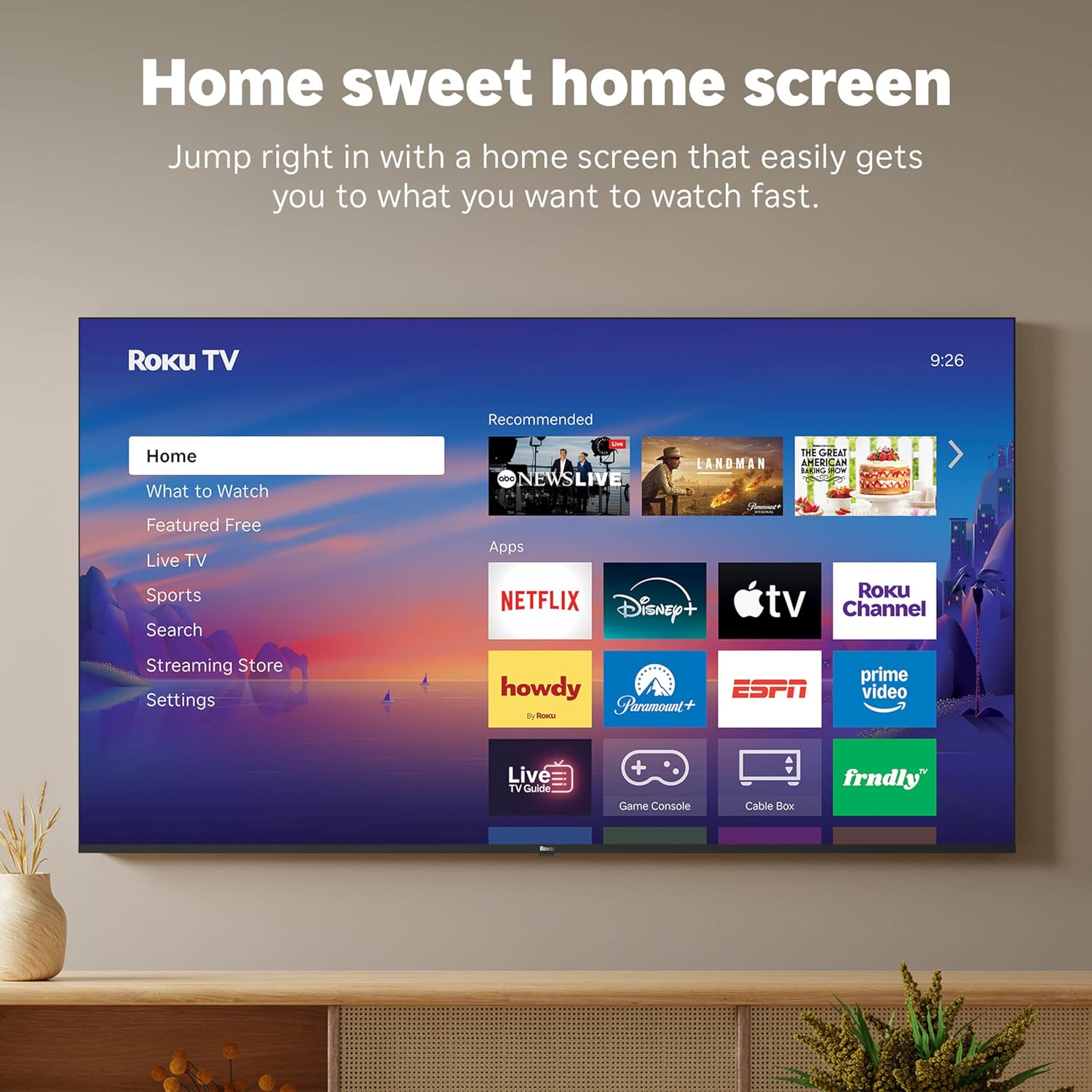
Figura 5: Interfaccia della schermata iniziale di Roku TV.
- Use the directional pad on your remote to navigate through the menu options on the left side of the screen (Home, What to Watch, Live TV, Sports, Search, Streaming Store, Settings).
- Select an app icon from the main grid to launch your desired streaming service.
- The TV's fast Wi-Fi and optimized app launch ensure quick access to entertainment.
2.3 Impostazioni immagine e audio
The Roku Select Series TV offers advanced picture and sound technologies for an enhanced viewesperienza di acquisizione.
- Schermo QLED 4K: Provides sharp 4K resolution and accurate colors.
- Supporto HDR10: Enhances contrast and color depth for compatible content.
- Roku Smart Picture: Automatically optimizes incoming TV signals and selects the appropriate picture mode for content.
- Audio Dolby: Delivers clear speech and enhanced sound quality through the integrated 2.1 channel speakers (20 Watts maximum output power).
- Bluetooth Headphone Mode: Collega le cuffie Bluetooth per un ascolto privato senza disturbare gli altri.
2.4 Controllo vocale e integrazione con la casa intelligente
Control your TV and integrate it into your smart home ecosystem.

Figure 6: Roku TV's smart home compatibility.
- Roku Voice: Use the voice button on your remote to search for content, launch apps, or control playback.
- Compatibilità con Smart Assistant: The TV is compatible with Siri, Alexa, and Google Assistant for voice control through external smart devices.
- Utilizzo di Apple AirPlay: Share videos, photos, music, and more from your Apple devices directly to your TV.
2.5 Live TV Access
Access live television channels directly from the home screen.

Figure 7: Live TV channel guide interface.
- Connect an antenna to the TV's Antenna/Cable input.
- Use the 'Live TV' option on the home screen or the dedicated button on the remote to access the channel guide.
- The TV supports ATSC tuner type for digital broadcasts.
3. Manutenzione
3.1 Pulizia del televisore
- Scollegare sempre la TV prima di pulirla.
- Utilizzare un panno morbido, asciutto e privo di lanugine per pulire delicatamente lo schermo e il telaio.
- Per segni ostinati, leggermente dampImmergere il panno in acqua o in un detergente per schermi delicato e non abrasivo. Non spruzzare il detergente direttamente sullo schermo.
- Evitare l'uso di prodotti chimici aggressivi, spugne abrasive o solventi, poiché potrebbero danneggiare la finitura del televisore.
3.2 Aggiornamenti software
The Roku TV receives automatic software updates to provide new features and improvements. Ensure your TV is connected to the internet to receive these updates.
4. Risoluzione Dei Problemi
If you encounter issues with your Roku TV, consider the following basic troubleshooting steps:
- Nessun potere: Assicurati che il cavo di alimentazione sia collegato saldamente sia al televisore che a una presa elettrica funzionante. Prova una presa diversa.
- Nessuna immagine/suono: Verificare che sia selezionata la sorgente di ingresso corretta. Controllare che tutti i collegamenti dei cavi (HDMI, antenna, ecc.) non siano allentati.
- Il telecomando non risponde: Replace the AAA batteries in the remote control. Ensure there are no obstructions between the remote and the TV (though Bluetooth reduces this issue). Re-pair the remote if necessary (refer to Roku support documentation).
- Problemi di connessione di rete: Vai a Impostazioni > Rete > Verifica connessione to diagnose network problems. Restart your router and modem.
- App Not Loading/Crashing: Try restarting the app. If the issue persists, remove the app and reinstall it from the Streaming Store.
- Scarsa qualità dell'immagine: Check your internet speed for streaming content. For broadcast TV, adjust your antenna. Ensure the TV's picture settings are appropriate for the content being viewed.
For more detailed troubleshooting or persistent issues, visit the Roku support website or consult the full User Manual PDF available online.
5. Specifiche
| Caratteristica | Dettaglio |
|---|---|
| Nome del modello | Roku 55" Select Series 4K |
| Numero di modello | 55R5D5 |
| Dimensioni dello schermo | 55 pollici |
| Tecnologia di visualizzazione | 4K UHD, LED, QLED |
| Risoluzione | Risoluzione 4K (3840 x 2160) |
| Frequenza di aggiornamento | Frequenza 60 Hz |
| Formato HDR supportato | HDR10, HDR10+, HLG |
| Picture Quality Enhancement | 4K, Roku Smart Picture |
| Potenza di uscita audio | 20 Watt |
| Integrated Surround Sound | Audio Dolby |
| Tecnologia di connettività | Bluetooth, Ethernet, USB C, Wi-Fi |
| Porte HDMI | 3 |
| Porte USB | 1 |
| Sistema operativo | Sistema operativo Roku |
| Controllo vocale | Roku Voice, Siri, Alexa, Google Assistant |
| Mirroring dello schermo | AirPlay 2, Miracast |
| Dimensioni del prodotto (P x L x A) | 12.7"P x 48.3"L x 30.5"A |
| Peso dell'articolo | 20.5 libbre |
| Standard di montaggio VESA | 200 x 100 millimetri |
| Consumo energetico | 160 watt |
| Codice UPC | 829610009322 |
6. Garanzia e supporto
6.1 Garanzia limitata
Roku warrants the hardware of this device against defects in materials and workmanship under normal use for a period of un (1) anno from the date of purchase (“Warranty Period”), provided it is used in accordance with the provided documentation.
If Roku determines that the device’s hardware is defective during the Warranty Period, Roku’s sole obligation, and your exclusive remedy, will be to either repair or replace the unit with either a new or rebuilt device, at its option.
Important information about warranty returns and replacements is available on the Roku support site.
6.2 Product Returns
You may return a device for any reason, subject to the terms of the applicable return policy:
- Within thirty (30) days from the date of purchase from Roku.
- Within the applicable return period if purchased from an authorized reseller or distributor.
Additional details regarding product returns can be found on the Roku support site.
6.3 Supporto aggiuntivo
For further assistance, including detailed guides and FAQs, please refer to the official Roku support website. A downloadable PDF version of the User Manual is also available for reference: Manuale utente (PDF).