
Introduzione
Thank you for choosing the Avantree SP851 Portable DAB+/FM Radio. This versatile device offers multiple listening options including DAB+, FM radio, Bluetooth streaming, and playback from TF cards or USB drives. It features a clear LCD screen, simple controls, and a long-lasting rechargeable battery, making it ideal for various environments. Please read this manual carefully to ensure proper use and optimal performance.
Cosa c'è nella scatola
- Avantree SP851 Radio
- Cavo di ricarica USB-C
- cordino
Prodotto finitoview
Familiarize yourself with the layout and components of your Avantree SP851 radio.
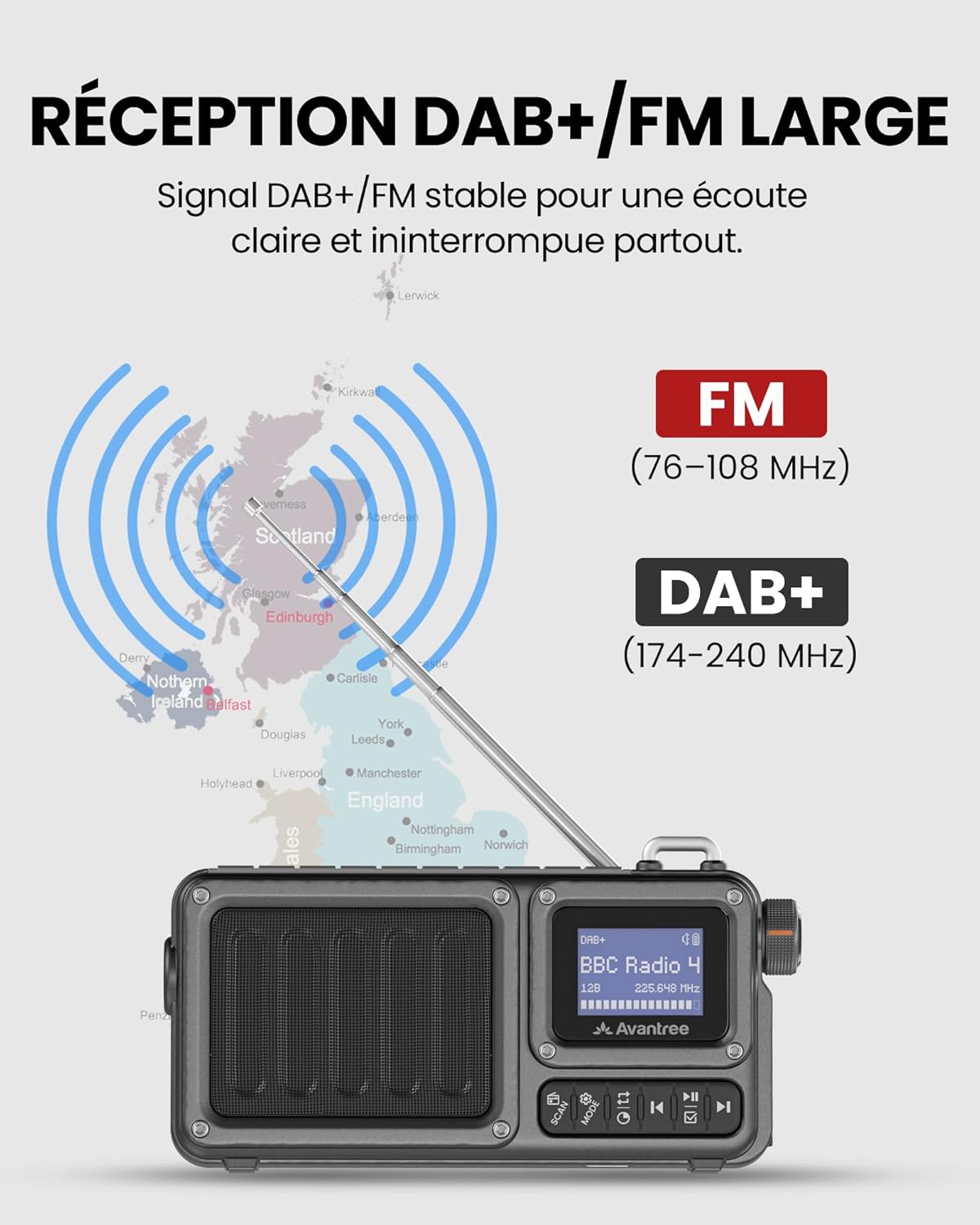
Figura 1: Davanti view of the Avantree SP851 radio, showing the speaker grille and LCD display.

Figura 2: Lato view of the Avantree SP851 radio, highlighting the USB-A port, 3.5mm headphone jack, and USB-C charging port.

Figura 3: Superiore view of the Avantree SP851 radio, showing the numbered preset buttons (0-9) and the extendable antenna.
Caratteristiche principali
- Wide DAB+/FM Radio Reception: Enjoy clear and stable DAB+ and FM reception at home or outdoors. For best results, fully extend the antenna and place the radio near a window. Reception may vary by location.
- 5-in-1 Radio with Bluetooth 6.0: Listen as you wish: DAB+/FM radio, Bluetooth streaming, or music from a TF card/USB stick – all in a compact format.
- Simple Controls & Clear LCD Screen: Intuitive button layout with quick access to tuning, presets, and playback. The bright LCD screen clearly displays channels and settings.
- Long Battery Life & Dual Power Supply: Up to 10 hours of listening thanks to the integrated rechargeable battery. Enjoy true portability on the go, or plug it in via USB-C for continuous use at home.
- Compact & Travel-Friendly Design: Lightweight and durable, ideal for travel, camping, or emergencies, with an integrated flashlight for added convenience.

Figura 4: Sopraview of the Avantree SP851's multi-functional capabilities, including DAB+/FM radio, Bluetooth, and TF/USB playback.
Impostare
1. Ricarica della radio
Before first use, fully charge the Avantree SP851. Connect the provided USB-C cable to the charging port on the side of the radio and plug the other end into a standard USB power adapter (not included) or a computer's USB port. The charging indicator on the screen will show charging status.
2. Posizionamento dell'antenna
For optimal radio reception (DAB+ and FM), fully extend the telescopic antenna. Position the radio near a window or in an open area to minimize interference. Reception quality can vary based on your geographical location and surrounding environment.
Istruzioni per l'uso
1. Accensione/spegnimento
To power on the radio, rotate the volume knob clockwise. To power off, rotate it counter-clockwise until it clicks.
2. Selezione della modalità
Press the 'MODE' button repeatedly to switch between DAB+, FM, Bluetooth, and TF/USB playback modes. The current mode will be displayed on the LCD screen.
3. Funzionamento della radio DAB+
- Switch to DAB+ mode.
- Press the 'SCAN' button to perform an automatic scan for available DAB+ stations. The radio will store all found stations.
- Use the 'Previous' and 'Next' buttons (left and right arrows) to navigate through the list of stations.
- To save a station as a preset, press and hold one of the numbered buttons (0-9) until the screen confirms the preset is saved. To recall a preset, simply press the corresponding numbered button.

Figura 5: Illustration of DAB+ (174-240 MHz) and FM (76-108 MHz) reception capabilities.
4. Funzionamento della radio FM
- Passa alla modalità FM.
- Press the 'SCAN' button to automatically scan and store available FM stations.
- Use the 'Previous' and 'Next' buttons to browse through the stored stations.
- To manually tune, briefly press the 'SCAN' button to stop auto-scan, then use the 'Previous' and 'Next' buttons for fine-tuning.
- Save and recall presets using the numbered buttons (0-9) as described for DAB+ mode.
5. Accoppiamento Bluetooth
- Switch to Bluetooth mode. The radio will enter pairing mode, indicated by a flashing Bluetooth icon on the screen.
- On your smartphone or other Bluetooth device, search for 'Avantree SP851' in the Bluetooth settings and select it to pair.
- Once paired, the Bluetooth icon will become solid, and you can stream audio from your device to the radio.
6. TF/USB Playback
- Insert a TF card into the Micro SD Card slot or a USB flash drive into the USB-A port.
- Switch to TF/USB mode. The radio will automatically detect and begin playing audio files dal dispositivo di archiviazione inserito.
- Use the 'Previous', 'Next', and 'Play/Pause' buttons to control playback.

Figura 6: Visual representation of the radio's multiple functions: DAB+/FM radio, flashlight, USB playback, Bluetooth 6.0, and SD card reader.
7. Funzione torcia
The Avantree SP851 includes an integrated flashlight. To activate or deactivate the flashlight, locate the dedicated flashlight button, usually on the side or top of the device, and press it.
Ricarica e durata della batteria
The Avantree SP851 features a built-in rechargeable lithium-ion battery, providing up to 10 hours of continuous listening on a full charge. When the battery is low, the battery indicator on the LCD screen will show a low level. Connect the radio to a power source using the USB-C cable to recharge. The radio can be used while charging.

Figura 7: The Avantree SP851 offers up to 10 hours of continuous playback, suitable for extended use.
Manutenzione
- Pulire la radio con un panno morbido e asciutto. Non utilizzare detergenti abrasivi o solventi.
- Evitare di esporre il dispositivo a temperature estreme, alla luce solare diretta o all'umidità.
- Do not attempt to disassemble or repair the radio yourself, as this will void the warranty.
Risoluzione dei problemi
| Problema | Possibile causa | Soluzione |
|---|---|---|
| Nessun potere | La batteria è scarica | Caricare la radio tramite il cavo USB-C. |
| Scarsa ricezione radio | Antenna not extended, weak signal | Fully extend the antenna. Move the radio closer to a window or to an open area. Perform a new scan. |
| Il Bluetooth non si connette | Radio not in pairing mode, device too far | Ensure the radio is in Bluetooth mode and flashing. Make sure your device's Bluetooth is on and within range. Forget previous pairings on your device and try again. |
| La riproduzione TF/USB non funziona | Non corretto file format, card/drive not inserted correctly | Garantire l'audio files are in a supported format (e.g., MP3). Reinsert the TF card or USB drive. Check if the radio is in TF/USB mode. |
Specifiche
| Caratteristica | Dettaglio |
|---|---|
| Marca | Avantree |
| Numero di modello | SP851 |
| Colore | Nero |
| Caratteristiche speciali | DAB+/FM Radio, Bluetooth 6.0, TF/USB Player, Flashlight |
| Dispositivi compatibili | Smartphone, Laptop, MP3 Player, Tablet |
| Tipo di batteria | Agli ioni di litio |
| Batteria ricaricabile | SÌ |
| Dimensioni del prodotto | 33L x 72W x 153H millimetri |
| Tecnologia di messa a punto | DAB+, FM |
| Fonte di alimentazione | Alimentato a batteria e con cavo elettrico |
| Bande radio supportate | 2 bande |
| Usi consigliati | Kitchen, Bedroom, Garden, Travel |

Figura 8: Dimensions of the Avantree SP851 radio, illustrating its compact and portable design.
Garanzia e supporto
Avantree offers a 24-month manufacturer warranty. Defective products can be returned at Avantree's expense within the first 12 months after product registration. Extended support is available via Chat, Email, Phone, Online Help, Video Tutorials, and FAQ sections. Please visit the official Avantree website for more details and to register your product.