1. Informazioni importanti sulla sicurezza
Leggere attentamente tutte le istruzioni di sicurezza prima di utilizzare questo prodotto. Conservare il presente manuale per riferimento futuro.
- Non esporre il dispositivo a pioggia o umidità.
- Evitare temperature estreme.
- Utilizzare solo gli adattatori di alimentazione forniti.
- Non tentare di smontare o riparare il dispositivo da soli. Contattare personale di assistenza qualificato.
- Smaltire le batterie e i componenti elettronici in modo responsabile, nel rispetto delle normative locali.
2. Cosa c'è nella scatola
Verificare che tutti gli articoli siano presenti al momento dell'apertura della confezione:
- 1 x Desobry 14.2" Portable TV
- 1 x Manuale utente
- 1 x Antenna
- 1 x Caricabatteria da auto
- 1 x 12V AC Adapter
- 1 x Cavo RCA
- 1 x Car Headrest Mount Holder
- 2 batterie AAA (per il telecomando)
- 1 x telecomando

Immagine: Tutti i componenti inclusi nella confezione del prodotto.
3. Prodotto finitoview
Anteriore e laterale Views
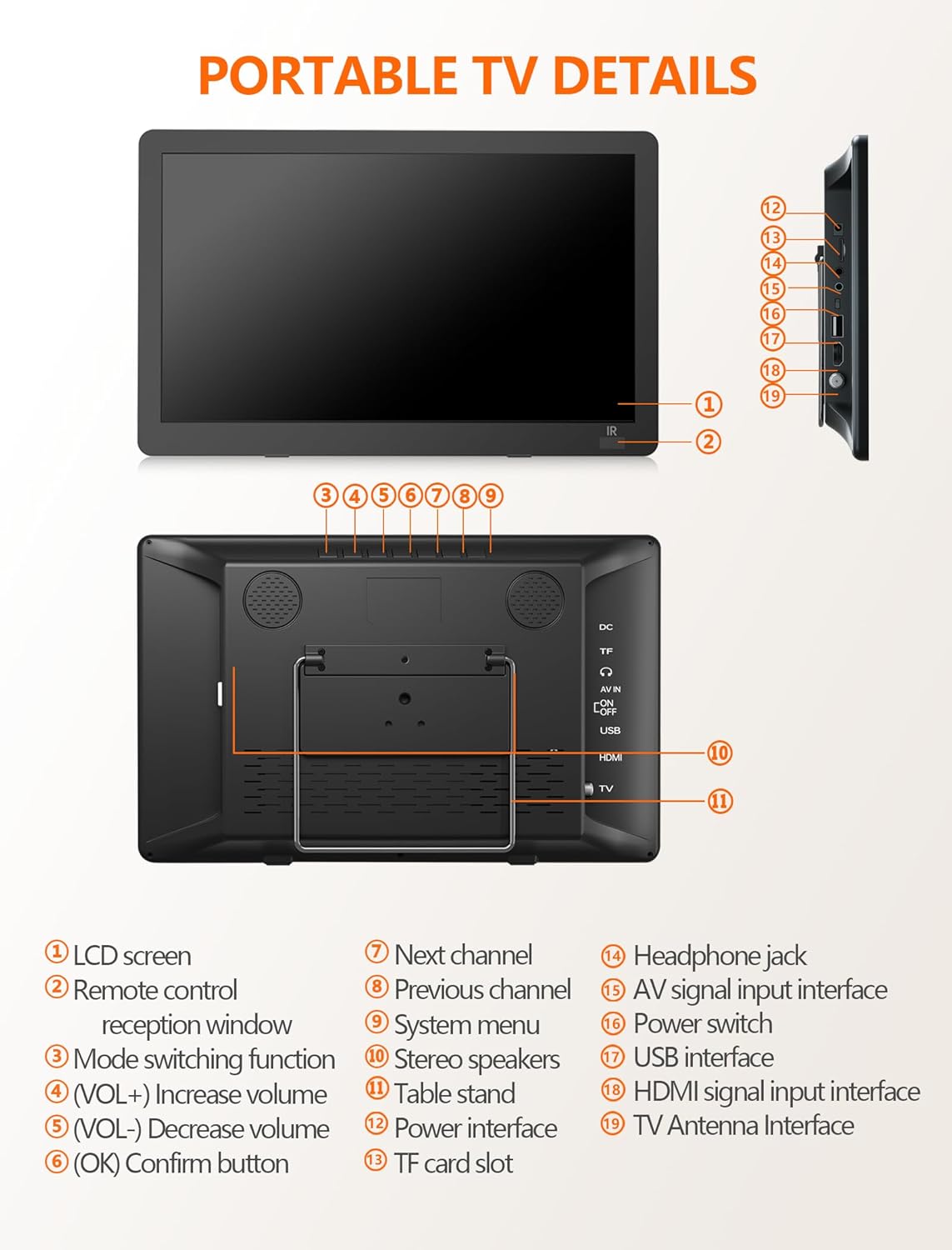
Immagine: frontale e laterale view of the portable TV with labeled components.
- Schermo LCD
- Finestra di ricezione del telecomando
- Funzione di cambio modalità
- Aumentare il volume (VOL+)
- Abbassare il volume (VOL-)
- OK / Confirm button
- Prossimo canale
- Canale precedente
- Menu di sistema
- Altoparlanti stereo
- Supporto da tavolo
- Interfaccia di potenza
- Slot per scheda TF
- Presa per cuffie
- AV signal input interface
- Interruttore di alimentazione
- Interfaccia USB
- Interfaccia di ingresso del segnale HDMI
- TV Antenna Interface
4. Impostazione
4.1 Powering the TV
The TV can be powered in three ways:
- Adattatore per corrente alternata: Connect the 12V AC adapter to the power interface (12) and a wall outlet.
- Caricabatterie per auto: Use the provided car charger to power the TV in a vehicle.
- Batteria integrata: The TV features a 4000mAh built-in rechargeable battery for portable use.

Image: Three charging systems for the portable TV.
4.2 Antenna Connection and Channel Scan
To receive free-to-air digital TV signals:
- Connect the detachable antenna to the TV Antenna Interface (19). For optimal signal, place the antenna near a window or outdoors.
- Assicurarsi che la TV sia accesa.
- Navigate to the system menu (9) and select ATSC mode.
- Perform an auto-scan for channels. The TV will search and store available digital channels.

Image: Portable TV with antenna connected, displaying a baseball game.
Video: Demonstration of connecting the antenna and performing a channel scan on a portable TV.
Video: Step-by-step guide to connecting the antenna and initiating the channel setup wizard.
5. Operativo
5.1 Selezione delle sorgenti di input
The TV supports multiple input sources:
- ATSC: For digital TV channels via antenna.
- HDMI: Connect external devices like laptops, gaming consoles, or streaming sticks (HDMI cable not included).
- Ingresso AV: Connect devices using the AV cable (AV cable included).
- USB: Riproduci contenuti multimediali files da un'unità USB.

Image: HDMI input screen mirroring from a smartphone to the portable TV.

Image: Portable TV connected via AV cable, showing a child watching content.
5.2 Riproduzione multimediale tramite USB
The USB port (17) supports various media formats:
- Video: MAVI, MPG, MOV, MKV, MP4, TS, VOB, DAT
- Audio: MP3, WMA, M4A, AAC
- Immagini: JPG, JPEG, BMP, PNG
- Testo: TXT

Image: Portable TV showing supported multiple formats for media playback.
5.3 Adjusting Volume and Channels
Use the VOL+ (4) and VOL- (5) buttons on the TV or the remote control to adjust the volume. Use the CH+ (7) and CH- (8) buttons on the TV or the remote control to change channels.
6 Caratteristiche
6.1 High-Definition Display
The 14.2-inch widescreen LCD display offers 1080P high-definition picture quality for clear viewing.

Image: Comparison of 720P and 1080P picture quality on the portable TV.
6.2 Supporto regolabile
The TV includes a desktop stand and a headrest stand for versatile placement. The built-in table stand (11) is adjustable up to 180 degrees.
6.3 Dual Speakers and Headphone Jack
Enjoy audio through the built-in dual stereo speakers (10) or connect headphones via the headphone jack (14) for private listening.

Image: Portable TV with built-in dual speakers highlighted.
Video: Oltreview of the portable TV's features, including 1080P display, flexible connectivity, adjustable kickstand, dual speakers, and sleep timer function.
7. Manutenzione
To ensure the longevity of your Desobry Portable TV:
- Pulisci lo schermo e l'esterno con un panno morbido e asciutto. Evita detergenti abrasivi.
- Tenere il dispositivo lontano dall'acqua e dall'umidità elevata.
- Conservare in luogo fresco e asciutto quando non in uso.
- Evitare di bloccare le aperture di ventilazione per evitare il surriscaldamento.
8. Risoluzione Dei Problemi
8.1 Signal Reception Issues
- Ensure the antenna is securely connected to the TV Antenna Interface (19).
- Place the antenna near a window or outdoors for better signal reception.
- Confirm the TV is set to ATSC mode for digital channels.
- If the local signal is weak, try connecting an outdoor antenna and performing a channel scan again.
8.2 Il telecomando non risponde
- Ensure the AAA batteries in the remote control are correctly inserted and not depleted.
- Point the remote control directly at the remote control reception window (2) on the TV.
- Maintain a distance of no more than 3 meters (10 feet) and within a 30-degree angle from the TV's IR sensor.
9. Specifiche
| Dimensioni dello schermo | 14.2 pollici |
| Tecnologia di visualizzazione | LCD |
| Risoluzione | Formato: 1080p |
| Frequenza di aggiornamento | Frequenza 60 Hz |
| Tecnologia di connettività | HDMI, USB, AV |
| Caratteristiche speciali | Altoparlante incorporato, portatile |
| Capacità della batteria | 4000 mAh (integrato) |
| Peso dell'articolo | 3.61 libbre |
| Dimensioni del prodotto | 2"P x 2"L x 2"A |
10. Garanzia e supporto
For warranty information or technical support, please refer to the contact details provided with your purchase documentation or visit the official Desobry website. If you encounter any problems with your portable TV, please do not hesitate to contact customer support for assistance.