
1. Introduzione
The KZ Duonic USB C Headphones are designed to deliver a high-fidelity audio experience. Featuring a triple-magnet planar magnetic driver and super-linear dynamic dual drivers, these in-ear monitors offer studio-grade resolution and customizable sound tuning. This manual provides essential information for setting up, operating, and maintaining your KZ Duonic headphones.
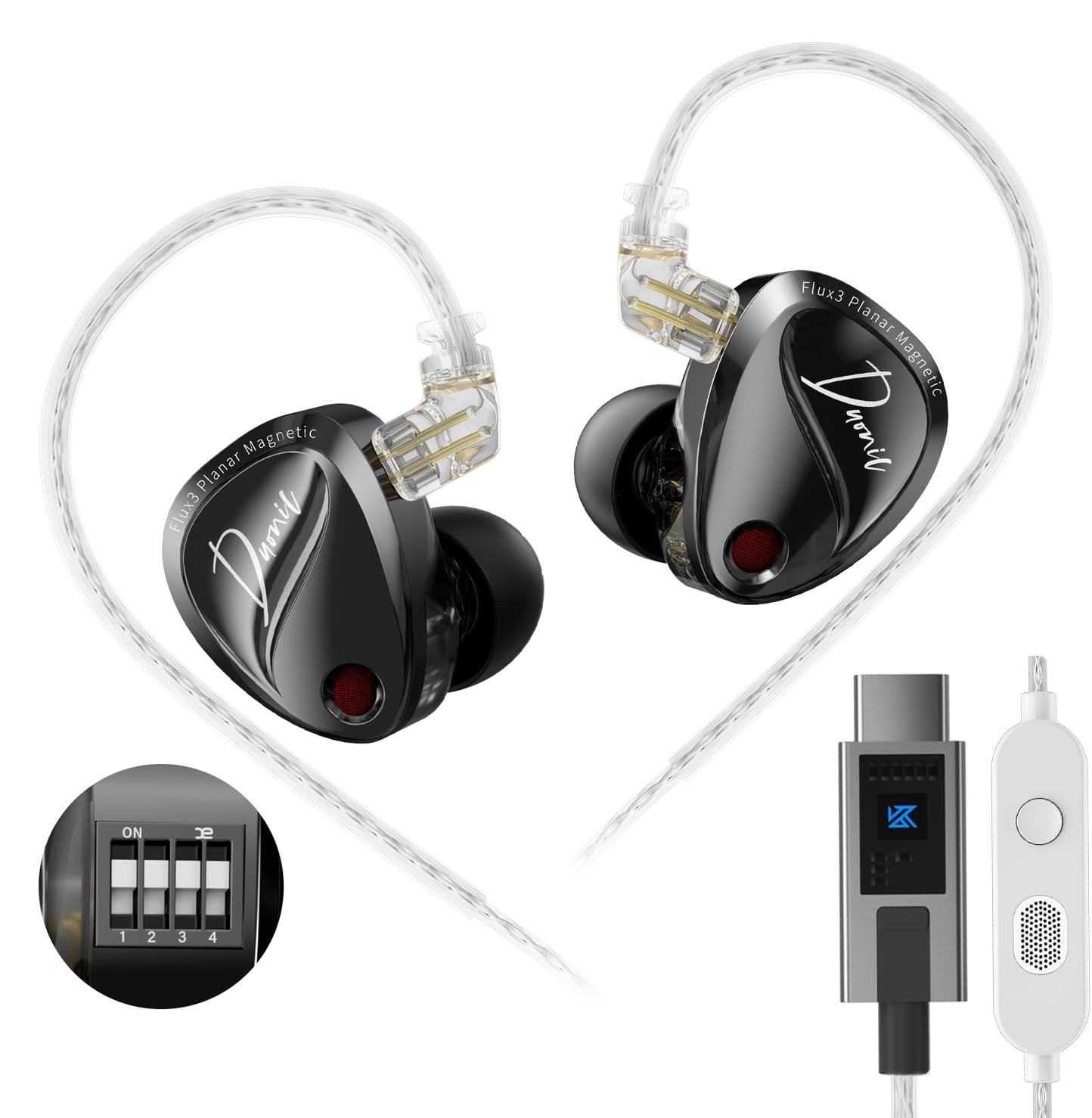
Image 1: KZ Duonic USB C Headphones, showcasing their sleek design and in-ear fit.
2. Caratteristiche del prodotto
- Triple-Magnet Planar Magnetic Driver: Industry-first design for exceptional sound quality and detail.
- Super-Linear Dynamic Dual Driver: Provides powerful bass and clear audio across all frequencies.
- Studio-Grade Resolution: Engineered for audiophiles and music professionals, delivering high-resolution sound.
- Comfort-fit and Noise Isolation: Ergonomic design with 3 sizes of silicone ear tips for up to 36 dB noise isolation.
- Dedicated Tuning Switches: 4 switches for user-customized sound adjustments (DSP version).
- High-Definition Decoding USB-C Cable: 0.78mm 2-pin high-purity silver-plated oxygen-free copper cable for precise signal transmission.
- Detachable Cable Design: Extends earphone lifespan and allows for upgrades (e.g., KZ Bluetooth Module).

Image 2: Illustration of the Triple-Magnet Planar Magnetic Driver, highlighting its innovative structure.

Image 3: Demonstrates the headphones' suitability for gaming and overall sound performance.
3. Contenuto della confezione
Assicurati che tutti gli articoli siano presenti nel pacco:
- 1 pair of KZ Duonic Earphones
- 1 Earphone Cable (USB-C)
- 3 pairs of Silicone Ear Tips (S, M, L - one pair pre-installed)
- 1 Tuning Rod (only for tuning version)
- 1 Scheda di garanzia
- 1 Exquisite Packaging Box

Image 4: Visual representation of the items included in the KZ Duonic package.
4. Impostazione
4.1 Collegamento del cavo
- Identificare gli auricolari sinistro (L) e destro (R) e i connettori corrispondenti sul cavo.
- Align the 2-pin connector on the cable with the port on the earpiece.
- Spingere delicatamente il connettore nell'auricolare finché non è saldamente inserito. Non forzare la connessione.
4.2 Selezione e fissaggio degli auricolari
Choose the ear tip size (Small, Medium, Large) that provides the most comfortable and secure fit, as well as optimal noise isolation. A proper seal is crucial for sound quality.
- Gently remove the pre-installed ear tip by twisting and pulling.
- Seleziona la dimensione preferita del tuo auricolare.
- Push the new ear tip onto the nozzle of the earphone, ensuring it is fully seated.
4.3 Indossare gli auricolari
The KZ Duonic headphones are designed for an over-ear fit with ergonomic ear hooks.
- Inserire l'auricolare nel condotto uditivo.
- Guide the cable over the top of your ear, using the pre-formed ear hook to secure it.
- Adjust the earpiece and cable for a snug and comfortable fit.
4.4 Connessione al dispositivo
Plug the USB-C connector of the cable into the USB-C port of your compatible device (e.g., Android smartphone, tablet, laptop, Nintendo Switch, iPad Pro/Air).
Video 1: Official product video demonstrating the KZ Duonic in-ear monitors and their features.
5. Istruzioni per l'uso
5.1 Basic Controls (In-line Microphone/Remote)
Il telecomando in linea sul cavo consente un comodo controllo dell'audio e delle chiamate:
- Pressione breve: Riproduci/Metti in pausa la musica, Rispondi/Termina chiamata.
- Premere a lungo: Rifiuta una chiamata.
- Premi due volte: Passa alla canzone successiva.
- Premere tre volte: Vai alla canzone precedente.

Image 5: Diagram illustrating the button functions on the in-line microphone/remote.
5.2 Sound Tuning (DSP Version Only)
The Duonic DSP version features 4 dedicated switches on each earpiece, allowing for user-customized sound adjustments. Use the included tuning rod to adjust the switches.
- Interruttore 1: Adjusts bass response.
- Interruttore 2: Further adjusts bass response.
- Interruttore 3: Adjusts mid-high frequency.
- Interruttore 4: Further adjusts mid-high frequency.
Refer to the tuning guide provided with your product for specific combinations and their effects on the sound signature. Experiment with different settings to find your preferred tonality.

Image 6: Close-up of the tuning switches on the KZ Duonic earpiece.

Image 7: Graph illustrating the effects of different tuning switch combinations on the frequency response.
Video 2: Una breve pre-produzioneview video from the KZ Official shop demonstrating the KZ Duonic in-ear monitors.
6. Manutenzione
6.1 Pulizia degli auricolari e dei gommini auricolari
- Pulire regolarmente i gommini auricolari con un panno morbido eamp panno per rimuovere cerume e detriti.
- Wipe the earpieces with a dry, soft cloth. Avoid using harsh chemicals or abrasive materials.
- Ensure the nozzles are clear of any obstructions to maintain optimal sound quality.
6.2 Cura dei cavi
- Store the cable neatly to prevent tangling and damage.
- Evitare curve brusche o trazioni eccessive del cavo.
- If the cable becomes damaged, it can be replaced due to the detachable design.
7. Risoluzione Dei Problemi
7.1 Nessun suono o volume basso
- Ensure the USB-C cable is securely connected to both the earphones and your device.
- Controlla il livello del volume sul tuo dispositivo.
- Verifica che sul tuo computer o smartphone sia selezionato il dispositivo di uscita audio corretto.
- Inspect ear tips and nozzles for any blockages.
7.2 Distorted Sound or Poor Quality
- Ensure ear tips provide a proper seal in your ear canal.
- Controllare la sorgente audio per eventuali problemi di qualità.
- For DSP versions, review the tuning switch settings. Incorrect settings might lead to undesirable sound profiles.
7.3 Il microfono non funziona
- Ensure the cable is fully connected.
- Check your device's settings to ensure the external microphone is selected.
8. Specifiche
| Caratteristica | Specificazione |
|---|---|
| Nome del modello | Duonic |
| Marca | KZ |
| Tecnologia di connettività | Cablato (USB-C) |
| Tipo di driver audio | Triple-Magnet Planar Magnetic + Super-Linear Dynamic Dual Driver |
| Risposta in frequenza | 20Hz - 20000Hz |
| Sensibilità | 103 dB |
| Impedenza | 24 Ohm |
| Controllo del rumore | Isolamento acustico |
| Caratteristica del cavo | 2 pin staccabili da 0.78 mm |
| Dispositivi compatibili | Android smartphones/tablets, Gaming devices with USB-C, Laptops, Nintendo Switch, iPad Pro/Air models |
| Peso dell'articolo | 2.39 once |
9. Garanzia e supporto
Your KZ Duonic USB C Headphones come with a manufacturer's warranty. Please refer to the included Warranty Card for details on coverage and duration. For technical support, troubleshooting assistance, or warranty claims, please contact KZ customer service through their official websito o il rivenditore presso cui hai acquistato il prodotto.
Per ulteriori informazioni e risorse, è possibile visitare il sito Negozio ufficiale KZ su Amazon.