
Devoko 0980
Manuale di istruzioni per la scrivania a L Devoko 140x80 cm
Modello: 0980
1. Introduzione
Thank you for choosing the Devoko L-Shaped Desk. This manual provides detailed instructions for assembly, operation, maintenance, and troubleshooting to ensure optimal use and longevity of your product. Please read this manual thoroughly before assembly and retain it for future reference.

Image 1.1: The Devoko L-Shaped Desk (140x80 cm) in a typical home office setup, showcasinil suo design e la sua funzionalità.
2. Caratteristiche principali
- Design reversibile a forma di L: Adaptable configuration for left or right-hand setup to fit various room layouts.
- Integrated Power Solution: Includes two AC outlets, one USB-A, and one USB-C port for convenient device charging and power access.
- AmpMemorizzazione: Features four spacious fabric drawers, an adjustable CPU shelf, and an under-desk grid for organized storage.
- Supporto ergonomico per monitor: Solleva il monitor a una posizione comoda viewaltezza, favorendo una postura migliore.
- Costruzione durevole: Built with high-quality wood surfaces and a stable metal frame with X-shaped support and adjustable foot pads.
3. Informazioni sulla sicurezza
Si prega di osservare le seguenti precauzioni di sicurezza:
- Prima del montaggio, assicurarsi che tutti i componenti siano presenti e integri.
- Montare la scrivania su una superficie morbida e pulita per evitare graffi.
- Non stringere eccessivamente le viti durante il montaggio per evitare di danneggiare il materiale.
- Tenere le parti di piccole dimensioni lontano dalla portata dei bambini.
- Non superare la portata massima della scrivania.
- For electrical components (USB/Type-C ports, power outlets), ensure proper grounding and avoid liquid contact.
4. Contenuto della confezione e componenti
Verifica che tutti i componenti elencati di seguito siano inclusi nella confezione. Se alcuni componenti risultano mancanti o danneggiati, contatta l'assistenza clienti.
4.1. Elenco dei componenti
- Desk panels (L-shaped top, monitor stand, CPU shelf)
- Componenti del telaio metallico (gambe, traverse)
- Drawer units (fabric drawers, drawer frames)
- Integrated power strip (2 AC outlets, 1 USB-A, 1 USB-C)
- Pedane regolabili
- Ferramenta di montaggio (viti, bulloni, chiave a brugola)
- Manuale di istruzioni

Image 4.1: An exploded diagram illustrating the various components of the Devoko L-Shaped Desk, including panels, frame, and hardware.
5. Istruzioni per l'installazione e il montaggio
Seguire attentamente questi passaggi per un corretto montaggio. Si consiglia di essere in due per alcune fasi.
5.1. Preparazione
- Predisporre un'area spaziosa per l'assemblea.
- Lay out all components and hardware, comparing them with the component list.
- Keep the included Allen wrench handy. A screwdriver (not included) may also be useful.
5.2. Fasi di assemblaggio
- Assemblare il telaio principale: Attach the metal legs to the main desk panels using the provided screws. Ensure all connections are secure but do not fully tighten yet.
- Installare le barre trasversali: Secure the X-shaped crossbars to the back of the frame for added stability.

Image 5.1: Details of the desk's construction, including the durable surface, X-shaped frame for stability, and adjustable foot pads for leveling.
- Collegare l'estensione L: Connect the L-shaped extension panel to the main desk frame. The design allows for reversible left or right-hand configuration. Decide your preferred orientation before securing.

Image 5.2: Illustration demonstrating the reversible L-shaped configuration, allowing the user to choose between left or right orientation for the extension.
- Install Drawer Unit: Assemble the drawer frames and insert the fabric drawers into their respective slots.

Immagine 5.3: Un dettaglio view of the four fabric drawers, highlighting their spacious design for organizing office supplies and documents.
- Fissare il supporto del monitor: Secure the elevated monitor stand to the main desk surface. This stand is designed to improve ergonomics.
- Install CPU Shelf: Position the adjustable CPU shelf within the designated area. The height can be adjusted to accommodate different computer tower sizes.

Image 5.4: A visual guide demonstrating how to adjust the height of the CPU shelf to fit various computer tower dimensions.
- Integrare la multipresa: Insert the built-in power strip into the pre-cut opening on the desk surface. Connect its power cable to a wall outlet.

Immagine 5.5: Un primo piano view of the integrated power strip, featuring two AC outlets, one USB-A port, and one USB-C port for convenient device charging.
- Serraggio finale: Once all components are in place and aligned, carefully tighten all screws.
- Regolare i cuscinetti dei piedi: Livellare la scrivania regolando i piedini nella parte inferiore delle gambe.
6. Istruzioni per l'uso
6.1. Using the Integrated Power Strip
La scrivania è dotata di una multipresa integrata per un comodo accesso alla corrente. Include:
- Two standard AC power outlets (220-250V/15A)
- One USB-A charging port (5V/2.1A)
- One USB-C charging port (5V/2.1A)
To use, simply plug the desk's power cord into a wall outlet. Then, connect your devices to the available ports. Avoid overloading the power strip.
6.2. Utilizzo delle funzionalità di archiviazione
- Cassetti: Use the four fabric drawers for organizing documents, stationery, and small electronic accessories. Note that these drawers are designed for lighter items.
- Supporto per monitor: Place your monitor on the elevated stand for an ergonomic viewing height. The space underneath can be used for keyboards, notebooks, or other small items.
- Ripiano CPU: Store your computer tower on the adjustable CPU shelf to keep it off the floor and save desk space.
- Under-desk Grid: The metal grid under the main desk surface can hold books or other frequently used items.
7. Cura e manutenzione
Proper care will extend the life of your Devoko L-Shaped Desk.
- Pulizia: Pulisci le superfici della scrivania con un panno morbido eamp cloth. Avoid abrasive cleaners or harsh chemicals that could damage the finish. For the fabric drawers, spot clean with a mild detergent if necessary.
- Fuoriuscite: Asciugare immediatamente eventuali fuoriuscite per evitare macchie o danni alla superficie del legno.
- Calore e umidità: Avoid placing hot items directly on the desk surface. Use coasters for drinks. Keep the desk away from excessive moisture or direct sunlight.
- Hardware: Controllare periodicamente tutte le viti e i bulloni per assicurarsi che siano ben serrati. Serrarli nuovamente se necessario.
- Distribuzione del peso: Distribuire il peso uniformemente sulla superficie della scrivania. Evitare di posizionare oggetti eccessivamente pesanti in un unico punto.
8. Risoluzione Dei Problemi
| Problema | Possibile causa | Soluzione |
|---|---|---|
| La scrivania è traballante. | Viti allentate; pavimento irregolare. | Tighten all assembly screws. Adjust the foot pads to level the desk. |
| Prese di corrente/porte USB non funzionanti. | Desk power cord not plugged in; wall outlet issue; device issue. | Ensure the desk's power cord is securely plugged into a functional wall outlet. Test the wall outlet with another device. Check if the device itself is working. |
| I cassetti non scorrono agevolmente. | Drawer frame misaligned; drawer overloaded. | Check the assembly of the drawer frames. Ensure drawers are not overloaded with heavy items. |
| Graffi sulla superficie. | Oggetti taglienti; pulizia abrasiva. | Use desk mats or coasters. Avoid dragging objects across the surface. Clean with soft cloths. |
9. Specifiche del prodotto
| Caratteristica | Dettaglio |
|---|---|
| Marca | Devoko |
| Modello | 0980 |
| Tipo | Scrivania per computer a forma di L |
| Dimensioni (L x P x A) | 140 x 80 x 75 cm (55.1 x 31.5 x 29.5 pollici) |
| Peso | 25 kg (55 libbre) |
| Colore | Bianco |
| Materiale | Wood (top), Metal (frame) |
| Prese di corrente | 2 x CA (220-250 V/15 A) |
| Porte USB | 1 x USB-A (5 V/2.1 A), 1 x USB-C (5 V/2.1 A) |
| Caratteristiche speciali | Reversible L-shape, 4 fabric drawers, Monitor stand, Adjustable CPU shelf, Adjustable foot pads, X-shaped stability frame. |
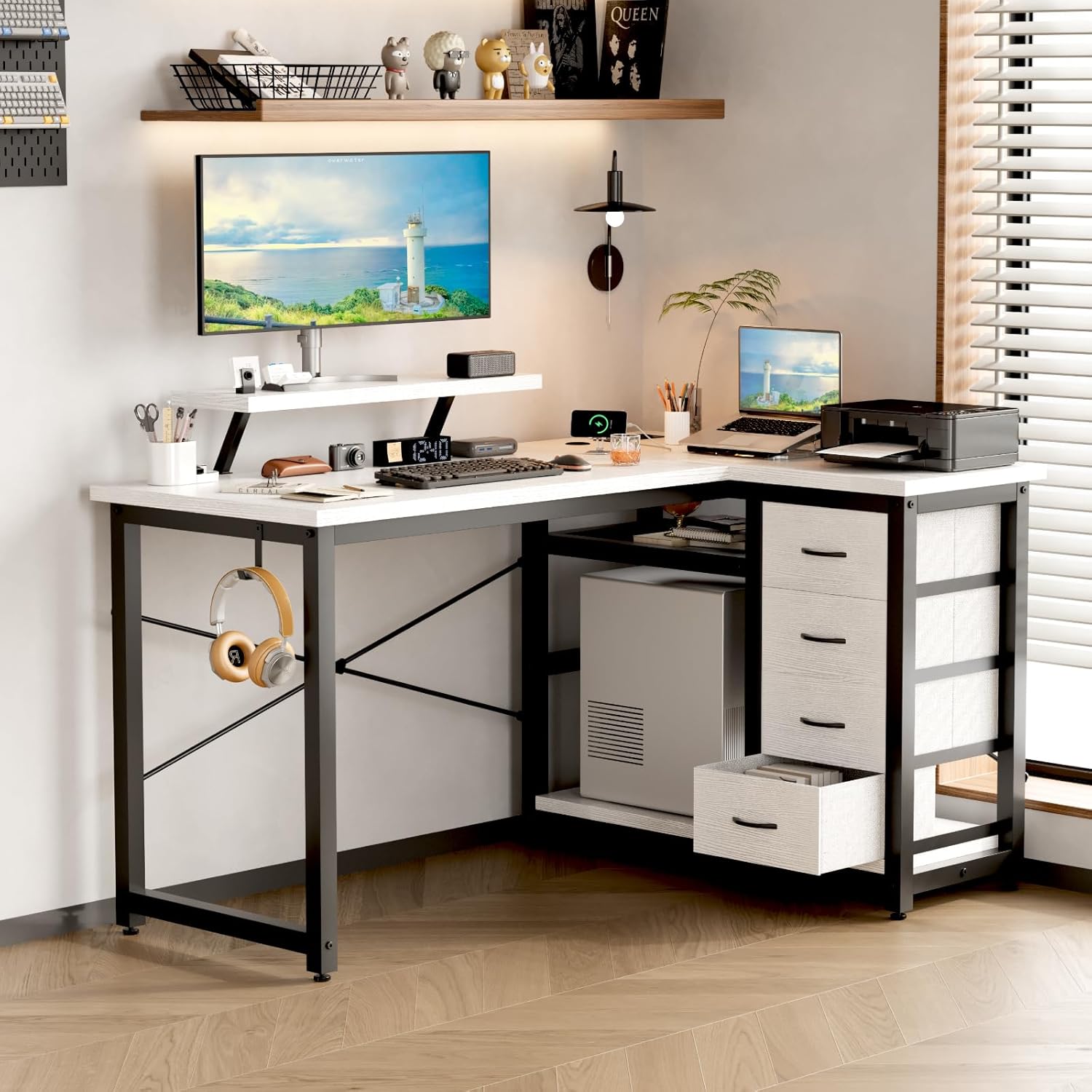
Image 9.1: A technical drawing showing the precise dimensions of the Devoko L-Shaped Desk, including length, width, and height of various sections.
10. Garanzia e supporto
10.1. Informazioni sulla garanzia
Devoko products are manufactured to high-quality standards. For specific warranty details, please refer to the warranty card included in your package or visit the official Devoko websito. La garanzia copre in genere i difetti di fabbricazione in condizioni di normale utilizzo.
10.2. Assistenza clienti
If you encounter any issues or have questions regarding your Devoko L-Shaped Desk, please contact our customer support team:
- E-mail: support@devoko.com
- Websito: www.devoko.com
- Quando contatti l'assistenza, tieni a portata di mano il numero del modello (0980) e la data di acquisto.
Ask a question about this manual
Ask about setup, troubleshooting, compatibility, parts, safety, or missing instructions. Manuals+ will review the question and use this page’s manual context to help answer it.