
Introduzione
The NEEWER F4 4-inch Phone Vlog Selfie Monitor Screen is designed to enhance your mobile video recording and photography experience. It allows you to use your smartphone's high-quality rear camera for selfies and vlogging by mirroring your phone screen in real-time. This ensures accurate framing and improved content quality. This manual provides comprehensive instructions for optimal use of your device.
Informazioni sulla sicurezza
- Tenere il dispositivo lontano dall'acqua e da ambienti ad alta umidità.
- Evitare di esporre il dispositivo a temperature estreme o alla luce solare diretta per periodi prolungati.
- Non tentare di smontare o riparare il dispositivo da soli. Rivolgersi a personale qualificato.
- Use only the provided charging cable and a compatible power adapter (5V 2A recommended) to prevent damage.
- Handle the screen with care to avoid scratches or impact damage.
Contenuto della confezione
Verifica che tutti gli articoli siano presenti nel tuo pacco:
- 1 x Phone Selfie Monitor Screen
- 1 x Dual Sided Phone Clamp
- 1 x Bluetooth Remote
- Cavo 1 x USB da C a USB C
- 1 x borsa con coulisse
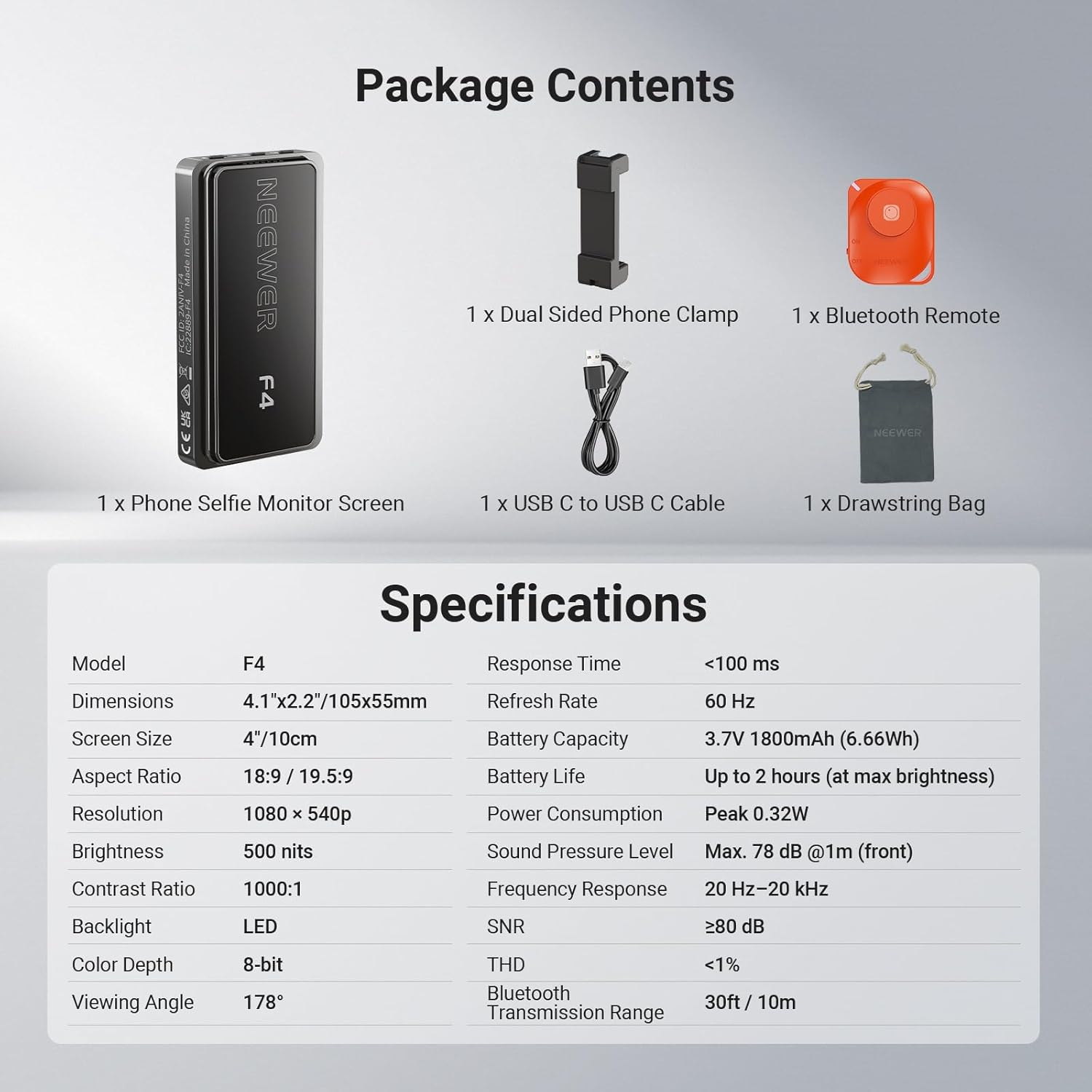
Image: Contents of the NEEWER F4 package, including the monitor, phone clamp, Bluetooth remote, USB-C cable, and drawstring bag.
Prodotto finitoview
The NEEWER F4 monitor features a 4-inch HD display with 1080x540p resolution and 500 nits brightness for clear viewing. It includes a built-in speaker and an 1800mAh battery for up to 2 hours of continuous use. The device supports wireless screen mirroring and offers a 180° screen rotation function.

Immagine: Oltreview of the NEEWER F4 monitor highlighting its 4-inch display, 500 nits brightness, 1800mAh battery, built-in speaker, 1080x540 resolution, and Type-C charging port.
Impostare
1. Carica del monitor
Before initial use, fully charge the monitor. Connect the provided USB-C to USB-C cable to the monitor's Type-C port and a compatible USB power source (e.g., wall adapter, power bank, computer USB port). The charging indicator will show the charging status.

Image: The NEEWER F4 monitor connected to a USB-C charging cable, illustrating the charging process and battery capacity.
2. Collegamento allo smartphone
The monitor comes with a dual-sided phone clamp that features a magnetic mount. This clamp securely attaches the monitor to the back of your smartphone.
- Attach the dual-sided phone clamp to your smartphone, ensuring a secure fit.
- Align the NEEWER F4 monitor with the magnetic area on the phone clamp. The magnets will secure the monitor in place.
- For additional accessories like a fill light or microphone, utilize the cold shoe slot integrated into the phone clamp. Insert the accessory's cold shoe base into this slot.

Image: Illustration of the NEEWER F4 monitor attaching to a smartphone via the magnetic phone clamp, and the cold shoe installation point for accessories.
3. Connessione wireless (Screen Mirroring)
The monitor connects wirelessly to your smartphone via screen mirroring technology.
- Per iPhone:
- Switch the monitor's network mode button to the "W" (Wireless) mode.
- On your iPhone, go to Wi-Fi settings, search for the device's SSID (network name), and connect to it.
- Enable screen mirroring/projection on your iPhone and select the NEEWER F4 device.
- For Android Smartphones (excluding Google Pixel phones):
- Switch the monitor's network mode button to the "D" (Direct) mode.
- On your Android phone, turn on Wi-Fi.
- Enable screen mirroring/projection (often found as "Smart View," "Cast," "Wireless Display," etc.) and select the NEEWER F4 device.
Note: The NEEWER F4 is not compatible with Google Pixel phones for wireless mirroring.

Image: Step-by-step guide for connecting the NEEWER F4 monitor to both iPhone and Android devices via Wi-Fi screen mirroring.
Istruzioni per l'uso
1. Funzioni di base del monitor
- Accensione/spegnimento: Press and hold the Power button located on the side of the monitor.
- Rotazione dello schermo: A single click of the Power/Screen rotation button will rotate the display 180°, eliminating inverted images.
- Regolazione della luminosità: Use the Brightness Adjustment button to cycle through 3 brightness levels (30%, 65%, 100%) to suit your environment. The 500 nits brightness ensures clear viewing even in strong light.
- Interruttore modalità rete: Use the Network Mode Switch Button to toggle between "W" (Wireless for iPhone) and "D" (Direct for Android) modes.

Image: The NEEWER F4 monitor displaying real-time phone screen mirroring, highlighting its wireless capability and built-in speaker.

Image: Close-up of the NEEWER F4 monitor's side buttons (Power/Screen rotation, Brightness Adjustment, Network Mode Switch) and an illustration of 180° screen rotation.
2. Using the Bluetooth Remote (RT-116)
The included RT-116 Wireless Bluetooth Remote allows you to control your phone's camera functions remotely, such as taking photos or starting/stopping video recording.
- Ensure the remote has a battery installed (pre-installed).
- Accendi il telecomando.
- On your smartphone, enable Bluetooth and pair with the "RT-116" remote.
- Once paired, you can use the remote to trigger your phone's camera shutter or start/stop video recording from up to 33ft (10m) away.

Image: The NEEWER F4 monitor in use with a smartphone, accompanied by the RT-116 Wireless Bluetooth Remote, showing its transmission range and compatibility.
Manutenzione
- Pulisci lo schermo con un panno morbido e privo di lanugine. Non utilizzare detergenti abrasivi o solventi.
- Store the monitor in the provided drawstring bag when not in use to protect it from dust and scratches.
- Ensure the USB-C port is free from dust and debris to maintain proper charging.
- Evitare di far cadere il dispositivo o di sottoporlo a forti impatti.
Risoluzione dei problemi
| Problema | Possibile causa | Soluzione |
|---|---|---|
| Il monitor non si accende. | Batteria scarica o pulsante di accensione non premuto correttamente. | Charge the monitor fully. Press and hold the power button for a few seconds. |
| No screen mirroring/connection. | Incorrect network mode, Wi-Fi not enabled, or phone not compatible. | Ensure the monitor is in the correct "W" (iPhone) or "D" (Android) mode. Verify Wi-Fi is on and screen mirroring is enabled on your phone. Confirm your phone is not a Google Pixel device. |
| Screen image is inverted. | Screen rotation setting. | Press the Power/Screen rotation button once to flip the image 180°. |
| Il telecomando Bluetooth non si connette. | Remote off, low battery, or not paired. | Ensure the remote is turned on. Check/replace remote battery. Pair the remote via your phone's Bluetooth settings. |
| Durata breve della batteria. | Impostazione di luminosità elevata o uso continuo. | Reduce screen brightness. Battery life is up to 2 hours at maximum brightness. Recharge as needed. |
Specifiche
| Caratteristica | Dettaglio |
|---|---|
| Modello | F4 |
| Dimensioni | 4.1" x 2.2" / 105 x 55 mm |
| Dimensioni dello schermo | 4 pollici / 10 cm |
| Proporzioni | 18:9 / 19.5:9 |
| Risoluzione | Risoluzione: 1080 x 540p |
| Luminosità | 500 nidi |
| Rapporto di contrasto | 1000:1 |
| Retroilluminazione | GUIDATO |
| Profondità del colore | 8 bit |
| Viewangolo di ing | 178° |
| Tempo di risposta | <100 millisecondi |
| Frequenza di aggiornamento | Frequenza 60 Hz |
| Capacità della batteria | 3.7 V 1800 mAh (6.66 Wh) |
| Durata della batteria | Up to 2 hours (at max brightness) |
| Consumo energetico | Picco 0.32W |
| Livello di pressione sonora | Max. 78 dB @1m (front) |
| Risposta in frequenza | Frequenza di campionamento: 20 Hz – 20 kHz |
| Rapporto segnale/rumore | ≥80 dB |
| THD | <1% |
| Gamma di trasmissione Bluetooth | 30ft / 10m |
Garanzia e supporto
The NEEWER F4 Selfie Monitor Screen comes with a Garanzia del produttore di 1 anni. For warranty claims, technical support, or service inquiries, please contact NEEWER customer support through their official webo al rivenditore presso cui è stato acquistato il prodotto. Si prega di conservare la prova d'acquisto per la convalida della garanzia.
For additional resources and product information, visit the official NEEWER store: Negozio NEEWER