
Introduzione
Welcome to the Thunderobot Zero 16 Pro user manual. This document provides essential information for setting up, operating, maintaining, and troubleshooting your new gaming laptop. The Thunderobot Zero 16 Pro is engineered for high-performance gaming and demanding applications, featuring an Intel Core Ultra 9 275HX processor, NVIDIA GeForce RTX 5080 graphics, a 16-inch QHD+ 360Hz display, 32GB DDR5 RAM, and a 1TB PCIe M.2 SSD.
Per prestazioni ottimali e una lunga durata, leggere attentamente questo manuale prima di utilizzare il dispositivo.
Contenuto della confezione
Verifica che tutti gli articoli siano presenti nel tuo pacco:
- Thunderobot Zero 16 Pro Gaming Laptop
- Adattatore di alimentazione e cavo
- Manuale dell'utente (questo documento)
- Scheda di garanzia
Impostare
1. Accensione iniziale
- Connetti alimentazione: Collegare l'adattatore di alimentazione alla porta di alimentazione del portatile e poi a una presa a muro.
- Apri il portatile: Aprire con cautela il coperchio del computer portatile.
- Accensione: Premere il pulsante di accensione, solitamente situato sopra la tastiera o sul lato.
- Configurazione iniziale: Seguire le istruzioni visualizzate sullo schermo per completare la configurazione di Windows 11 Home, inclusa la lingua, la regione, la connessione di rete e la creazione dell'account utente.
2. Collegamento di periferiche
The Thunderobot Zero 16 Pro offers various ports for connecting external devices:
- Porte USB-A: Connect mice, keyboards, external hard drives, and other USB accessories.
- USB-C Port (Thunderbolt 5): For high-speed data transfer, external displays, and power delivery.
- Porta HDMI 2.1: Collegalo a monitor esterni o TV per una visualizzazione estesa.
- Porta Ethernet RJ-45: Per una connessione di rete cablata stabile.
- Jack audio da 3.5 mm: Collega cuffie o altoparlanti esterni.
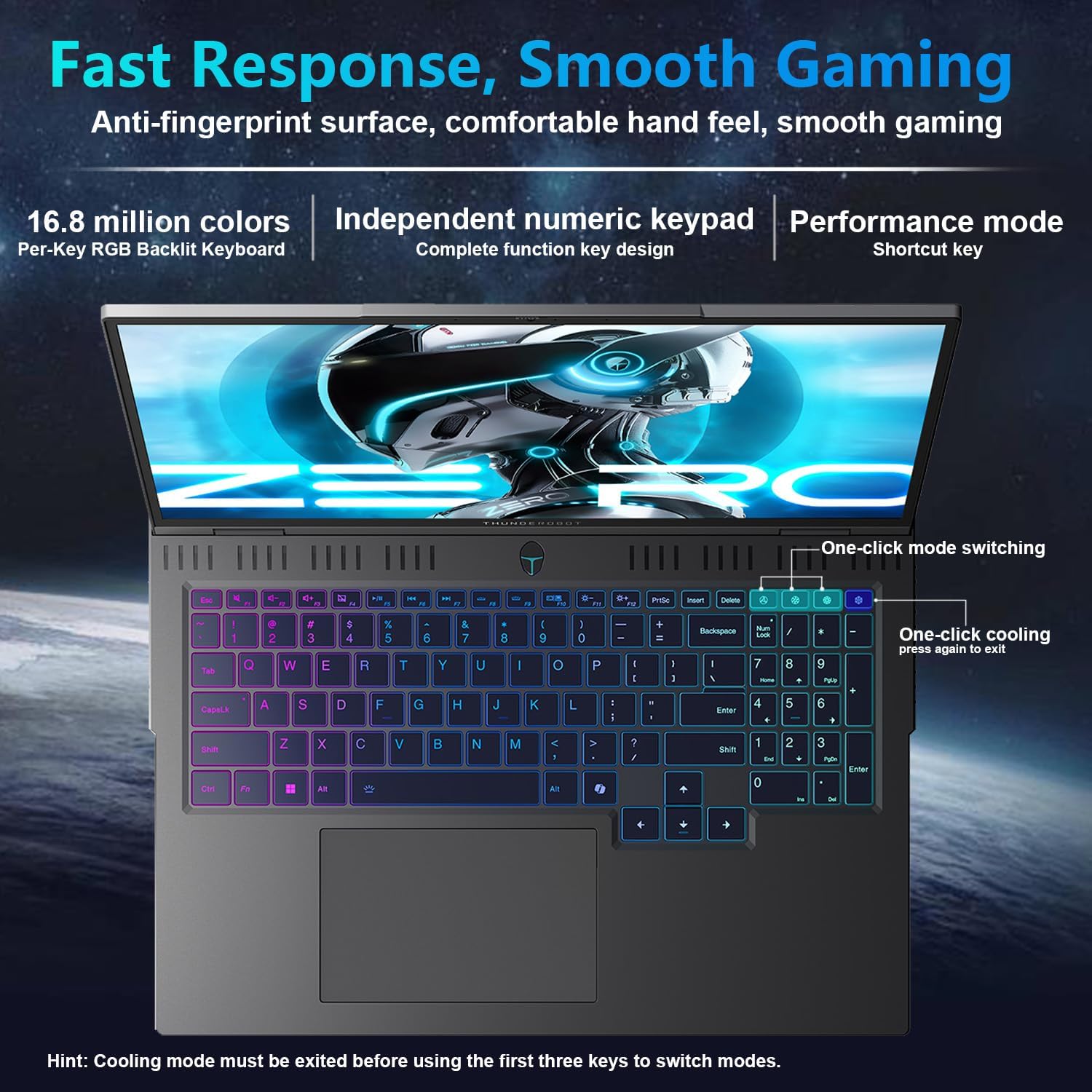
Immagine: Lato view of the Thunderobot Zero 16 Pro, highlighting the RJ-45, USB3.2 Gen2 Type-A, HDMI 2.1, Thunderbolt 5 Type-C, Power, USB3.2 Gen1 Type-A, and 3.5mm audio jack ports.

Image: Detailed diagram illustrating the location and type of ports available on the Thunderobot Zero 16 Pro, including USB, HDMI, Ethernet, and audio connections.
Istruzioni per l'uso
1. Keyboard and Lighting
The laptop features a full-size, per-key RGB backlit keyboard with a numeric keypad. You can customize the RGB lighting effects through the Thunderobot Control Center software.
- Performance Mode Switching: Use dedicated shortcut keys to switch between performance profiles (e.g., Quiet, Balance, Turbo).
- One-Click Cooling: A dedicated key allows for instant activation of maximum cooling.
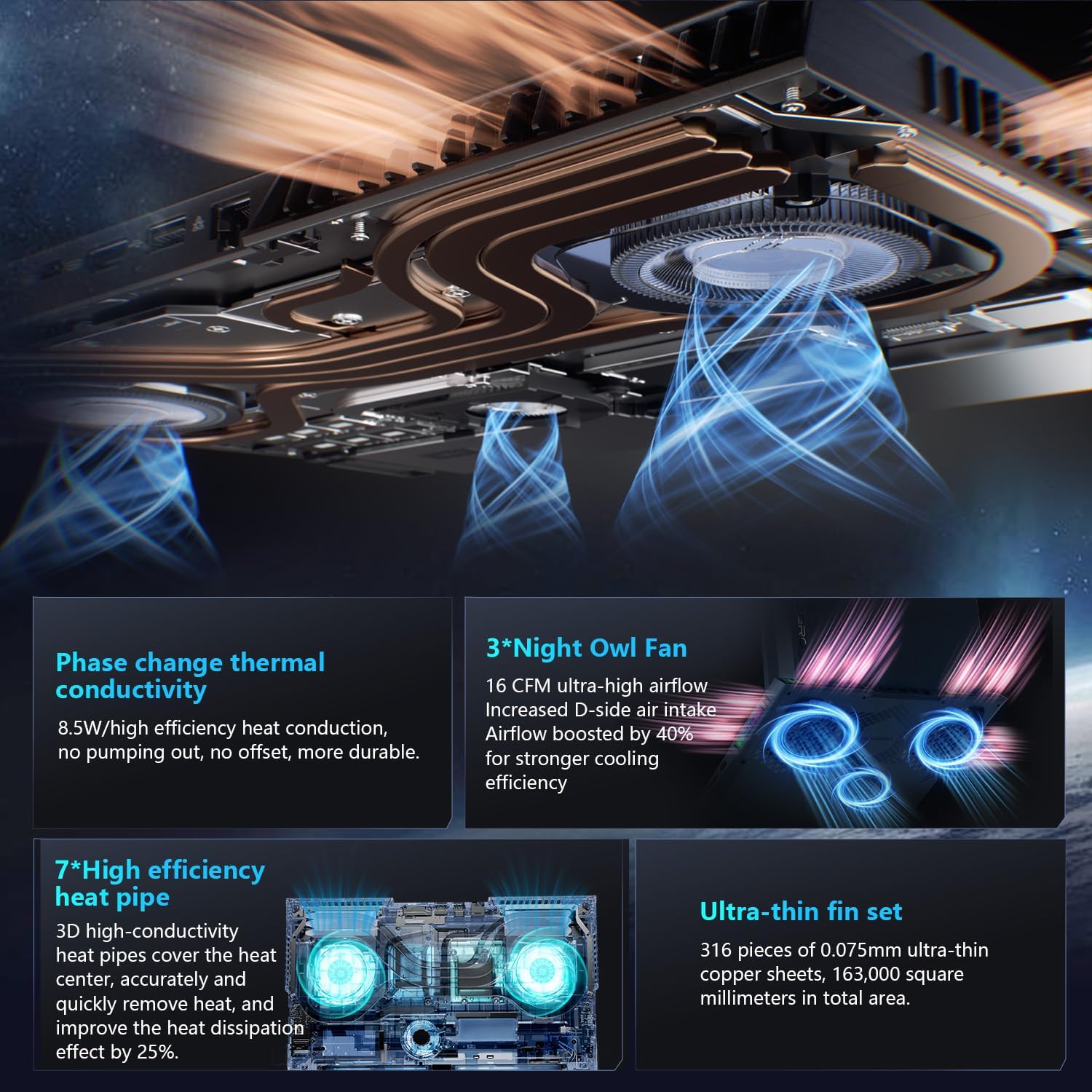
Image: The RGB backlit keyboard of the Thunderobot Zero 16 Pro, showing the full layout and numeric keypad.

Image: Visual guide to the keyboard's one-click mode switching and cooling activation keys.
Video: This video demonstrates the RGB lighting system and keyboard features of the Thunderobot Zero 16 Pro, including performance mode switching and one-click cooling.
2. Caratteristiche dello schermo
The 16-inch QHD+ (2560x1600) display offers a 360Hz refresh rate and eye-care technology. To utilize the highest refresh rate, ensure the dedicated graphics direct connection mode is enabled in the Control Center.
- Anti-Glare & Anti-Reflection: Reduces distractions from ambient light.
- Anti-luce blu: Helps reduce eye strain during prolonged use.
- Dimmerazione CC: Provides flicker-free eye protection.
- Professional Color Calibration: Garantisce una riproduzione accurata dei colori.

Image: The 16-inch QHD+ display of the Thunderobot Zero 16 Pro, showcasing its high refresh rate and eye-care features.

Image: Infographic detailing the display's features such as 2.5K resolution, 360Hz refresh rate, 500 nits brightness, and various eye protection technologies.
3. Thunderobot Control Center
The AI Intelligent Control Center software allows for comprehensive management of your laptop's performance, lighting, and system settings. It is recommended to connect the device to a power source for full functionality of system mode switching.
- Performance Tuning: Adjust CPU and GPU settings for optimal performance or power saving.
- Intelligent Light Adjustment: Customize keyboard, strip, and logo RGB lighting.
- Comprehensive Adjustment: Monitor system status, fan speeds, and manage other personalized settings.
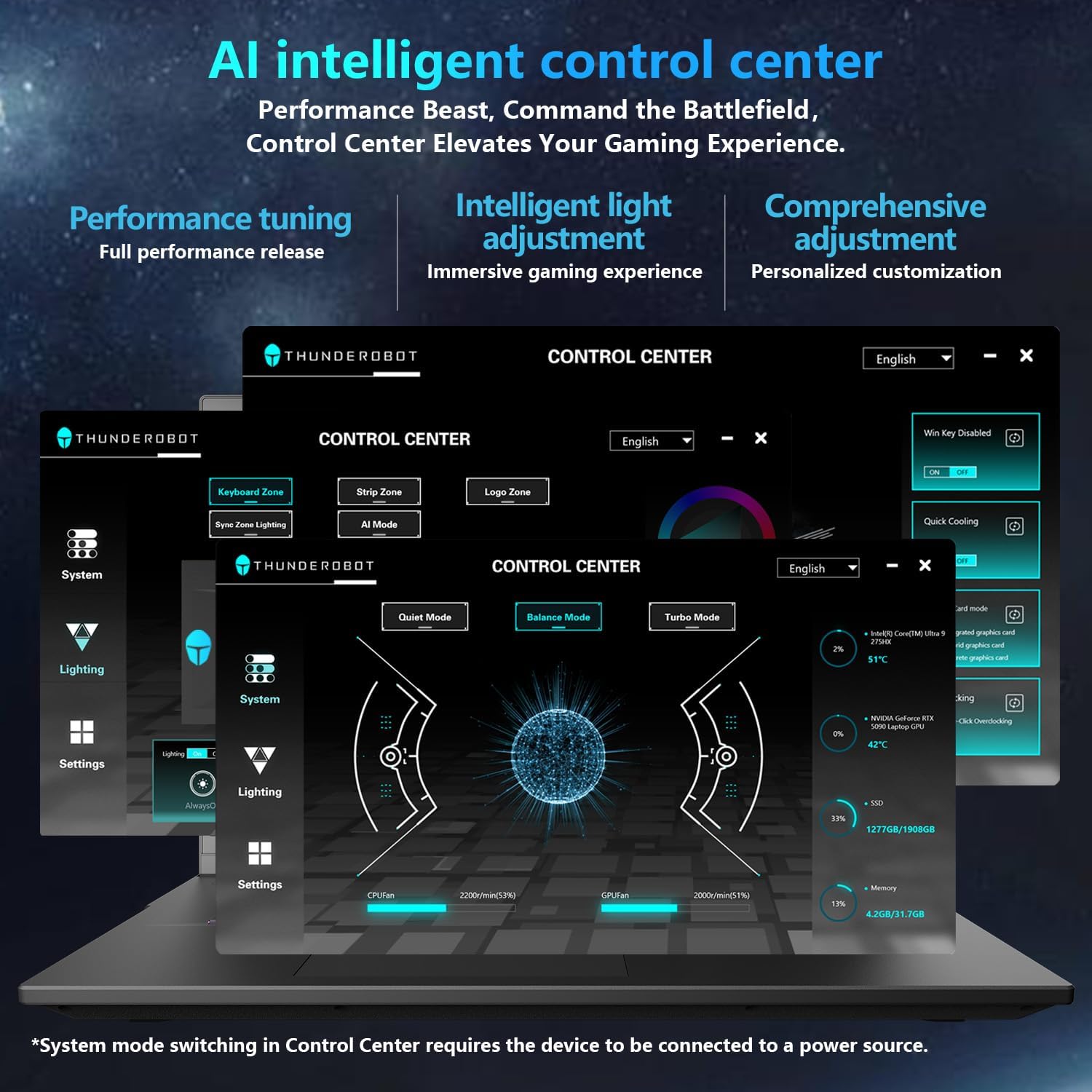
Image: A visual representation of the Thunderobot Control Center interface, showing options for system monitoring, lighting control, and performance settings.
Image: Infographic explaining the capabilities of the AI Intelligent Control Center, including performance tuning, intelligent light adjustment, and comprehensive system management.
4. Sistema audio
The laptop is equipped with a Soundstage Full audio system, featuring 4 speakers and Nahimic high-quality sound effects for an immersive audio experience.

Image: A graphic illustrating the Soundstage Full audio system with sound waves, emphasizing the immersive experience.
Video: This video showcases the display quality and overall design of the Thunderobot Zero series, including the Zero 16 Pro.
Manutenzione
1. Sistema di raffreddamento
The Thunderobot Zero 16 Pro features a robust cooling system designed to maintain performance under heavy loads. This includes dual Night Owl fans, 7 enlarged heat pipes, and 316 ultra-thin copper fins.
- Mantenere libere le prese d'aria: Ensure that the air intake and exhaust vents are not obstructed to allow for proper airflow.
- Pulizia regolare: Pulire periodicamente le prese d'aria dalla polvere utilizzando aria compressa.

Immagine: Un esploso view of the laptop's internal cooling components, showing the dual fans, heat pipes, and fin set.

Image: Infographic explaining the Night Hawk fans, high-efficiency heat pipes, phase-change thermal conduction, and ultra-thin fin array.
2. Assistenza generale
- Pulizia: Utilizzare un panno morbido e privo di lanugine per pulire lo schermo e il telaio. Evitare prodotti chimici aggressivi.
- Condizioni ambientali: Operate the laptop within recommended temperature ranges (-20°C to 60°C) and humidity (up to 90%).
- Longevità della batteria: To prolong battery life, avoid frequently discharging the battery completely and store the laptop with a partial charge if not used for extended periods.
Video: This video highlights the robust build quality and testing of Thunderobot gaming products, demonstrating their durability.
Risoluzione dei problemi
Problemi comuni e soluzioni
| Problema | Possibile causa | Soluzione |
|---|---|---|
| Display not reaching 360Hz refresh rate. | Dedicated graphics direct connection mode is not enabled. | Enable the dedicated graphics direct connection mode in the Thunderobot Control Center. |
| Laptop performance is lower than expected. | Laptop is not connected to power, or is in a power-saving mode. | Connect the laptop to its power adapter. Adjust performance settings to "Turbo Mode" or "Performance Mode" in the Thunderobot Control Center. Ensure cooling vents are clear. |
| Keyboard RGB lighting is not working or customizable. | Lighting settings are disabled or not configured in the Control Center. | Open the Thunderobot Control Center and navigate to the "Lighting" section to enable and customize RGB effects. |
| Nessun suono dagli altoparlanti o dalle cuffie. | Audio drivers are outdated, volume is muted, or incorrect output device selected. | Check volume levels and audio output settings in Windows. Update audio drivers if necessary. Ensure headphones are fully plugged into the 3.5mm jack. |
Specifiche
| Caratteristica | Dettaglio |
|---|---|
| Marca | Thunderobot |
| Nome del modello | ZERO 16 Pro |
| Dimensioni dello schermo | 16 pollici |
| Risoluzione | 2560x1600 pixels (QHD+) |
| Frequenza di aggiornamento | 360 Hz |
| Modello CPU | Intel Core Ultra 9 275HX (24 Cores, up to 5.4 GHz) |
| Coprocessore grafico | NVIDIA GeForce RTX 5080 (12 GB GDDR7) |
| Dimensione della memoria RAM installata | 32 GB DDR5 (4800 MHz) |
| Dimensioni del disco rigido | SSD da 1 TB (PCIe x4) |
| Sistema operativo | Windows 11 Casa |
| Tecnologia di connettività | Wi-Fi 6E, Bluetooth, USB-A, USB-C (Thunderbolt 5), HDMI, Ethernet, Audio Jack |
| Porte USB totali | 4 |
| Porte HDMI | 1 |
| Tastiera | Backlit, Full-size with Numeric Keypad |
| WebCapacità della camma | SÌ |
| Dimensioni dell'articolo (L x P x Spessore) | 14.09"L x 10.52"W x 1.03"S |
| Usi specifici per il prodotto | Gioco d'azzardo |
Garanzia e supporto
Informazioni sulla garanzia
Every Thunderobot laptop includes a Garanzia di 12 mesi, offering expert support, thorough diagnostics, and genuine parts if a repair is needed. Additionally, a Garanzia di 90 giorni is provided on all warranty replacement parts, ensuring hassle-free repairs. Your complete satisfaction is our commitment.
Assistenza clienti
For technical assistance, warranty claims, or product inquiries, please visit the official Thunderobot website or contact their customer support. Refer to the warranty card included in your package for specific contact details and terms.
Puoi anche visitare il Thunderobot Store on Amazon per ulteriori informazioni sul prodotto e risorse di supporto.