
1. Introduzione
This manual provides comprehensive instructions for the Ivation Replacement Remote Control, model JID0TPT01. This remote is specifically designed to operate various Ivation Large Digital LED Timer Clocks. Please read this manual thoroughly to ensure proper setup and operation of your remote control.
2. Compatibilità del prodotto
This replacement remote control is compatible exclusively with the following Ivation Large Digital LED Timer Clock models. It is not a universal remote and will not function with other devices.
- JID0124TBLU, JID0124TRED, JID0124TWHT
- JID0136TBLU, JID0136TRED, JID0136TWHT
- JID0148TRED, JID0148TBLU, JID0148TWHT
- JID0160TRED, JID0160TBLU, JID0160TWHT
- JID0172TBLU, JID0172TRED, JID0172TWHT
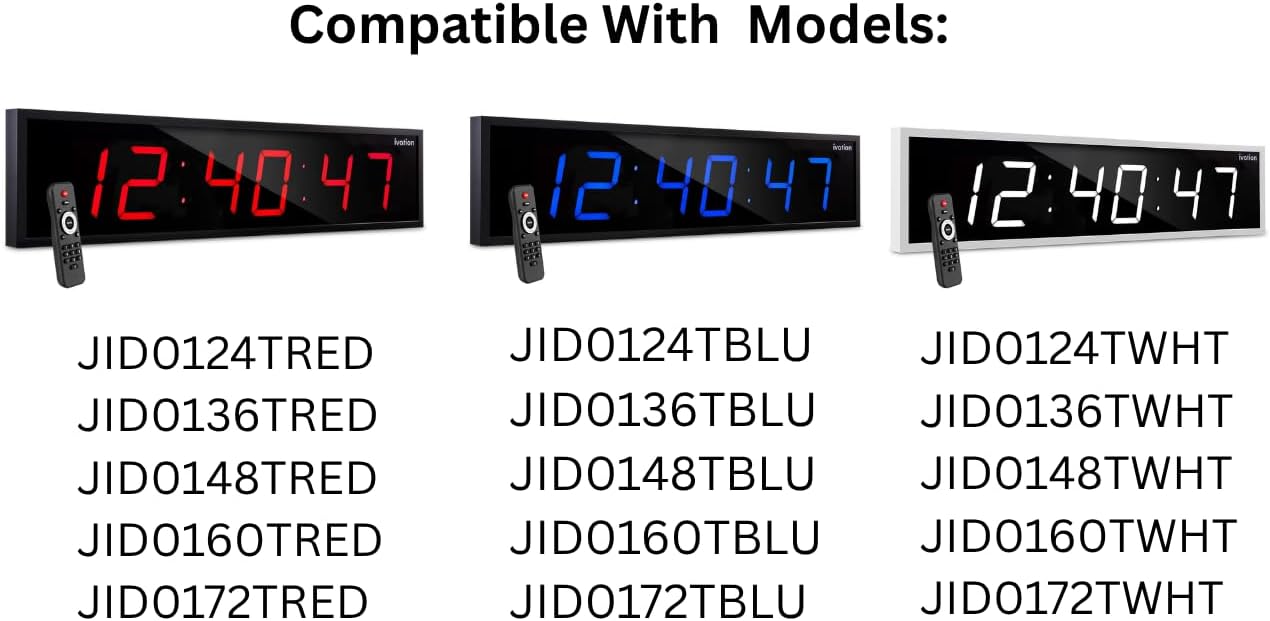
This image illustrates the various Ivation Large Digital LED Timer Clock models that are compatible with this replacement remote control. The clocks are shown in red, blue, and white display colors, each paired with the remote. Below the clocks, a comprehensive list of compatible model numbers is provided for reference.
3. Impostazione
3.1 Installazione della batteria
- Individuare il vano batterie sul retro del telecomando.
- Far scorrere per aprire il coperchio del vano batterie.
- Inserire due (2) batterie alcaline AAA, assicurandosi della corretta polarità (+ e -) come indicato all'interno del vano.
- Chiudere saldamente il coperchio del vano batterie.
Nota: Sostituire sempre entrambe le batterie contemporaneamente. Non mischiare batterie vecchie e nuove o tipi diversi di batterie. Rimuovere le batterie se il telecomando non viene utilizzato per un periodo prolungato.
4. Istruzioni per l'uso
The Ivation replacement remote control features a straightforward button layout for easy operation of your compatible Ivation Large Digital LED Timer Clock. Refer to the diagram below for button identification and functions.

This image provides a clear, labeled diagram of the Ivation replacement remote control. Each button is identified with its name and a brief description of its function, such as 'Clock' for showing time, 'Display' for cycling through time, date, and temperature, 'Mute' for toggling alert sounds, 'Brightness' for adjusting display intensity, 'Timer Functions' for stopwatch, countdown, or alarms, 'F/C' for temperature unit toggle, 'AM/PM 12/24' for time format, and the 'Number Pad' for manual settings.
4.1 Funzioni dei pulsanti
- Orologio: Displays the current time on the clock.
- Display: Cycles through different display modes, such as time, date, and temperature.
- Disattiva audio: Toggles alert sounds (e.g., alarm beeps) on or off.
- Luminosità: Cycles through 6 different brightness levels for the clock display.
- Allarme: Accesses alarm settings. Press to set or activate alarms.
- Avvio/Arresto: Initiates or pauses stopwatch and countdown timer functions.
- Conto alla rovescia: Activates the countdown timer function.
- Set/Enter: Confirms selections or enters settings within menus.
- C/C: Alterna la visualizzazione della temperatura tra Fahrenheit e Celsius.
- AM/PM 12/24: Cycles the time display between 12-hour (AM/PM) and 24-hour formats.
- Tastierino numerico (0-9): Used to manually input numbers for setting time, date, alarms, or timer durations.
5. Risoluzione Dei Problemi
Se riscontri problemi con il telecomando, consulta le seguenti soluzioni comuni:
- Il telecomando non risponde:
- Ensure the remote has fresh AAA alkaline batteries installed correctly.
- Check for any obstructions between the remote and the clock's infrared receiver.
- Assicuratevi di trovarvi entro il raggio d'azione effettivo del telecomando (in genere fino a 20 piedi).
- Pulsanti non funzionanti:
- Press buttons firmly.
- Clean the remote's surface if there is any debris that might be obstructing button presses.
- Funzionamento intermittente:
- Sostituisci le batterie con altre nuove.
- Evitare fonti di luce intensa (come la luce solare diretta) che potrebbero interferire con il segnale a infrarossi.
If problems persist after attempting these solutions, please contact Ivation customer support.
6. Specifiche
| Nome del modello | JID0TPT01 |
| Marca | ivazione |
| Tecnologia di connettività | Infrarossi |
| Dispositivi compatibili | Ivation Large Digital LED Timer Clocks (listed in Section 2) |
| Quantità del pulsante | 3 (referring to main function buttons, not including number pad) |
| Tipo di controllore | Controllo dei pulsanti |
| Tipo di batteria | Alkaline AAA (x2) |
| Colore | Nero |
7. Garanzia e supporto
For warranty information and customer support, please refer to the documentation provided with your original Ivation Large Digital LED Timer Clock or visit the official Ivation webluogo. Conserva la ricevuta di acquisto per eventuali richieste di garanzia.