
Introduzione
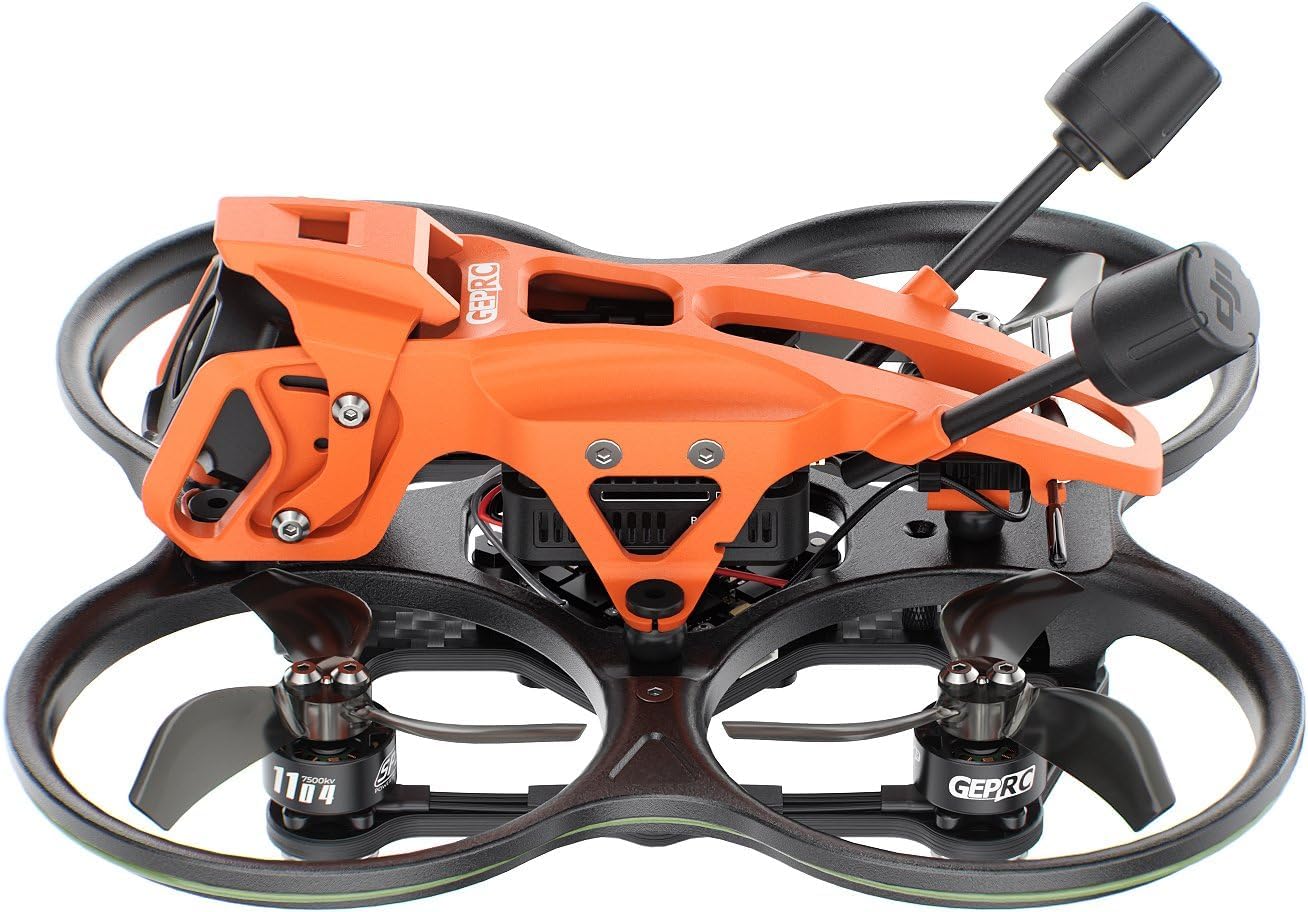
This manual provides essential information for the safe and efficient operation of your GEPRC DarkStar22 O4 Pro CineWhoop Quadcopter. Please read these instructions thoroughly before first use and retain for future reference. The DarkStar22 O4 Pro is designed for cinematic-grade 4K/120fps footage with ultra-low latency, featuring a 20A AIO flight controller for precision control and a reinforced frame for durability.
Caratteristiche del prodotto
- Cinematic-Grade Footage: Capture 4K/120fps video with ultra-low latency for real-time responsiveness and professional quality.
- Advanced Flight Control: Equipped with a 20A AIO flight controller with integrated stabilization algorithms for precision control in various conditions.
- Vibrazione Dampin: Engineered to minimize vibrations and maintain camera stability during dynamic movements.
- Design durevole: Features a reinforced frame with a shockproof canopy and prop guards for enhanced durability in indoor and outdoor flights.
- Assemblaggio intuitivo: Simplified assembly with only 4 screws and intuitive LED controls for quick customization.
Contenuto della confezione
Verify all items are present in your package:
- 1 × DarkStar22 Drone
- 1 × Prop Guard
- 1 × Top Plate
- 1 × Camera Cover
- 1 × Battery Pad
- 2 × Propellers (pairs)
- 1 × 10*120mm Battery Strap
- 1 × L-shaped Hex Wrench 1.5mm
- 1 × Battery Anti-slip Pad
- 1×Damping Ball Punch Tool
- 1 × Binding Pin
- 1 × USB Adapter Board
- 1 × 5P Terminal Cable
- Spare Screw Pack (2 × Damping Balls, 4 × M2*4 Round-head Screws, 4 × M2*7 Round-head Screws, 4 × M2*6 Countersunk Screws, 4 × M2*5 Countersunk Screws, 4 × M2*6 Round-head Screws, 4 × M2*7 Countersunk Self-Tapping Screw)
Impostare
Binding Radio and Quadcopter
To establish communication between your radio transmitter and the DarkStar22 quadcopter, follow the binding procedure. Ensure both devices are powered off before starting.
Video: Aquila16 Brushless Drone User Tips. This video demonstrates the binding process for a similar drone model, which can be applied to the DarkStar22.
Installazione della batteria
Proper battery installation is crucial for safe operation. Always ensure the battery is securely fastened.
Video: Aquila16 Brushless Drone User Tips. This video includes a demonstration of battery installation for a similar drone model.
O4 Air Unit Pro Camera and VTX Installation
The DarkStar22 features an integrated O4 Air Unit Pro. If re-assembly or maintenance is required, refer to the following videos for guidance on installing the O4 camera and VTX module. While these videos may feature different drone models, the O4 Air Unit installation steps are generally applicable.
Video: Meteor65 Pro/ Meteor75 Pro Brushless Drone Installation. This video demonstrates the installation of the DJI O4 Air Unit, which is relevant for the DarkStar22.
Video: Pavo Femto Quadcopter Installation. This video also shows the installation process for the DJI O4 Air Unit.
Istruzioni per l'uso
Before each flight, ensure the battery is fully charged and securely installed. Perform a pre-flight check of all propellers, motors, and the frame for any damage. Always operate the quadcopter in an open area, away from people, animals, and obstacles. Familiarize yourself with the flight controller's functions and emergency procedures.
Controlli di volo di base
- Throttle: Controls altitude. Increase to ascend, decrease to descend.
- Imbardata: Rotates the quadcopter left or right on its vertical axis.
- Pece: Tilts the quadcopter forward or backward.
- roll: Tilts the quadcopter left or right.
Start with slow, controlled movements to get accustomed to the controls. Practice hovering and gentle maneuvers before attempting more advanced flights.
Manutenzione
Regular maintenance ensures the longevity and optimal performance of your DarkStar22. After each flight, inspect the propellers for cracks or chips and replace them if damaged. Check the motor mounts and frame for any loose screws or structural integrity issues. Keep the camera lens clean and free from dust or debris. Store the quadcopter and batteries in a cool, dry place.
Risoluzione dei problemi
| Problema | Possibile causa | Soluzione |
|---|---|---|
| Quadcopter does not power on | Batteria non carica o installata in modo errato | Charge battery fully. Ensure battery is correctly inserted and clicked into place. |
| Loss of control/unresponsive | Binding issue or signal interference | Re-bind the radio and quadcopter. Move to an area with less interference. |
| Unstable flight/vibrations | Damaged propellers or loose components | Inspect and replace damaged propellers. Check all screws and connections for tightness. |
| Scarsa qualità video | Dirty camera lens or VTX interference | Clean the camera lens. Ensure VTX antenna is properly connected and not obstructed. |
Specifiche
| Caratteristica | Dettaglio |
|---|---|
| Modello | DarkStar22 O4 Pro |
| Telaio | GEP-DS22 |
| Main Carbon Plate Thickness | 2.5mm |
| Passo | 100mm |
| FC System | TAKER F405 20A ELRS2.4 2-4S AIO |
| MCU | STM32F405 |
| Giroscopio | ICM42688-P |
| Firmware FC | GEPRC_TAKER_F405 AIO |
| Flash | 16 MB |
| ESC | 8Bit 20A |
| Motore | SPEEDX2 1104 7500KV |
| Eliche | HQProp 2219-3 |
| Connettore di alimentazione | XT30U-M |
| VTX | Unità aria O4 Pro |
| Telecamera | O4 Air Unit Pro camera module |
| Antenna | O4 Air Unit Pro antenna |
| Ricevitore | PNP (O4 Pro built-in RX) / ELRS 2.4G |
| Weight (ELRS 2.4G version) | 126.8g |
| Batteria consigliata | GEPRC Storm LiHV 3S 720mAh |
| Tempo di volo | 6min45s (tested under smooth cruising; actual flight time depends on flight style) |
| Dimensioni del prodotto | 5.47 cm L x 5.71 cm P x 2.61 cm A |
| Peso dell'articolo | 127 grammi |
| Produttore | GEPRC |
Prodotto finitoview


Garanzia e supporto
GEPRC products are covered by a limited warranty against manufacturing defects. For detailed warranty information, technical support, or service inquiries, please visit the official GEPRC websito o contattare il servizio clienti. Conservare la prova d'acquisto per eventuali reclami in garanzia.