
1. Introduzione
The FOXWELL NT201 is an On-Board Diagnostics II (OBDII) and European On-Board Diagnostics (EOBD) scanner designed to diagnose engine-related issues in vehicles. This device allows users to read and clear diagnostic trouble codes (DTCs), view live data streams, perform I/M readiness tests, and more. This manual provides detailed instructions for the proper use and maintenance of your NT201 scanner and its accompanying portable carrying case.
2. Informazioni sulla sicurezza
Osservare sempre le precauzioni di sicurezza quando si lavora su un veicolo. L'uso improprio degli strumenti diagnostici può causare lesioni personali o danni al veicolo. Si prega di leggere e seguire queste linee guida:
- Assicurarsi che il veicolo sia parcheggiato su una superficie piana e con il freno di stazionamento inserito.
- Indossare una protezione per gli occhi adeguata.
- Keep clothing, hair, hands, tools, and test equipment away from moving engine parts.
- Operate the vehicle in a well-ventilated area to prevent carbon monoxide poisoning.
- Non collegare o scollegare l'attrezzatura di prova mentre l'accensione è inserita o il motore è in funzione.
- Keep the scanner dry and clean. Avoid exposure to extreme temperatures.
3. Contenuto della confezione
Verifica che tutti gli articoli siano presenti nel tuo pacco:
- FOXWELL NT201 OBD2 Scanner Unit
- Cavo OBDII integrato
- Custodia portatile per il trasporto
- Manuale dell'utente (questo documento)
4. Prodotto finitoview
The NT201 scanner features a clear display and intuitive button layout for easy navigation and operation.

Figura 4.1: Davanti view of the FOXWELL NT201 OBD2 Scanner. This image displays the scanner's screen, which shows 'I/M Readiness' status indicators, and the control buttons including ESC, UP, DOWN, and ENTER, along with the I/M readiness hotkey.
4.1. Disposizione del dispositivo
- Schermo LCD: Shows test results, menu options, and operational information.
- Pulsante ESC: Exits current screen or returns to the previous menu.
- Pulsanti SU/GIÙ: Navigates through menu options or data.
- Pulsante INVIO: Conferma una selezione o accede a un menu.
- I/M Readiness Hotkey: Provides quick access to the I/M Readiness status.
- Connettore OBDII: Connects the scanner to the vehicle's Data Link Connector (DLC).
5. Impostazione
To begin using your NT201 scanner, follow these steps:
- Locate the vehicle's 16-pin Data Link Connector (DLC). This is typically located under the dashboard on the driver's side.
- Portare l'accensione del veicolo in posizione "ON" (motore spento).
- Plug the NT201's OBDII connector into the vehicle's DLC. The scanner will power on automatically.
- The scanner will perform a system check and display the main menu.
6. Istruzioni per l'uso
6.1. Read and Clear Fault Codes
This function allows you to retrieve Diagnostic Trouble Codes (DTCs) from the vehicle's engine control unit (ECU) and clear them after repairs.
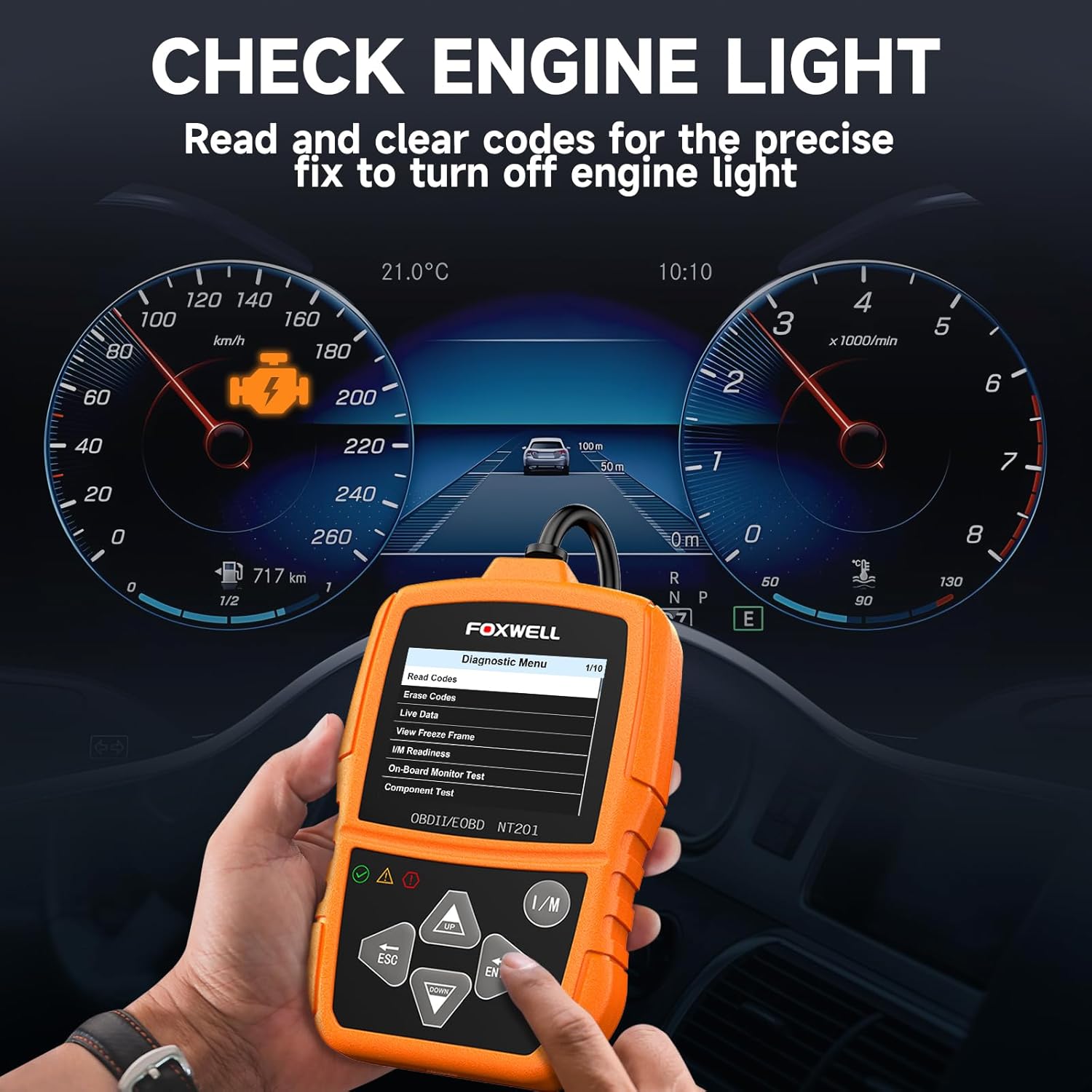
Figura 6.1: The FOXWELL NT201 scanner in use, displaying the diagnostic menu with 'Read Codes' highlighted. A vehicle dashboard is visible in the background, showing the check engine light illuminated.
- Dal menu principale, utilizzare il SU/GIÙ buttons to select "Diagnostic Menu" and press ENTRARE.
- Seleziona "Leggi codici" per view current, pending, and permanent DTCs. The scanner will display the codes and their definitions.
- After addressing the underlying issue, select "Erase Codes" from the Diagnostic Menu and press ENTRARE. Confirm the action when prompted. This will turn off the Malfunction Indicator Lamp (MIL) or 'Check Engine Light'.
6.2. Flusso di dati in tempo reale
View real-time operational parameters of the vehicle's engine, such as engine RPM, vehicle speed, coolant temperature, and more.

Figura 6.2: The FOXWELL NT201 scanner displaying a live data stream. The screen shows various parameters like Engine RPM and Vehicle Speed Sensor data, presented both numerically and graphically, with a car interior visible in the background.
- From the Diagnostic Menu, select "Live Data" and press ENTRARE.
- Puoi view data in text format or graphical format. Use the SU/GIÙ pulsanti per scorrere i parametri.
- Premere ENTRARE to select a parameter for detailed viewing or graphing.
6.3. One-Key I/M Readiness Test
Quickly check the vehicle's emission readiness status to determine if it's ready for an emissions test.

Figura 6.3: The FOXWELL NT201 scanner with its 'I/M' hotkey prominently displayed and highlighted, indicating its function for a quick smog check. An exhaust pipe is visible in the background, suggesting emissions testing.
- With the scanner connected and powered on, press the dedicated NEL tasto di scelta rapida.
- The scanner will display the status of various emission-related monitors (e.g., MIL, MIS, FUE, CCM, CAT, O2S, EGR).
- Green indicates the monitor has completed its test, Yellow indicates pending, and Red indicates not ready or a fault.
6.4. Test del sensore O2
This function retrieves O2 sensor monitor test results for the most recently completed tests from the vehicle's on-board computer. This helps in diagnosing fuel efficiency and emission-related issues.
- From the Diagnostic Menu, select "O2 Sensor Test" and press ENTRARE.
- Segui le istruzioni sullo schermo per view i risultati del test.
7. Manutenzione
7.1. Pulizia dello scanner
Utilizzare un morbido, damp cloth to clean the scanner's exterior. Do not use abrasive cleaners or solvents. Keep the screen free of dust and smudges for optimal visibility.
7.2. Conservazione
When not in use, store the NT201 scanner in its portable carrying case to protect it from dust, moisture, and physical damage. Store in a cool, dry place away from direct sunlight.

Figura 7.1: An open portable carrying case designed for the FOXWELL NT201 scanner, showing the scanner and its cable neatly organized within the case's compartments. The case provides organized protection for the device.

Figura 7.2: A diagram illustrating the dimensions of the portable carrying case, showing its length, width, and height. This case is suitable for the FOXWELL NT201 and similar diagnostic tools.
8. Risoluzione Dei Problemi
If you encounter issues with your NT201 scanner, refer to the following common problems and solutions:
| Problema | Possibile causa | Soluzione |
|---|---|---|
| Lo scanner non si accende. | Collegamento allentato al DLC; accensione del veicolo non inserita; batteria del veicolo scarica. | Assicurarsi che il cavo OBDII sia collegato saldamente. Ruotare l'accensione del veicolo su "ON". Controllare la tensione della batteria del veicolo.tage. |
| Errore di comunicazione con il veicolo. | Incorrect protocol; Faulty DLC; Vehicle not OBDII compliant. | Verify vehicle is OBDII compliant (1996 or newer for most regions). Check DLC for damage. Try on another compliant vehicle. |
| La visualizzazione sullo schermo è scura o illeggibile. | Environmental conditions; Screen damage. | Move to a better lit area. If damaged, contact support. |
9. Specifiche
- Display: LCD retroilluminato
- Temperatura di esercizio: da 0 a 60°C (da 32 a 140°F)
- Temperatura di conservazione: Da -20 a 70°C (da -4 a 158°F)
- Potenza esterna: Alimentazione da 8.0 a 18.0 V fornita tramite la batteria del veicolo
- Protocolli supportati: KWP2000, J1850 VPW, ISO9141, J1850 PWM, CAN
- Compatibilità: Most 1996 and newer OBDII compliant vehicles (cars, light trucks, SUVs, minivans, hybrids). Does not support electric vehicles or 24V heavy-duty trucks.
10. Garanzia e supporto
For warranty information or technical support, please refer to the FOXWELL official websito o contattare direttamente il servizio clienti. Conservare la ricevuta d'acquisto per eventuali reclami in garanzia.
FOXWELL Ufficiale Websito: www.foxwelltech.com


