
1. Introduzione
The Reflexion HIF2082DAB is a versatile retro-style music system designed to combine nostalgic aesthetics with modern audio technology. This unit integrates a turntable, CD player, DAB+/FM radio, USB playback and recording capabilities, and Bluetooth 5.3 connectivity. It is equipped with external speakers to deliver clear and powerful sound, making it a comprehensive audio solution for various environments.
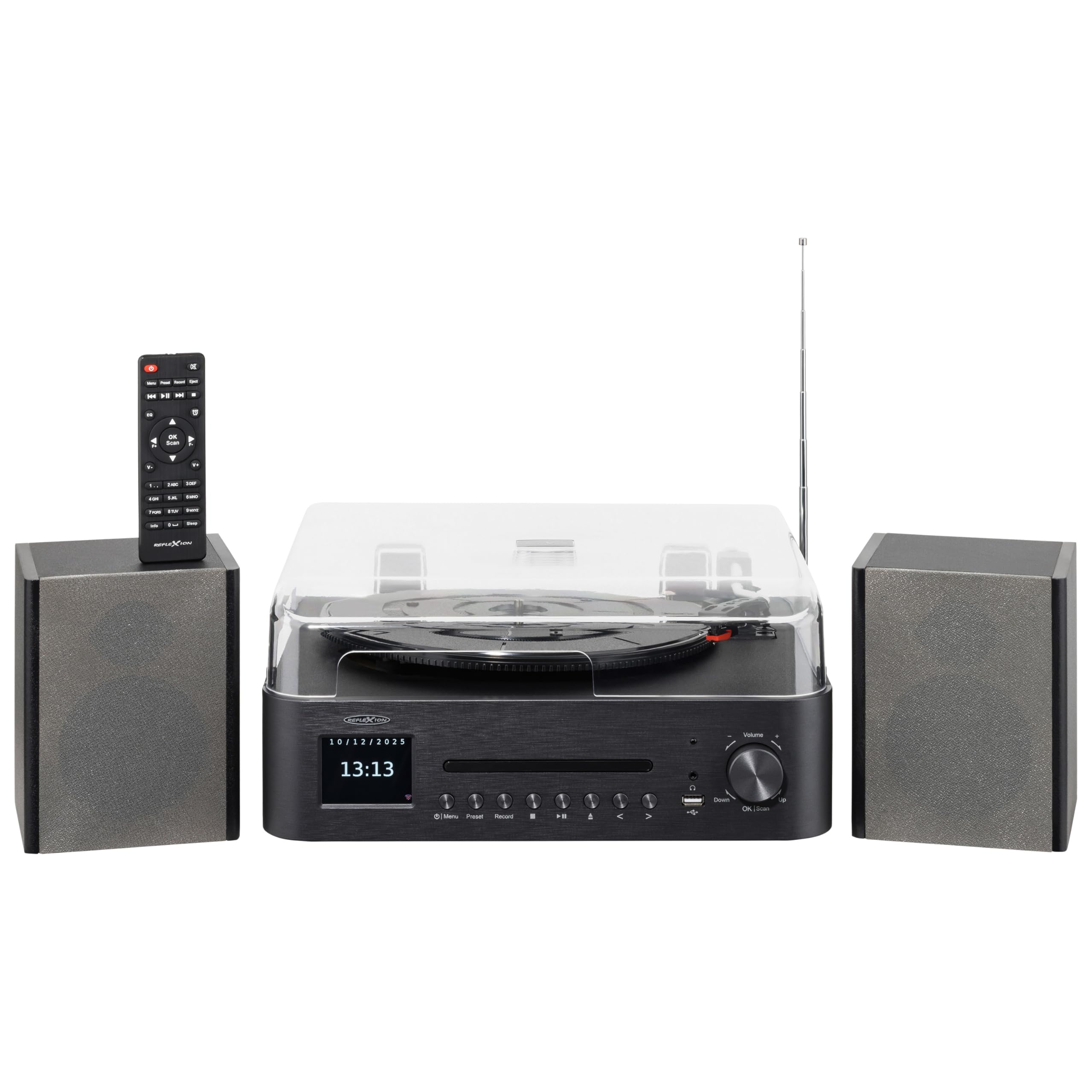
Image 1.1: The Reflexion HIF2082DAB Retro Turntable with included external speakers.
2. Istruzioni di sicurezza
- Leggere attentamente tutte le istruzioni prima di utilizzare il dispositivo.
- Conservare il manuale per riferimento futuro.
- Non esporre l'unità alla pioggia o all'umidità per evitare incendi o scosse elettriche.
- Assicurare una ventilazione adeguata; non ostruire le aperture di ventilazione.
- Posizionare l'unità su una superficie stabile e piana.
- Utilizzare solo accessori/componenti specificati dal produttore.
- Scollegare l'unità durante i temporali o quando non viene utilizzata per lunghi periodi.
- Affidare tutti gli interventi di assistenza a personale qualificato.
3. Contenuto della confezione
Si prega di verificare che tutti gli articoli elencati di seguito siano inclusi nel pacchetto:
- 1 x Reflexion HIF2082DAB Main Unit
- 2 x Stereo Speakers
- 1 x cavo di alimentazione
- 1 x Remote Control (2 AAA batteries not included)
- 1 x Manuale di istruzioni

Image 3.1: Included remote control and power cable.
4. Prodotto finitoview
4.1 Pannello frontale e controlli
The front panel features the main display, control buttons for various functions, and the CD tray. The volume knob and USB port are also located here for easy access.
4.2 Top Panel (Turntable)
The top panel houses the semi-automatic turntable, including the platter, tonearm, and stylus. A protective dust cover is also provided.

Immagine 4.1: Primo piano view of the turntable with auto-stop and tonearm return features highlighted.
4.3 Collegamenti del pannello posteriore
The rear panel includes connections for the external speakers, Line Out for connecting to an external amplifier, and Aux In for connecting external audio sources.

Image 4.2: Rear panel showing speaker terminals, Line Out, Aux In, and power input.
5. Impostazione
5.1 Disimballaggio e posizionamento
- Rimuovere con attenzione tutti i componenti dalla confezione.
- Place the main unit and speakers on a stable, level surface, ensuring adequate ventilation around the unit.
- Tenere l'unità lontana dalla luce solare diretta, da fonti di calore e dall'umidità.
5.2 Collegamento degli altoparlanti
- Connect the included stereo speakers to the speaker terminals on the rear of the main unit. Ensure correct polarity (red to red, black to black).
5.3 Collegamento di alimentazione
- Insert the power cable into the AC input on the rear of the unit.
- Plug the other end of the power cable into a suitable wall outlet (AC 100-240V).
5.4 Configurazione iniziale
- Upon first power-on, the unit may prompt you to select a language and set the time/date. Follow the on-screen instructions using the navigation buttons and OK/Scan button.
6. Istruzioni per l'uso
6.1 Funzionamento del giradischi
- Selezione della velocità: Choose the appropriate speed (33, 45, or 78 RPM) using the speed selector switch.
- Riproduzione di un disco: Place a record on the platter. Remove the stylus protector. Gently lift the tonearm using the cueing lever and position it over the desired track. Lower the tonearm slowly onto the record.
- Funzione di arresto automatico: The turntable features an auto-stop function that automatically stops the platter when a record finishes playing. The tonearm will also return to its rest position.
6.2 Lettore CD
- Press the CD mode button.
- Press the Eject button to open the CD tray. Place a CD (audio CD or MP3 CD) with the label side up.
- Press Eject again to close the tray. Playback will begin automatically.
- Use the Skip/Search buttons to navigate tracks and Play/Pause for playback control.
Radio DAB+/FM 6.3
- Press the DAB+ or FM mode button.
- Scansione automatica: For DAB+, the unit will automatically scan for available stations. For FM, press and hold the OK/Scan button to perform an auto scan.
- Sintonizzazione manuale: Use the navigation buttons to manually tune to a frequency.
- Preselezioni: Save your favorite stations by pressing and holding the Preset button, then selecting a preset number. Recall saved stations by pressing the Preset button and selecting the desired number.
6.4 Connettività Bluetooth
- Press the Bluetooth mode button. The display will show "Pairing" or similar.
- Abilita il Bluetooth sul tuo dispositivo mobile (smartphone, tablet, ecc.).
- Cercare "Reflexion HIF2082DAB" in your device's Bluetooth list and select it to pair.
- Once paired, you can stream audio from your device to the HIF2082DAB.
6.5 Riproduzione e registrazione USB
- Riproduzione USB: Insert a USB flash drive (up to 32GB, FAT format) containing MP3 files into the USB port. Press the USB mode button. The unit will automatically detect and play MP3 files.
- USB Recording (from Vinyl): While playing a vinyl record, press the Record button. The unit will begin recording the audio directly to the connected USB drive as an MP3 file. Press Record again to stop.
6.6 Sveglia e timer di spegnimento
- Allarme: The unit features two adjustable alarms. Access the alarm settings through the menu to set wake-up times and desired audio sources (e.g., radio, CD).
- Sveglia: Set the sleep timer (up to 90 minutes) to automatically turn off the unit after a specified duration. This is useful for falling asleep to music.
7. Manutenzione
7.1 Pulizia dell'unità
- Pulire l'unità con un panno morbido e asciutto. Non utilizzare detergenti abrasivi o solventi.
- Per la copertura antipolvere, utilizzare un panno morbido, leggermente damp panno, quindi asciugare accuratamente.
7.2 Cura dello stilo
- Regularly clean the stylus using a soft brush, brushing gently from back to front.
- Replace the stylus when sound quality deteriorates or after approximately 300-500 hours of use to prevent damage to your records.
8. Risoluzione Dei Problemi
| Problema | Possibile causa | Soluzione |
|---|---|---|
| Nessun potere | Cavo di alimentazione non collegato; presa di corrente difettosa | Assicurarsi che il cavo di alimentazione sia collegato saldamente; provare una presa diversa |
| Nessun suono | Volume troppo basso; Altoparlanti non collegati; Modalità di input errata | Increase volume; Check speaker connections; Select correct source mode |
| Il giradischi non gira | Speed selector incorrect; Auto-stop engaged | Check speed setting; Ensure tonearm is over the record |
| Scarsa ricezione radio | Antenna non estesa; segnale debole | Fully extend the telescopic antenna; Reposition the unit for better reception |
| L'associazione Bluetooth non riesce | Dispositivo troppo lontano; Bluetooth non abilitato sul dispositivo; Unità non in modalità di associazione | Move device closer; Enable Bluetooth; Ensure unit is in pairing mode |
9. Specifiche
- Marca: Reflexion
- Modello: HIF2082DAB
- Colore: Nero
- Dimensioni (L x P x A): 32.9 x 37.1 x 16 cm (12.95 x 14.61 x 6.3 pollici)
- Peso del prodotto: 6.5 chilogrammi (14.33 libbre)
- Tecnologia Bluetooth: SÌ
- Numero di relatori: 2 (External Stereo Speakers)
- Max Speaker Power: 2 x 160 W (Peak Power)
- Velocità del giradischi: 33, 45, 78 giri
- Display: 2.8" Color TFT Display
- Compatibilità USB: Up to 32GB, FAT format (for MP3 playback and recording)
- Radio: DAB+, FM
- Caratteristiche aggiuntive: CD Player (MP3/Audiobook compatible), USB Recording, Remote Control, Dual Alarms, Sleep Timer, Auto-Stop with Tonearm Return, Line Out, Aux In.
10. Garanzia e supporto
For warranty information and customer support, please refer to the warranty card included in your package or contact your local Reflexion dealer or service center. Keep your proof of purchase for any warranty claims.
For further assistance, you may also visit the official Reflexion websito o consultare le informazioni di contatto fornite nella documentazione originale del prodotto.