
1. Introduzione
The ORICO CB05 Dual USB Flash Drive is a versatile storage solution designed for universal compatibility across various devices. Featuring both USB-C and USB-A connectors, this flash drive allows for seamless data transfer between smartphones, tablets, laptops, and other compatible devices without requiring additional drivers or software. Its robust metal housing and swivel design ensure durability and ease of use.
Caratteristiche principali:
- Doppia connettività: Equipped with both USB-C and USB-A 3.0 connectors for broad device compatibility.
- Design girevole a 360°: Allows for easy switching between connectors and protects the unused port.
- Trasferimento dati ad alta velocità: Achieves read speeds up to 150MB/s and write speeds up to 70MB/s, significantly faster than USB 2.0.
- Alloggiamento in metallo resistente: Constructed from zinc alloy with silver electroplating for resistance against scratches, drops, and daily wear.
- Funzionalità plug-and-play: Per la maggior parte dei sistemi operativi non è richiesta l'installazione di driver o software.
- Ampia compatibilità: Supports iPhone 15, Android smartphones, iPads, MacBooks, Windows laptops, gaming consoles, and car audio systems.
2. Prodotto finitoview
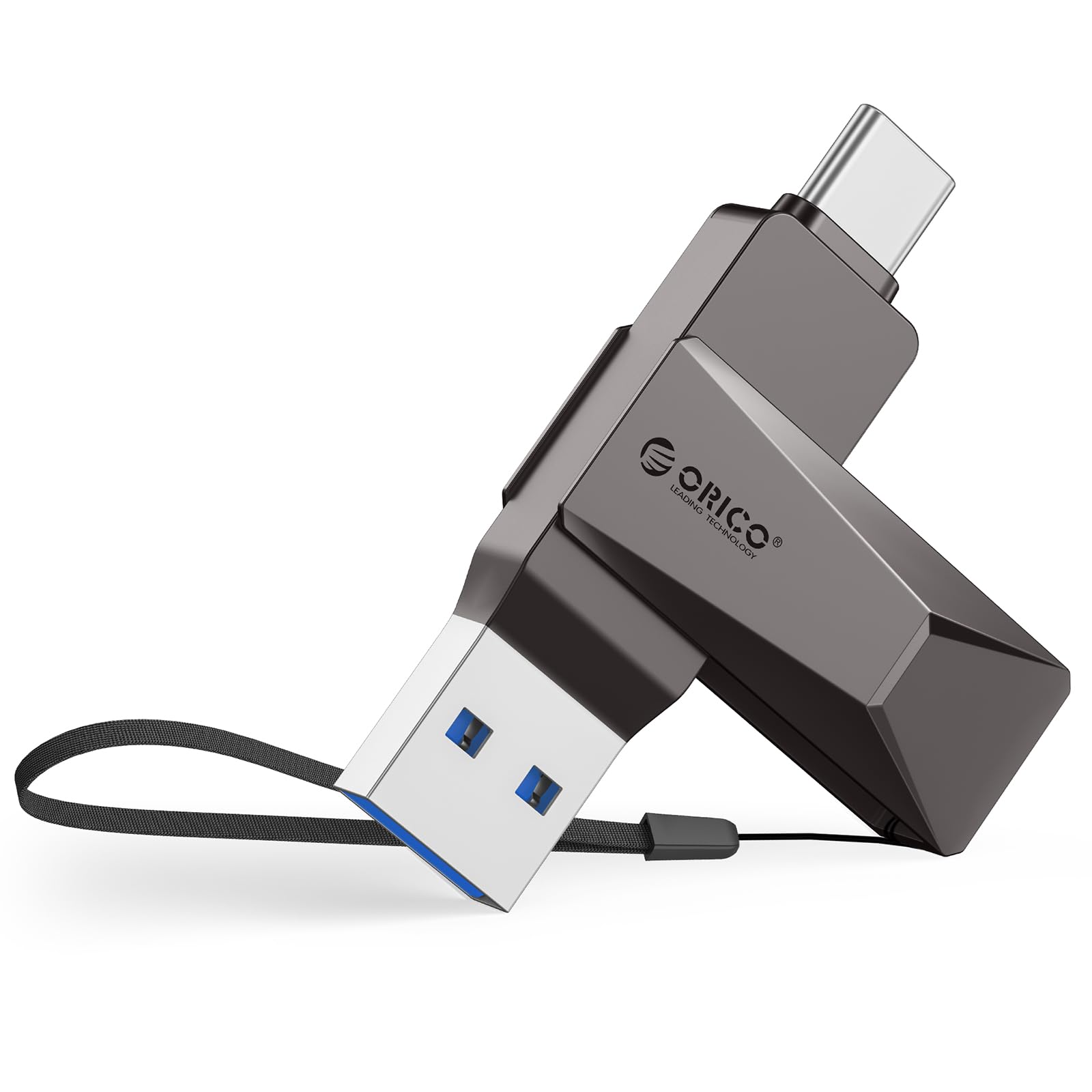
Figure 2.1: The ORICO CB05 128GB Dual USB Flash Drive in Grey, showcasing il suo design compatto.

Figure 2.2: Detail of the dual USB-A and USB-C connectors, highlighting the swivel mechanism.

Figura 2.3: Un overview of the ORICO CB05 Dual USB Flash Drive, emphasizing its dual USB-A and USB-C functionality.
3. Impostazione
Connessione ai dispositivi:
The ORICO CB05 is designed for plug-and-play operation. No special drivers or software are typically required for basic functionality on most compatible devices.
- Identificare il connettore corretto: The flash drive features both a standard USB-A connector and a reversible USB-C connector. Rotate the metal housing to expose the desired connector.
- Insert into device: Plug the appropriate connector firmly into the corresponding port on your smartphone, tablet, laptop, or other compatible device.
- Riconoscimento del dispositivo: Your device should automatically detect the flash drive. On computers, it will appear as a removable drive. On smartphones/tablets, you may need to access a file applicazione di gestione.

Figure 3.1: The ORICO CB05 supports a wide range of devices including PCs, laptops, printers, USB hubs, smartphones, tablets, MacBooks, Nintendo Switch, Smart TVs, and car audio systems.
4. Istruzioni per l'uso
File Transfer on Mobile Devices (iOS/Android):
For iOS devices (iPhone 15 series, iPads with USB-C) and Android devices, file management is typically handled through the device's native file app di gestione.
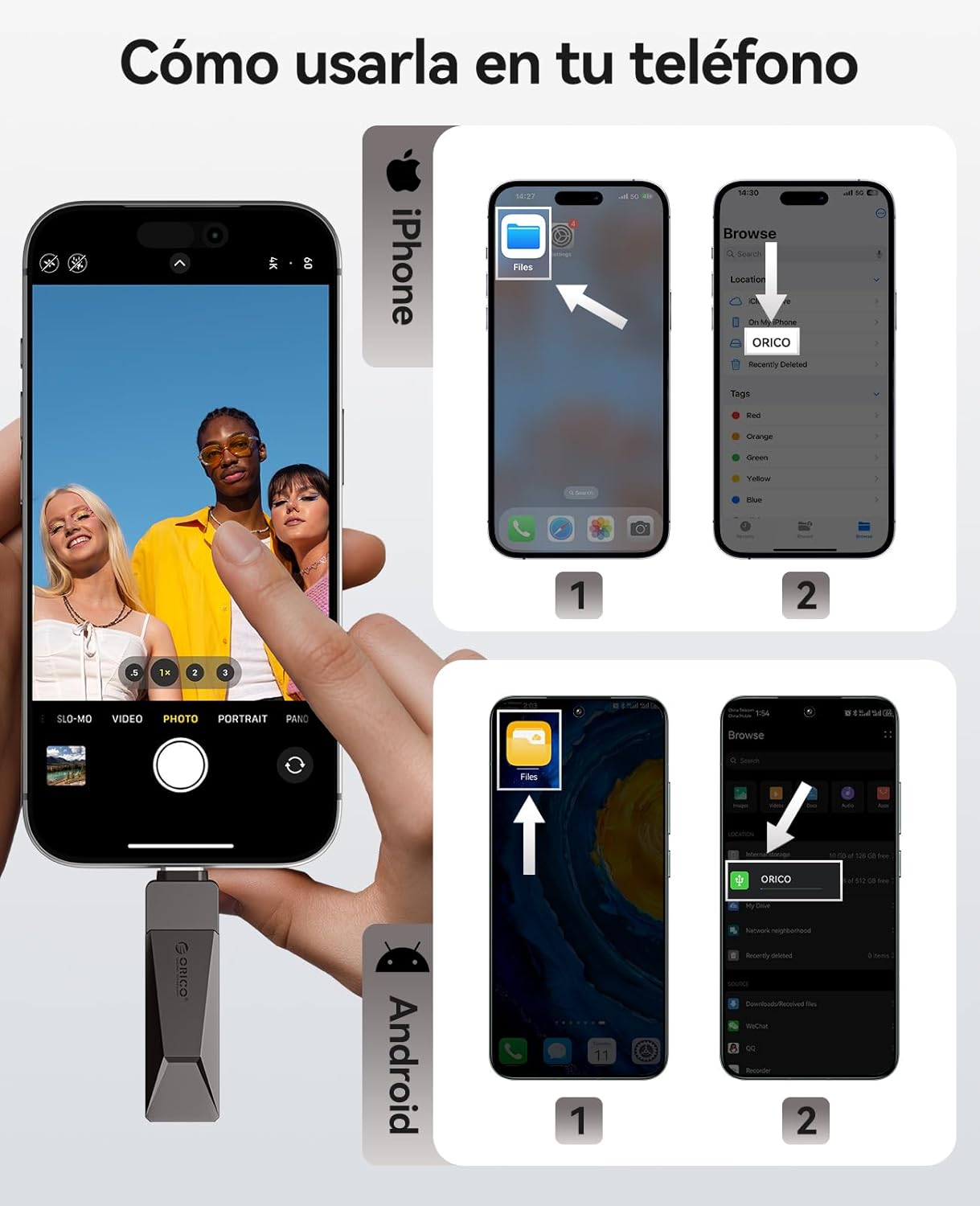
Figure 4.1: Visual guide for connecting and accessing the flash drive on both iPhone and Android devices using their respective file applicazioni di gestione.
iOS Devices (iPhone 15 Series, USB-C iPads):
- Connect the flash drive to your iPhone 15/iPad via the USB-C port.
- Apri il 'Files' app sul tuo dispositivo.
- Navigate to 'Browse' and select 'ORICO' under Locations.
- Ora puoi view, copy, or move files da e verso l'unità flash.
Dispositivi Android:
- Connect the flash drive to your Android phone via the USB-C port.
- Apri il 'Files' app (or equivalent file manager) on your device.
- The ORICO drive should appear as an external storage device.
- You can now manage filese necessario.
File Transfer on Computers (Windows/Mac):
For Windows and Mac computers, the process is straightforward:
- Connect the flash drive to your computer using either the USB-A or USB-C connector.
- The computer will recognize the drive automatically.
- Aprire 'File Explorer' (Windows) or 'Finder' (Mac) and locate the 'ORICO' drive.
- Trascina e rilascia files to transfer them to or from the flash drive.
Video 4.1: Demonstration of the ORICO CB05's multi-device compatibility and plug-and-play functionality across various platforms without needing app installations.
Video 4.2: A short video illustrating the convenience of using a single ORICO CB05 drive for both USB-A and USB-C storage needs.
5. Prestazioni
The ORICO CB05 utilizes USB 3.0 technology to deliver fast data transfer speeds, optimizing your workflow for large files, 4K videos, and high-resolution photos.

Figure 5.1: The ORICO CB05 offers speeds up to 150MB/s, making it significantly faster than older USB 2.0 drives.

Figure 5.2: Illustrates the high-speed capability, allowing for quick transfer of large files.
Tecnologia interna:
The drive incorporates TLC NAND Flash technology, which contributes to faster read/write speeds, stable performance, and an extended lifespan compared to traditional QLC flash.

Figure 5.3: The internal TLC NAND Flash ensures superior performance and reliability.
6. Manutenzione
The ORICO CB05 is designed for durability with its zinc alloy casing. To ensure longevity and optimal performance:
- Mantenere pulito: Periodically wipe the exterior with a soft, dry cloth to remove dust and debris. Avoid using harsh chemicals or abrasive materials.
- Proteggere i connettori: Utilize the 360° swivel design to protect the unused connector from dust and physical damage when not in use.
- Evitare condizioni estreme: Do not expose the drive to extreme temperatures, humidity, or strong magnetic fields.
- Rimozione sicura: Per evitare il danneggiamento dei dati, espellere sempre in modo sicuro l'unità flash dal dispositivo prima di rimuoverla fisicamente.

Figure 6.1: The zinc alloy casing provides shockproof, compression-resistant, X-ray shielding, and dustproof protection.
7. Risoluzione Dei Problemi
If you encounter issues with your ORICO CB05 flash drive, try the following troubleshooting steps:
- Unità non riconosciuta:
- Assicurarsi che l'unità sia completamente inserita nella porta USB.
- Prova una porta USB diversa sul tuo dispositivo.
- Riavvia il computer o il dispositivo mobile.
- For mobile devices, ensure you are using the correct file manager app and that your device supports OTG (On-The-Go) functionality.
- Velocità di trasferimento lente:
- Ensure you are connected to a USB 3.0/3.2 Gen 1 port for optimal performance. Connecting to a USB 2.0 port will result in slower speeds.
- Verifica che i driver del tuo dispositivo siano aggiornati.
- Un gran numero di piccoli files può trasferire più lentamente di un singolo grande file della stessa dimensione totale.
- Performance may vary depending on the host device, file attributi e altri fattori.
- Corruzione dei dati:
- Always safely eject the drive before removing it from your device.
- Avoid disconnecting the drive during a file trasferimento.
- Discrepanza di capacità:
- Labeled capacity uses the decimal system (1GB = 1,000,000,000 bytes). Operating systems like Windows/Mac may show slightly less due to using a binary system (1GB = 1024MB). This is normal and not a defect.
8. Specifiche
| Caratteristica | Dettaglio |
|---|---|
| Marca | ORICO |
| Nome del modello | CB05-128GB |
| Capacità di archiviazione della memoria | 128 GB |
| Interfaccia Hardware | USB, USB 3.2 Gen 1 |
| Tecnologia di connettività hardware | USB tipo A, USB tipo C |
| Velocità di lettura | 150 Megabyte al secondo |
| Velocità di scrittura | 70 Megabyte al secondo |
| Caratteristica speciale | Dual USB Connector, Lightweight |
| Dispositivi compatibili | iPhone 15, Android smartphones, iPads, MacBooks, Windows laptops, gaming consoles, car audio systems |
| Colore | Grigio |
| Produttore | SHENZHEN ORICO TECHNOLOGIES CO.,LTD |
9. Garanzia e supporto
Informazioni sulla garanzia:
The ORICO CB05 Dual USB Flash Drive is backed by a Garanzia del produttore di 36 mesiLa presente garanzia copre i difetti di materiali e fabbricazione in condizioni di normale utilizzo. Si prega di conservare la prova d'acquisto per eventuali reclami in garanzia.
Assistenza clienti:
For technical assistance, warranty claims, or general inquiries, please contact ORICO customer support through their official website or the retailer where the product was purchased. You can visit the Negozio ORICO su Amazon per ulteriori informazioni e risorse di supporto.