
1. Importanti istruzioni di sicurezza
Please read all safety instructions carefully before using the WANBO Cube 1 Projector. Keep this manual for future reference.
- Alimentazione elettrica: Utilizzare solo l'adattatore di alimentazione fornito. Assicurarsi che il volumetage corrisponde ai requisiti del proiettore.
- Ventilazione: Non ostruire le aperture di ventilazione. Garantire un flusso d'aria adeguato attorno al proiettore per evitare il surriscaldamento.
- Esposizione al liquido: Tenere il proiettore lontano da acqua o altri liquidi. Non utilizzarlo con le mani bagnate.
- Pulizia: Scollegare il proiettore prima di pulirlo. Utilizzare un panno morbido e asciutto. Non utilizzare detergenti liquidi o spray.
- Posizionamento: Posizionare il proiettore su una superficie stabile e piana. Evitare di esporlo alla luce diretta del sole o vicino a fonti di calore.
- Protezione degli occhi: Do not look directly into the projector lens when the device is on.
- Smontaggio: Non tentare di smontare o riparare il proiettore da soli. Contattare personale qualificato per assistenza.
2. Prodotto finitoview
The WANBO Cube 1 is a compact and versatile smart projector designed for home entertainment. Featuring Android TV 11.0, a 360-degree rotating stand, and a built-in 8W HiFi speaker, it delivers an immersive viewesperienza di utilizzo semplice.
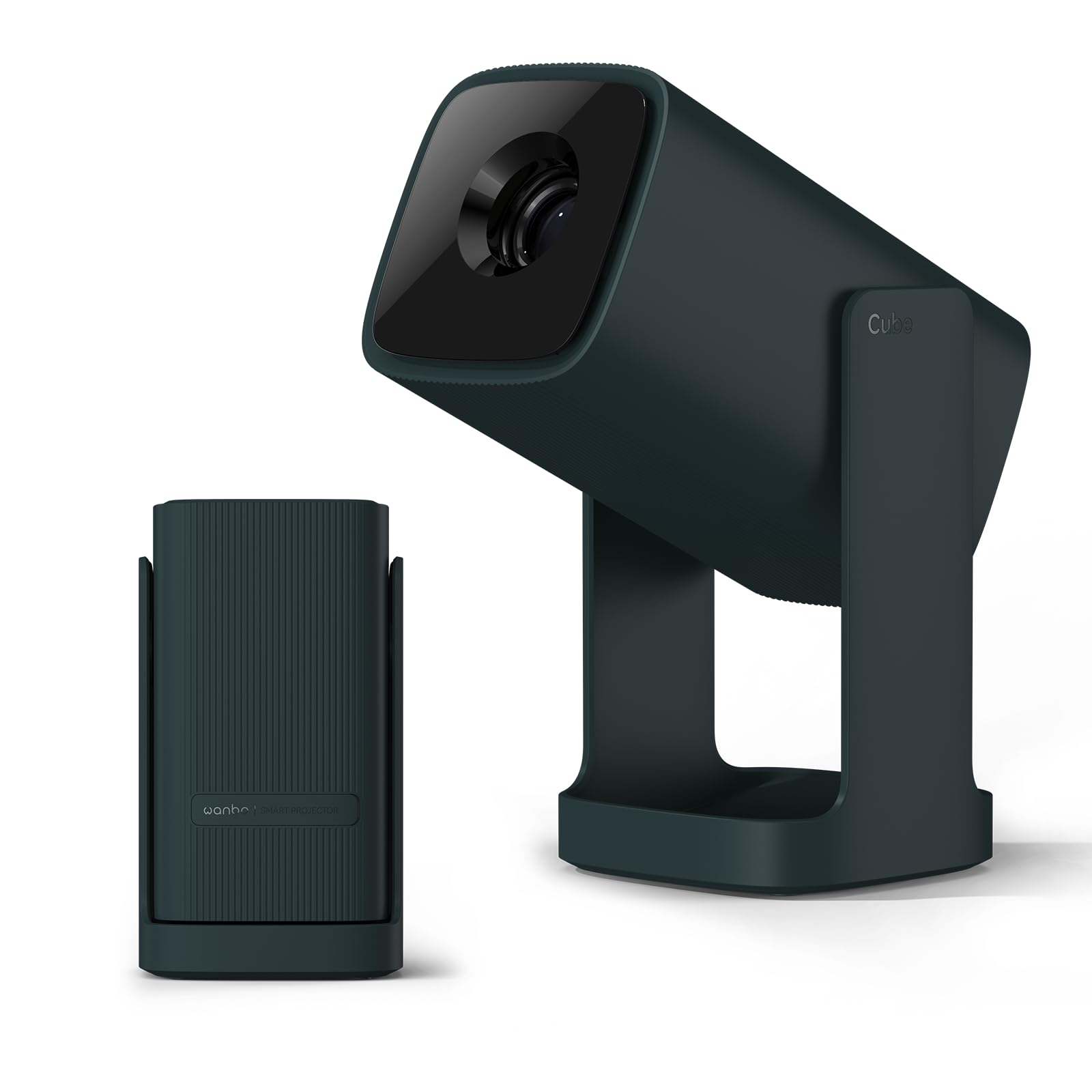
Image: The WANBO Cube 1 Projector in its dark green finish.

Immagine: un primo piano view of the WANBO Cube 1, highlighting its compact and sleek design.
Video: Un oltreview of the WANBO Cube 1 Projector's features, including its design, automatic adjustments, and smart capabilities.
Caratteristiche principali:
- Android TV 11.0: Access popular streaming apps directly from Google Play Store, including Netflix, Prime Video, YouTube, Disney+, and more.
- Supporto girevole a 360°: Project onto walls, ceilings, or any surface with flexible angle adjustments. The integrated stand also protects the lens when folded.
- Compatto e portatile: Weighing approximately 0.9kg, its small size makes it easy to carry for various uses.
- Proiezione di alta qualità: 200 ISO lumens brightness and a 1.2:1 throw ratio allow for a 100-inch screen from approximately 2.7 meters.
- Audio coinvolgente: Built-in 8W HiFi speaker delivers rich sound without the need for external speakers.
- Regolazione intelligente dell'immagine: Features electric focus, automatic vertical keystone correction, and 4-point manual correction for a perfectly rectangular image.
- Connettività versatile: Supports HDMI (ARC), USB, 3.5mm audio jack, 5GHz/2.4GHz dual-band Wi-Fi, and Bluetooth 5.0 for seamless connection to various devices.
- Funzionamento silenzioso: Operates at a low noise level of 28dB, ensuring an undisturbed viewesperienza di acquisizione.
3. Contenuto della confezione
Verifica che tutti gli articoli siano inclusi nel tuo pacco:
- WANBO Cube 1 Projector
- Telecomando
- Cavo di alimentazione
- Manuale dell'utente (questo documento)
4. Per iniziare: configurazione
4.1 Accensione iniziale
- Collegare il cavo di alimentazione al proiettore e poi a una presa di corrente.
- Premere il pulsante di accensione sul proiettore o sul telecomando per accenderlo.
4.2 Accoppiamento telecomando
If the remote control is not responsive, it may need to be paired:
- Assicurarsi che il proiettore sia acceso.
- Puntare il telecomando verso il proiettore.
- Press and hold the indicated pairing button (refer to remote control diagram in the physical manual if available) until the pairing indicator appears on screen.
4.3 Connessione di rete
- From the Android TV home screen, navigate to Impostazioni.
- Selezionare Rete e Internet.
- Scegli la tua rete Wi-Fi e inserisci la password.
4.4 Regolazione dell'immagine
The WANBO Cube 1 offers several ways to achieve a perfect image:
- Messa a fuoco elettrica: Use the remote control to fine-tune the image sharpness.
- Correzione trapezoidale verticale automatica: The projector automatically adjusts the image to be rectangular when placed at an angle vertically.
- Correzione trapezoidale manuale a 4 punti: For precise adjustments, especially when projecting from a side angle, use the manual 4-point correction feature in the settings.
- Funzione zoom: Regola le dimensioni dello schermo dal 50% al 100% per adattarle alla superficie di proiezione senza spostare il proiettore.

Image: Illustration of the one-touch adjustment capabilities, including electric focus and keystone correction.

Image: Visual representation of the short-throw lens, showing different screen sizes at various distances.
5. Funzionamento
Interfaccia Android TV 11.0 5.1
The projector runs on official Android TV 11.0, providing a user-friendly interface for navigating content and apps.

Image: The Android TV 11.0 home screen displaying various streaming applications.
5.2 App Installation and Streaming
Access a wide range of entertainment by installing apps directly from the Google Play Store:
- Navigate to the Google Play Store icon on the home screen.
- Cercare your desired apps (e.g., Netflix, Prime Video, YouTube, Disney+, Hulu, U-NEXT, AbemaTV, TVer).
- Install and open the apps to start streaming.

Image: The Netflix interface projected by the WANBO Cube 1, demonstrating high-quality streaming.
5.3 Google Cast and Voice Assistant
- Google Cast: Easily mirror content from your smartphone or PC to the projector. Ensure both devices are connected to the same Wi-Fi network.
- Assistente vocale: Use the built-in voice assistant by pressing the dedicated button on your remote and speaking commands for search, playback, and more.

Image: A user interacting with the Google Assistant feature on the WANBO Cube 1 Projector.
5.4 Uscita audio
The projector features an integrated 8W HiFi speaker for clear and powerful audio. No additional speakers are required for a complete audio-visual experience.

Image: The WANBO Cube 1 Projector highlighting its powerful 8W HiFi speaker for immersive sound.
5.5 Timer di spegnimento
Utilize the sleep timer function to automatically power off the projector after a set period, ideal for watching content before sleep.

Image: The projector operating quietly, with a visual of the sleep timer function on the screen.
6. Connettività
The WANBO Cube 1 offers multiple wired and wireless connection options:
- HDMI (ARC compatible): Connect gaming consoles, TV sticks, laptops, and other HDMI-enabled devices.
- USB: Collegare unità USB per la riproduzione di contenuti multimediali o altre periferiche.
- Jack audio da 3.5 mm: Collegare cuffie o altoparlanti esterni.
- Dual-band Wi-Fi (5GHz/2.4GHz): For fast and stable internet connection and wireless mirroring.
- Bluetooth 5.0: Pair with wireless speakers, headphones, or other Bluetooth devices.

Image: A close-up of the projector's rear panel, showing the HDMI, USB, and audio ports.
7. Manutenzione
7.1 Pulizia del proiettore
- Prima di procedere alla pulizia, assicurarsi che il proiettore sia spento e scollegato.
- Per pulire la parte esterna, utilizzare un panno morbido, asciutto e privo di lanugine.
- For the lens, use a specialized lens cleaning cloth or brush. Do not use abrasive materials or harsh chemicals.
7.2 Protezione delle lenti
The integrated 360° rotating stand doubles as a lens cover. When the stand is folded, it protects the lens from dust and scratches, eliminating the need for a separate lens cap.

Image: The WANBO Cube 1's minimalist design, showing how the integrated stand protects the lens when closed.
8. Risoluzione Dei Problemi
If you encounter issues with your WANBO Cube 1 Projector, refer to the following table for common problems and solutions:
| Problema | Possibile causa | Soluzione |
|---|---|---|
| Nessuna alimentazione/Non si accende | Power cord not connected properly; Power outlet issue; Projector fault. | Check power cord connection. Try a different outlet. Contact support if issue persists. |
| Immagine sfocata | Focus not adjusted; Keystone not corrected; Projector too far/close to screen. | Use electric focus to sharpen. Apply automatic or manual keystone correction. Adjust projection distance. |
| Nessun suono o qualità del suono scadente | Volume too low; Muted; External audio device not connected correctly; Source audio issue. | Increase volume. Unmute. Check external audio connections. Verify audio output from source device. |
| Il telecomando non funziona | Batteries low/dead; Not paired; Obstruction. | Sostituire le batterie. Riassociare il telecomando (vedere Sezione 4.2). Assicurarsi che non vi siano ostacoli tra il telecomando e il proiettore. |
| Impossibile connettersi al Wi-Fi | Password errata; problema con il router; fuori portata. | Double-check Wi-Fi password. Restart router. Move projector closer to router. |
9. Specifiche
| Caratteristica | Dettaglio |
|---|---|
| Marca | WANBO |
| Numero di modello | Cubo 1 |
| Uso consigliato | Cinema in casa |
| Sistema operativo | TV Android 11.0 |
| Luminosità | 200 lumen ISO |
| Risoluzione nativa | 1280 x 720 pixel |
| Rapporto di lancio | 1.2:1 (lancio corto) |
| Oratore | 8W HiFi Built-in Speaker |
| Connettività | HDMI (ARC), USB, 3.5mm Audio, Infrared |
| Connettività wireless | 5GHz/2.4GHz Dual-band Wi-Fi, Bluetooth 5.0, Chromecast |
| Peso | Circa 0.9 kg |
| Livello di rumore | 28 dB |
| Caratteristiche speciali | Internet compatible, Built-in speaker, Short throw, Automatic Keystone Correction, Electric Focus, 360° Rotating Stand |
| Paese di origine | Cina |
10. Garanzia e supporto
For warranty information and technical support, please refer to the warranty card included with your product or visit the official WANBO websito. Conserva la ricevuta d'acquisto come prova d'acquisto.
If you require further assistance, please contact WANBO customer service.