
1. Introduzione
This manual provides detailed instructions for the ECHTPower EP05 Wireless PC Gaming Controller. This multi-platform controller features a TFT screen for on-the-fly adjustments, Hall-Effect joysticks for precision, dual Hall triggers, a 1000Hz polling rate, and customizable RGB lighting. It is compatible with Windows PC, Nintendo Switch, Android, and iOS devices.
Video: ECHTPower PC Controller with Intelligent Screen. This official video provides an overview delle caratteristiche e del design del controller.
2. Caratteristiche principali
- Smart TFT Screen Control: Adjust vibration, RGB lighting, turbo settings, trigger travel, and button mapping directly on the integrated screen without external software.
- Hall-Effect Joysticks: Designed to prevent joystick drift, providing stable and smooth control for various game genres.
- Trigger Hall doppi: Offers adjustable trigger travel (2mm for rapid fire, 6mm for precise control) for an optimized gaming experience.
- Frequenza di polling 1000Hz: Ensures ultra-fast input and responsiveness in 2.4GHz wireless or wired modes.
- Supporto multipiattaforma: Connects via Bluetooth, 2.4G wireless, or USB-C wired to Windows PC, Switch, Android, and iOS devices. (Note: Not compatible with Xbox or PlayStation.)
- Conductive Gel Buttons: Provides sharp feedback and durability, rated for 3 million presses.
3. Contenuto della confezione
Dopo aver disimballato, assicurarsi che siano presenti tutti gli articoli:
- ECHTPower EP05 Wireless PC Gaming Controller
- Cavo di ricarica USB-C
- Ricevitore wireless 2.4G (dongle USB)
- Manuale d'uso
4. Configurazione e connettività
4.1 Ricarica del controller
Prima del primo utilizzo, caricare completamente il controller utilizzando il cavo USB-C in dotazione. Collegare l'estremità USB-C al controller e l'estremità USB-A a una fonte di alimentazione (ad esempio, PC, adattatore da parete USB).
4.2 Accensione/Spegnimento
Per accendere il controller, tenere premuto il tasto SPENTO/ACCESO button located on the front of the controller until the RGB lights illuminate and the TFT screen activates. To power off, press and hold the same button until the lights turn off.
4.3 Connessione ai dispositivi
The controller supports three connection modes: Bluetooth, 2.4G Wireless, and Wired USB-C.
- Bluetooth Connection (for Switch, Android, iOS):
- Assicurarsi che il controller sia spento.
- Switch the rear mode selector to the appropriate platform (e.g., "SW" for Switch, "PHONE" for Android/iOS).
- Press and hold the pairing button (often indicated by a Bluetooth icon or a dedicated pairing button) until the RGB lights flash rapidly.
- On your device, go to Bluetooth settings and select "ECHTPower EP05" to pair.
- 2.4G Wireless Connection (for PC):
- Assicurarsi che il controller sia spento.
- Switch the rear mode selector to "PC" or "Receiver".
- Inserire il ricevitore wireless 2.4G in una porta USB disponibile sul PC.
- Power on the controller. It should automatically connect to the receiver. The TFT screen will indicate connection status.
- Wired USB-C Connection (for PC):
- Connect the USB-C cable to the controller and the USB-A end to your PC.
- Il controller passerà automaticamente alla modalità cablata e verrà riconosciuto dal PC.
Important: Always switch the rear mode selector to the correct platform before attempting to pair or connect.

Image: The ECHTPower EP05 controller shown with its 2.4G wireless dongle and USB-C cable, highlighting the various connection methods available.
5. Funzionamento del controller
5.1 Using the TFT Screen
The integrated TFT screen allows for direct customization of controller settings. Navigate the menu using the D-pad and action buttons (A, B, X, Y).

Immagine: Un dettaglio view of the controller's TFT screen, showing options for adjusting settings such as light brightness, vibration, and volume.
5.2 Regolazione dell'illuminazione RGB
Access the RGB lighting settings via the TFT screen. You can adjust brightness, choose from various lighting effects (e.g., marquee, flow, gradient), and select specific colors.

Image: The ECHTPower EP05 controller showcasing its adjustable RGB lights, with the TFT screen displaying lighting options.
5.3 Customizing Vibration
The controller offers four levels of adjustable vibration intensity. Use the TFT screen to select your preferred feedback level (0%, 30%, 60%, 100%).

Image: The controller displaying its four-level adjustable vibration settings on the TFT screen, ranging from 0% to 100%.
5.4 Dual Hall Triggers
The dual Hall triggers can be switched between two modes:
- Short-travel (2mm): Ideal for rapid-fire actions in shooter games.
- Long-travel (6mm): Provides precise control for racing games or other applications requiring nuanced input.

Image: An illustration of the ECHTPower EP05's dual Hall triggers, demonstrating the 2mm short-travel for quick shooting and 6mm long-travel for precise control in racing games.
5.5 Pulsanti posteriori programmabili
The controller features mappable back buttons (M1, M2) for enhanced customization. These can be programmed via the TFT screen to replicate other button inputs or execute macros.
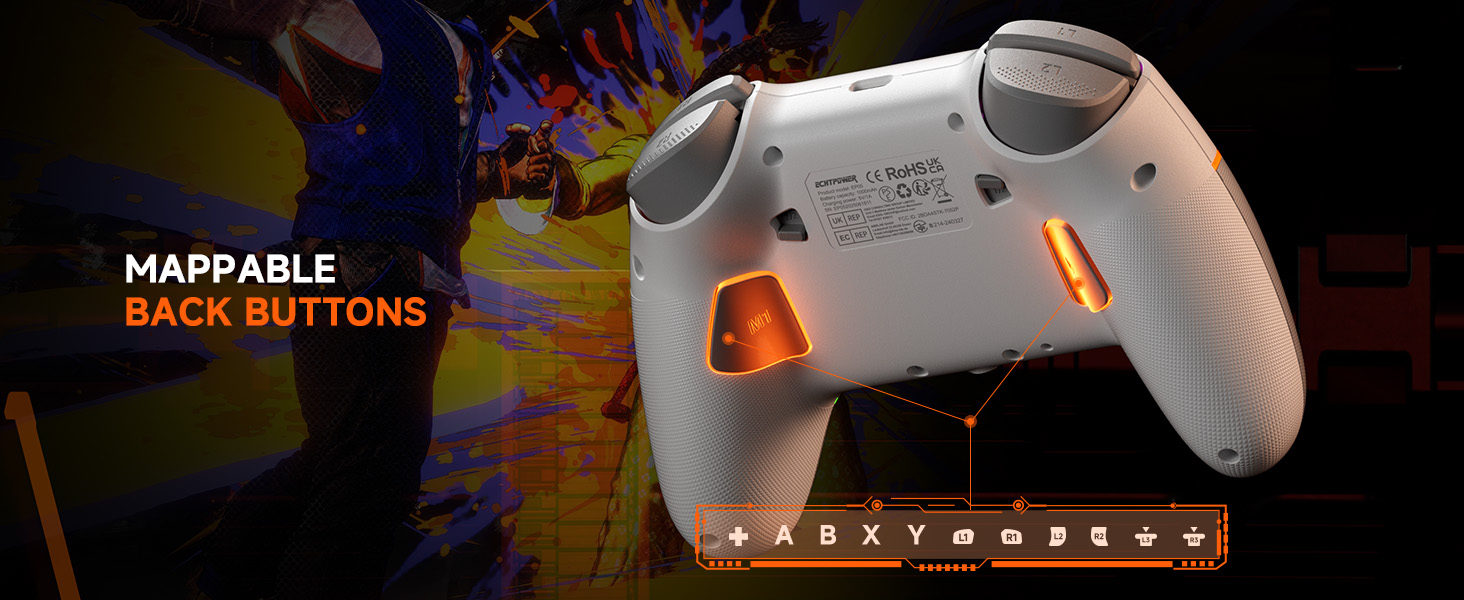
Image: The underside of the ECHTPower EP05 controller, highlighting the mappable back buttons (M1, M2) for custom assignments.
6. Manutenzione
- Pulizia: Utilizzare un panno morbido e asciutto per pulire il controller. Evitare detergenti abrasivi o solventi.
- Magazzinaggio: Conservare il controller in un luogo fresco e asciutto, lontano dalla luce solare diretta e da temperature estreme.
- Cura della batteria: Per una durata ottimale della batteria, evitare di scaricare completamente il controller frequentemente. Caricarlo regolarmente.
7. Risoluzione Dei Problemi
- Il controller non si connette:
- Assicurati che il controller sia carico.
- Verify the rear mode selector is set to the correct platform (PC, SW, PHONE).
- For 2.4G, ensure the receiver is properly inserted and the controller is in 2.4G mode.
- Per quanto riguarda il Bluetooth, assicurati che il Bluetooth del tuo dispositivo sia attivo e che il controller sia in modalità di associazione.
- Prova a riavviare sia il controller che il dispositivo.
- Deriva del joystick:
- The Hall-Effect joysticks are designed to prevent drift. If you experience issues, ensure the controller's firmware is up to date (check the manufacturer's webposto).
- Perform a calibration if available through the controller's TFT screen settings.
- Le luci RGB non funzionano:
- Check the RGB settings on the TFT screen to ensure they are enabled and configured correctly.
- Regola i livelli di luminosità.
- Breve durata della batteria:
- Assicurarsi che il controller sia completamente carico prima dell'uso.
- Reduce RGB lighting brightness or turn off lighting effects to conserve battery.
- Disable vibration if not needed.
8. Specifiche
| Caratteristica | Dettaglio |
|---|---|
| Modello | EP05 |
| Connettività | Bluetooth, wireless 2.4G, USB-C cablato |
| Tasso di sondaggio | 1000 Hz (2.4 G/cablato) |
| Joystick | Effetto Hall (senza deriva) |
| Trigger | Dual Hall-Effect (Adjustable 2mm/6mm) |
| Tipo di schermo | Schermo a colori |
| Capacità della batteria | 1000mAh |
| Piattaforme compatibili | PC Windows, Nintendo Switch, Android, iOS |
| Colore | Bianco |
9. Garanzia e supporto
9.1 Informazioni sulla garanzia
This ECHTPower EP05 controller comes with a Garanzia limitata di 2 anni. Please retain your proof of purchase for warranty claims. The warranty covers manufacturing defects and malfunctions under normal use. It does not cover damage caused by misuse, accidents, unauthorized modifications, or normal wear and tear.
9.2 Assistenza clienti
For technical support, warranty claims, or general inquiries, please contact ECHTPower customer service:
- E-mail: service@echtpower.com
- Websito: www.echtpower.com
Please provide your product model (EP05) and a detailed description of your issue when contacting support.