
1. Introduzione
Grazie per l'acquistoasing the DEPSTECH DS620-TL Triple Lens Endoscope Camera. This device is designed for visual inspection in hard-to-reach areas, featuring a 1080P triple-lens camera, a 5-inch IPS monitor, and an IP67 waterproof semi-rigid cable. This manual provides essential information for safe and effective use of your endoscope camera.
2. Prodotto finitoview
2.1 Caratteristiche principali
- 1080P Triple Lens Camera: Equipped with three cameras (front, side B, side C) for multi-angle inspection.
- Monitor IPS da 5 pollici: Provides clear, real-time images with excellent color reproduction.
- Sonda impermeabile IP67: The 7.9mm diameter semi-rigid cable is waterproof, suitable for wet environments.
- Luci a LED regolabili: Features 8+1+1 high-brightness LED chips with adjustable intensity for optimal illumination.
- 5M Semi-Rigid Cable: Offers flexibility and durability for navigating various spaces.
- Batteria ricaricabile: Built-in battery provides approximately 2-3 hours of continuous operation.
2.2 Contenuto della confezione
Assicurarsi che tutti gli articoli siano presenti nel pacco:
- DEPSTECH DS620-TL Endoscope Camera
- Cavo di ricarica di tipo C.
- Hook and Magnet Attachments
- Storage Drawstring Bag
- Manuale d'uso

Figura 2.2: Accessori inclusi e unità principale.
3. Informazioni sulla sicurezza
- Non utilizzare il dispositivo in ambienti con gas infiammabili o esplosivi.
- Tenere il dispositivo lontano da forti campi elettromagnetici.
- Evitare l'esposizione diretta dell'obiettivo della fotocamera a fonti di luce intensa.
- Non tentare di smontare o modificare il dispositivo. Le riparazioni devono essere eseguite solo da personale autorizzato.
- Assicurarsi che il dispositivo sia completamente carico prima dell'uso per evitare interruzioni durante l'ispezione.
- Clean the probe and lens after each use, especially after contact with liquids or corrosive substances.
4. Impostazione
4.1 Ricarica del dispositivo
Connect the provided Type-C charging cable to the device's charging port and a suitable USB power adapter (not included). The charging indicator will show the charging status. A full charge typically takes 2-3 hours.
4.2 Inserimento di una scheda Micro SD
To save photos and videos, a Micro SD card (Class 10/Class 10 or higher, 8-32GB) is required (not included). Locate the Micro SD card slot on the side of the monitor unit and insert the card until it clicks into place.
4.3 Collegamento degli accessori
The endoscope comes with hook and magnet attachments. These can be screwed onto the tip of the camera probe for retrieving small objects or maneuvering in tight spaces.

Figure 4.3: Magnet and hook attachments for the probe.
5. Istruzioni per l'uso
5.1 Accensione/Spegnimento
Press and hold the power button (usually located on the side or front panel) for a few seconds to turn the device on. The screen will display the DEPSTECH logo. To power off, press and hold the power button again.

Figure 5.1: Monitor button layout and functions.
5.2 Switching Lenses
The DS620-TL features a triple-lens system. Press the lens switch button (often labeled with a camera icon or 'M') to cycle between Front Camera A, Side Camera B, and Side Camera C. This allows for comprehensive viewing without repositioning the probe.

Figure 5.2: Triple lens camera detail.
5.3 Regolazione della luminosità del LED
Use the up/down arrow buttons on the monitor to adjust the brightness of the LED lights on the camera probe. There are multiple levels of brightness to suit different inspection environments.
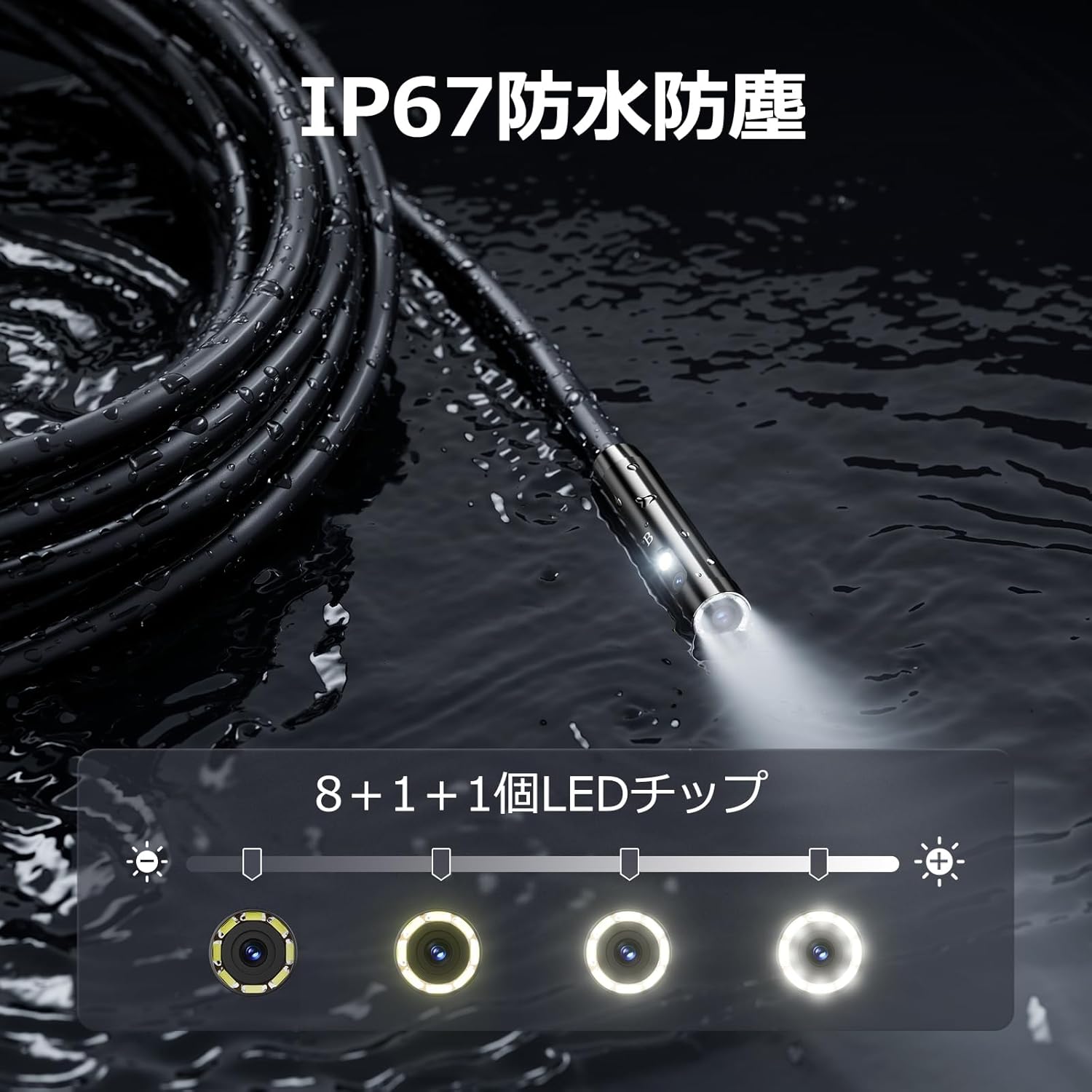
Figure 5.3: IP67 waterproof probe with adjustable LED illumination.
5.4 Scattare foto e registrare video
Press the photo/video button (usually a camera icon) to capture a still image. To record video, press and hold the photo/video button; press again to stop recording. Ensure a Micro SD card is inserted to save your media.

Figure 5.4: Monitor interface for photo and video capture.
5.5 Rotazione dello schermo
Press the screen rotation button (often a circular arrow icon) to rotate the image on the monitor by 180 degrees. This is useful when the probe is in an inverted position.
5.6 Applicazioni pratiche
The DS620-TL is suitable for various tasks including home appliance maintenance, pipe inspection, wall wiring checks, and automotive repairs.

Figure 5.6: Various inspection scenarios for the endoscope.
5.7 Video dimostrativo del prodotto
Video 5.7: A demonstration of the DEPSTECH DS620-TL endoscope camera in use, showcasinle sue caratteristiche e applicazioni.
6. Manutenzione
6.1 Pulizia della sonda e della lente
After each use, especially in dirty or wet conditions, gently wipe the camera probe and lens with a soft, dry cloth. For stubborn dirt, a slightly damp È possibile utilizzare un panno e asciugare. Non utilizzare detergenti abrasivi o solventi.
6.2 Conservazione
Store the endoscope camera in a cool, dry place, away from direct sunlight and extreme temperatures. Use the provided drawstring bag for protection. Ensure the cable is coiled neatly without sharp bends.
6.3 Cura della batteria
To prolong battery life, avoid fully discharging the device frequently. If storing for an extended period, charge the battery to approximately 50% every three months.
7. Risoluzione Dei Problemi
7.1 Nessuna immagine sullo schermo
- Assicurarsi che il dispositivo sia acceso e completamente carico.
- Check if the camera cable is securely connected to the monitor unit.
- Regolare la luminosità dei LED per garantire un'illuminazione adeguata nell'area di ispezione.
7.2 Impossibile registrare foto/video
- Verify that a compatible Micro SD card (Class 10/Class 10 or higher, 8-32GB) is inserted correctly.
- Verificare che la scheda Micro SD abbia spazio libero sufficiente.
- Ensure the Micro SD card is not locked (read-only).
- Prova a formattare la scheda Micro SD (questa operazione cancellerà tutti i dati).
7.3 Dispositivo non in carica
- Ensure the Type-C charging cable is properly connected to both the device and the power source.
- Prova a utilizzare un adattatore di alimentazione USB o un cavo di ricarica diverso.
- Controllare la porta di ricarica per eventuali detriti o danni.
If you encounter issues not listed here or if the problem persists, please contact DEPSTECH customer support.
8. Specifiche
| Caratteristica | Specificazione |
|---|---|
| Marca | DEPSTECH |
| Nome del modello | DS620TL-JP |
| Colore | Nero |
| Livello di impermeabilità | Grado di protezione IP67 |
| Tipo di supporto | SD Memory Card (8-32GB, Class 10/Class 10 or higher recommended) |
| File Formato | MP4, MOV, AVI, JPEG, RAW |
| Formato di acquisizione video | MP4 |
| ViewTipo di cercatore | Informazione pubblica |
| Tipo di sensore | CMOS |
| Risoluzione del sensore fotografico | 2.1 MP |
| Funzione di messa a fuoco | Messa a fuoco fissa |
| Messa a fuoco automatica | NO |
| Durata media della batteria | 2 ore |
| Componenti inclusi | Type-C Cable, Attachments, Storage Drawstring Bag |
| Garanzia del produttore | 2 anni |
| Paese di origine | Cina |
9. Garanzia e supporto
9.1 Garanzia del produttore
The DEPSTECH DS620-TL comes with a 24-month manufacturer warranty. Your order number serves as proof of purchase for warranty claims.
9.2 Assistenza clienti
For any inquiries, technical assistance, or warranty claims, please contact our dedicated support team:
- E-mail: support@depstech.com
- Tempo di risposta: We aim to respond to all inquiries within 24 hours. For requests submitted on weekends or holidays, a response will be provided on the next business day.

Figure 9.2: DEPSTECH support details.