
1. Introduzione
Thank you for choosing the GEEKOM GT1 Mega Mini PC. This manual provides essential information for setting up, operating, maintaining, and troubleshooting your device. Please read it carefully before use and keep it for future reference.
The GEEKOM GT1 Mega is a high-performance mini PC equipped with the Intel Core Ultra 9 185H processor, Intel AI Boost (dedicated NPU), and integrated Intel Arc graphics. It is designed for demanding tasks such as AI applications, advanced multitasking, 4K video editing, photo retouching, virtualization, and professional software.
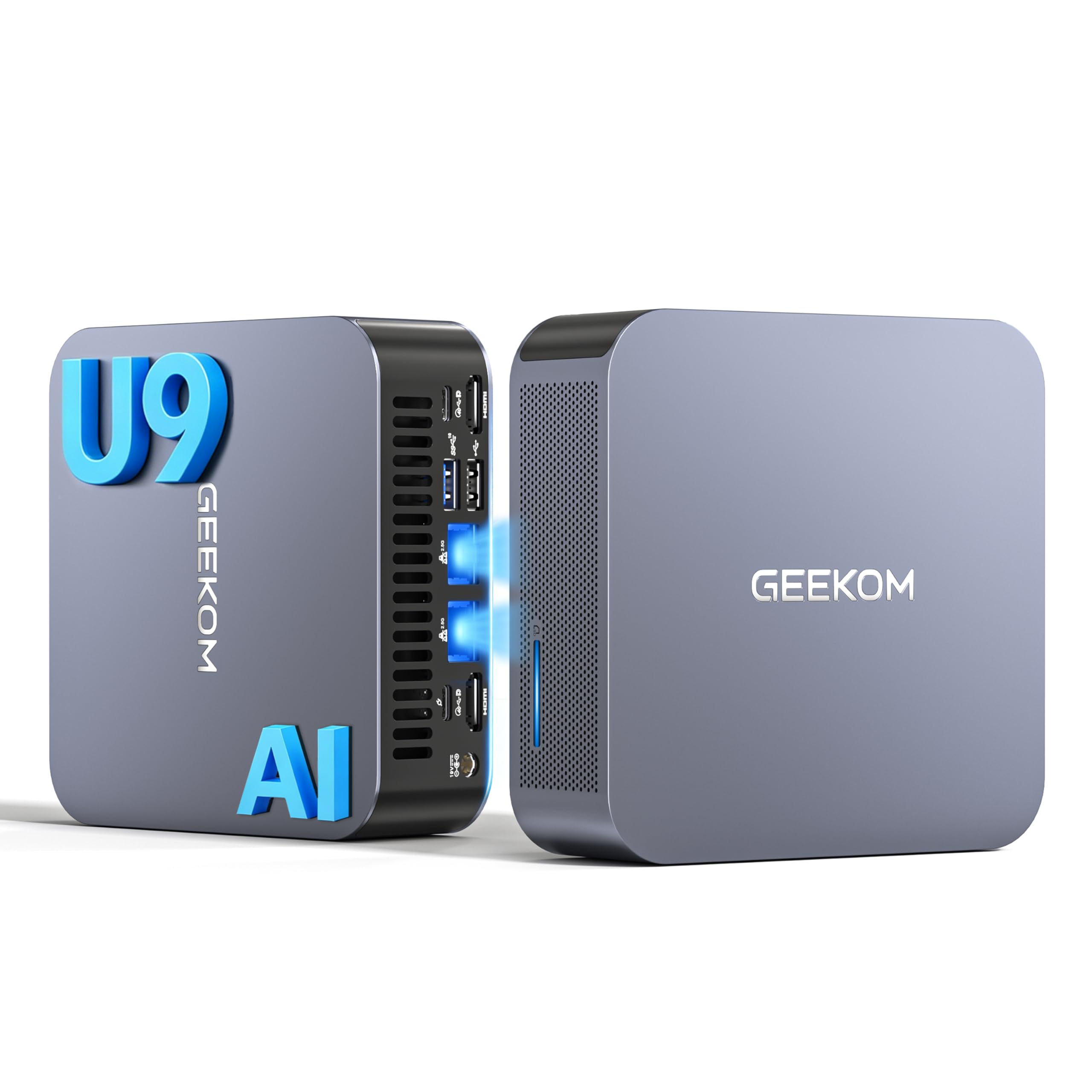
Immagine 1.1: anteriore view of the GEEKOM GT1 Mega Mini PC.
2. Informazioni sulla sicurezza
Per evitare danni al dispositivo o lesioni personali, attenersi alle seguenti linee guida di sicurezza:
- Utilizzare solo l'alimentatore fornito con il dispositivo.
- Non esporre il dispositivo ad acqua, umidità o temperature estreme.
- Evitare di posizionare il dispositivo alla luce diretta del sole o vicino a fonti di calore.
- Assicurare una ventilazione adeguata; non ostruire le aperture di ventilazione.
- Non tentare di aprire o riparare il dispositivo da soli. Contattare personale qualificato per l'assistenza.
- Tenere il dispositivo lontano da forti campi magnetici.
3. Contenuto della confezione
Verifica che tutti gli articoli siano presenti nel tuo pacco:
- 1 x GEEKOM GT1 Mega Mini PC
- 1 x supporto VESA con viti
- 1 x adattatore di alimentazione
- 1 cavo HDMI
- 1 x Manuale utente
- 1 x biglietto di ringraziamento

Image 3.1: Contents included in the GEEKOM GT1 Mega Mini PC package.
4. Prodotto finitoview
4.1. Porte anteriori e posteriori
The GEEKOM GT1 Mega Mini PC offers a comprehensive set of ports for versatile connectivity:

Image 4.1: Diagram illustrating the front and rear ports of the GEEKOM GT1 Mega Mini PC.
- Porte anteriori:
- 4 x USB 3.2 Gen2 Type-A (one with Always On power)
- Jack 1 x 3.5mm per cuffie
- 1 x Pulsante di accensione
- Porte posteriori:
- 2 x USB4 (40 Gbps, eGPU compatible, one with power delivery)
- 2xHDMI 2.0
- 2 x RJ45 2.5Gbps Ethernet Ports
- 1 x USB 3.2 Gen2 Tipo-A
- 1 x USB 2.0 tipo A
- 1 x ingresso CC
- 1 x lettore di schede SD
- 1 slot per blocco Kensington
4.2. Caratteristiche principali
- Processore: Intel Core Ultra 9 185H (16 Cores, 22 Threads, up to 5.1 GHz) with Intel AI Boost (NPU).
- Grafica: Integrated Intel Arc Graphics.
- Memoria: 16GB DDR5 5600MHz dual-channel RAM (upgradable up to 128GB).
- Magazzinaggio: 1TB NVMe PCIe Gen4 SSD (expandable up to 4TB).
- Rete: Dual 2.5G Ethernet, WiFi 7, Bluetooth 5.4.
- Supporto display: Up to four 4K displays or one 8K display via USB4 and HDMI.
- Raffreddamento: IceBlast 2.0 advanced cooling system with dual copper heat pipes and high-efficiency fan.
- Chassis: Premium metallic chassis, 0.78 L volume, withstands pressure up to 200 kg.
5. Impostazione
5.1. Connessione iniziale
- Connetti Display: Connect your monitor(s) to the Mini PC using the HDMI or USB4 ports. The GT1 Mega supports up to four 4K displays or one 8K display.
- Connetti le periferiche: Collega la tastiera, il mouse e qualsiasi altro dispositivo USB alle porte USB disponibili.
- Connetti rete: For wired internet, connect an Ethernet cable to one of the 2.5G RJ45 ports. For wireless, ensure your WiFi network is available during initial setup.
- Connetti alimentazione: Collegare l'adattatore di alimentazione alla porta di ingresso CC del Mini PC, quindi collegare l'adattatore a una presa di corrente.
5.2. Primo avvio
- Premere il pulsante di accensione sulla parte anteriore del Mini PC.
- The device will boot into Windows 11 Pro. Follow the on-screen instructions to complete the initial Windows setup, including language, region, network connection, and user account creation.
- Once Windows is set up, it is recommended to check for and install any available system updates.

Immagine 5.1: Es.ample of a multi-monitor setup with the GEEKOM GT1 Mega Mini PC.
6. Istruzioni per l'uso
6.1. Accensione/spegnimento
- Accensione: Premere una volta il pulsante di accensione.
- Fermare: Fare clic sul pulsante Start in Windows, quindi selezionare Arresta il sistema > Arresta il sistema.
- Ricomincia: Fare clic sul pulsante Start in Windows, quindi selezionare Arresta > Riavvia.
- Sonno: Fare clic sul pulsante Start in Windows, quindi selezionare Alimentazione > Sospensione.
6.2. Connettività di rete
- Cablato (Ethernet): Connect an Ethernet cable to one of the two 2.5G RJ45 ports. The system will automatically detect the connection.
- Senza fili (Wi-Fi 7): In Windows, fai clic sull'icona di rete nella barra delle applicazioni, seleziona la tua rete Wi-Fi, inserisci la password e connettiti.
- Bluetooth 5.4: To pair Bluetooth devices, go to Windows Settings > Bluetooth & devices, turn on Bluetooth, and select 'Add device'.
6.3. Configurazione dello schermo
The Mini PC supports multiple displays. To configure them:
- Fare clic con il tasto destro del mouse sul desktop e selezionare "Impostazioni schermo".
- Windows will detect connected displays. You can arrange them, change resolution, and set display modes (Extend, Duplicate, Second screen only).
7. Manutenzione
7.1. Pulizia
- Pulire regolarmente l'esterno del Mini PC con un panno morbido e asciutto.
- Utilizzare aria compressa per rimuovere delicatamente la polvere dalle aperture di ventilazione e mantenere prestazioni di raffreddamento ottimali.
- Non utilizzare detergenti liquidi o materiali abrasivi.
7.2. Aggiornamenti di sistema
Keep your Windows operating system and drivers updated to ensure optimal performance and security:
- Go to Windows Settings > Windows Update to check for and install system updates.
- Visita il sito ufficiale GEEKOM website for the latest driver updates for your GT1 Mega.
7.3. Aggiornamenti hardware
The GEEKOM GT1 Mega allows for memory and storage upgrades:
- Memoria RAM: The device supports up to 128GB of DDR5 SODIMM memory.
- SSD: The 1TB NVMe PCIe Gen4 SSD can be expanded up to 4TB. An additional M.2 2242 SATA SSD slot is available for up to 2TB.
For detailed instructions on how to perform hardware upgrades, please refer to the comprehensive guide on the GEEKOM support website or consult a professional technician.

Image 7.1: Illustration of the GEEKOM GT1 Mega's upgradable DDR5 memory and SSD storage.

Immagine 7.2: Esploso view of the GEEKOM GT1 Mega, highlighting the IceBlast 2.0 cooling system components.
8. Risoluzione Dei Problemi
If you encounter issues with your GEEKOM GT1 Mega, refer to the following common solutions:
| Problema | Possibile causa | Soluzione |
|---|---|---|
| Nessun potere | Power adapter not connected, faulty outlet | Assicurati che l'adattatore di alimentazione sia collegato saldamente sia al PC sia a una presa di corrente funzionante. Prova una presa diversa. |
| Nessuna visualizzazione | Monitor not connected, incorrect input source, faulty cable | Check HDMI/USB4 cable connections. Ensure monitor is on and set to the correct input source. Try a different cable or monitor. |
| No internet (Wi-Fi) | Wi-Fi disattivato, password errata, problema con il router | Check Wi-Fi settings in Windows. Verify Wi-Fi password. Restart your router. |
| No internet (Ethernet) | Ethernet cable disconnected, network driver issue | Ensure Ethernet cable is securely connected. Check network adapter status in Device Manager. Update network drivers. |
| System slow/unresponsive | Too many applications running, overheating, outdated drivers | Close unnecessary applications. Ensure proper ventilation. Update drivers and Windows. |
If the problem persists, please contact GEEKOM customer support for further assistance.
9. Specifiche
Detailed technical specifications for the GEEKOM GT1 Mega Mini PC:
| Caratteristica | Specificazione |
|---|---|
| Marca | GEEKOM |
| Nome del modello | GT1Mega |
| Sistema operativo | Windows 11 Pro |
| Modello CPU | Intel Core Ultra 9-185H |
| Velocità della CPU | 5.1 GHz (frequenza turbo massima) |
| Grafica | Grafica Intel Arc integrata |
| Memoria RAM | 16 GB DDR5 (5600MHz, expandable to 128 GB) |
| Magazzinaggio | 1 TB NVMe PCIe Gen4 SSD (expandable to 4 TB) |
| Tecnologia del disco rigido | Unità SSD |
| Connettività | 2x 2.5G Ethernet, Wi-Fi 7, Bluetooth 5.4 |
| Porte USB | 2x USB4 (40Gbps), 5x USB 3.2 Gen2 Type-A, 1x USB 2.0 Type-A |
| Uscita video | 2x HDMI 2.0, 2x USB4 (DisplayPort 1.4) |
| Risoluzione massima dello schermo | 8K (via USB4), 4K (via HDMI) |
| Uscita audio | 3.5mm Jack audio |
| Lettore di schede | Lettore di schede SD |
| Alimentazione elettrica | Type C/EF – 2 pins (European/Hybrid FR-DE plug) |
| Certificazioni | Certificazione CE, FCC, RoHS |

Image 9.1: GEEKOM GT1 Mega Mini PC certifications including CB, ROHS, FCC ID, EPR, CEC, UKCA, UL4200A.
10. Garanzia e supporto
The GEEKOM GT1 Mega Mini PC comes with a 3-year manufacturer's warranty and professional technical support.
10.1. Informazioni sulla garanzia
Your device is covered by a 3-year warranty from the date of purchase, ensuring peace of mind against manufacturing defects. Please retain your proof of purchase for warranty claims.
10.2. Supporto tecnico
For any technical issues or support inquiries, please use one of the following methods:
- Contatta il venditore su Amazon: Log in to your Amazon account, navigate to 'Your Orders', and click 'Get Help' for assistance.
- Supporto via e-mail: Send an email to the GEEKOM support team at pan.he@geekom.tw. Our team will respond as soon as possible.