
1. Introduzione
This manual provides detailed instructions for the installation, operation, and maintenance of your Surakey Android 13 Car Player. This head unit features a 7-inch retractable capacitive screen, Android 13 operating system, Bluetooth 5.1, WiFi, wired and wireless CarPlay/Android Auto, RDS radio, and GPS navigation. Please read this manual thoroughly before use to ensure proper functionality and safety.

Figura 1.1: Surakey Android 13 Car Player and its accessories, including wiring harness, GPS antenna, mounting keys, and user manual.
2. Configurazione e installazione
2.1. Note generali di installazione
- The compact 178x53mm install size fits most dashboards.
- Ensure the vehicle operates on 12-14.4V.
- Wiring protection is integrated to prevent electrical issues.
- The rugged 188x58mm case and 160mm depth ensure a secure, vibration-resistant fit.
- Before installation, verify compatibility with your vehicle model. Provide the correct wiring diagram to confirm if it matches your vehicle.
- Depending on the vehicle's power cords and protocols, ensure you purchase compatible power cords and protocols.
2.2. Schema elettrico del prodotto
Refer to the following diagram for connecting the main unit to your vehicle's electrical system and peripherals. Ensure all connections are secure and correctly matched to prevent damage.

Figura 2.1: Detailed wiring diagram showing connections for power, speakers, steering wheel control, and other inputs/outputs. This diagram illustrates the rear panel connections including USB ports and camera input.
2.3. Installazione della telecamera per la retromarcia
For safe parking, connect a reversing camera. The system supports OEM CVBS 720P backup cameras. If your OEM camera is incompatible, use the included backup camera. The reversing input must be plugged in even if the camera is not used.

Figura 2.2: Wiring diagram for the reversing camera. Connect the camera's positive wire to the car's reversing light positive, and the negative wire to the car's reversing light negative. The reversing trigger is controlled by the stereo and does not require a separate connection. The white plug must be connected to the main device for Bluetooth and WiFi signals.
Passaggi per il cablaggio della telecamera per la retromarcia:
- Collegare il filo positivo della telecamera al polo positivo della luce di retromarcia dell'auto.
- Collegare il filo negativo della telecamera al polo negativo della luce di retromarcia dell'auto.
- Il grilletto di retromarcia è controllato dallo stereo e non richiede un collegamento separato.
- Ensure the white plug is connected to the main device for proper Bluetooth and WiFi signal reception.
Backup Camera Format and Resolution Setup:
To configure the backup camera settings, follow these steps:
- Tap the settings icon on the main screen to open the settings menu.
- Selezionare Impostazioni di fabbrica, then enter the password 8888.
- Vai a Impostazioni dei parametri del protocollo.
- Selezionare Reverse video resolution settings.
- Choose the correct setting based on your camera type. For OEM cameras, select Formato NTSC/PAL. For the included camera, keep the default AHD/25.


Figura 2.3: Screenshots illustrating the steps to access and adjust backup camera resolution settings within the system menu.
3. Istruzioni per l'uso
3.1. Sistema Android 13 finitoview
The head unit runs on Android 13 with 2GB RAM and 64GB ROM, providing a smooth user experience for various applications, navigation, and media playback. The 7-inch retractable capacitive screen offers a 1024x600 resolution with colorful LED backlighting and an anti-glare display for clear viewing.

Figura 3.1: The main interface of the Android 13 system, showing various application icons and system information.
3.1 video: A short demonstration of the Android 13 system interface, showing navigation and interaction with the display.
3.2. Connettività Bluetooth
The unit features Bluetooth 5.1 for stable connections, enabling hands-free calls and music streaming. Pair your smartphone to access your address book, make calls, and play audio wirelessly.

Figura 3.2: Screenshot of the Bluetooth interface, showing options for music, address book, caller ID, and voice calls.
3.3. WiFi and Internet Access
Connect to WiFi (2.4/5GHz) for fast internet access. This allows you to download apps, stream online content, and use online navigation services. You can also connect to mobile hotspots.

Figura 3.3: Display showing the WiFi internet functionality, allowing connection to mobile hotspots and downloading various online applications.

Figura 3.4: Illustration of WiFi connectivity, highlighting the ability to use online maps and play music via Bluetooth from a phone.
3.4. CarPlay e Android Auto
The unit supports both wired and wireless CarPlay and Android Auto, providing seamless smartphone integration. Access navigation, music, messages, and voice assistants directly from your car's display.
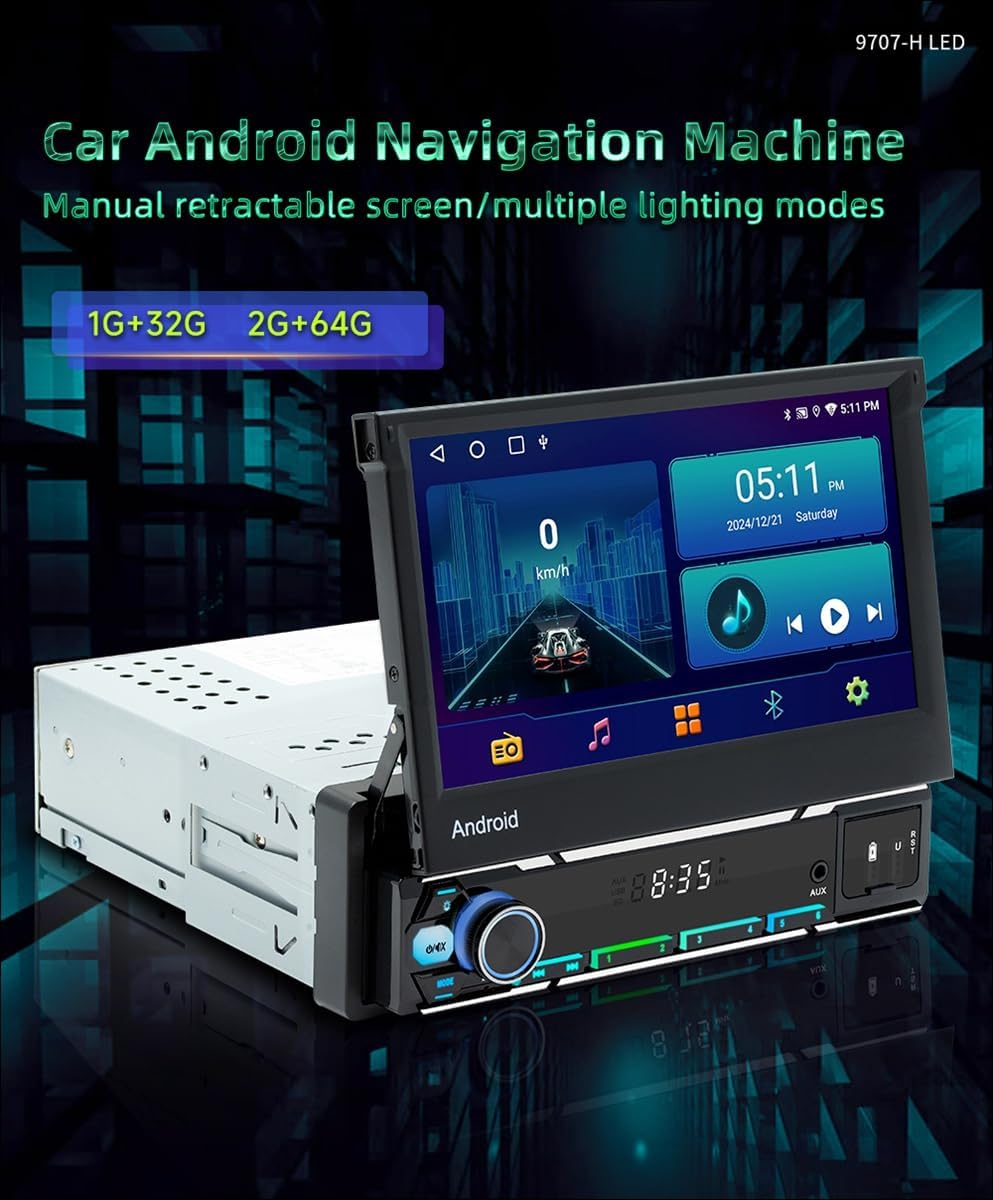
Figura 3.5: The interface showing CarPlay and Android Auto icons, indicating support for both wired and wireless connections.

Figura 3.6: Visual representation of wireless CarPlay and Android Auto functionality, including voice command interaction for navigation and music.
3.5. MirrorLink Functionality
MirrorLink allows for wired and wireless screen projection from both Android and Apple phones, displaying your phone's content directly on the head unit's screen.

Figura 3.7: Display illustrating MirrorLink capabilities for both Android and Apple devices, showing screen mirroring via wired and wireless connections.

Figura 3.8: An image demonstrating the Mirror Link function, where a smartphone screen is mirrored onto the car stereo display, showing a racing car video.
3.6. Navigazione GPS
The unit supports GPS navigation (Beidou/GPS+GLONASS). You can download third-party map software from the Play Store for online and offline navigation.

Figura 3.9: The GPS navigation screen showing a map with route information and various navigation app icons.

Figura 3.10: Illustration of GPS navigation, emphasizing the ability to purchase and use offline maps from the Play Store, such as Google Maps.
3.7. Radio RDS
The built-in RDS radio keeps you updated with traffic information and allows access to various FM/AM channels. External USB DAB box compatibility expands your radio options.

Figura 3.11: Screenshot of the FM radio interface, showing frequency tuning and RDS information display.
3.8. Controllo del volante (SWC)
Personalize your driving experience with steering wheel key learning. This feature allows you to map functions to your steering wheel buttons for convenient control of music, radio channels, and volume.

Figura 3.12: Image showing the Steering Wheel Control (SWC) learning interface, where users can assign functions to their car's steering wheel buttons.
3.9. Visualizzazione a schermo diviso
The split-screen feature allows you to experience multiple functions simultaneously, such as navigation and music playback, enhancing efficiency and convenience.

Figura 3.13: An image demonstrating the split-screen display, showing a navigation map on one side and a music player on the other.
3.10. Funzione DSP
The Digital Signal Processor (DSP) function provides high-quality audio and personalized sound settings. This allows for optimized soundstage and enhanced in-car audio performance with various equalizer presets.

Figura 3.14: Screenshot of the DSP function interface, displaying an equalizer with various audio presets like Metal, Subwoofer, Vocal, Rock, and Jazz.
4. Manutenzione
- Mantenere pulito lo schermo utilizzando un panno morbido e asciutto. Evitare detergenti abrasivi.
- Garantire un'adeguata ventilazione intorno all'unità per evitare il surriscaldamento.
- Controllare regolarmente i collegamenti dei cavi per individuare eventuali segni di usura o allentamento.
- Update the Android system and applications periodically for optimal performance and security.
5. Risoluzione Dei Problemi
5.1. Problemi comuni e soluzioni
- Nessun potere: Check all power connections, including the ACC and B+ wires. Ensure the vehicle's battery is charged.
- Nessun suono: Verify speaker connections. Check volume settings and ensure the mute function is not active. Confirm audio output settings.
- La telecamera di backup non viene visualizzata:
- Ensure the camera is correctly wired to the reversing light and the video input.
- Verify the camera's compatibility (supports OEM CVBS 720P).
- Check the "Reverse video resolution settings" in Factory Settings (password 8888) and adjust if necessary (NTSC/PAL for OEM, AHD/25 for included camera).
- Ensure the white plug is connected to the main device for proper signal.
- Perdita del segnale GPS: Assicurarsi che l'antenna GPS sia collegata correttamente e posizionata in un'area con una vista libera view del cielo.
- Problemi di connessione Bluetooth/WiFi: Ensure the white plug is connected to the main device. Check device pairing and network settings.
- Comandi al volante non funzionanti: Perform the "Steering Wheel Key Learning" procedure in the settings menu. Ensure the KEY1/KEY2 wires are correctly connected.
6. Specifiche
| Caratteristica | Dettaglio |
|---|---|
| Modello | B0G2Y5TTPK |
| Sistema operativo | Androide 13 |
| Memoria RAM | 2 GB |
| ROM | 64 GB |
| Dimensioni dello schermo | 7-inch retractable capacitive screen |
| Risoluzione | 1024x600 |
| Versione Bluetooth | 5.1 |
| Wifi | 2.4/5GHz |
| Car Play/Android Auto | Cablato e wireless |
| GPS | Beidou/GPS+GLONASS |
| Potenza in uscita | 60W x 4 |
| Volume di eserciziotage | 12-14.4 V |
| Temperatura di esercizio | -10°C a 60°C |
| Dimensioni di installazione | 178x53mm (compact), 188x58mm (rugged case) |
| Peso dell'articolo | 1.6 once |
| ASIN | B0G2Y5TTPK |
7. Garanzia e supporto
For technical assistance, warranty claims, or any questions regarding your Surakey Android 13 Car Player, please contact our customer support team.
- Email dell'assistenza clienti: Fuyatongus@outlook.com
- Politica di ritorno: Politica di rimborso/sostituzione di 30 giorni.

Figura 7.1: Image showing customer support contact details, including the email address for inquiries.