
1. Introduzione
The Symcode MJ-5500DW is a high-resolution omnidirectional 2D barcode scanner designed for efficient and accurate data capture. This desktop scanner features a 90-degree rotating window, making it suitable for various applications including retail, supermarkets, and airport ticket gates. It supports both 1D and 2D barcodes, including QR codes, and offers multiple connectivity options for seamless integration into existing systems.
2. Caratteristiche principali
- High-Resolution Scan Engine: Captures 1D and 2D barcodes with exceptional clarity and accuracy, including moving codes.
- Scansione omnidirezionale: Features a 90-degree rotating scan window for flexible scanning angles and positions, accommodating various item sizes.
- Schermo LCD a colori TFT: Displays barcode content, type, number, length, remaining battery power, signal strength, and transmission status in real-time.
- Applicazione versatile: Ideal for retail stores, supermarkets, and airport ticket gates, capable of reading QR codes and traditional barcodes.
- Progettazione del desktop: Sturdy desktop mount provides hands-free operation and maintains an optimal scanning position for increased efficiency.
- Molteplici opzioni di connettività: Supports Bluetooth, 2.4GHz Wireless, and Wired USB connections for broad compatibility.
- Funzionalità NFC: (Optional) Supports Near Field Communication for reading NFC-enabled cards.
- Tempo di attesa prolungato: Built-in 3000mAh battery provides up to 30 days standby or 12-13 hours of continuous scanning after a 5-hour charge.

Figure 2.1: High-resolution scan engine capturing barcodes.

Figure 2.2: Omnidirectional scanning with 90-degree rotating window.
3. Impostazione
3.1 Disimballaggio
Estrarre con cautela lo scanner e tutti gli accessori dalla confezione. Verificare che tutti i componenti siano presenti:
- Symcode MJ-5500DW Barcode Scanner
- Cavo USB
- Manuale dell'utente (questo documento)
3.2 Carica iniziale
Before first use, ensure the scanner is fully charged. Connect the scanner to a power source using the provided USB cable. The battery indicator on the LCD screen will show charging status. A full charge typically takes approximately 5 hours.
3.3 Connessione a un dispositivo host
The scanner supports three connection modes: Wired USB, 2.4GHz Wireless, and Bluetooth. Select the appropriate mode based on your host device and application.
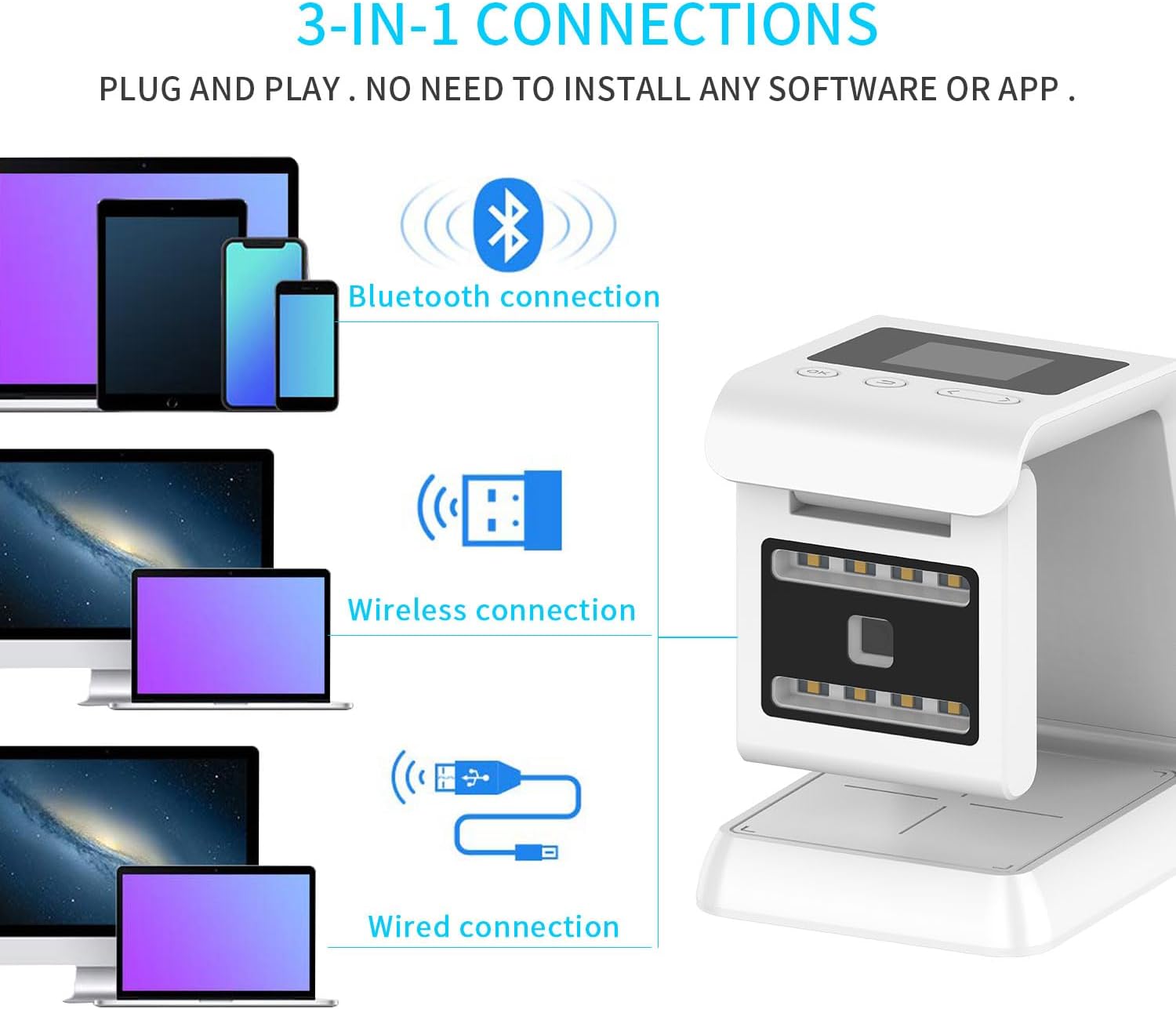
Figure 3.1: 3-in-1 connection options.
- Connessione cablata: Connect the scanner directly to your computer or POS system using the USB cable. The scanner will be recognized as a keyboard device.
- Connessione wireless a 2.4 GHz: Plug the 2.4GHz USB dongle into your host device. The scanner will automatically pair with the dongle.
- Connessione Bluetooth: Enable Bluetooth on your host device. Put the scanner into Bluetooth pairing mode (refer to the scanner's on-screen menu or quick start guide for specific instructions). Select "Symcode MJ-5500DW" from your device's Bluetooth list to pair.
No software installation is typically required for basic operation; it functions as a plug-and-play device.
4. Istruzioni per l'uso
4.1 Scansione di base
Place the barcode within the scanning window. The omnidirectional design allows for scanning from various angles without precise alignment. The scanner will emit a beep and the scanned data will appear on the connected host device and the scanner's LCD screen upon successful reading.

Figure 4.1: Scanner in use for retail and airport applications.
4.2 Adjusting the Scan Window
The scan window can be rotated up to 90 degrees to optimize scanning for different item sizes and shapes. Gently rotate the upper part of the scanner to adjust the window angle as needed.
4.3 Scansione di codici a barre 1D e 2D
The MJ-5500DW is capable of reading a wide range of 1D and 2D barcodes, including UPC/EAN, Code 39, Code 128, QR Code, Data Matrix, and PDF417. Ensure the barcode is clear and well-lit for optimal performance.
5. Connettività
The Symcode MJ-5500DW offers flexible connectivity options to suit various operational environments.
- Bluetooth 4.0: Provides a wireless connection range of up to 15 meters (49 feet) in typical indoor environments.
- Wireless a 2.4 GHz: Utilizes a dedicated USB dongle for a wireless connection range of up to 30 meters (98 feet) indoors.
- USB cablato: Direct connection via USB cable for reliable data transmission and charging.
- Barrier-Free Environment Range: In open, barrier-free environments, Bluetooth range can extend up to 50 meters (164 feet), and 2.4GHz Wireless up to 150 meters (492 feet).

Figure 5.1: Wireless transmission ranges.
6. Display LCD
The integrated TFT color LCD screen provides real-time feedback and status information. Key indicators include:

Figure 6.1: LCD screen and control layout.
- Connessioni: Indicates the current connection status (e.g., Bluetooth, 2.4GHz, Wired).
- Tempo: Visualizza l'ora corrente.
- Potenza della batteria: Mostra il livello di carica rimanente della batteria.
- Scan Number: The number of barcodes scanned.
- Barcode Content: Displays the data of the last scanned barcode.
- Modalità di archiviazione: Indicates if data is being stored internally.
- Numero di archiviazione: The number of barcodes currently stored.
- Navigation Buttons (OK, Return, Up, Down): Used to navigate through the scanner's menu and settings.
The screen also features 8 LED distributed lighting in the window, designed to be non-irritating to human eyes.
7. NFC Function (Optional)
Some models of the MJ-5500DW scanner may include an optional Near Field Communication (NFC) function. This allows the scanner to read data from NFC-enabled cards by simply swiping the card over the designated NFC area on the scanner.
This feature is useful for applications involving metro cards, VIP cards, loyalty cards, gift cards, cash cards, and other cards equipped with an NFC chip.

Figure 7.1: Using the NFC function to read a card.
8. Manutenzione
8.1 Pulizia dello scanner
To ensure optimal scanning performance, keep the scanning window clean. Use a soft, lint-free cloth lightly dampened with water or a mild, non-abrasive cleaning solution. Do not spray cleaning solution directly onto the scanner. Avoid using harsh chemicals or abrasive materials.
8.2 Cura della batteria
The scanner is equipped with a built-in 3000mAh nonstandard battery. For best battery life, avoid fully discharging the battery frequently. Charge the scanner when the battery indicator shows low power. If the scanner will not be used for an extended period, charge it to approximately 50% before storage and recharge every few months.

Figure 8.1: Battery capacity and standby/operating times.
8.3 Conservazione
Conservare lo scanner in un luogo fresco e asciutto, lontano dalla luce solare diretta, da temperature estreme e da materiali corrosivi.
9. Risoluzione Dei Problemi
If you encounter issues with your Symcode MJ-5500DW scanner, refer to the following common problems and solutions:
- Lo scanner non si accende:
- Assicurarsi che la batteria sia carica. Collegare lo scanner a una fonte di alimentazione tramite il cavo USB.
- Verify the power button (if applicable) is pressed.
- Lo scanner non legge i codici a barre:
- Controllare se il codice a barre è danneggiato o stampato male.
- Ensure the scanning window is clean and free of obstructions.
- Verify the scanner is properly connected to the host device (wired, 2.4GHz, or Bluetooth).
- Regolare la distanza e l'angolazione tra lo scanner e il codice a barre.
- Confirm the barcode type is supported by the scanner.
- Nessun dato trasmesso al dispositivo host:
- For wired connection, ensure the USB cable is securely connected to both the scanner and the host device.
- For 2.4GHz wireless, ensure the USB dongle is plugged in and the scanner is paired.
- For Bluetooth, ensure the scanner is paired and connected to the host device's Bluetooth.
- Check the host device's input settings (e.g., ensure a text editor or input field is active).
- Problemi di connessione Bluetooth:
- Ensure Bluetooth is enabled on both the scanner and the host device.
- Unpair and re-pair the scanner with the host device.
- Move the scanner closer to the host device to reduce interference.
Se il problema persiste, contattare l'assistenza clienti.
10. Specifiche
| Caratteristica | Dettaglio |
|---|---|
| Numero di modello | MJ-5500DW |
| Dimensioni del pacco | 7.76 x 7.05 x 4.41 pollici |
| Peso dell'articolo | 1.15 libbre |
| Batteria | 1 Nonstandard Battery (3000mAh, included) |
| Tecnologia di connettività | Bluetooth, USB Cable, 2.4GHz Wireless |
| Fonte di alimentazione | USB |
| Dispositivi compatibili | Desktop Computers, Laptop, POS Systems, Retail Terminals |
| Produttore | codice simbolico |
| Capacità di scansione | 1D and 2D Barcodes (e.g., QR Code, Data Matrix, UPC/EAN, Code 128) |
| Scan Window Rotation | 90 gradi |
| Display | TFT Color LCD Screen |
11. Garanzia e supporto
11.1 Informazioni sulla garanzia
Please refer to the warranty card included with your product or visit the official Symcode webPer termini e condizioni di garanzia dettagliati, consultare il sito. La garanzia copre in genere i difetti di fabbricazione per un periodo di tempo specificato a partire dalla data di acquisto.
11.2 Assistenza clienti
For technical assistance, troubleshooting, or product inquiries, please contact Symcode customer support. Contact information can usually be found on the product packaging, the official Symcode websito o la scheda di garanzia.
When contacting support, please have your product model number (MJ-5500DW) and purchase details ready.