
1. Prodotto finitoview
The Pyle PLR7103MHU is a 7-inch single DIN touchscreen car stereo designed to enhance your in-car multimedia experience. It features wireless Apple CarPlay and Android Auto for seamless smartphone integration, Bluetooth 5.0 for stable connectivity, USB/USB-C ports for fast charging and media playback, and an AM/FM radio tuner. The unit also includes a backup camera for improved safety during parking maneuvers.

Image 1.1: Pyle PLR7103MHU Car Stereo main unit.
2. Informazioni sulla sicurezza
Read all instructions carefully before installation and operation. Failure to follow these instructions may result in personal injury or damage to the product or vehicle. Keep this manual for future reference.
- Se non si è sicuri di qualche passaggio, consultare sempre un professionista per l'installazione.
- Non utilizzare l'unità in modo da distrarti dalla guida.
- Assicurarsi che tutti i cavi siano collegati correttamente per evitare cortocircuiti o danni.
- Evitare di esporre l'unità a temperature estreme, alla luce solare diretta per periodi prolungati o a umidità eccessiva.
- Per evitare pericoli elettrici, scollegare la batteria del veicolo prima di iniziare l'installazione.
3. Contenuto della confezione
Prima di procedere con l'installazione, verificare che tutti gli elementi siano presenti nella confezione.

Image 3.1: Contents of the Pyle PLR7103MHU package.
- Single DIN Car Stereo Unit
- Telecomando
- Alimentazione e cablaggio
- Telecamera di backup
- Mounting & Cable Accessories (screws, mounting straps, RCA cables, microphone)
4. Guida all'installazione
4.1 Controlli pre-installazione
- Assicurarsi che la batteria del veicolo sia scollegata.
- Confirm the vehicle has a single DIN dashboard opening.
- Review lo schema elettrico fornito con l'unità.
4.2 Montaggio dell'unità
The PLR7103MHU is designed to fit standard single DIN slots. The screen offers tilt and height adjustments for optimal viewing.

Image 4.1: Pyle PLR7103MHU unit installed in a vehicle dashboard.
- Rimuovere l'autoradio esistente dal cruscotto.
- Connect the wiring harness to the vehicle's wiring and the stereo unit.
- Slide the stereo unit into the single DIN slot.
- Fissare l'unità utilizzando le staffe di montaggio e le viti fornite.
- Adjust the screen tilt and height as needed.
4.3 Collegamenti di cablaggio
Refer to the detailed wiring diagram included with your product for specific connections. Key connections include power, ground, speaker outputs, antenna, and auxiliary inputs/outputs.

Immagine 4.2: posteriore view of the Pyle PLR7103MHU showing various input/output ports.
- Potenza (Giallo): Costante 12V+
- Accessorio (rosso): Switched 12V+
- Terra (Nero): Vehicle chassis ground
- Cavi dell'altoparlante: Collegare ai cavi corrispondenti degli altoparlanti del veicolo (ad esempio, anteriore sinistro +, anteriore sinistro -).
- Backup Camera Input (Yellow RCA): Connect to the video output of the backup camera.
- Reverse Trigger (Brown): Connect to the vehicle's reverse light circuit.
- Antenna (blu): Antenna elettrica/ampaccensione remota del lifier.
4.4 Installazione della telecamera di backup
The included HD waterproof backup camera provides night vision for enhanced visibility.

Image 4.3: Included waterproof backup camera with night vision capabilities.
- Mount the backup camera at the rear of the vehicle, ensuring a clear view.
- Run the video cable from the camera to the stereo unit's "CAM IN" RCA input.
- Collegare il cavo di alimentazione della telecamera alla fonte di alimentazione della luce di retromarcia del veicolo.
- Connect the stereo's reverse trigger wire (usually brown) to the same reverse light power source.
5. Istruzioni per l'uso
5.1 Funzionamento di base
- Accensione/spegnimento: Premere il pulsante di accensione (solitamente la manopola del volume) per accendere o spegnere l'unità.
- Controllo del volume: Ruotare la manopola del volume o utilizzare i comandi touchscreen.
- Selezione della modalità: Press the MODE button to cycle through available sources (Radio, USB, Bluetooth, CarPlay/Android Auto, AUX, AV IN).
- Schermata iniziale: Press the HOME button to return to the main menu.
5.2 Interfaccia touchscreen
The 7-inch touchscreen provides intuitive control over all functions. Navigate by tapping icons and swiping through menus.
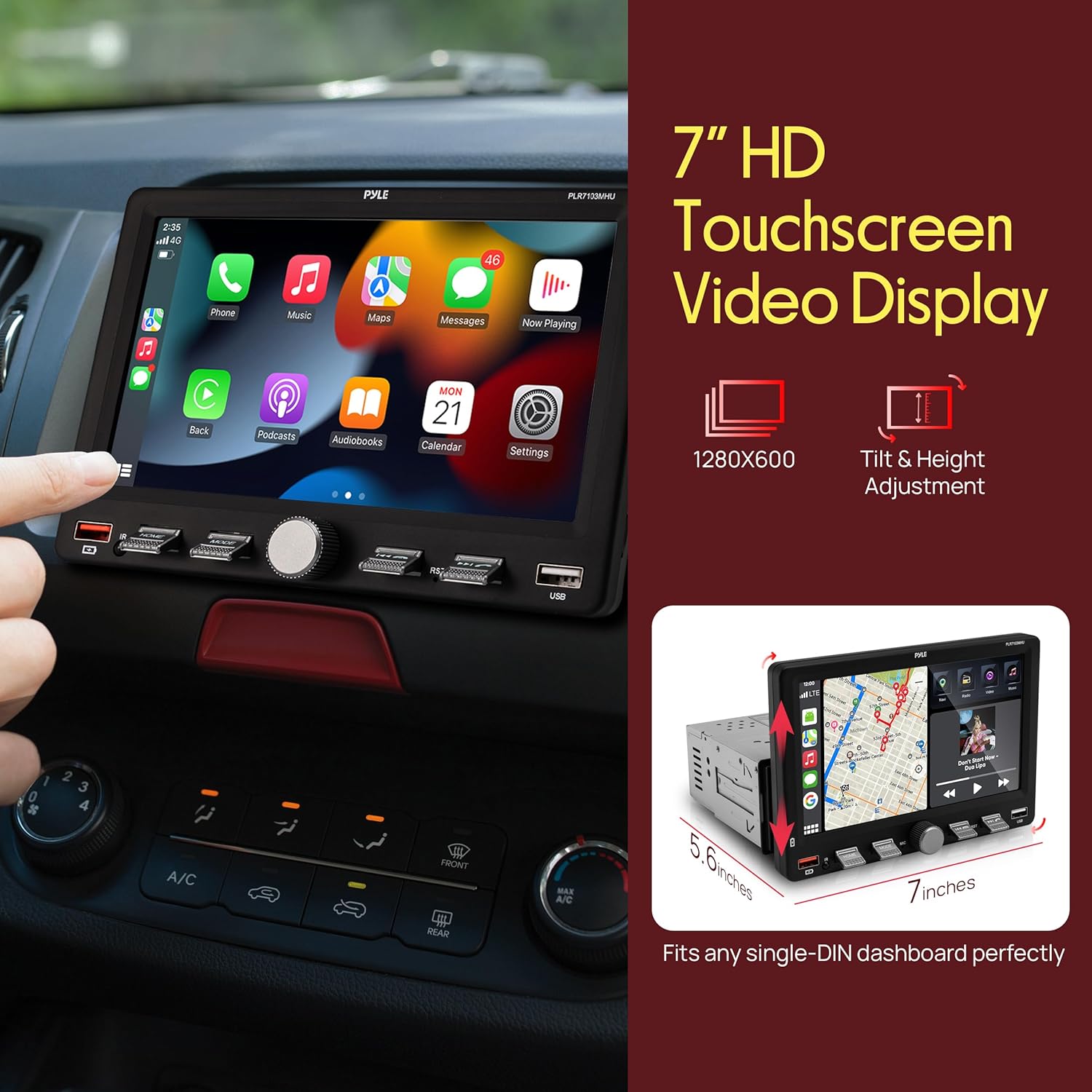
Image 5.1: Touchscreen display showing Apple CarPlay interface.
5.3 Funzionamento radio (AM/FM)
- Select "Radio" from the main menu.
- Use the "Scan" function to automatically search for and store strong stations.
- Manually tune by tapping the frequency up/down arrows.
- Save favorite stations to preset buttons (P1-P6).
6. Funzionalità di connettività
6.1 Apple CarPlay e Android Auto wireless
Connect your compatible smartphone wirelessly to access navigation, music, calls, and messages directly on the stereo's display.
- Assicurati che il Bluetooth sia abilitato sullo smartphone e sull'autoradio.
- Associa il tuo telefono all'autoradio tramite Bluetooth.
- Once paired, select "CarPlay" or "Android Auto" from the stereo's menu.
- Follow any on-screen prompts on your phone to grant permissions.
6.2 Bluetooth Audio & Hands-Free Calling
Bluetooth 5.0 provides a stable connection for streaming music and making hands-free calls.
- Abilita il Bluetooth sul telefono e sullo stereo.
- Cercare "Pyle PLR7103MHU" (or similar) on your phone's Bluetooth settings.
- Select the device to pair. A confirmation prompt may appear.
- Once connected, you can stream audio or make/receive calls using the stereo's interface.
6.3 USB/USB-C Media Playback & Charging
The unit features USB and USB-C ports for media playback from flash drives and fast charging of compatible devices.
- Insert a USB flash drive into the USB-A or USB-C port.
- Select "USB" from the main menu to browse and play media files.
- Connect your smartphone or other devices to the USB/USB-C ports for charging.
7. Impostazioni audio
Access the Equalizer (EQ) settings to customize your audio experience. The unit features a 10-band EQ.
- From the main menu, select "EQ" or "Sound Setup".
- Adjust frequency bands to your preference.
- Choose from preset EQ modes like Jazz, Classic, Rock, Pop, or Flat.
- Adjust Loudness settings for enhanced bass and treble at low volumes.
8. Funzionamento della telecamera di retromarcia
Se installata correttamente, la telecamera di backup visualizza automaticamente la parte posteriore view quando il veicolo è innestato in retromarcia.
- Shift the vehicle into reverse. The screen will automatically switch to the camera view.
- Guide lines may appear on the screen to assist with parking.
- Shift out of reverse to return to the previous screen.
9. Manutenzione
- Pulizia dello schermo: Utilizzare un panno morbido e privo di lanugine per pulire delicatamente il touchscreen. Non utilizzare detergenti abrasivi o solventi.
- Pulizia generale: Mantenere l'unità libera da polvere e detriti.
- Aggiornamenti software: Controlla il Pyle webperiodicamente il sito per verificare la disponibilità di aggiornamenti firmware per il tuo modello.
10. Risoluzione Dei Problemi
| Problema | Possibile causa | Soluzione |
|---|---|---|
| L'unità non si accende. | Incorrect wiring (power/ground), blown fuse, vehicle battery disconnected. | Check all power and ground connections. Inspect vehicle fuses. Ensure battery is connected. |
| Nessun suono dagli altoparlanti. | Cablaggio degli altoparlanti non corretto, volume troppo basso, disattivazione audio attivata, ampproblemi di lifier. | Verify speaker connections. Increase volume. Check if mute is active. Consult amplifier manual if external amp viene utilizzato. |
| La connessione Bluetooth è instabile o non funziona. | Interference, phone too far, incorrect pairing process, phone software issue. | Ensure phone is close to the unit. Re-pair the device. Restart phone and stereo. Clear Bluetooth cache on phone. |
| CarPlay/Android Auto non si connette. | Incorrect phone settings, app issues, unstable Bluetooth/Wi-Fi connection. | Ensure CarPlay/Android Auto is enabled on your phone. Check phone's Wi-Fi and Bluetooth. Restart phone and stereo. |
| La telecamera di retromarcia non viene visualizzata. | Incorrect camera wiring, reverse trigger not connected, faulty camera. | Check camera power and video connections. Verify reverse trigger wire connection. Test camera if possible. |
11. Specifiche
| Caratteristica | Dettaglio |
|---|---|
| Numero di modello | PLR7103MHU |
| Dimensioni dello schermo | 7 pollici |
| Dimensione DIN | Singolo DIN |
| Connettività | Wireless Apple CarPlay, Android Auto, Bluetooth 5.0, USB, USB-C, Auxiliary, RCA |
| Sintonizzatore radio | AM/FM |
| Potenza di uscita | 60 Watt (per canale, in genere 4 canali) |
| Dimensioni del prodotto | 5.6"P x 7"L x 4.9"A |
| Peso dell'articolo | 2.95 libbre |
| Accessori inclusi | Backup Camera, Remote Control, Wiring Harness |
12. Video del prodotto finitoview
Guarda questo video ufficiale del prodotto per una panoramica visivaview of the Pyle PLR7103MHU 7-inch Single DIN Touchscreen Car Stereo's features and functions.
Video 12.1: Prodotto ufficiale finitoview of the Pyle PLR7103MHU car stereo.
13. Garanzia e supporto
Pyle products are designed for reliability and performance. For specific warranty details, please refer to the warranty card included with your product or visit the official Pyle website. For technical support, troubleshooting assistance, or service inquiries, please contact Pyle customer support through their official channels.
Ufficiale Pyle Websito: www.pyleusa.com