
1. Introduzione
This manual provides essential information for the safe and efficient use of your HP 17.3 Inch FHD Business Laptop. Please read this guide thoroughly before operating your device to ensure optimal performance and longevity. This laptop is designed for business and everyday computing tasks, offering a large display, robust performance, and portability.
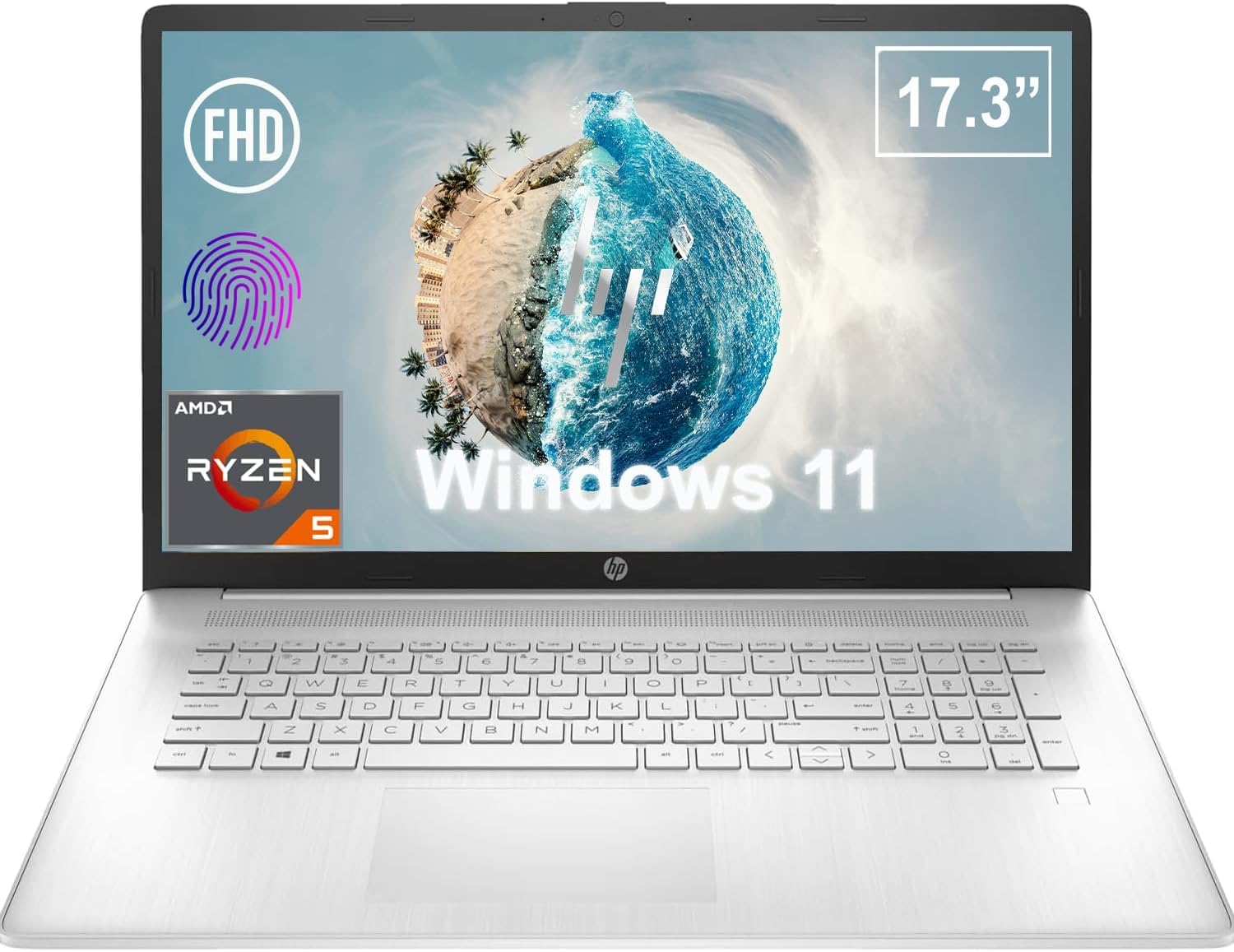
Figura 1.1: Fronte view of the HP 17.3 Inch FHD Business Laptop, showcasing the large display and keyboard.
2. Impostazione
2.1 Disimballaggio e ispezione iniziale
Rimuovere con cautela tutti i componenti dall'imballaggio. Verificare che siano presenti i seguenti elementi:
- HP 17.3 Inch FHD Business Laptop
- Power Adapter (45 W Smart AC Power Adapter)
- Documentazione (questo manuale, informazioni sulla garanzia)
Inspect the laptop and accessories for any signs of damage. If any items are missing or damaged, contact your retailer or HP support immediately.
2.2 Collegamento dell'adattatore di alimentazione
Before first use, ensure the laptop is fully charged. Connect the power adapter to the AC smart pin port on the side of the laptop and then plug the adapter into a power outlet.
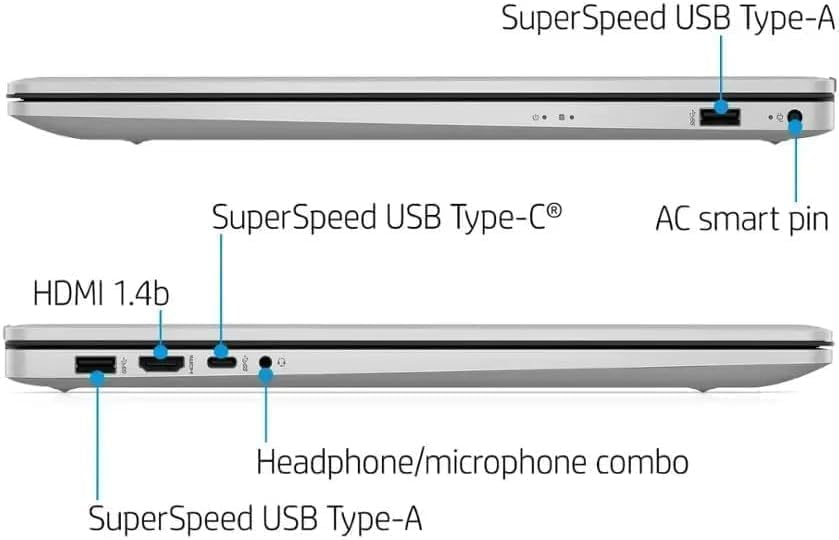
Figura 2.1: lato view illustrating the location of the AC smart pin and other ports.
2.3 Accensione iniziale e configurazione di Windows
Premere il pulsante di accensione per accendere il laptop. Seguire le istruzioni visualizzate sullo schermo per completare la configurazione di Windows 11 Home. Questa procedura include la configurazione dell'account utente, della connessione di rete e delle preferenze iniziali.
3. Utilizzo del laptop
3.1 Tastiera e touchpad
The laptop features a full-size QWERTY keyboard with a 10-key number pad for efficient data entry. The integrated touchpad provides precise cursor control. Refer to the operating system's settings for customizing touchpad gestures and keyboard shortcuts.
3.2 Lettore di impronte digitali
For enhanced security and convenient login, utilize the integrated fingerprint reader. Set up your fingerprints through Windows Hello in the Windows 11 settings.
3.3 Webcam e microfoni
The HP True Vision 720p HD Camera and integrated dual array digital microphones are located at the top of the display. These are suitable for video conferencing and online communication.
3.4 Connettività
- Wifi: The laptop supports 802.11a/b/g/n/ac Wi-Fi for wireless internet access. Connect to available networks via the Windows network settings.
- Bluetooth: Bluetooth 5 allows for wireless connection to compatible devices such as headphones, mice, and keyboards. Enable and manage Bluetooth devices through Windows settings.
3.5 Porte e dispositivi esterni
Il portatile è dotato di diverse porte per il collegamento di dispositivi esterni:
- 1 x USB Type-C (5Gbps, Data Only): For connecting USB-C compatible devices and data transfer.
- 2 x USB Type-A (5Gbps): For connecting standard USB devices like external drives, mice, or keyboards.
- 1 x HDMI 1.4b: For connecting to external displays or projectors.
- 1 x Headphone/Microphone Combo: For connecting a headset with a single 3.5mm jack.
- 1 x AC Smart Pin: For connecting the power adapter.

Figura 3.1: Aperto view of the laptop, highlighting the keyboard and touchpad area.
3.6 Gestione della batteria
The laptop is powered by a 3-Cell, 41 Wh Li-ion battery, offering up to 8 hours and 30 minutes of video playback. Use the provided 45 W Smart AC Power Adapter for charging. HP Fast Charge technology allows for quicker charging times.
4. Manutenzione
4.1 Pulizia del portatile
To maintain the laptop's appearance and functionality:
- Utilizzare un panno morbido e privo di lanugine dampcon acqua o con un detergente specifico per schermi.
- Per la tastiera e lo chassis, utilizzare un panno morbido e asciutto. Evitare prodotti chimici aggressivi o materiali abrasivi.
- Prima di pulirlo, assicurarsi che il computer portatile sia spento e scollegato.
4.2 Aggiornamenti software
Aggiorna regolarmente il sistema operativo Windows e i driver per garantire prestazioni, sicurezza e compatibilità ottimali. Puoi accedere a Windows Update tramite il menu Impostazioni.
4.3 Security Software
The laptop comes preloaded with McAfee LiveSafe for security. Ensure this software is active and updated to protect against viruses and other threats.
5. Risoluzione Dei Problemi
Questa sezione affronta i problemi più comuni che potresti riscontrare con il tuo laptop HP.
5.1 Problemi di alimentazione
- Il portatile non si accende: Ensure the power adapter is securely connected to both the laptop and a working power outlet. Verify the battery is charged.
- La batteria non si carica: Controllare che l'adattatore e il cavo di alimentazione non siano danneggiati. Provare una presa di corrente diversa.
5.2 Problemi di visualizzazione
- Nessuna immagine sullo schermo: Collega un monitor esterno per verificare se il problema riguarda il display del laptop. Riavvia il laptop.
- Immagine tremolante o distorta: Aggiorna i driver grafici. Regola la risoluzione dello schermo e la frequenza di aggiornamento nelle impostazioni di Windows.
5.3 Problemi di connettività
- Wi-Fi non connesso: Ensure Wi-Fi is enabled. Restart your router and the laptop. Check network settings for correct password and configuration.
- Dispositivo Bluetooth non associato: Assicurati che il Bluetooth sia abilitato su entrambi i dispositivi. Assicurati che il dispositivo sia in modalità di associazione e nel raggio d'azione.
Per problemi più complessi, fare riferimento al supporto HP websito o contattare il servizio clienti.
6. Specifiche
| Caratteristica | Dettaglio |
|---|---|
| Marca | HP |
| Nome del modello | Numero di modello: HP17 |
| Numero di modello | i5-1135G7 |
| Dimensioni dello schermo | 17.3 pollici |
| Tipo di visualizzazione | IPS, Anti-Glare, LED |
| Risoluzione | Risoluzione 1920 x 1080 (Full HD) |
| Frequenza di aggiornamento | Frequenza 60 Hz |
| Processore | AMD Ryzen 5 5500U (6 Cores, 12 Threads, up to 4.0 GHz Max Boost Clock) |
| Grafica | Grafica AMD Raon integrata |
| Memoria RAM | 32 GB DDR4-3200 MHz (Max 64 GB) |
| Magazzinaggio | SSD PCIe NVMe M.2 da 1 TB |
| Sistema operativo | Windows 11 Home, 64 bit, inglese |
| Connettività wireless | Wi-Fi 802.11a/b/g/n/ac, Bluetooth 5 |
| Porti | 1x USB Type-C (5Gbps), 2x USB Type-A (5Gbps), 1x HDMI 1.4b, 1x Headphone/Microphone Combo, 1x AC Smart Pin |
| Webcamma | HP True Vision 720p HD Camera |
| Audio | Dual Speakers, Integrated Dual Array Digital Microphones |
| Batteria | 3-Cell, 41 Wh Li-ion (Up to 8.5 hours video playback) |
| Adattatore di alimentazione | Adattatore di alimentazione CA intelligente da 45 W |
| Dimensioni (L x P x A) | 40.07 x 25.78 x 2.06 cm (14.14"L x 9.31"W x 0.78"Th) |
| Peso | A partire da 2.07 kg |
| Caratteristiche speciali | Fingerprint Reader, Lightweight Design, HP Fast Charge |
7. Garanzia e supporto
7.1 Informazioni sulla garanzia
This HP laptop comes with a 1-year manufacturer's limited warranty. For detailed terms and conditions, please refer to the warranty documentation included with your product or visit the official HP support websito.
7.2 Assistenza clienti
Se riscontri problemi che non possono essere risolti seguendo le procedure di risoluzione dei problemi descritte in questo manuale, contatta l'assistenza clienti HP. Puoi trovare informazioni di contatto e risorse aggiuntive sul sito ufficiale HP. websito:
- Supporto HP Websito: supporto.hp.com
- Negozio HP: Negozio HP su Amazon