
1. Introduzione
Welcome to the user manual for your LOKLNEYK H610 S4 Motherboard. This guide provides detailed instructions for installation, operation, maintenance, and troubleshooting to ensure optimal performance and longevity of your system. Please read this manual thoroughly before beginning installation.
2. Impostazione
2.1. Contenuto della confezione
Verificare che tutti i componenti siano presenti nella confezione della scheda madre:
- LOKLNEYK H610 S4 Motherboard
- Schermo I / O
- Cavi dati SATA (la quantità può variare)
- Manuale dell'utente (questo documento)
- CD/USB del driver (o istruzioni per il download)
2.2. Layout della scheda madre
Familiarize yourself with the various components and connectors on the motherboard. Refer to the diagram below for a detailed overview of the H610 S4 motherboard's key areas.

Figure 1: Labeled diagram of the LOKLNEYK H610 S4 Motherboard, highlighting CPU socket, RAM slots, PCIe slots, M.2 slots, SATA ports, and various headers.
2.3. Fasi di installazione
Per una corretta installazione della scheda madre e dei componenti, seguire questi passaggi:
- Preparare il telaio: Installare la schermatura I/O nell'apertura posteriore del case del computer.
- Installare la scheda madre: Posizionare con attenzione la scheda madre nello chassis, allineandola con i distanziali. Fissarla con le viti.
- Installazione CPU (LGA 1700):
- Open the CPU socket lever and protective cover.
- Align the CPU's triangular mark with the mark on the socket.
- Inserire delicatamente la CPU nel socket. Non forzarla.
- Chiudere la leva per fissare la CPU.
- Installazione del dissipatore della CPU: Installare il dissipatore della CPU seguendo le istruzioni del produttore, assicurandosi di applicare correttamente la pasta termica.
- RAM Installation (DDR4):
- Aprire le clip su entrambe le estremità degli slot di memoria DDR4.
- Align the memory module's notch with the slot's key.
- Premere con decisione su entrambe le estremità del modulo finché le clip non scattano in posizione.
- Storage Installation (NVMe M.2 / SATA):
- For M.2 SSDs, insert the drive into the M.2 slot and secure it with the provided screw.
- For SATA drives, connect SATA data cables to the motherboard's SATA ports and to your drives. Connect power cables from your power supply to the drives.
- Installazione della scheda PCIe: Insert your graphics card or other PCIe expansion cards into the appropriate PCIe slots and secure them.
- Collegamenti di alimentazione: Collegare il connettore di alimentazione ATX a 24 pin e il connettore di alimentazione CPU a 8 pin dall'alimentatore alla scheda madre.
- Collegamenti del pannello frontale: Connect the front panel headers (power button, reset button, USB ports, audio jacks, LED indicators) to the corresponding pins on the motherboard. Refer to the motherboard layout diagram (Figure 1) for pin locations.
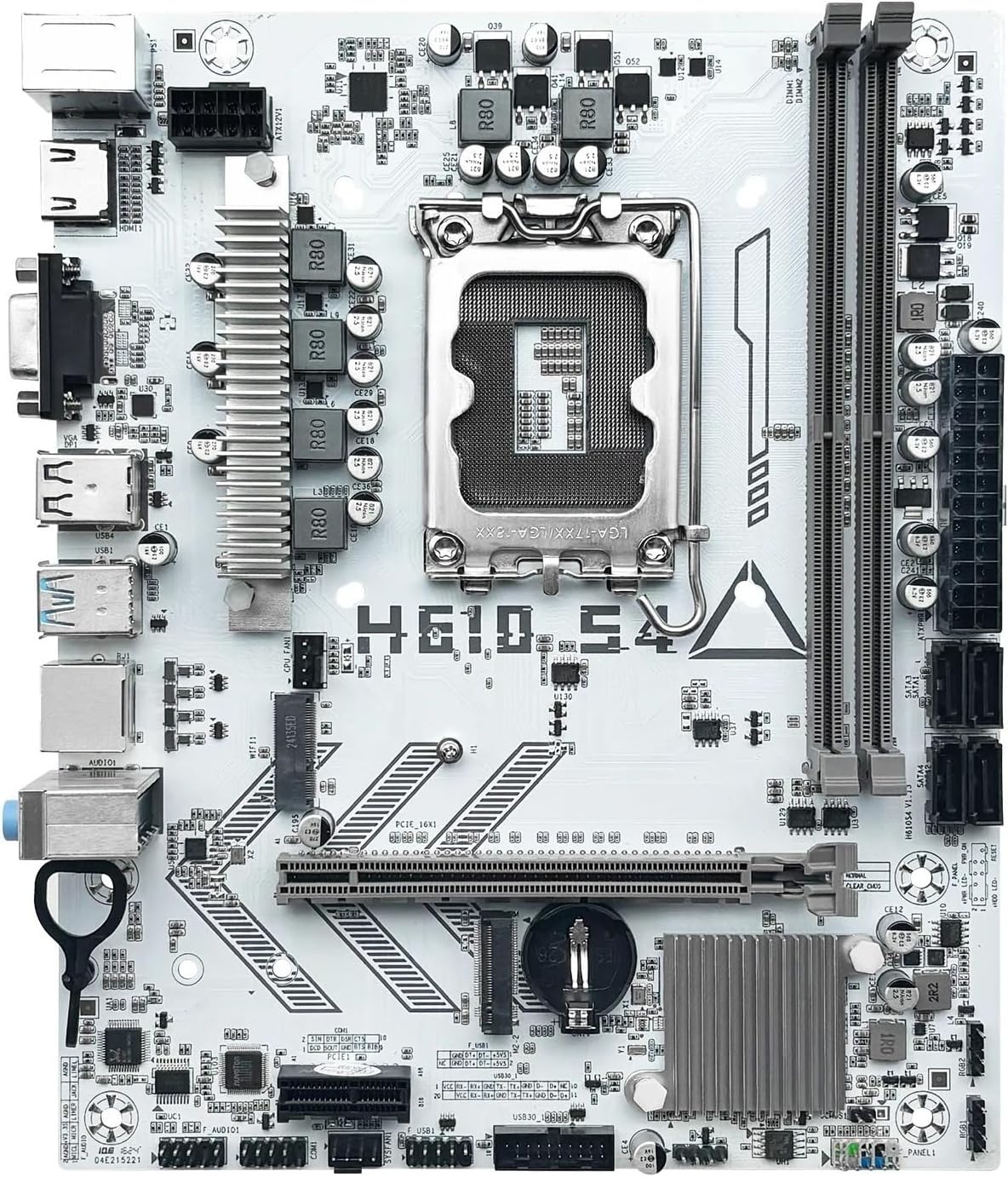
Figura 2: Oltreview of the LOKLNEYK H610 S4 Motherboard, showing the general layout of components.
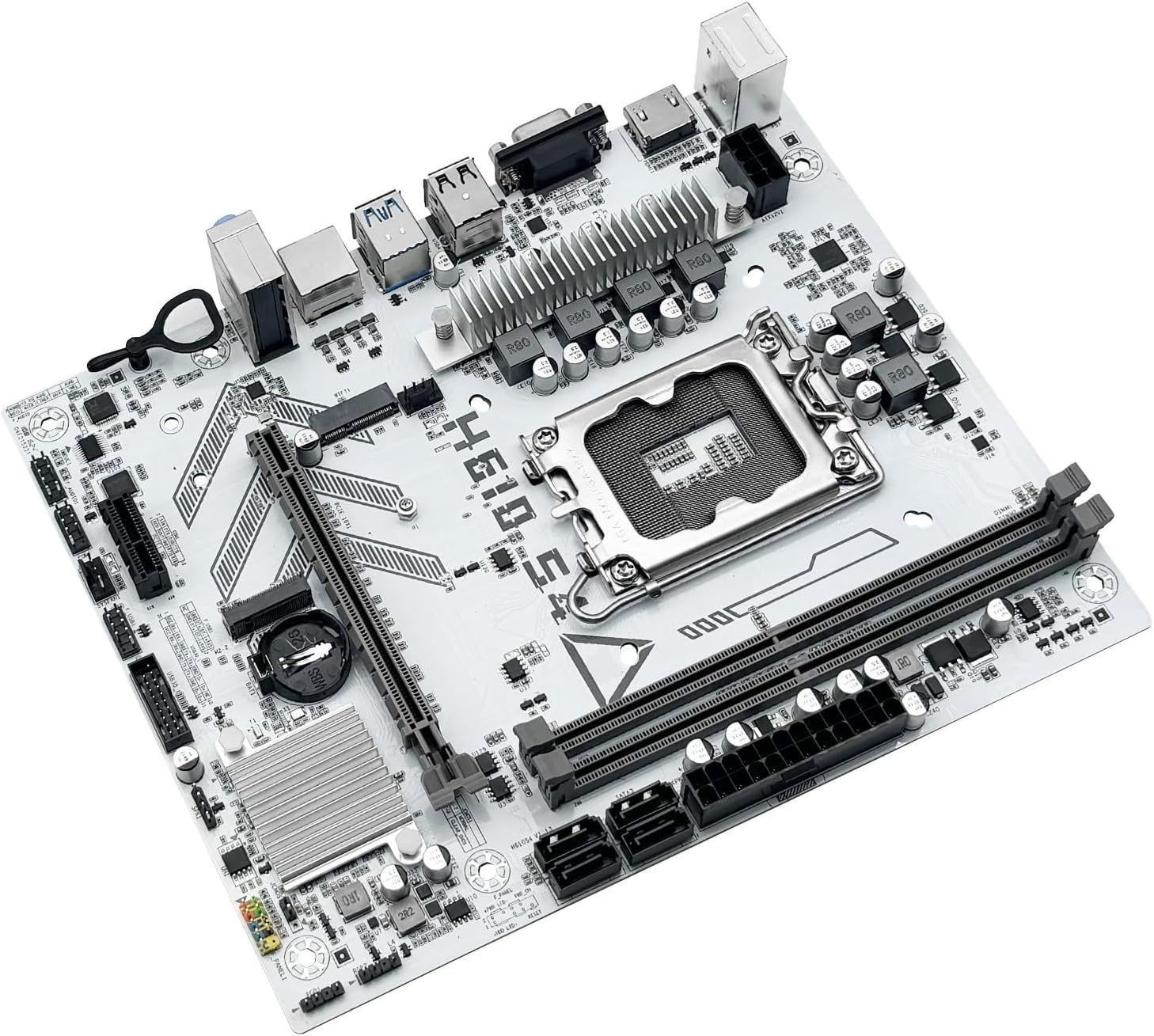
Figure 3: Rear I/O panel connectors and typical accessories like the I/O shield and SATA cables.
3. Istruzioni per l'uso
3.1. Primo avvio
After completing all hardware installations, connect your monitor, keyboard, and mouse. Power on your system. The system should display the BIOS/UEFI splash screen. If not, check all power connections and component seating.
3.2. Configurazione BIOS/UEFI
Per accedere all'utilità di configurazione BIOS/UEFI, premere il tasto DEL or F2 key during the initial boot sequence. Here you can configure:
- Boot order for your operating system drive.
- Impostazioni di data e ora.
- Memory profiles (e.g., XMP for DDR4).
- Fan speed controls.
- SATA mode (AHCI/RAID).
3.3. Installazione del driver
After installing your operating system, it is crucial to install the latest drivers for your motherboard components. These include:
- Driver del chipset
- Driver LAN (Ethernet)
- Driver audio
- Graphics drivers (for integrated graphics or discrete GPU)
Drivers can typically be found on the LOKLNEYK official website or on the provided driver media.
4. Manutenzione
4.1. Pulizia
Regular cleaning helps maintain optimal performance and extends the lifespan of your motherboard. Use compressed air to remove dust from heatsinks, fans, and other components. Ensure the system is powered off and unplugged before cleaning.
4.2. Aggiornamenti BIOS/UEFI
Periodically check the LOKLNEYK website for updated BIOS/UEFI versions. Updates can provide improved compatibility, stability, and new features. Follow the specific instructions provided by LOKLNEYK for updating the BIOS/UEFI to avoid system damage.
5. Risoluzione Dei Problemi
Questa sezione fornisce soluzioni ai problemi più comuni che potresti riscontrare.
5.1. Problemi comuni e soluzioni
- Nessun potere:
- Check if the power supply is connected correctly to the motherboard (24-pin ATX and 8-pin CPU).
- Assicurarsi che l'interruttore di alimentazione sia in posizione "ON".
- Verificare il collegamento del pulsante di accensione sul pannello frontale.
- Nessuna visualizzazione:
- Ensure the monitor cable is securely connected to the graphics card or motherboard (if using integrated graphics).
- Reinstallare la scheda grafica e i moduli RAM.
- Prova ad avviare il computer con una sola RAM.
- Instabilità/arresti anomali del sistema:
- Controllare le temperature della CPU e della GPU.
- Assicurarsi che tutti i driver siano aggiornati.
- Verificare la presenza di errori nei moduli RAM.
- Dispositivo di avvio non trovato:
- Verify that your storage drive (SSD/HDD) is properly connected.
- Check BIOS/UEFI settings for correct boot order and SATA mode.
- Assicurarsi che il sistema operativo sia installato correttamente sull'unità.
For more complex issues, consult the LOKLNEYK support websito o un tecnico qualificato.
6. Specifiche
Below are the technical specifications for the LOKLNEYK H610 S4 Motherboard:
| Caratteristica | Specificazione |
|---|---|
| Presa CPU | LGA1700 |
| CPU compatibili | Intel Core 12th, 13th, 14th Generation i3, i5 Processors |
| Chipset | Intel H610 |
| Slot di memoria | 2 x DDR4 DIMM |
| Capacità massima di memoria | 64 GB |
| Interfacce di archiviazione | 2 x M.2 (NVMe 2280), 4 x SATA 3.0 |
| Slot PCIe | 1 x PCIe 4.0 x16, 1 x PCIe x1 |
| Rete locale | 1 Gigabit Ethernet RJ45 |
| Porte USB | USB 3.0, USB 3.1 Gen1, USB 2.0 (Front & Rear) |
| Uscite video | HDMI, VGA |
| Audio | Audio di bordo |
| Fattore di forma | Compact (180mm x 220mm) |

Figure 4: LOKLNEYK H610 S4 Motherboard showing its physical dimensions.
7. Garanzia e supporto
7.1. Informazioni sulla garanzia
Please refer to the warranty card included with your product or visit the official LOKLNEYK websito per termini e condizioni di garanzia dettagliati. Conservare la prova d'acquisto per eventuali reclami in garanzia.
7.2. Supporto tecnico
If you encounter any issues that cannot be resolved using this manual, please visit the LOKLNEYK support websito per domande frequenti, download di driver e informazioni di contatto per l'assistenza tecnica.