
Introduzione
Thank you for choosing the MACAP MI40 Luxe On-Demand Espresso Grinder. This manual provides essential information for the safe and efficient operation, maintenance, and care of your new grinder. Please read all instructions carefully before use and retain this manual for future reference.

The MACAP MI40 Luxe On-Demand Espresso Grinder, featuring a sleek black finish and integrated touchscreen display.
Informazioni sulla sicurezza
Quando si utilizzano apparecchi elettrici, seguire sempre le precauzioni di sicurezza di base per ridurre il rischio di incendi, scosse elettriche e lesioni.
- Leggere tutte le istruzioni prima di utilizzare il macinacaffè.
- Non immergere il macinacaffè, il cavo o la spina in acqua o altri liquidi.
- Scollegare dalla presa quando non in uso, prima di montare o smontare componenti e prima di pulirlo.
- Evitare il contatto con le parti in movimento.
- Non utilizzare alcun apparecchio con un cavo o una spina danneggiati o dopo che l'apparecchio non funziona correttamente o è stato danneggiato in qualsiasi modo. Contatta l'assistenza clienti per ricevere assistenza.
- L'uso di accessori non consigliati o venduti dal produttore può causare incendi, scosse elettriche o lesioni.
- Non utilizzare all'aperto.
- Non lasciare che il cavo penda dal bordo di un tavolo o di un bancone e non tocchi superfici calde.
- Prima di azionare il macchinario, assicurarsi che il coperchio della tramoggia sia ben fissato in posizione.
- Only grind whole roasted coffee beans. Do not grind other substances such as nuts, spices, or instant coffee.
Impostare
1. Disimballaggio
- Rimuovere con attenzione tutti i componenti dalla confezione.
- Inspect the grinder for any signs of damage. If damaged, do not operate and contact your retailer.
- Rimuovere tutte le pellicole protettive e i materiali di imballaggio.
2. Identificazione dei componenti
Familiarize yourself with the main parts of your MI40 Luxe grinder:
- Tramoggia: Contiene chicchi di caffè interi.
- Coperchio della tramoggia: Copre la tramoggia.
- Manopola di regolazione della macinatura: Located below the hopper, used to set grind fineness.
- Schermo touchscreen: For programming and selecting dosing options.
- Beccuccio dosatore: Dove viene erogato il caffè macinato.
- Portafiltro: Supporta il portafiltro durante la macinatura.
- Interruttore di alimentazione: Located on the side of the grinder.
3. Assemblaggio iniziale
- Installare la tramoggia: Place the hopper onto the grinder body, ensuring it seats correctly. Rotate it slightly until it locks into position.
- Install the Hopper Lid: Place the lid securely on top of the hopper.
4. Posizionamento
Posizionare il macinacaffè su una superficie stabile, piana e asciutta. Assicurarsi che ci sia un'adeguata ventilazione attorno all'unità.
5. Collegamento elettrico
Collegare il cavo di alimentazione a una presa elettrica con messa a terra. Assicurarsi che il volumetage matches the specifications listed on the grinder's rating label.
Istruzioni per l'uso
1. Riempimento della tramoggia
Lift the hopper lid and pour whole roasted coffee beans into the hopper. Do not overfill. Replace the lid securely.
2. Grind Adjustment (Nice Grind Control Dial)
The MI40 Luxe features a stepless grind adjustment dial for precise control. To adjust the grind fineness:
- Accendere il macinacaffè tramite l'interruttore di alimentazione.
- Rotate the grind adjustment dial. Turning it clockwise results in a finer grind, and counter-clockwise results in a coarser grind.
- For espresso, start with a fine setting and adjust incrementally based on extraction time and taste. It is recommended to adjust the grind while the burrs are running to prevent jamming.

Dettagliato view of the Nice Grind Control Dial for precise grind fineness adjustment.
3. Touchscreen Dosing
The touchscreen allows for programmable dosing for single and double shots.
- Accensione: Ensure the grinder is powered on. The touchscreen will illuminate.
- Seleziona la dose: On the main screen, you will see icons for single and double shot doses. Tap the desired dose icon.
- Adjust Dose Time (if needed): To program the dose time, press and hold the desired dose icon until it enters programming mode. Use the '+' and '-' buttons on the screen to adjust the grinding time in seconds. Tap the icon again to save.
- Place Portafilter: Position your portafilter securely in the portafilter holder beneath the dosing spout.
- Inizia a macinare: Tap the selected dose icon once to start grinding. The grinder will automatically stop after the programmed time.
- Manual Grinding: Some models may offer a manual grind option, typically by pressing a dedicated button or holding a dose icon briefly. Refer to the on-screen prompts.
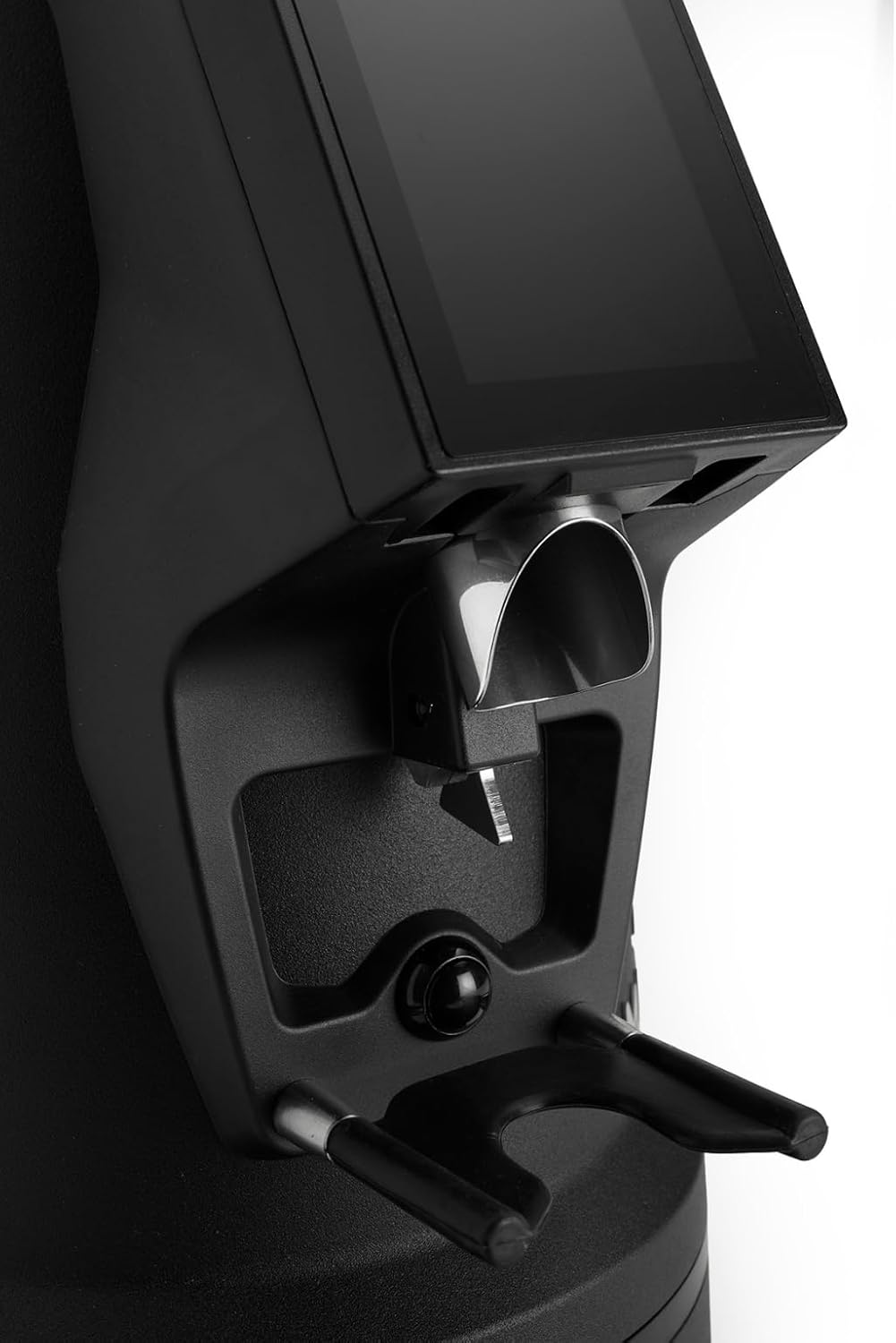
The dosing spout and portafilter holder, designed for efficient and clean coffee dispensing.
Manutenzione
Una pulizia e una manutenzione regolari garantiscono prestazioni ottimali e longevità del tuo macinacaffè.
1. Pulizia quotidiana
- Tramoggia: Empty any remaining beans and wipe the inside of the hopper with a dry cloth.
- Beccuccio dosatore: Use a brush or vacuum cleaner to remove any residual coffee grounds from the dosing spout and portafilter holder area.
- Esterno: Pulisci l'esterno del macinino con l'adamp panno. Non utilizzare detergenti abrasivi né immergere l'unità in acqua.
2. Burrs Cleaning (Weekly/Bi-weekly)
To maintain grind consistency, the burrs should be cleaned regularly.
- Scollegare il macinino: Always disconnect the power before cleaning the burrs.
- Rimuovere la tramoggia: Empty the hopper and remove it from the grinder body.
- Accesso alle sbavature: Depending on the model, you may need to unscrew the top burr carrier. Refer to the specific instructions for your MI40 Luxe model.
- Pulisci le sbavature: Use a stiff brush or a vacuum cleaner to remove all coffee grounds from both the stationary and rotating burrs. Do not use water.
- Rimontare: Carefully reassemble the burr carrier and hopper, ensuring all parts are securely in place.
3. Assistenza generale
- Conservare il macinacaffè in un luogo fresco e asciutto.
- Avoid exposing the grinder to direct sunlight or extreme temperatures.
Risoluzione dei problemi
Se riscontri problemi con il tuo macinino, fai riferimento ai seguenti problemi comuni e alle relative soluzioni:
| Problema | Possibile causa | Soluzione |
|---|---|---|
| Il macinacaffè non si accende | No power, power switch off, or safety interlock not engaged. | Check power cord connection, ensure power switch is ON, verify hopper is correctly seated. |
| No coffee grinding / Grinder jams | Beans not feeding, burrs clogged, or grind setting too fine. | Ensure hopper has beans. Unplug, remove hopper, clean burrs. Adjust to a coarser setting. |
| Macinatura incoerente | Le sbavature sono sporche o usurate. | Clean burrs thoroughly. If problem persists, burrs may need replacement. |
| Il macinino è rumoroso | Foreign object in burrs or loose components. | Unplug and inspect burrs for foreign objects. Ensure all parts are securely fastened. |
If the problem persists after attempting these solutions, please contact MACAP customer support or your retailer.
Specifiche
| Caratteristica | Dettaglio |
|---|---|
| Modello | MI40 Luxe |
| Marca | Macap |
| Tipo di sbavatura | Macine piatte |
| Dimensione della bava | 65 millimetri |
| Regolazione della macinatura | Stepless (Nice Grind Control Dial) |
| Dosaggio | Touchscreen Programmable On-Demand |
| Capacità della tramoggia | 2.6 libbre (circa 1.2 kg) |
| Materiale | Acciaio inossidabile |
| Peso dell'articolo | 19.6 libbre (circa 8.9 kg) |
| Dimensioni (L x P x A) | 12" x 7.6" x 22" (circa 30.5 cm x 19.3 cm x 55.9 cm) |
| Motore | High-Torque |
Garanzia e supporto
Your MACAP MI40 Luxe Grinder is covered by a manufacturer's warranty. For specific warranty terms and conditions, please refer to the warranty card included with your product or visit the official Macap website. For technical support, spare parts, or service inquiries, please contact your authorized Macap dealer or the customer support team.
Informazioni sui contatti:
- Refer to your purchase documentation for retailer contact details.
- Visit the official Macap website for global support information.