
Introduzione
This manual provides detailed instructions for the assembly, operation, and maintenance of your Jocoevol Farmhouse 57" Lift Up Executive Desk. Please read all instructions carefully before assembly and use to ensure safe and proper functionality. Keep this manual for future reference.
Informazioni sulla sicurezza
AVVERTIMENTO: La mancata osservanza di queste istruzioni di sicurezza potrebbe causare lesioni o danni al prodotto.
- Montare sempre la scrivania su una superficie morbida e pulita per evitare graffi.
- Assicurarsi che tutta la ferramenta sia ben serrata prima dell'uso. Controllare periodicamente e serrare nuovamente se necessario.
- Do not overload drawers or the desktop. Refer to specifications for weight limits.
- Tenere le parti di piccole dimensioni e i materiali di imballaggio lontano dalla portata dei bambini e degli animali domestici.
- Use caution when operating the lift-up mechanism to avoid pinching fingers or objects.
- Questo prodotto è destinato esclusivamente all'uso in ambienti interni.
Contenuto della confezione
Prima di iniziare il montaggio, verificare che tutti i componenti elencati di seguito siano presenti e integri. Se qualche componente risulta mancante o danneggiato, contattare immediatamente l'assistenza clienti.
- Desktop Panels (Lift-up sections and fixed sections)
- Side Cabinets (Left and Right)
- Center Support Structure
- Drawers (5 total, including file cassetto)
- Vassoio per tastiera
- Lift Mechanism Hardware
- Guide e maniglie per cassetti
- Gancio per cuffie
- Charging Station Unit (Built-in USB Outlet, USB Ports, Type-C)
- Ferramenta di montaggio (viti, tasselli, serrature a camma, ecc.)
- Manuale di istruzioni

Immagine: Esploso view of desk components, including drawers, cabinets, lift-up desktop, and headphone hook.
Installazione e assemblaggio
Assembly requires two people and basic tools (not included, e.g., Phillips head screwdriver, hammer). Follow the numbered steps carefully.
- Preparare l'area di lavoro: Clear a spacious, clean, and soft area for assembly to prevent damage to the desk components.
- Assemble Side Cabinets: Begin by assembling the left and right side cabinets. Attach the back panels and internal shelves as per the included hardware instructions. Ensure all cam locks and screws are tightened.
- Installare le guide dei cassetti: Attach the drawer slides to the interior of the side cabinets and the center support structure. Pay attention to the orientation of the slides (left/right, front/back).
- Montare i cassetti: Construct the drawer boxes. Attach the drawer fronts with the beadboard detailing and install the retro-style handles. Insert the assembled drawers into their respective slides.
- Supporto Attach Center: Connect the center support structure, which includes the keyboard tray housing, between the two side cabinets. Secure with provided hardware.
- Install Lift Mechanism and Desktop: Attach the gas spring lift mechanisms to the center support and the underside of the lift-up desktop panels. Carefully align and secure the desktop panels to the lift mechanism and the fixed side cabinet tops.
- Installa il vassoio della tastiera: Slide the ergonomic keyboard tray into its designated slot beneath the lift-up desktop.
- Collegare la stazione di ricarica: If not pre-installed, integrate the built-in charging station (2-Outlet, USB Ports, Type-C) into the designated cutout on the desktop. Ensure all connections are secure.
- Fissare il gancio per le cuffie: Fissare il gancio per le cuffie al lato della scrivania come desiderato.
- Controllo finale: Verify that all screws, bolts, and connections are tight. Test the lift-up mechanism, drawers, and keyboard tray for smooth operation.
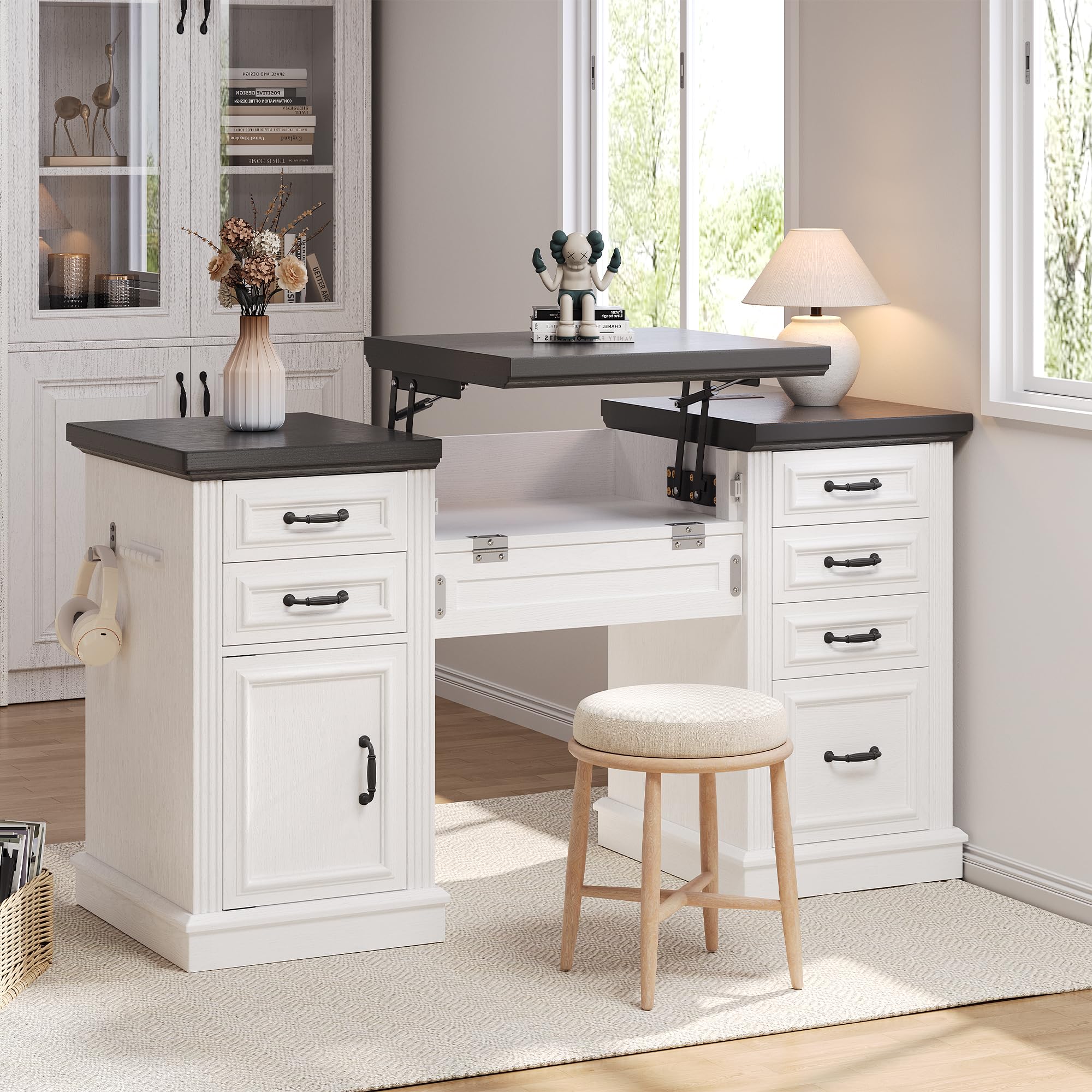
Image: The assembled desk, ready for use.
Istruzioni per l'uso
Lift-Up Desktop Mechanism
The desk features a gas spring lift mechanism for seamless sit-stand transitions.
- Sollevare: Gently lift the front edge of the center desktop panel. The gas springs will assist in raising the desktop to your desired standing height.
- Ridurre: Apply gentle downward pressure to the center desktop panel. Guide it smoothly back into the closed position. Ensure no objects or fingers are in the path of the closing mechanism.

Image: Detail of the gas spring lift mechanism and keyboard tray.
Cassetti e File Mobiletto
The desk includes five functional drawers and a dedicated file mobiletto per riporre oggetti in modo organizzato.
- Cassetti standard: Pull the retro-style handles to open and push to close. These are suitable for small items, notebooks, and office supplies.
- File Consiglio dei ministri: The bottom drawer on one side is designed as a file cabinet. It accommodates letter and legal-sized documents. Ensure files are properly hung on the internal rails.
- Quick-Access Desk Dresser: The cabinet on the left side provides additional storage for larger items or binders. Open the door to access.

Image: A functional drawer storing office essentials.

Image: The spacious file drawer with hanging folders.

Image: The quick-access desk dresser cabinet.
Ergonomic Keyboard Tray
The slide-out keyboard tray provides a comfortable position for your keyboard and mouse.
- Per utilizzare: Gently pull the tray forward from beneath the desktop.
- Per conservare: Push the tray back until it is fully recessed under the desktop.
Stazione di ricarica
La stazione di ricarica integrata garantisce un comodo accesso all'alimentazione per i tuoi dispositivi.
- Collegare il cavo di alimentazione della scrivania a una presa a muro standard.
- Use the 2 AC outlets, USB-A ports, and USB-C port to charge up to four devices simultaneously.
- Ensure devices are compatible with the provided charging outputs.

Image: Diagram of the convenient charging station.
Manutenzione
- Pulizia: Pulisci le superfici della scrivania con un pannoamp panno. Evitare prodotti chimici aggressivi o detergenti abrasivi, che possono danneggiare la finitura.
- Controllo hardware: Ispezionare periodicamente tutte le viti e i collegamenti per assicurarsi che siano ben serrati. Serrare nuovamente se necessario per mantenere la stabilità.
- Meccanismo di sollevamento: The gas springs are designed for long-term use and generally require no maintenance. Do not attempt to lubricate or disassemble the mechanism.
- Guide per cassetti: Se i cassetti diventano rigidi, è possibile applicare sulle guide una piccola quantità di lubrificante a base di silicone.
Risoluzione dei problemi
Se riscontri problemi con la tua scrivania, fai riferimento alle seguenti soluzioni comuni:
- Instabilità della scrivania: Ensure all assembly hardware is fully tightened. Check that the desk is placed on a level surface.
- I cassetti non scorrono fluidamente: Verify that drawer slides are correctly installed and free of obstructions. Check for any loose hardware on the slides or drawer boxes.
- Lift Mechanism Issues: If the lift mechanism is difficult to raise or lower, ensure no objects are obstructing its movement. Do not force the mechanism. If issues persist, contact customer support.
- Stazione di ricarica non funzionante: Confirm the desk's power cord is securely plugged into a functional wall outlet. Check that devices are properly connected to the charging ports.
For problems not addressed here, please contact Jocoevol customer support.
Specifiche
| Caratteristica | Dettaglio |
|---|---|
| Marca | Jocoevol |
| Numero di modello | C-1654 |
| Progettazione della scrivania | Executive Desk with Lift-Up Feature |
| Stile | Casa colonica |
| Colore | Bianco+Nero |
| Dimensioni del prodotto (P x L x A) | 21.6"P x 57"L x 30.3"A |
| Peso dell'articolo | 115.3 libbre |
| Tipo di materiale | Legno ingegnerizzato |
| Numero di cassetti | 5 (including 1 file cassetto) |
| Opzioni di archiviazione | 5 drawers + 1 file cabinet + 1 quick-access cabinet |
| Caratteristiche speciali | Built-In USB Outlet, File Storage Drawer, Large Desktop, Headphone Hook, Ergonomic Keyboard Tray |
| Assemblaggio richiesto | SÌ |
| Istruzioni per la cura del prodotto | Pulisci con Damp Stoffa |

Immagine: Dimensioni del prodotto oltreview.
Garanzia e supporto
Jocoevol stands behind the quality of its products. For warranty information, replacement parts, or technical assistance, please contact Jocoevol customer support through the retailer where the product was purchased or visit the official Jocoevol websito.
Please have your model number (C-1654) and purchase date available when contacting support.