
1. Introduzione
Grazie per l'acquistoasing the ULTIMEA Aura A60 U2621 7.1ch Dolby Atmos Soundbar System. This manual provides essential information for setting up, operating, and maintaining your new sound system. Please read this manual thoroughly before use to ensure proper functionality and to maximize your audio experience.

Figure 1.1: Immersive audio experience with the ULTIMEA Aura A60 system.
2. Informazioni sulla sicurezza
To reduce the risk of electric shock, fire, or damage to your device, please observe the following safety precautions:
- Non esporre questo apparecchio a pioggia o umidità.
- Non collocare sull'apparecchio oggetti contenenti liquidi, come vasi.
- Assicurare una ventilazione adeguata. Non ostruire le aperture di ventilazione.
- Non installare vicino a fonti di calore come radiatori, bocchette di riscaldamento, stufe o altri apparecchi (inclusi amplificatori) che producono calore.
- Proteggere il cavo di alimentazione per evitare che venga calpestato o schiacciato, in particolare in corrispondenza delle spine, delle prese di corrente e del punto in cui esce dall'apparecchio.
- Utilizzare solo accessori/componenti specificati dal produttore.
- Scollegare l'apparecchio durante i temporali o quando non viene utilizzato per lunghi periodi di tempo.
- Affidare tutti gli interventi di assistenza a personale qualificato.
3. Contenuto della confezione
Si prega di verificare che tutti gli articoli siano presenti e in buone condizioni:
- ULTIMEA Aura A60 Soundbar
- Wireless Subwoofer (4-inch, BassMX Technology)
- 4 x Surround Speakers (2 front, 2 rear)
- Telecomando
- Cavo HDMI
- Power Adapter/Cables
- Manuale dell'utente (questo documento)
4. Prodotto finitoview
The ULTIMEA Aura A60 U2621 is a 7.1ch Dolby Atmos soundbar system designed to deliver an immersive home theater audio experience. It features a main soundbar unit, a powerful wireless subwoofer with BassMX technology, and four surround speakers.
4.1 Main Soundbar Unit
The main soundbar unit houses 3 main channels for clear dialogue and primary audio. It serves as the central hub for all audio connections.

Figure 4.1: Main soundbar unit with front surround speakers.
4.2 subwoofer wireless
The dedicated 4-inch wireless subwoofer incorporates BassMX technology to enhance low frequencies, providing deep and resonant bass for a more impactful audio experience.

Figure 4.2: Wireless subwoofer with BassMX technology.
4.3 altoparlanti surround
The system includes four surround speakers: two front and two rear. The rear speakers connect wirelessly to the soundbar, minimizing cable clutter and allowing flexible placement to create an expansive acoustic space.

Figure 4.3: Diagram of 7.1ch sound distribution.
4.4 Porte di ingresso/uscita
The soundbar features multiple input options for versatile connectivity:
- eARC HDMI: For high-quality audio transmission and seamless TV integration.
- Ottico: Ingresso audio digitale.
- AUSILIARI: Ingresso audio analogico.
- USB: Per la riproduzione multimediale.
- Bluetooth: Streaming audio wireless.

Figure 4.4: Rear panel connections, including HDMI eARC.
5. Impostazione
5.1 Posizionamento fisico
Il posizionamento ottimale dei componenti del sistema audio è fondamentale per ottenere la migliore esperienza audio.
- Barra audio: Posiziona la soundbar al centro, sotto il televisore. Assicurati che non ci siano ostacoli.
- Subwoofer: Position the wireless subwoofer on the floor near the soundbar. Experiment with placement to find the best bass response for your room.
- Altoparlanti surround anteriori: Place the two wired front surround speakers to the left and right of your TV, ideally at ear level when seated.
- Altoparlanti surround posteriori: Position the two wireless rear surround speakers behind your primary listening position, to the left and right. These speakers will automatically connect wirelessly to the soundbar once powered on.

Figure 5.1: Recommended speaker placement for Dolby Atmos.
5.2 Connessioni
Follow these steps to connect your soundbar system:
- Collegamento elettrico: Connect the power cables to the soundbar, subwoofer, and surround speakers, then plug them into a power outlet.
- HDMI eARC (consigliato): Connect one end of the provided HDMI cable to the HDMI eARC port on your soundbar and the other end to the HDMI eARC/ARC port on your TV. This connection supports Dolby Atmos and allows for TV remote control of the soundbar.
- Collegamento ottico (alternativa): If your TV does not have an HDMI eARC/ARC port, connect an optical cable (not included) from your TV's optical output to the OPTICAL input on the soundbar.
- AUX Connection (Alternative): For analog audio sources, connect a 3.5mm AUX cable (not included) from your device's audio output to the AUX input on the soundbar.
- Connessione USB: Insert a USB drive into the USB port on the soundbar for direct media playback.
- Accoppiamento Bluetooth: To connect a Bluetooth device, select the Bluetooth input on the soundbar. On your device, search for 'ULTIMEA Aura A60' and pair.
6. Istruzioni per l'uso
6.1 Accensione/spegnimento
Premere il pulsante di accensione sulla soundbar o sul telecomando per accendere o spegnere il sistema.
6.2 Selezione dell'ingresso
Use the 'Input' button on the remote control or the soundbar to cycle through available input sources: HDMI eARC, Optical, AUX, USB, and Bluetooth.

Figura 6.1: Telecomando per un facile utilizzo.
6.3 Controllo del volume
Adjust the master volume using the 'Volume Up' and 'Volume Down' buttons on the remote control or the soundbar. You can also adjust subwoofer and surround speaker levels independently.
6.4 Sound Modes and EQ Presets
The Aura A60 offers various sound modes and EQ presets to optimize audio for different content and preferences.
- Dedicated Modes: Select from 6 specialized modes: Movie, Music, Voice, Sports, Game, and Night.
- Preselezioni equalizzatore: Access 121 professional EQ presets for genres like Bass, Pop, Classical, and Rock via the ULTIMEA app.

Figure 6.2: 121 preset EQ matrix for customized audio.
6.5 Controllo dell'app
Download the ULTIMEA app to your smartphone for advanced control and customization options, including a 10-band EQ and access to all EQ presets.
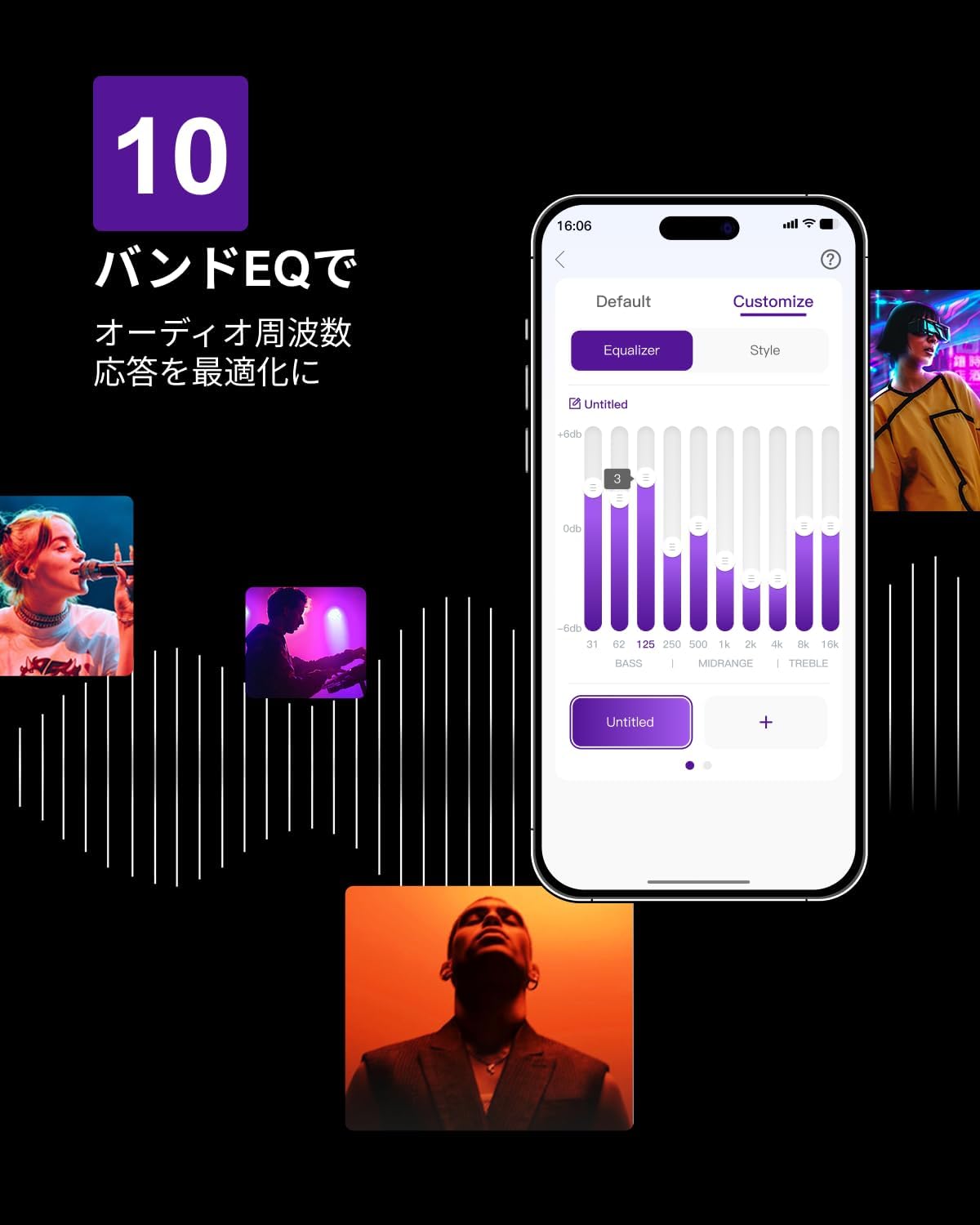
Figure 6.3: ULTIMEA mobile application interface.
7. Manutenzione
To ensure the longevity and optimal performance of your ULTIMEA Aura A60 soundbar system, follow these simple maintenance guidelines:
- Pulizia: Use a soft, dry cloth to wipe the surfaces of the soundbar, subwoofer, and speakers. Do not use liquid cleaners or abrasive materials, as they may damage the finish.
- Ventilazione: Assicurarsi che tutte le aperture di ventilazione rimangano libere e libere da ostruzioni per evitare il surriscaldamento.
- Magazzinaggio: Se si conserva il sistema per un periodo prolungato, scollegarlo dall'alimentazione e conservarlo in un luogo fresco e asciutto, lontano dalla luce solare diretta e da temperature estreme.
8. Risoluzione Dei Problemi
Se riscontri problemi con il tuo sistema soundbar, fai riferimento ai seguenti problemi comuni e alle relative soluzioni:
| Problema | Possibile causa | Soluzione |
|---|---|---|
| Nessun suono dalla soundbar. | Incorrect input selected, volume too low, cables not connected properly. | Verify the correct input source. Increase volume. Check all cable connections (HDMI, Optical, AUX). Ensure the soundbar is powered on. |
| Nessun suono dagli altoparlanti subwoofer/surround. | Subwoofer/speakers not paired or powered on, volume too low. | Ensure subwoofer and surround speakers are powered on. They should automatically pair. If not, refer to the pairing instructions in the full manual (if available) or contact support. Increase their individual volume levels. |
| Qualità del suono distorta o scarsa. | Incorrect audio settings, poor source quality, interference. | Adjust EQ settings or try different sound modes. Ensure the audio source is high quality. Check for nearby electronic devices causing interference. |
| Problemi di connessione Bluetooth. | Device out of range, not in pairing mode, interference. | Ensure the soundbar is in Bluetooth pairing mode. Move your device closer to the soundbar. Disconnect and re-pair the device. |
Se il problema persiste dopo aver provato queste soluzioni, contattare l'assistenza clienti ULTIMEA.
9. Specifiche
| Caratteristica | Dettaglio |
|---|---|
| Marca | ULTIMA |
| Nome del modello | Aura A60 |
| Numero di modello | Minore 2621 |
| Tipo di altoparlante | Soundbar with 7.1ch Surround Sound |
| Tecnologia audio | Dolby Atmos, BassMX Technology |
| Connettività | HDMI eARC, Bluetooth, Optical, AUX, USB |
| Subwoofer | 4-inch Wired Subwoofer (integrated BassMX) |
| Altoparlanti surround | 4 (2 wired front, 2 wireless rear) |
| Controllare | Remote Control, ULTIMEA App |
| Colore | Nero |
| Dimensioni (P x L x A) | 9 cm x 40 cm x 7 cm (Soundbar, approximate) |
| Paese di origine | Cina |
10. Garanzia e supporto
ULTIMEA is committed to providing high-quality products and customer satisfaction. Your Aura A60 U2621 soundbar system comes with comprehensive support.
10.1 Informazioni sulla garanzia
Specific warranty details may vary by region. Please refer to the warranty card included with your product or visit the official ULTIMEA websito per i termini e le condizioni di garanzia più aggiornati.
10.2 Assistenza clienti
For any questions, technical assistance, or troubleshooting not covered in this manual, please contact our dedicated support team:
- 365-Day Support: Our expert staff is available year-round to assist you.
- Chat dal vivo: Instant responses are available via live chat on our websito.
- Resi: We offer a 30-day return policy with free shipping for your peace of mind.

365-Day Expert Support

Instant Live Chat

Resi gratuiti entro 30 giorni
Per ulteriore assistenza, visitare il sito Negozio del marchio ULTIMEA.