
1. Introduzione
Grazie per l'acquistoasing the RovyVon E80s LED Flashlight. This compact and powerful EDC (Everyday Carry) flashlight is designed for versatility and durability, featuring a main white light with up to 1800 lumens output and a beam distance of 180 meters. It includes a built-in 3000mAh battery for extended use, along with multiple side light modes including white, red, and 365nm UV. This manual provides essential information for safe and effective operation of your device.
2. Informazioni sulla sicurezza
- Non puntare la luce direttamente negli occhi. Il fascio luminoso potente può causare danni temporanei alla vista o danni permanenti agli occhi.
- Tenere fuori dalla portata dei bambini.
- Do not disassemble the flashlight, as this may damage the device and void the warranty.
- Evitare di esporre la torcia a temperature estreme o alla luce solare diretta per periodi prolungati.
- Per la ricarica utilizzare solo il cavo USB-C in dotazione.
- Assicurarsi che il coperchio della porta di ricarica sia ben chiuso per garantire la resistenza all'acqua.
3. Contenuto della confezione
Si prega di controllare la confezione per verificare la presenza dei seguenti elementi:
- RovyVon E80s LED Flashlight
- Cavo di ricarica USB-C
- Manuale d'uso
- Removable Pocket Clip (pre-installed or separate)
4. Prodotto finitoview
The RovyVon E80s features a durable aluminum alloy body, a main LED, and a side light array with multiple functions. It is designed for comfortable grip and easy portability.

Figura 4.1: Principale view of the RovyVon E80s LED Flashlight.

Figure 4.2: The bidirectional and removable pocket clip allows for flexible carrying options, such as attaching to a strap or pocket.

Figure 4.3: The groove design on the flashlight body provides a non-slip surface and helps with sweat absorption, enhancing grip security.
5. Impostazione
5.1 Carica iniziale
Before first use, fully charge the flashlight. Connect the provided USB-C cable to the flashlight's charging port and to a USB power source (e.g., computer, wall adapter). The smart battery indicator will show charging status.

Figure 5.1: The 3000mAh battery charges via USB-C, with a smart indicator showing charge level. Red indicates <4%, Blue indicates 5-19%, Green indicates 20-39%, Yellow indicates 40-59%, and all four blue lights indicate 60-100%.
6. Istruzioni per l'uso
6.1 Main White Light Operation
- Attiva/disattiva: Press and hold the main switch for 0.5 seconds to turn the main light on or off.
- Modalità Ciclismo: While the main light is on, single-click the main switch to cycle through Low → Medium → High modes.
- Funzione di memoria: The main light will remember the last used mode when turned off and on again.
6.2 Funzionamento delle luci laterali
The E80s features a versatile side light array with white, red, and UV modes.
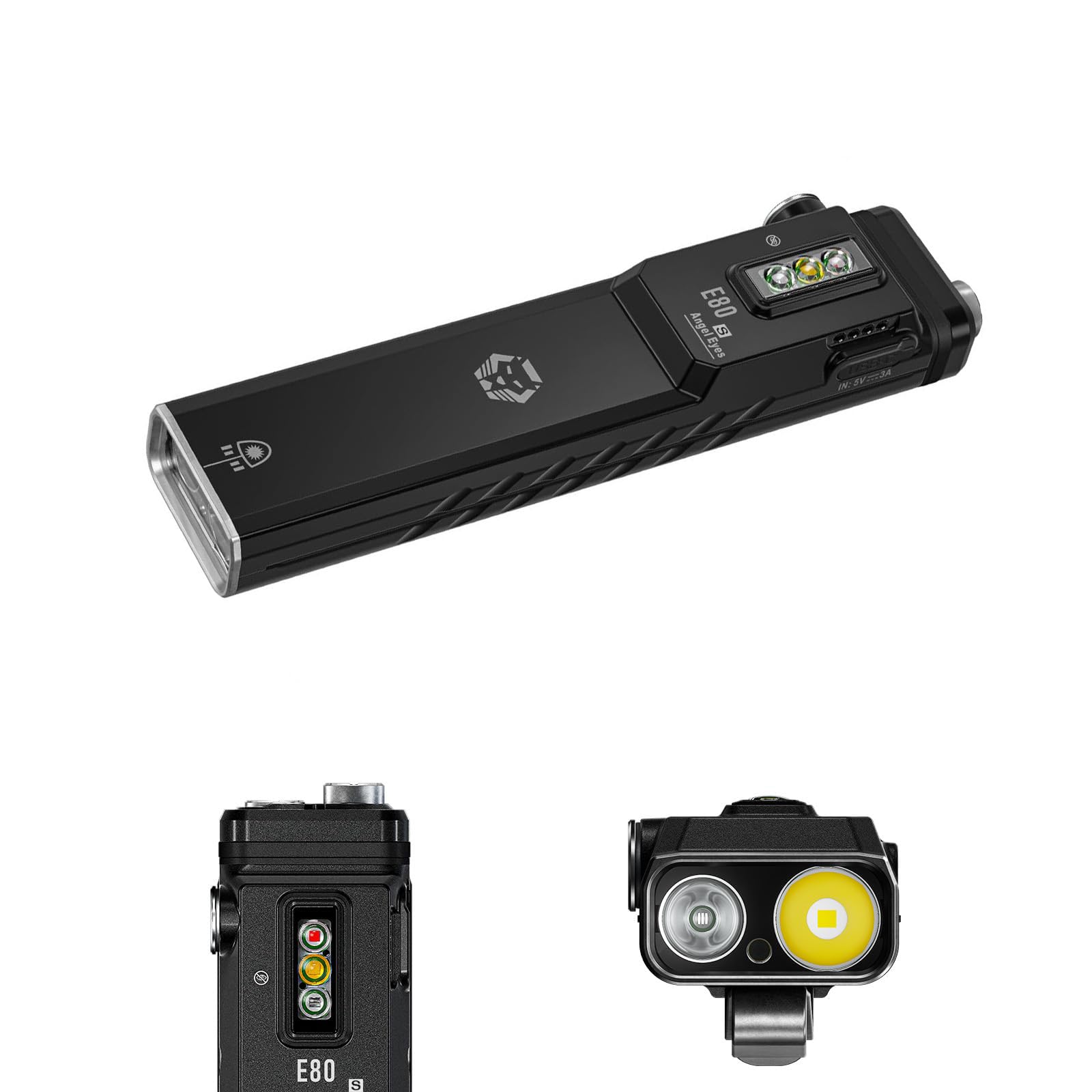
Figure 6.1: Various practical side light modes including white (low, medium, high), UV, and red (low, high, flash, beacon).
- Attiva/disattiva: Double-click the side switch to turn the side light on or off.
- Mode Cycling (White/Red/UV): While the side light is on, single-click the side switch to cycle through the available modes.
- White Side Light: Offers Low, Medium, and High modes for general illumination or reading.
- Red Side Light: Offers Low, High, Flash, and Beacon modes. Useful for preserving night vision or as a signal light.
- 365nm UV Side Light: Provides 1W output, suitable for currency verification, detecting pet stains, or checking hotel cleanliness. The front 365nm UV light offers up to 3W output for more specialized UV applications, with up to 4.5 hours of illumination.
7. Manutenzione
- Pulizia: Pulisci la torcia con un panno morbido eamp panno. Non usare detergenti abrasivi o solventi.
- Magazzinaggio: Conservare la torcia in un luogo fresco e asciutto quando non la si utilizza. Per una conservazione a lungo termine, caricare la batteria ogni 3-6 mesi per mantenerla in buone condizioni.
- Resistenza all'acqua: The E80s is IP68 rated. Ensure the USB-C port cover is fully sealed to maintain water resistance. Avoid prolonged submersion in water.
8. Risoluzione Dei Problemi
- La torcia non si accende: Assicurati che la batteria sia carica. Collegala a una fonte di alimentazione USB-C e controlla l'indicatore di carica.
- L'emissione luminosa è debole: La batteria potrebbe essere scarica. Ricaricare la torcia.
- La ricarica non funziona: Controlla il cavo USB-C e la fonte di alimentazione. Assicurati che il cavo sia completamente inserito nella porta.
- Funzionamento intermittente: Ensure the flashlight is not overheating. Allow it to cool down if it has been operating on high mode for an extended period.
9. Specifiche
| Caratteristica | Dettaglio |
|---|---|
| Modello | E80SHKJP |
| Marca | Rovy Von |
| Uscita luce principale | Max 1800 Lumen |
| Distanza del raggio | Massimo 180 metri |
| Batteria | 3000mAh incorporati |
| Porta di ricarica | USB-C |
| Modalità luce laterale | White (Low/Medium/High), Red (Low/High/Flash/Beacon), 365nm UV (1W) |
| Front UV Light | 365nm UV, Max 3W |
| Materiale | Lega di alluminio |
| Colore | Nero |
| Resistenza all'acqua | Grado di protezione IP68 |
| Dimensioni (L x P x A) | 13.1 cm x 3 cm x 2.1 cm (5.16 pollici x 1.18 pollici x 0.83 pollici) |
| Peso | 170 grammi (6 once) |
| Paese di origine | Cina |
10. Garanzia e supporto
The RovyVon E80s LED Flashlight comes with a limited warranty. For specific warranty terms and conditions, please refer to the product packaging or contact RovyVon customer support. If you encounter any issues or have questions regarding your product, please reach out to the retailer or RovyVon directly for assistance.