
Introduzione
The MINISO MS102 AI Translator Earbuds are designed to provide real-time language translation, high-definition call clarity, and premium audio playback. These earbuds support translation across 135 languages with near-instant response times and high accuracy. They are compatible with both iPhone and Android devices, offering a versatile solution for communication and entertainment.
Key features include an intuitive LCD touchscreen control on the charging case, multiple translation modes, and advanced audio technologies for an enhanced user experience.

Image: The MINISO MS102 AI Translator Earbuds are suitable for diverse translation scenarios, including study abroad, global travel, and multinational team communication.
Cosa c'è nella scatola
Verificare che tutti gli articoli siano presenti nella confezione:
- MINISO MS102 Earbuds (2)
- Scatola di ricarica (1)
- Charging Cable (USB-C) (1)
- Manuale d'uso (1)
- Scatola di imballaggio (1)
- cordino (1)

Image: The package contents for the MINISO MS102 AI Translator Earbuds, showing the earbuds, charging case, USB-C charging cable, user manual, and a lanyard.
Impostare
To utilize the full functionality of your MINISO MS102 AI Translator Earbuds, including translation features, follow these setup steps:
- Scarica l'App: Download the free "Auralntelli" application from your device's app store (available for both iOS and Android). No subscriptions are required for translation features.
- Login: Open the Auralntelli app and log in or create an account.
- Pair Earbuds via Bluetooth: Take the earbuds out of the charging case. On your smartphone, navigate to Bluetooth settings and pair with "MINISO-MS102".
- Connettiti tramite l'app: Open the Auralntelli app, and follow the on-screen prompts to connect your earbuds to the application.

Image: A visual guide illustrating the four steps to set up the earbuds: downloading the Auralntelli app, logging in, connecting via Bluetooth, and finalizing the connection within the app.
Istruzioni per l'uso
Accensione e connettività
The earbuds automatically power on when removed from the charging case and connect instantly to previously paired devices. They are compatible with mobile phones, iPads, computers, and other Bluetooth-enabled devices.
Intuitive LCD Touchscreen Control
The charging case features a vibrant HD touchscreen display, providing access to over 15 functions without needing your phone. Tap an item on the screen to access its options.
- Riproduzione musicale: Control tracks and volume.
- Impostazioni dell'equalizzatore: Adjust audio equalization.
- Comandi vocali: Attiva l'assistente vocale del tuo dispositivo.
- Strumenti utili: Accedi a funzioni come sveglia, cronometro e controllo remoto della telecamera.
- Traduzione: Directly access translation modes.
- Trova i miei auricolari: Individua gli auricolari smarriti.

Image: The multifunctional LED full-color touchscreen of the charging case displays icons for various functions, including system settings, music control, camera, power management, equalizer adjustments, translation access, and the 'Find My Earbuds' feature.
Translation Features and Modes
The earbuds support 135 languages with 98% accuracy and a reaction time of less than 0.5 seconds.

Image: A comprehensive list of 135 languages supported by the MINISO MS102 AI Translator Earbuds, demonstrating broad linguistic coverage.
The MS102 offers various translation modes to suit different communication needs:
- Modalità vivavoce: Facilitates real-time conversation flow for natural interactions.
- Touch Control Mode: Allows single-ear operation for quick translations.
- Photo Translate: Capture text from images for instant translation. Useful for menus, signs, and documents.
- Modalità chat AI: An AI assistant for natural dialogue, providing solutions for daily life or work queries.
- Modalità riunione: Designed for multilingual group discussions.
- Modalità ibrida: Enables simultaneous music playback and translation.
- Note vocali: Automatically transcribes spoken memos.
- Traduzione dei sottotitoli del video: Generates real-time subtitles for videos in supported applications.

Image: An illustration detailing the nine distinct translation modes available on the MINISO MS102 AI Translator Earbuds, designed for various communication scenarios.

Immagine: Un example of real-time translation in action, showing a conversation translated from English to German, highlighting the seamless cross-language communication provided by the earbuds.

Image: The photo translation feature is demonstrated by a smartphone scanning a street sign, with the text automatically translated from German to English, aiding in understanding foreign text.

Image: A user is shown watching a video on a smartphone while wearing the earbuds, with AI-generated captions displayed on the screen, illustrating the AI video captions feature for real-time subtitle translation.
Caratteristiche audio
The MS102 earbuds feature an open-ear design for comfort and studio-quality sound. Advanced Adaptive Noise Cancellation (ANC) technology minimizes background noise, ensuring clear audio for calls and music in various environments.
- Impostazioni EQ personalizzate: Adjust your audio experience with 5 custom equalizer presets (Pop, Rock, Standard, Classic, Jazz) to match your preferences.
- Nessun ritardo audio: Enjoy synchronized audio with video content, providing an immersive experience.
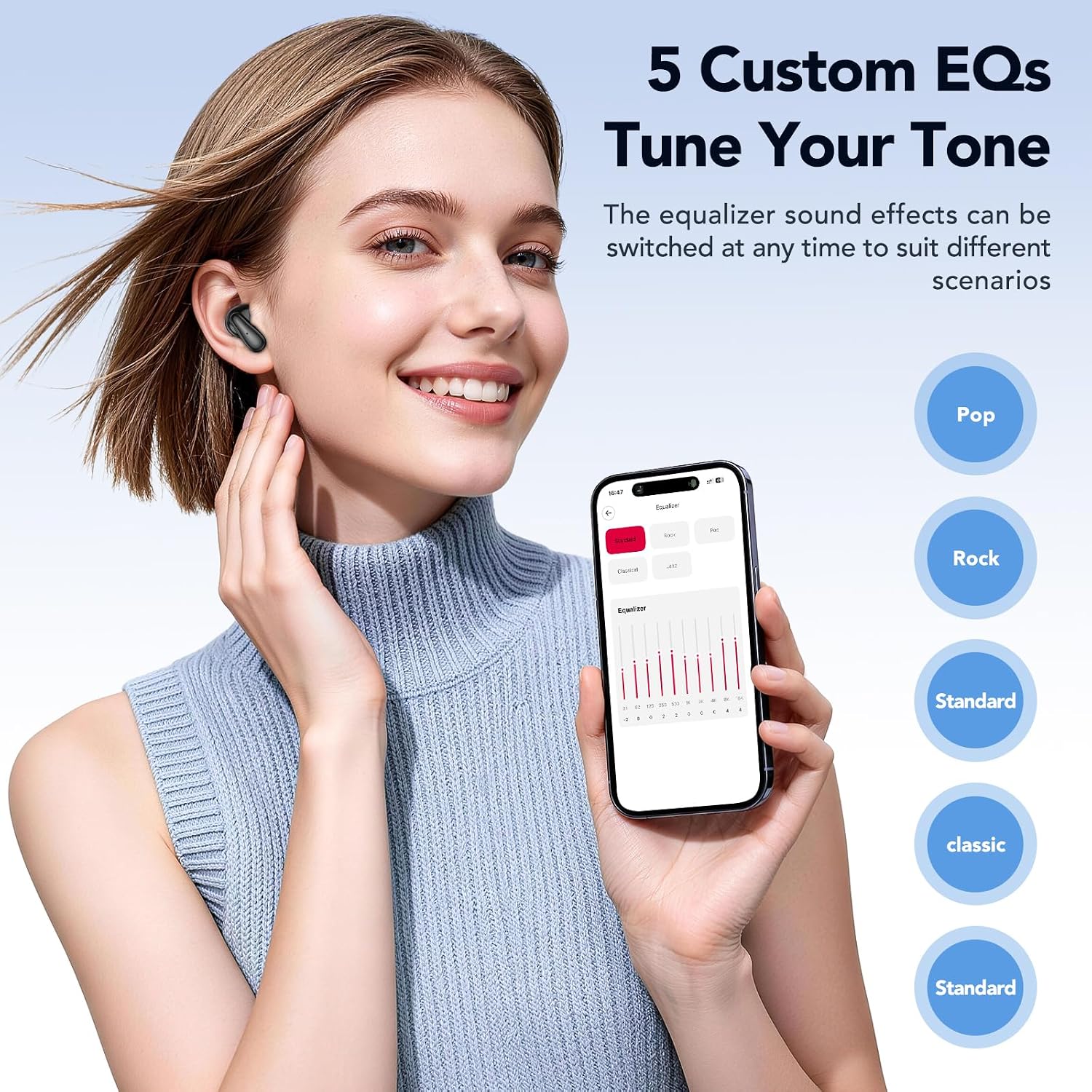
Image: A user adjusting the equalizer settings on a smartphone, showcasing the five custom EQ options (Pop, Rock, Standard, Classic, Jazz) available to tune the audio tone of the earbuds.
Find My Earbuds Feature
If you misplace your earbuds, the built-in tracker, accessible via the companion app, can display their last known location. You can also trigger an audible alert to help pinpoint their exact position.
Manutenzione
Una corretta manutenzione garantisce la longevità e le prestazioni ottimali dei tuoi auricolari.
- Pulizia: Pulisci regolarmente gli auricolari e la custodia di ricarica con un panno morbido, asciutto e privo di lanugine. Evita di utilizzare materiali abrasivi o sostanze chimiche aggressive.
- Magazzinaggio: Quando non li usi, conservali nella loro custodia di ricarica per proteggerli da polvere e danni. Conservali in un luogo fresco e asciutto, lontano da temperature estreme.
- Cura della batteria: To preserve battery life, avoid fully discharging the earbuds and charging case frequently. Charge them regularly, even if not in constant use. The earbuds offer up to 50 hours of battery life with the charging case, with a full charge taking approximately 1.5 hours.
- Resistenza all'acqua: The earbuds are IPX5 waterproof, meaning they are resistant to splashes and sweat. Do not submerge them in water.
Risoluzione dei problemi
If you encounter issues with your MINISO MS102 AI Translator Earbuds, refer to the following common solutions:
- Gli auricolari non si caricano:
- Assicurarsi che il cavo di ricarica sia collegato saldamente sia alla custodia di ricarica sia a una fonte di alimentazione.
- Verify that the charging case itself has power.
- Pulisci i contatti di ricarica su entrambi gli auricolari e all'interno della custodia con un batuffolo di cotone asciutto.
- Poor Audio Quality or Intermittent Sound:
- Assicurati che gli auricolari siano posizionati correttamente nelle orecchie.
- Check the Bluetooth connection and ensure you are within range of your paired device.
- Restart your paired device and reconnect the earbuds.
- Pulisci eventuali detriti dagli altoparlanti degli auricolari.
- Translation Features Not Working:
- Confirm that the "Auralntelli" app is installed and updated to the latest version.
- Ensure the earbuds are connected to your device via Bluetooth AND connected within the Auralntelli app.
- Controlla la tua connessione Internet, poiché le funzionalità di traduzione spesso richiedono l'accesso online.
- Gli auricolari non si connettono al dispositivo:
- Place the earbuds back in the charging case, close the lid, wait a few seconds, then remove them to re-initiate pairing mode.
- On your device, forget the "MINISO-MS102" Bluetooth connection and attempt to pair again.
Specifiche
| Caratteristica | Dettaglio |
|---|---|
| Marca | MINISIO |
| Numero di modello | MS102 |
| Posizionamento dell'orecchio | Orecchio aperto |
| Fattore di forma | Orecchio aperto True Wireless |
| Controllo del rumore | Cancellazione adattiva del rumore |
| Tipo di controllo | Controllo touch |
| Tipo di driver audio | Driver dinamico |
| Materiale di recinzione | Plastica |
| Tecnologia di connettività | Wireless (Bluetooth) |
| Versione Bluetooth | 5.4 |
| Livello di resistenza all'acqua | IPX5 impermeabile |
| Tempo di carica della batteria | 1.5 ore |
| Durata media della batteria | 50 ore (con custodia di ricarica) |
| Dispositivi compatibili | Cellphones, iPads, Computers, Watches |
| Codice UPC | 850073442531 |
Garanzia e supporto
The MINISO MS102 AI Translator Earbuds come with a Garanzia limitata di 1 anno dalla data di acquisto, a copertura dei difetti di fabbricazione. Si prega di conservare la prova d'acquisto per eventuali reclami in garanzia.
For setup assistance, troubleshooting, or any other product-related inquiries, please contact our dedicated customer service team. Refer to the contact information provided in your product packaging or visit the official MINISO websito per i dettagli del supporto.