Introduzione
This manual provides comprehensive instructions for the installation, operation, and maintenance of your Eseesmart Smart Front Door Lock Set (Model YL-MD168). This advanced keyless entry system offers multiple unlocking methods including Bluetooth APP control, anti-peep passcode, RFID cards, and physical keys. It features auto-lock functionality, passage mode, and robust security features designed for durability and convenience. Please read this manual thoroughly before installation and use to ensure proper function and safety.
Contenuto della confezione
Prima di iniziare l'installazione, verificare che tutti i componenti siano presenti nella confezione.
- Front Plate * 1
- Base Plate Assembly * 1
- Fermo * 1
- Bullone * 1
- Tubo * 1
- Spring * 1
- Decorative Cover * 1
- Battery Cover * 1
- Screw Pack (includes Self-tapping screws * 4, M4 screw (short) * 3, M4 screw (long) * 2, M5 screw * 1)
- Backup Key * 2

Immagine: Esploso view of the Eseesmart Smart Lock components, showing the front plate, base plate, latch, bolt, tube, spring, decorative cover, battery cover, various screws, and backup keys.
Configurazione e installazione
The Eseesmart Smart Front Door Lock Set is designed for easy installation, typically requiring no additional drilling for standard door setups. It replaces existing locks and is compatible with US standard left and right-handed doors.
1. Controllo della compatibilità delle porte
Assicurati che la tua porta soddisfi le seguenti specifiche:
- Spessore della porta: 1.49 - 1.97 pollici (38 - 50 mm)
- Entrata: 2-3/8 inches (60 mm) or 2-3/4 inches (70 mm)
- Diametro del foro: Greater than 1-17/20 inches (47 mm)
- Distance between bore holes: 5-1/2 inches (140 mm) apart.

Image: Diagram illustrating door thickness, backset, hole diameter, and distance between bore holes for proper installation of the Eseesmart Smart Lock.

Image: Visual guide for checking door dimensions and compatibility with the Eseesmart Smart Lock, showing measurements for left-handed and right-handed doors.
2. Fasi di installazione
Follow the detailed instructions provided in the included manual for step-by-step installation. A video guide is also available for visual assistance.
Importante: Ensure the bore holes are exactly 5-1/2 inches (140mm) apart for stable installation.
3. Installazione della batteria
The lock requires 4 AAA batteries (not included). Install them into the battery compartment located on the interior side of the lock.

Immagine: View of the Eseesmart Smart Lock's interior, showing the battery compartment designed for 4 AAA batteries.
Istruzioni per l'uso
1. Metodi di sblocco
Your Eseesmart Smart Lock offers multiple convenient ways to unlock your door:
- Controllo tramite APP Bluetooth: Use the dedicated mobile application to unlock your door remotely.
- Codice di accesso della tastiera: Enter your personalized code on the anti-peep OLED keypad.
- Carte RFID: Tap a registered RFID card to the lock for quick access.
- Chiave fisica: Use the provided backup keys for traditional unlocking.
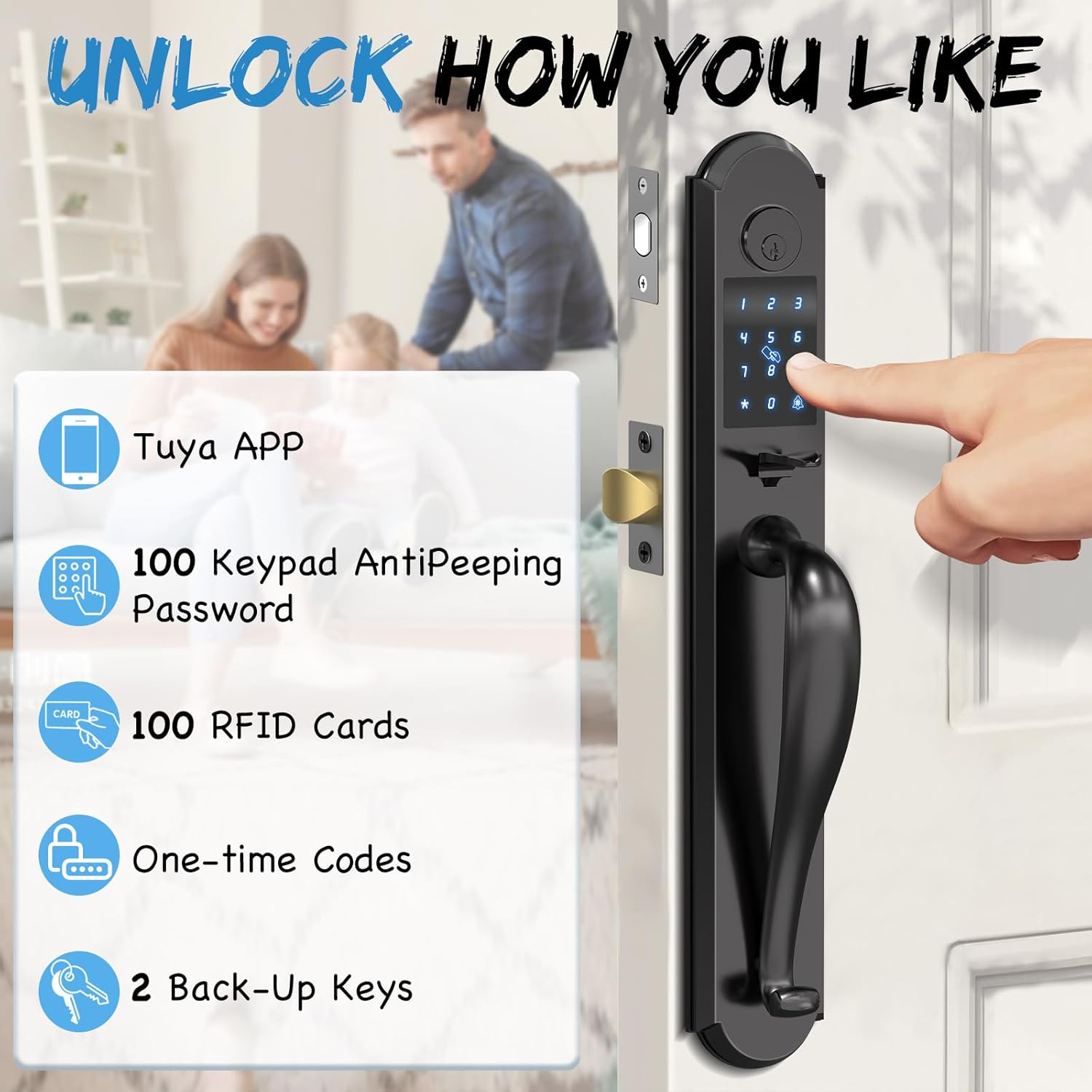
Image: Illustration of various unlocking methods including Tuya APP, keypad with anti-peeping password, RFID cards, one-time codes, and backup keys.
2. Keypad Passcode Entry (Anti-Peep Feature)
To enhance security, the keypad supports an anti-peep function. You can enter random digits before and after your actual passcode. The lock will recognize the correct sequence within the longer string of numbers.

Image: Demonstrates the anti-peep password feature, where random digits can be entered before and after the actual password to prevent onlookers from discerning the code.
3. Controllo delle applicazioni mobili
The Eseesmart app allows you to manage your lock from your smartphone. Features include:
- Generating various types of codes (one-time, permanent, timed, recurring, custom) for guests.
- Assigning up to 100 guest passcodes and 100 IC cards.
- Setting Auto Lock Timer or Passage Mode.
- Real-time push notifications and activity logs.

Image: Screenshot of the Eseesmart mobile application interface, showing options for creating various types of PIN codes such as one-time, permanent, timed, custom, recurring, and erase codes.

Image: A user interacting with the Eseesmart app, highlighting features like app control, real-time push notifications, activity logs, and user management.
4. Auto Lock and Passage Mode
- Chiusura automatica: The lock can be configured to automatically lock after a set period (5-60 seconds) once the door is closed. This feature can be customized via the app.
- Modalità di passaggio: When Passage Mode is enabled, the auto-lock function is temporarily turned off, allowing the door to remain unlocked for continuous access. This is useful for gatherings or when frequent entry/exit is needed.

Image: Depicts the Auto Lock feature, showing the lock automatically engaging after a set time, and the Passage Mode, where the lock remains unlocked for convenience during social events.

Image: A woman with a baby bag demonstrating the auto-lock feature, where the door automatically locks after a customizable duration of 5-60 seconds.

Image: A group of people enjoying a gathering, illustrating the Passage Mode where the lock remains unlocked, allowing free entry and exit without needing to re-enter codes.
5. Volume regolabile
The lock's operational sounds can be adjusted to Mute, Low, Medium, or High volume settings.

Image: Shows the adjustable volume settings for the smart lock, including mute, low, medium, and high volume options, with a sleeping child in the background to emphasize quiet operation.
Manutenzione
1. Gestione della batteria
- Avviso batteria scarica: The lock will provide clear alerts when the battery level drops below 20%. Replace batteries promptly to ensure continuous operation.
- Emergency Charge: In case of complete battery depletion, the lock features a USB-C port for emergency power, allowing you to temporarily power the lock and gain entry.
- Chiave di backup: Always keep a physical backup key in a secure location outside your home for emergency access.
Image: Displays the battery compartment, the USB-C port for emergent charging, a real-time battery status indicator, and the option to unlock with a backup physical key.
2. Pulizia
Pulisci l'esterno della serratura con un panno morbido eamp panno. Evitare l'uso di detergenti abrasivi o solventi, poiché potrebbero danneggiare la finitura e i componenti elettronici.
Risoluzione dei problemi
If you encounter issues with your Eseesmart Smart Lock, refer to the following common solutions:
- Il lucchetto non risponde: Check battery levels. If low, replace batteries or use the emergency USB-C charge port.
- La tastiera non si illumina: Assicurarsi che le batterie siano installate correttamente e cariche.
- Difficoltà con la connessione all'app: Ensure Bluetooth is enabled on your device and you are within range of the lock. Restart the app or your phone if necessary.
- anti-tampallarme attivato: The lock features an anti-saw tongue with a built-in hidden anti-saw pin and an alarm system. If the prevent-pry setting is enabled and tampering is detected, the system will lock and alarm for 180 seconds.
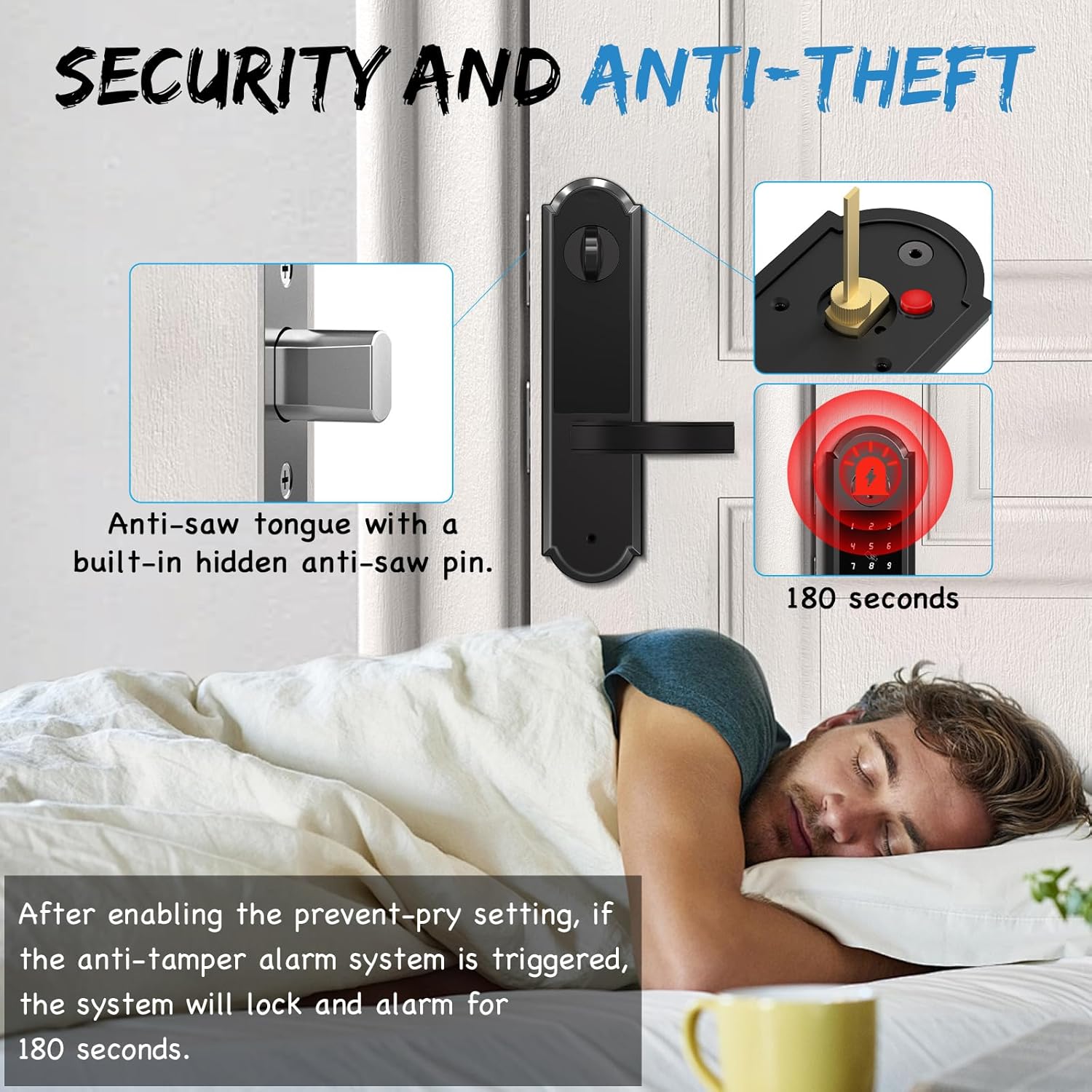
Image: Illustrates the anti-saw tongue with a hidden anti-saw pin and the anti-tamper alarm system, which triggers a 180-second alarm if tampviene rilevato un guasto.

Image: A person sleeping peacefully, while the image highlights the anti-saw tongue with a built-in hidden anti-saw pin and an alarm system that activates for 180 seconds if tampviene rilevato un guasto.
Specifiche
| Marca | Eseesmart |
| Numero di modello | YL-MD168 |
| Materiale | Heavy Duty Alloy |
| Colore | Nero |
| Stile | Smart Fashion |
| Tipo di blocco | Deadbolt Lock, Keyless Entry Door Lock with Handle, Keypad Lock |
| Dimensioni del prodotto | 3.2 x 1.39 x 20 pollici |
| Peso dell'articolo | 11 libbre |
| Fonte di alimentazione | 4 batterie AAA (non incluse) |
| Caratteristiche speciali | App Control, Anti-Peep Passcode, RFID Cards Unlock, Auto Lock, One-Touch Lock, Passage Mode, Physical Key, Emergent Charge (USB-C), Low Battery Alert, Anti-Saw Tongue, Alarm System, Tempered Glass Keypad, Integrated Design |
| Durata | Resistant to -31°F to 158°F, IP65 Waterproof, Shock Resistant, 168H Salt Spray & Humidity Test, 150,000 Usage Test |
Image: Close-up of the Eseesmart Smart Lock keypad, highlighting its robust construction and features like 2173N appearance pressure resistance, temperature resistance (-31°F to 158°F), 168H salt spray & humidity test, 150,000 usage test, and IP65 waterproof rating.

Image: The Eseesmart Smart Lock installed on a door during snowy weather, emphasizing its resistance to temperatures from -31°F to 158°F and its IP65 waterproof rating.
Garanzia e supporto
Eseesmart provides a 12-month replacement or refund policy for your product. Additionally, LIFETIME troubleshooting and customer service support sono disponibili.
For any queries, technical assistance, or warranty claims, please contact Eseesmart customer service.
Informazioni sui contatti: Refer to the Eseesmart websito o nella documentazione di acquisto per i dettagli di contatto più aggiornati.