
1. Introduzione
Thank you for choosing the Devoko L-Shaped Corner Desk. This manual provides essential information for the safe assembly, operation, and maintenance of your new desk. Designed for both office and gaming environments, this desk features a spacious L-shaped work surface, integrated LED lighting, built-in power outlets with USB ports, an ergonomic monitor stand, and convenient storage drawers. Please read these instructions carefully before assembly and retain them for future reference.
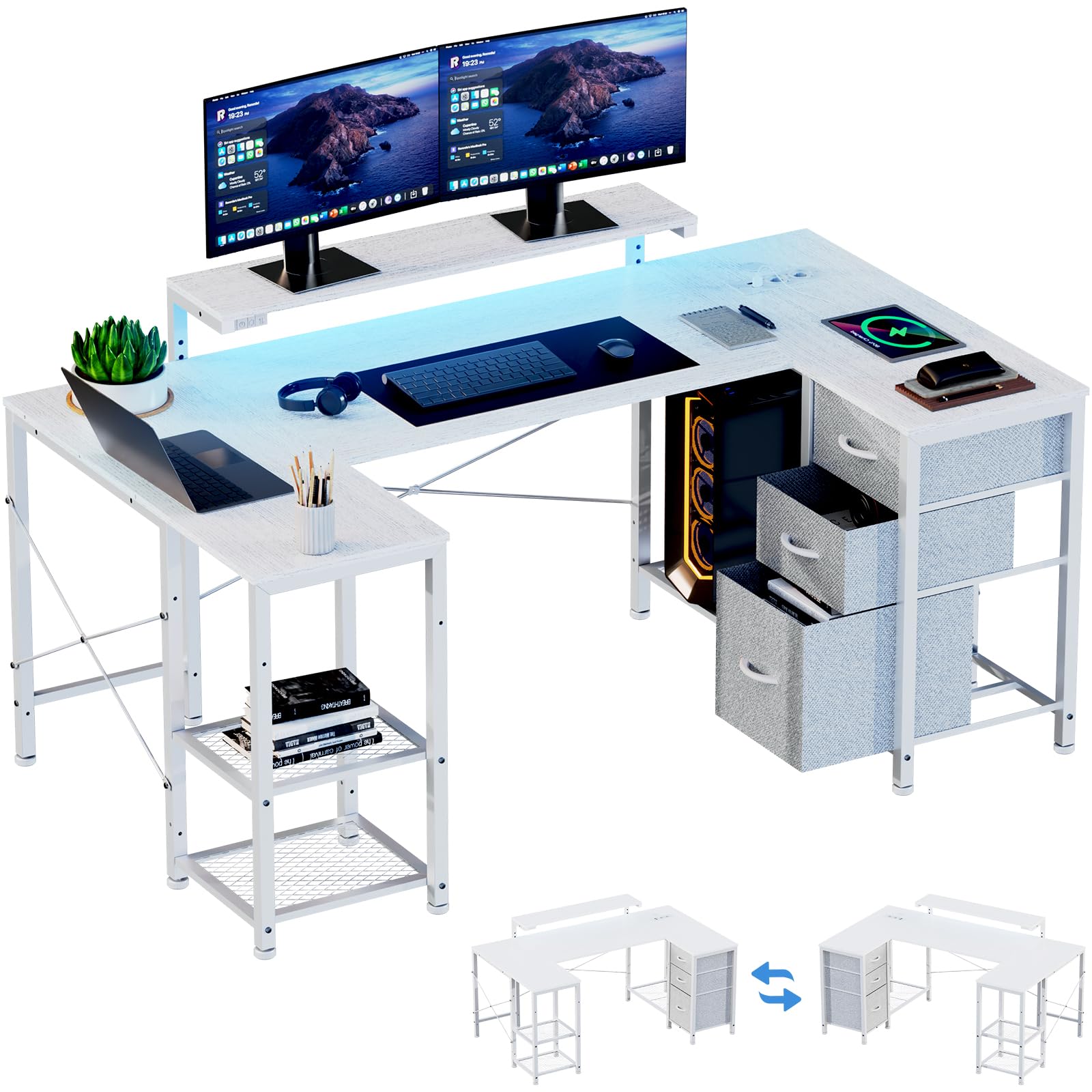
Figura 1: Oltreview of the Devoko L-Shaped Corner Desk.
2. Specifiche del prodotto
| Caratteristica | Dettaglio |
|---|---|
| Marca | Devoko |
| Forma | Forma a L. |
| Dimensioni del prodotto (P x L x A) | 66.93" x 37.4" x 29.53" (170 x 95 x 75 cm) |
| Colore | Bianco |
| Tipo di materiale superiore | Legna |
| Tipo di materiale del telaio | Metallo |
| Numero di cassetti | 3 (Tessuto) |
| Supporto per monitor | Altezza regolabile |
| Prese di corrente | 2 AC Sockets (220-250V/15A) |
| Porte USB | 2 porte USB (5 V/2.1 A) |
| Illuminazione a LED | RGB LED Strips (7 colors) |
| Assemblaggio richiesto | Sì (strumenti inclusi) |

Figure 2: Detailed product dimensions. The desk measures 170cm (66.93 inches) along the longer side and 95cm (37.4 inches) along the shorter side, with a height of 75cm (29.53 inches). The monitor stand is adjustable in height.
3. Installazione e assemblaggio
Assembly of the Devoko L-Shaped Corner Desk is designed to be straightforward. All necessary tools and hardware are included. It is recommended to assemble the desk with two people for ease and safety. Please follow the steps below carefully.
- Disimballare i componenti: Disimballare con cura tutti i componenti e l'hardware. Verificare che tutti i componenti elencati nella lista di imballaggio siano presenti e integri.
- Identificare le parti: Lay out all metal frame pieces, wooden panels, and hardware. Each part is typically labeled for easy identification.
- Montare il telaio: Begin by assembling the metal frame structure according to the provided diagrams. Ensure all screws are tightened securely but do not overtighten until the entire frame is assembled.
- Fissare i pannelli della scrivania: Secure the wooden desk panels to the assembled metal frame. Pay attention to the orientation of the L-shape and ensure the pre-drilled holes align.
- Installare il supporto del monitor: Attach the monitor stand to the designated area on the desk. The height can be adjusted during or after assembly.
- Unità di potenza integrata: Carefully place the power outlet and USB unit into its designated cutout on the desk surface. Connect the power cable.
- Installare strisce LED: Adhere the LED light strips to the underside of the monitor stand or desired location. Connect the LED controller and power supply.
- Inserisci cassetti: Assemble the fabric drawers and slide them into the designated compartments.
- Serraggio finale: Once all components are in place and aligned, fully tighten all screws and bolts to ensure stability.
Nota: The desk features a reversible layout, allowing the storage unit to be placed on either the left or right side during assembly to best fit your room configuration.
4. Istruzioni per l'uso
4.1. Prese di corrente e porte USB integrate
The desk includes a built-in power strip with two AC sockets and two USB charging ports, providing convenient access to power for your devices.
- Prese CA: Rated for 220-250V/15A. Use for laptops, monitors, and other standard electronics.
- Porte USB: Rated for 5V/2.1A. Ideal for charging smartphones, tablets, headphones, and other USB-powered devices.

Figure 3: Close-up of the integrated power outlets and USB ports. Connect your devices directly to the desk for charging and power.
To use, simply plug the desk's main power cable into a wall outlet. Then, plug your devices into the integrated sockets or USB ports.
4.2. Sistema di illuminazione a LED
The desk features RGB LED light strips to enhance your workspace ambiance. The LED strips are controlled via a dedicated controller.
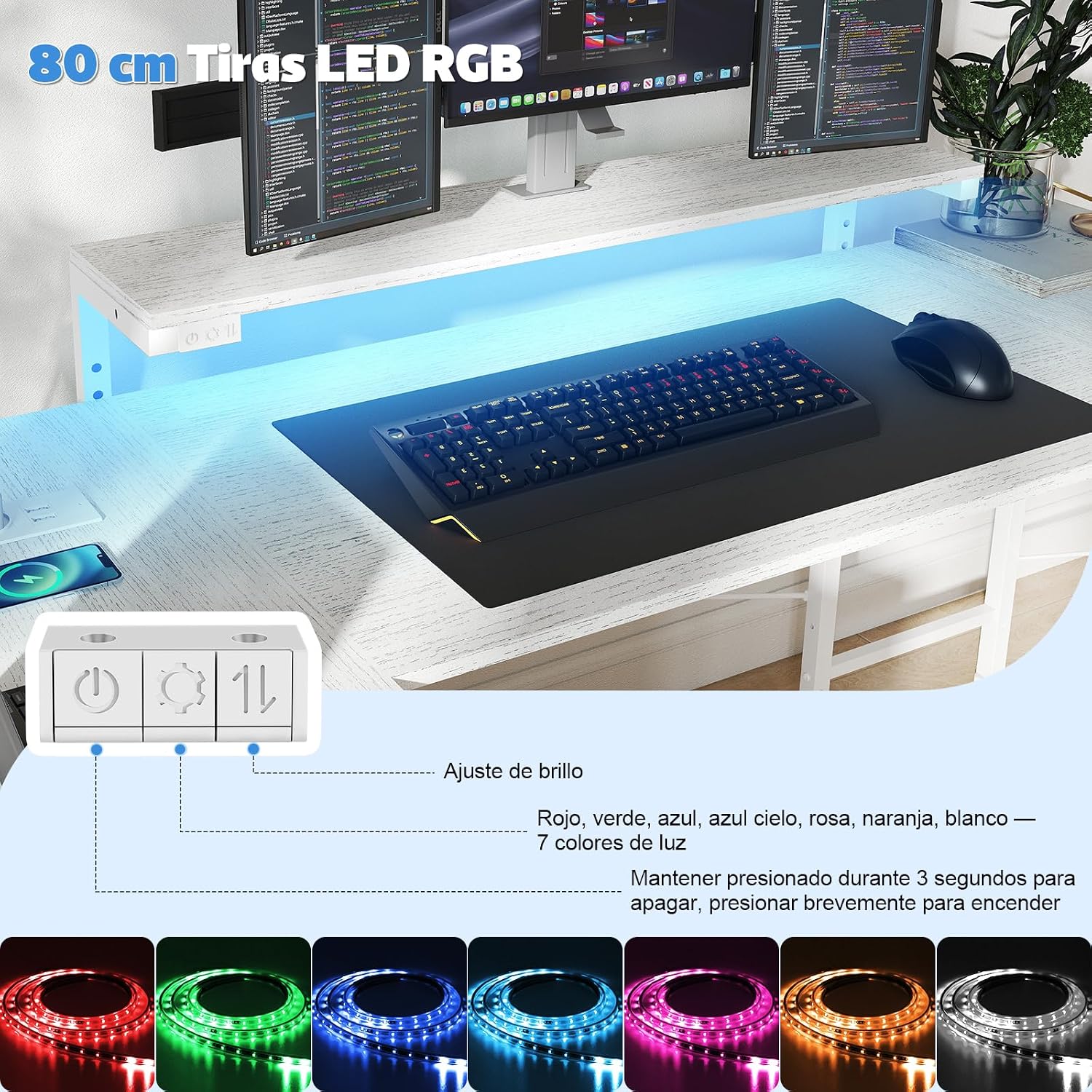
Figure 4: LED lighting controller with power, mode, and brightness adjustment buttons. The system offers 7 color options: Red, Green, Blue, Sky Blue, Pink, Orange, White.
- Accensione/spegnimento: Briefly press the power button to turn the LEDs on. Press and hold for 3 seconds to turn them off.
- Selezione del colore: Use the mode button to cycle through the 7 available colors (Red, Green, Blue, Sky Blue, Pink, Orange, White) and various lighting effects.
- Regolazione della luminosità: Use the brightness buttons to increase or decrease the intensity of the LED lights.

Figure 5: The desk illuminated by its integrated LED lighting, creating an immersive environment.
4.3. Supporto per monitor regolabile
The ergonomic monitor stand is designed to optimize your viewing height, reducing neck and eye strain. It can be adjusted to different heights.

Figure 6: Illustration of the adjustable monitor stand, showing different height settings (e.g., 10cm, 13cm, 16cm above the main desk surface).
To adjust the monitor stand height, carefully lift the stand and reposition it into the desired slots on the desk frame. Ensure it is securely seated before placing monitors or other equipment on it.
4.4. Cassetti portaoggetti
The desk includes three spacious fabric drawers for organizing your office supplies, documents, and gaming accessories.

Figure 7: The three fabric drawers provide ample storage for stationery, documents, electronic accessories, and other personal items, helping to keep your workspace tidy.
To use the drawers, simply pull them out by their handles. Ensure not to overload them to maintain smooth operation and prevent damage.
5. Manutenzione
Regular maintenance will help prolong the life and appearance of your Devoko L-Shaped Corner Desk.
- Pulizia delle superfici: Wipe desk surfaces with a soft, damp panno. Evitare detergenti abrasivi o prodotti chimici aggressivi che potrebbero danneggiare la finitura. Per macchie ostinate, è possibile utilizzare una soluzione di sapone neutro, seguita da asciugatura con un panno pulito.
- Cura del telaio: Il telaio metallico può essere pulito con un pannoamp panno. Assicurarsi che sia ben asciutto per evitare la ruggine.
- Cura dei cassetti: I cassetti in tessuto possono essere puliti con un detergente delicato e acqua. Lasciarli asciugare completamente all'aria prima di reinserirli.
- Controllare le connessioni: Controllare periodicamente tutte le viti e i bulloni per assicurarsi che siano ben serrati. Se necessario, serrarli nuovamente per mantenere la stabilità della scrivania.
- Componenti elettrici: Ensure the power outlets, USB ports, and LED lighting components are kept dry. Do not attempt to disassemble or repair electrical components yourself.
6. Risoluzione Dei Problemi
If you encounter any issues with your Devoko L-Shaped Corner Desk, please refer to the following common problems and solutions:
| Problema | Possibile causa | Soluzione |
|---|---|---|
| La scrivania è traballante/instabile. | Viti allentate o pavimento irregolare. | Assicurarsi che tutte le viti di montaggio siano ben serrate. Regolare i piedini di livellamento, se presenti, o posizionare degli spessori sotto le gambe su superfici irregolari. |
| Prese di corrente/porte USB non funzionanti. | Desk not plugged into wall outlet, wall outlet not active, or internal connection issue. | Verify the desk's main power cable is securely plugged into a functional wall outlet. Test the wall outlet with another device. If the issue persists, contact customer support. |
| Le luci LED non si accendono. | LED power cable disconnected, controller malfunction, or power issue. | Check that the LED power cable is securely connected to the controller and the power source. Ensure the desk's main power is on. Try pressing the power button on the LED controller briefly. |
| I cassetti sono difficili da aprire/chiudere. | Overloaded or improperly inserted. | Reduce the weight in the drawers. Ensure the fabric drawers are correctly folded and inserted into their compartments. |
If these solutions do not resolve your issue, please contact Devoko customer support for further assistance.
7. Garanzia e supporto
Devoko stands behind the quality of its products. For specific warranty information regarding your L-Shaped Corner Desk, please refer to the warranty card included with your purchase or visit the official Devoko website. For technical support, replacement parts, or any other inquiries, please contact Devoko customer service through their official channels.
Informazioni sui contatti: Please refer to your purchase documentation or the Devoko brand websito per i dettagli di contatto più aggiornati dell'assistenza clienti.