
1. Introduzione e oltreview
The GEYA GPS6-VA5 is an advanced adjustable over and under voltage protection device designed to safeguard electrical equipment from voltage fluctuations. It features a digital display for real-time monitoring of voltage and current, and offers customizable protection parameters. This device is suitable for various applications requiring reliable power protection.
This manual provides essential information for the safe and effective installation, operation, and maintenance of your GEYA GPS6-VA5 protection device.
2. Informazioni sulla sicurezza
Avvertimento: Electrical installation and maintenance should only be performed by qualified personnel. Failure to follow these instructions may result in electric shock, fire, or serious injury.
- Always disconnect power to the circuit before installing, wiring, or servicing the device.
- Assicurarsi che tutti i collegamenti elettrici siano sicuri e conformi alle normative e agli standard elettrici locali.
- Non utilizzare il dispositivo se appare danneggiato.
- Verificare il volumetage and current ratings of your system are compatible with this device.
3. Caratteristiche del prodotto
- Display digitale intelligente: Clear LED display shows real-time voltage, current, and fault status for quick monitoring.
- Advanced Over & Under Voltage Protezione: Equipped with factory default settings of 275V overvoltage and 175V undervoltage, ensuring device safety. These settings are adjustable.
- Monitoraggio corrente: Displays current values, providing comprehensive electrical oversight.
- Adjustable Reset Time: Offers a factory default reset time of 30 seconds, adjustable from 2 to 900 seconds to suit specific application needs.
- Design compatto: Ultra-small size for efficient space utilization.
- Montaggio su guida DIN: Designed for easy integration with 35mm DIN rail systems, simplifying installation.
4. Configurazione e installazione
The GEYA GPS6-VA5 is designed for 35mm DIN rail mounting. Ensure the mounting location is dry, well-ventilated, and free from excessive vibration or heat.
4.1 Montaggio
Attach the device securely to a standard 35mm DIN rail. The device features a clip mechanism for easy installation and removal.

Image: Dimensions of the GEYA GPS6-VA5 device and an illustration of 35mm DIN rail mounting.
4.2 Cablaggio
Connect the device according to the wiring diagram provided. Ensure correct polarity and secure connections for both input (Line and Neutral) and output to the load.
- Connect the incoming Line (L) and Neutral (N) wires to the designated input terminals.
- Connect the load's Line (L) and Neutral (N) wires to the designated output terminals.
- Tighten all screw terminals firmly to prevent loose connections.
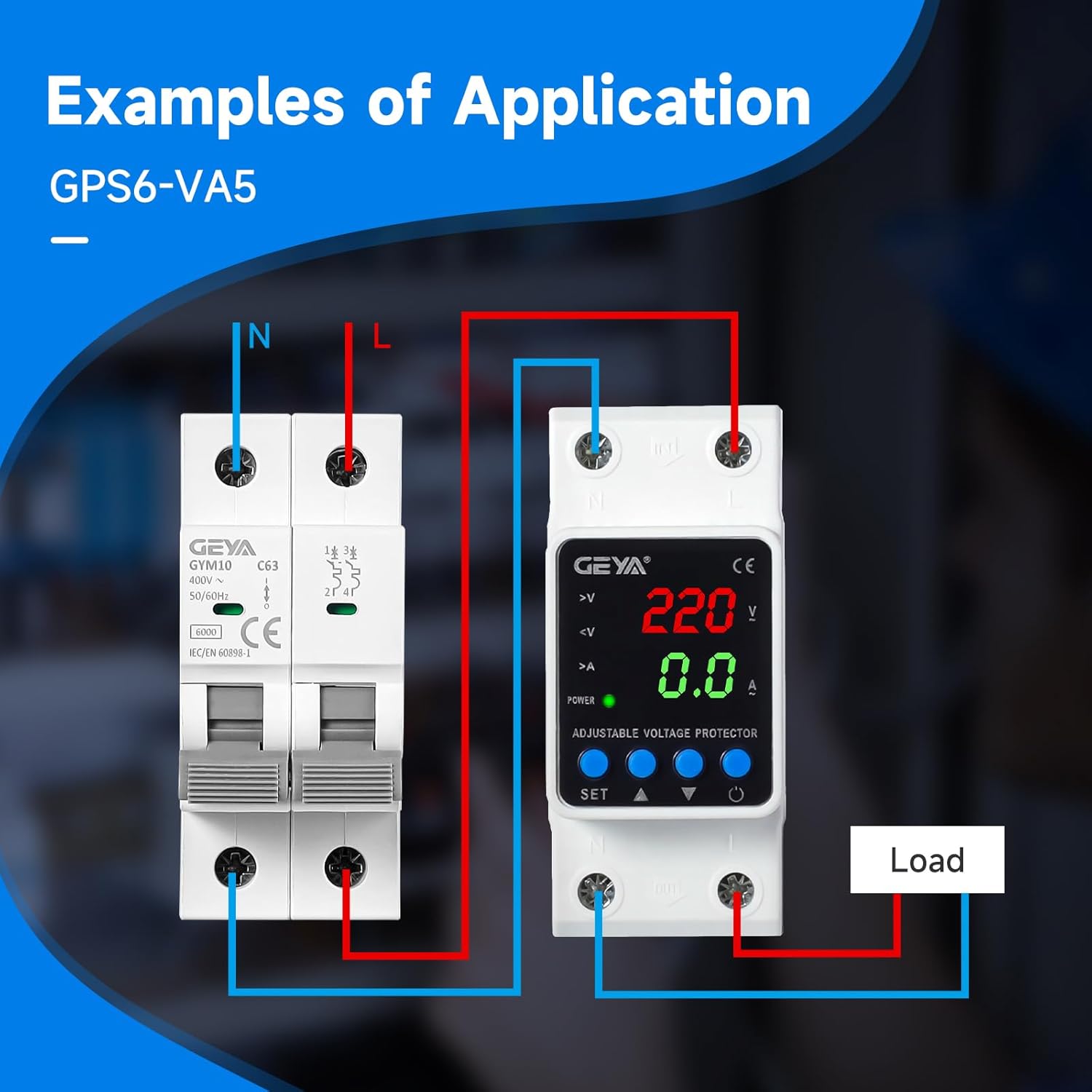
Immagine: Example wiring diagram showing connections for the GEYA GPS6-VA5 with an external circuit breaker and load.
5. Istruzioni per l'uso
Una volta installato e acceso, il dispositivo visualizzerà il volume in tempo realetage and current readings. The LED indicators provide status information.
5.1 Display digitale sopraview
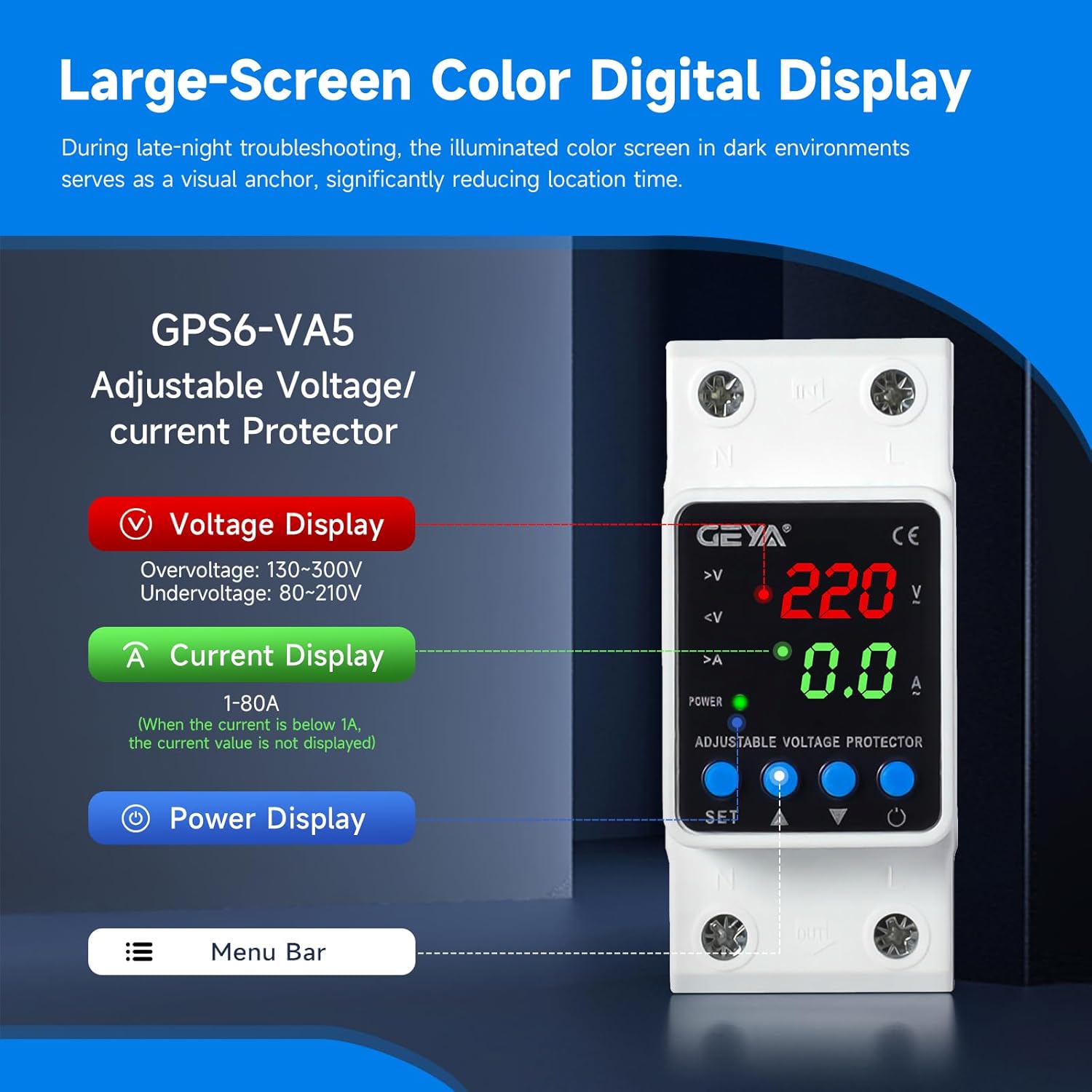
Image: Close-up of the GEYA GPS6-VA5 digital display, highlighting voltage, current, and power indicators, along with control buttons.
- Voltage Visualizzazione: Mostra il volume correntetage (V). Overvoltage range: 130-300V, Undervoltage portata: 80-210V.
- Visualizzazione corrente: Shows the current (A) flowing through the device (1-80A). If current is below 1A, the value may not be displayed.
- Visualizzazione della potenza: Indica lo stato di alimentazione.
- Indicatori: LEDs for overvoltage (>V), undervoltage (<V), and overcurrent (>A) provide quick visual status.
5.2 Regolazione delle impostazioni
The device features 'SET', 'Up Arrow', and 'Down Arrow' buttons for adjusting protection parameters. Refer to the detailed instructions below for specific parameter adjustments.
- Press the 'SET' button to enter the setting mode.
- Use the 'Up Arrow' and 'Down Arrow' buttons to navigate through different parameters (e.g., overvoltage soglia, sottovoltage threshold, reset time).
- Press 'SET' again to select a parameter, then use 'Up Arrow' and 'Down Arrow' to adjust its value.
- Press 'SET' to confirm the new value and move to the next parameter or exit setting mode.
Nota: Factory default settings are 275V for overvoltage, 175V for undervoltage, and a 30-second reset time. These can be adjusted within the specified ranges.
6. Manutenzione
The GEYA GPS6-VA5 is designed for minimal maintenance. Regular checks can help ensure its continued reliable operation.
- Pulizia: Periodically wipe the device with a soft, dry cloth to remove dust. Do not use abrasive cleaners or solvents.
- Verifica della connessione: Annually inspect all wiring connections to ensure they remain tight and free from corrosion.
- Condizioni ambientali: Assicurarsi che l'ambiente operativo rimanga entro gli intervalli di temperatura e umidità specificati.
- Nessuna parte riparabile dall'utente: Do not attempt to open or repair the device. Refer any issues to qualified service personnel.
7. Risoluzione Dei Problemi
If you encounter issues with your GEYA GPS6-VA5 device, refer to the following common troubleshooting steps:
- Nessun display/Nessuna alimentazione:
- Controllare l'alimentazione principale del dispositivo.
- Verificare che tutti i collegamenti dei cavi di ingresso siano sicuri.
- Device Not Tripping on Fault:
- Confirm that the overvoltage/sottovoltage thresholds are set correctly and within the expected range for your application.
- Ensure the fault condition (e.g., voltage outside set limits) is present and sustained long enough to trigger the trip delay.
- Device Tripping Unexpectedly:
- Check the actual line voltage and current to ensure they are within normal operating parameters.
- Review the set overvoltage, sottovoltage, and overcurrent thresholds. Adjust if necessary.
- Inspect for intermittent power fluctuations in your electrical system.
- Letture errate:
- Ensure wiring is correct and connections are tight.
- Compare readings with a calibrated multimeter if possible.
If the problem persists after attempting these steps, contact GEYA customer support or a qualified electrician.
8. Specifiche
| Parametro | Valore |
|---|---|
| Nome del marchio | GEYA |
| Numero di modello | GPS6-VA5-2P-40A-220V |
| Fornitura nominale voltage | AC220V (LN) |
| Frequenza nominale | Frequenza 50/60 Hz |
| Valutazione attuale | 40 Amps |
| Bobina voltage | 220 Volt (CA) |
| Vol. minimo di commutazionetage | 130 Volt (CA) |
| Modalità di funzionamento | Automatico |
| Tipo di montaggio | Montaggio su guida DIN |
| Tipo di connettore | Vite |
| Materiale di contatto | Argento |
| Tipo di contatto | Normalmente aperto |
| Tempo di ripristino | 2-900s (Factory default: 30s) |
| Certificazione | CE |
9. Garanzia e supporto
For warranty information or technical support, please contact GEYA customer service. Keep your purchase receipt as proof of purchase.
For further assistance, visit the official GEYA websito o contattare il distributore locale.