
1. Finitaview
The Ulefone Tab A9 Pro is an 8.68-inch kids learning tablet designed for children aged 3-12. It features an 8.68" TÜV SÜD Eye Comfort Display, runs on Android 15 with a MediaTek G91 Octa-Core processor, and includes 8GB RAM and 128GB storage (expandable up to 2TB). This tablet is equipped with built-in learning apps, parental controls, and dual SIM support for connectivity on the go. It comes with a durable, shockproof EVA case and a DIY creativity kit.
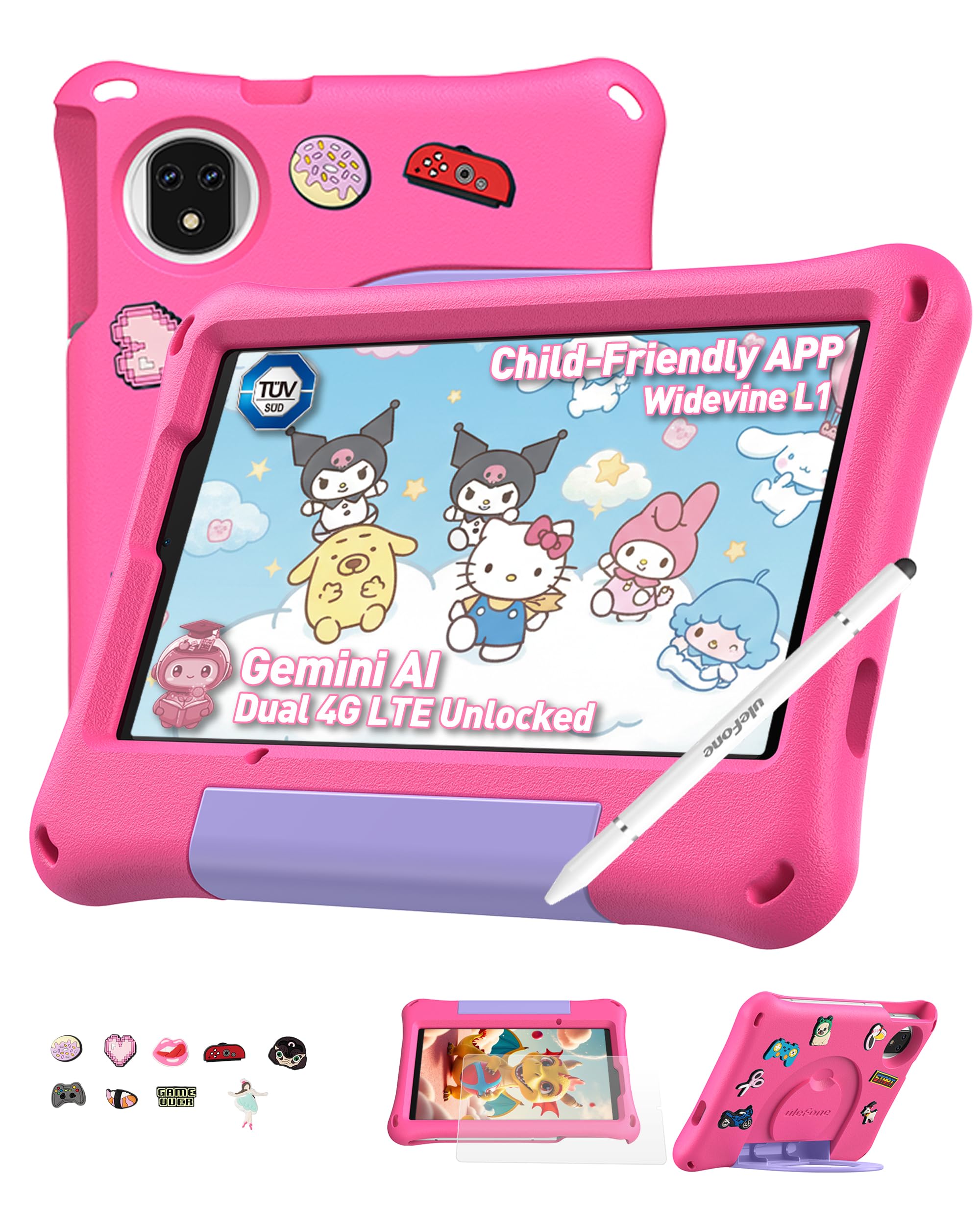
Figure 1: Ulefone Tab A9 Pro Kids Learning Tablet (Pink Edition) with its protective case and various features highlighted.
2. Cosa è incluso
The Ulefone Tab A9 Pro package contains the following items:
- 1x Ulefone Tab A9 Pro Tablet
- 1x Type-C to Type-C Charging Cable (1M)
- 1x Tempered Glass Screen Protector (pre-applied)
- 1x Cartoon Decor Kit (15 random accessories)
- 1x EVA Protective Case with adjustable stand
- 1x Capacitive Stylus
- 1x ago SIM
- 1x caricabatterie CA
- 1x Safety Prompt Statement
- 1x Scheda di istruzioni per la ricarica
- 1x Manuale utente multilingue

Figure 2: All items included in the Ulefone Tab A9 Pro Kids Learning Tablet package.
Video 1: Unboxing e fineview of the Ulefone Tab A9 Pro Kids Learning Tablet, demonstrating its components and initial setup.
3. Caratteristiche principali
- Zero Subscription & Parental Controls: The tablet provides a safe digital environment with no monthly fees. Advanced parental controls allow content filtering, screen time limits, and a secure space for children. It comes preloaded with GMS-certified educational apps.

Figure 3: The tablet features built-in parental control mode for a supervised experience.
Video 2: Demonstration of the advanced parental control features available on the Ulefone Tab A9 Pro Kids Tablet.
- Powerful Android 15 Performance: Equipped with Android 15 OS and a MediaTek G91 Octa-Core processor, 8GB RAM (4+4GB), and 128GB storage (expandable to 2TB). It includes Google Gemini AI for instant answers and supports demanding educational games and 3D applications.
- Eye-Protection Screen: The 8.68-inch IPS display features a 90Hz refresh rate and TÜV SÜD low blue light certification to reduce eye strain. Widevine L1 certification allows streaming HD content from platforms like Disney+ and Netflix.

Figure 4: The 8.68-inch 90Hz display with TÜV SÜD low blue light certification for eye comfort.
- Durable Case & DIY Gift Set: Comes with a rugged, shockproof EVA case with an adjustable stand. The DIY Creativity Kit includes 15 random cartoon accessories for case decoration and a stylus pen for interactive use.

Figure 5: The tablet's double protection with a pre-applied tempered glass screen protector and a soft silicone protective case.
- Travel Essentials: Features Dual SIM support and Dual-band Wi-Fi for connectivity. A 5040mAh battery provides extended use. Includes 12MP+13MP rear cameras and an 8MP front camera with Face Unlock.

Figure 6: The tablet is designed for use at home and on-the-go, with dual SIM and Wi-Fi capabilities.

Figure 7: The tablet is equipped with 12MP + 13MP rear cameras and an 8MP front camera.
4. Guida all'installazione
4.1 Accensione iniziale
- Ensure the tablet is fully charged using the provided Type-C cable and AC power charger.
- Press and hold the Power button (usually located on the side) until the Ulefone logo appears on the screen.
- Segui le istruzioni sullo schermo per selezionare la lingua, la regione e accettare i termini e le condizioni.
4.2 Connessione al Wi-Fi
- During initial setup or via Settings, navigate to "Network & internet".
- Attiva il Wi-Fi.
- Seleziona la rete Wi-Fi desiderata dall'elenco.
- Se richiesto, inserisci la password Wi-Fi e tocca "Connetti".
4.3 Impostazione del controllo genitori
The Ulefone Tab A9 Pro includes robust parental control features to manage your child's usage:
- Access the dedicated "Kids Mode" application or navigate to "Settings > Digital Wellbeing & parental controls".
- Crea un bambino professionistafile and set up a parental password.
- Configure screen time limits, content restrictions, and app access permissions.
- Monitor activity and adjust settings as needed to ensure a safe and educational experience.
5. Utilizzo del tablet
5.1 Navigazione nell'interfaccia
- Schermata iniziale: Swipe left or right to access different pages of apps.
- Notifiche: Scorri verso il basso dalla parte superiore dello schermo a view notifiche e impostazioni rapide.
- Applicazioni recenti: Tocca l'icona quadrata (oppure scorri verso l'alto e tieni premuto dal basso) per visualizzare le applicazioni utilizzate di recente.
- Indietro: Tocca l'icona del triangolo (o scorri dal bordo sinistro/destro) per tornare alla schermata precedente.
5.2 Utilizzo dello stilo
The included capacitive stylus can be used for drawing, writing, and precise navigation. Simply touch the stylus tip to the screen as you would with your finger. The stylus has two ends for versatile use.
5.3 Installazione e gestione delle app
- App precaricate: The tablet comes with various educational and entertainment apps.
- Google Play Store: Access the Google Play Store to download additional apps, games, and content. Ensure parental controls are configured to manage downloads.
- Disinstallazione delle app: To remove an app, long-press its icon on the home screen or app drawer, then drag it to the "Uninstall" option, or go to "Settings > Apps > See all apps" and select the app to uninstall.
6. Manutenzione e cura
- Pulizia: Utilizzare un panno morbido e privo di lanugine per pulire lo schermo e il corpo. Evitare prodotti chimici aggressivi o materiali abrasivi.
- Cura della batteria: To prolong battery life, avoid extreme temperatures. Charge the tablet regularly, but do not leave it plugged in for extended periods after it's fully charged.
- Magazzinaggio: Store the tablet in a cool, dry place. When not in use, keep it in its protective EVA case.
- Aggiornamenti software: Periodically check for system updates in "Settings > System > System update" to ensure optimal performance and security.
7. Risoluzione dei problemi comuni
| Problema | Soluzione |
|---|---|
| Il tablet non si accende. | Assicurarsi che la batteria sia carica. Collegare il caricabatterie e attendere qualche minuto prima di riprovare ad accendere il dispositivo. Se il dispositivo non risponde, eseguire un riavvio forzato tenendo premuto il pulsante di accensione per 10-15 secondi. |
| Lo schermo non risponde. | Riavvia il tablet. Se il problema persiste, assicurati che lo schermo sia pulito e privo di detriti. |
| Problemi di connessione Wi-Fi. | Controlla se il Wi-Fi è abilitato nelle impostazioni. Riavvia il router e il tablet. Assicurati di essere nel raggio d'azione del segnale Wi-Fi. |
| Le app si bloccano o sono lente. | Close background apps. Clear the cache of the problematic app (Settings > Apps > [App Name] > Storage & cache > Clear cache). Ensure sufficient storage space is available. Restart the tablet. |
| Il controllo parentale non funziona come previsto. | Verify that the parental control settings are correctly configured in the Kids Mode app or system settings. Ensure the parental password is secure and not shared. |
8. Specifiche del prodotto
| Caratteristica | Specificazione |
|---|---|
| Marca | Ulefone |
| Nome del modello | Ulefone A9 Pro Kids Tablet Pink |
| Capacità di archiviazione della memoria | 128 GB (espandibile fino a 2 TB) |
| Dimensioni dello schermo | 8.68 pollici |
| Risoluzione massima dello schermo | 800×1340 |
| Sistema operativo | Androide 15 |
| Processore | MediaTek G91 Octa-Core |
| Memoria RAM installata | 8 GB (4+4 GB) |
| Capacità della batteria | 5040 milioneampprima ora (mAh) |
| Telecamere posteriori | 12MP + 13MP |
| Fotocamera frontale | 8MP (with Face Unlock) |
| Tecnologia senza fili | Bluetooth, Dual-band Wi-Fi |
| Tecnologia cellulare | 4G (Note: Not compatible with AT&T or Cricket) |
| Presa per cuffie | 3.5 millimetri |
| Dimensioni dell'articolo (L x P x Spessore) | 8.37"L x 0.31"W x 4.93"S |
9. Garanzia e assistenza clienti
Ulefone fornisce un Garanzia di 2 anno for non-human damage. For any questions or support regarding your Ulefone Tab A9 Pro Kids Learning Tablet, please contact customer service via email at: support@ulefone.com.
Conservare la prova d'acquisto per eventuali richieste di garanzia.