
Introduzione
The STF Elite On-Ear Wireless Headphones offer versatile audio connectivity and comfortable listening. This manual provides essential information for setting up, operating, maintaining, and troubleshooting your headphones to ensure optimal performance.
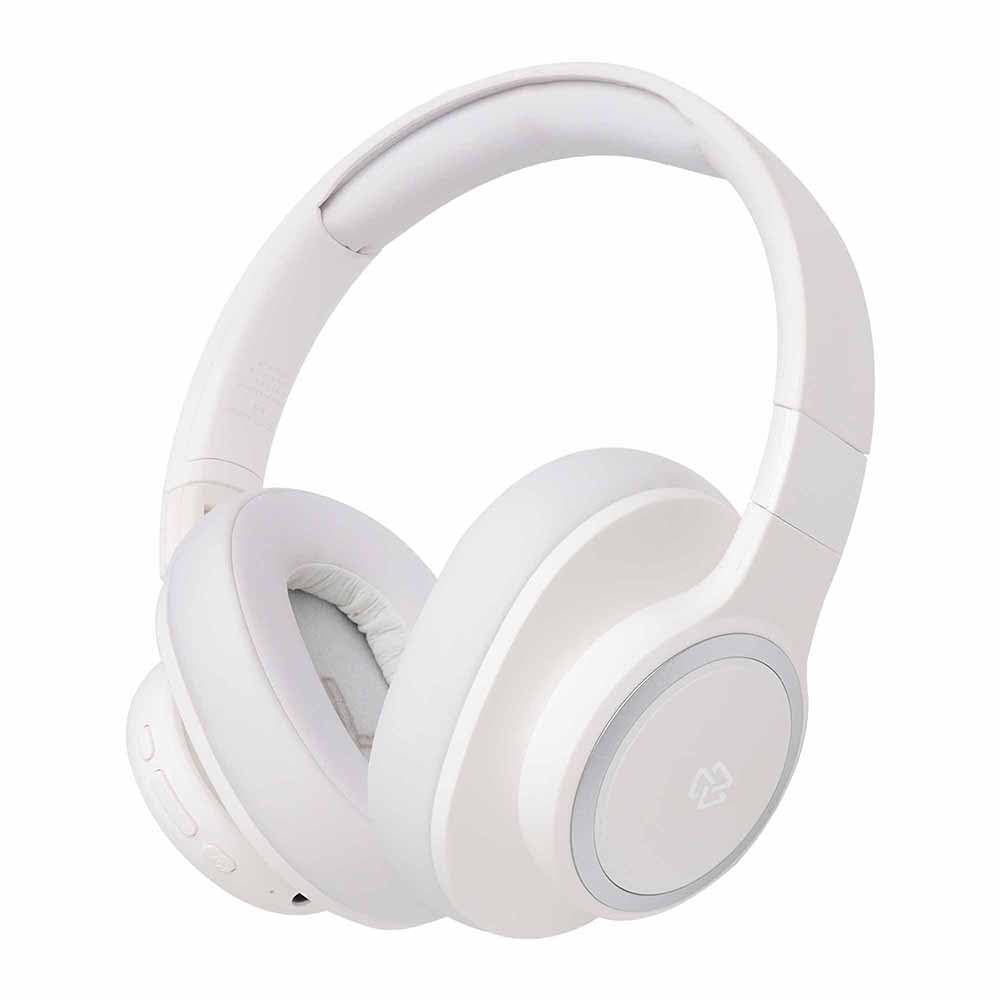
Immagine: Frontale view of the STF Elite On-Ear Wireless Headphones in white.
Impostare
1. Carica delle cuffie
Before first use, fully charge the headphones. Use the provided Type-C charging cable to connect the headphones to a compatible USB power source (e.g., computer USB port, USB wall adapter).
- Una carica completa richiede circa 2 ore.
- L'indicatore LED mostrerà lo stato di carica (ad esempio, rosso per la carica, blu per la carica completa).
- A fully charged battery provides up to 7 hours of continuous use.

Immagine: Lato view of the STF Elite headphones, highlighting the charging port and control buttons.
2. Accoppiamento Bluetooth
- Assicurati che le cuffie siano spente.
- Tenere premuto il pulsante di accensione finché l'indicatore LED non lampeggia alternativamente in blu e rosso, indicando la modalità di associazione.
- Sul tuo dispositivo (smartphone, tablet, computer), attiva il Bluetooth e cerca i dispositivi disponibili.
- Select "STF Elite" from the list of found devices.
- Una volta connesso, l'indicatore LED lampeggerà lentamente in blu o rimarrà fisso in blu.
- Una volta accese, le cuffie tenteranno automaticamente di riconnettersi all'ultimo dispositivo associato.
3. Auxiliary (Wired) Connection
To use the headphones with a wired connection, connect one end of the provided 3.5mm audio cable to the auxiliary input port on the headphones and the other end to your audio device's 3.5mm output jack. The headphones will automatically switch to auxiliary mode.
4. Riproduzione della scheda MicroSD
Insert a MicroSD card (with audio files) into the designated slot on the headphones. The headphones will automatically detect the card and begin playing audio files. Use the control buttons to manage playback.
Istruzioni per l'uso
Accensione/spegnimento
- Accensione: Tenere premuto il pulsante di accensione per circa 3 secondi finché l'indicatore LED non si accende.
- Spegni: Tenere premuto il pulsante di accensione per circa 3 secondi finché l'indicatore LED non si spegne.
Controlli di riproduzione musicale
- Riproduci/Pausa: Premere una volta il pulsante multifunzione (spesso il pulsante di accensione o un pulsante dedicato per la riproduzione/pausa).
- Aumenta volume: Premere il pulsante Volume su (+).
- Volume basso: Premere il pulsante Volume giù (-).
- Traccia successiva: Tieni premuto il pulsante Volume su (+).
- Traccia precedente: Premere e tenere premuto il pulsante Volume giù (-).
Gestione delle chiamate
- Rispondi/Termina chiamata: Premi una volta il pulsante Multifunzione.
- Rifiuta chiamata: Tenere premuto il pulsante Multifunzione per circa 2 secondi.
- Ricomponi l'ultimo numero: Premi due volte il pulsante Multifunzione.
Cambio di modalità
The headphones support Bluetooth, Auxiliary, and MicroSD playback modes. The headphones will automatically switch to Auxiliary mode when the 3.5mm cable is connected. To switch between Bluetooth and MicroSD modes, use the dedicated mode button if available, or disconnect the auxiliary cable to revert to wireless modes.
Manutenzione
- Pulizia: Use a soft, dry cloth to clean the headphone surfaces and earcups. Do not use abrasive cleaners or immerse the headphones in water.
- Magazzinaggio: Quando non vengono utilizzate, conservare le cuffie in un luogo fresco e asciutto, lontano dalla luce solare diretta e da temperature estreme. Il design pieghevole consente di riporle in modo compatto.
- Cura della batteria: Per prolungare la durata della batteria, evitare di scaricare completamente le cuffie frequentemente. Ricaricarle regolarmente, anche se non utilizzate per periodi prolungati.
Risoluzione dei problemi
Nessun potere
- Ensure the headphones are fully charged. Connect them to a power source using the Type-C cable and check the charging indicator.
Impossibile associare tramite Bluetooth
- Assicurarsi che le cuffie siano in modalità di associazione (LED lampeggiante in blu e rosso).
- Assicurati che il Bluetooth sia abilitato sul tuo dispositivo e che si trovi entro 10 metri dalle cuffie.
- Disattiva e attiva la funzione Bluetooth sul tuo dispositivo.
- If previously paired, try "forgetting" or "unpairing" "STF Elite" from your device's Bluetooth list and then re-pair.
- Ensure no other Bluetooth devices are actively connected to the headphones.
Nessun suono
- Controlla il livello del volume sia delle cuffie che del dispositivo collegato.
- If using Bluetooth, ensure the headphones are properly paired and connected.
- If using the auxiliary cable, ensure it is fully inserted into both the headphones and the audio source.
- If using a MicroSD card, ensure it is inserted correctly and contains compatible audio files.
- Prova a riavviare sia le cuffie sia il dispositivo sorgente audio.
Scarsa qualità audio
- If using Bluetooth, ensure there are no obstructions between the headphones and your device, and that you are within the 10-meter range.
- Prova a riprodurre un audio diverso file or from a different source to rule out source issues.
- Ensure the auxiliary cable is not damaged and is securely connected.
Specifiche
| Modello | Elite |
| Versione Bluetooth | 5.3 |
| Portata Bluetooth | Fino a 10 metri |
| Dimensioni del conducente | 40 millimetri |
| Risposta in frequenza | 20 Hz - 20 kHz |
| Impedenza | 32 Ohm |
| Livello di pressione sonora (SPL) | 100 dB |
| Capacità della batteria | 200 mAh |
| Tempo di riproduzione | Fino a 7 ore |
| Tempo di ricarica | Circa 2 ore |
| Porta di ricarica | Tipo C |
| Opzioni di connettività | Bluetooth, 3.5mm Aux, MicroSD |
| Microfono | Integrato |
| Peso | 280 grammi |
Garanzia e supporto
The STF Elite On-Ear Wireless Headphones come with a Garanzia di 1 anno dalla data di acquisto. La presente garanzia copre i difetti di fabbricazione in condizioni di normale utilizzo. Non copre i danni causati da uso improprio, incidenti, modifiche non autorizzate o normale usura.
For warranty claims, technical support, or further assistance, please contact STF customer service through their official webo al rivenditore presso cui è stato acquistato il prodotto. Si prega di conservare la prova d'acquisto per la convalida della garanzia.