
1. Introduzione
The NJTY Digital Inclinometer SZ-08 is a precision tool designed for fast and accurate angle measurement. It is suitable for various applications including construction, woodworking, mechanical setup, and equipment calibration. This device features a high-definition backlit display, a high-sensitivity illuminated bubble level, and a dual magnetic base for stable and versatile use. It supports both absolute and relative angle measurements, data hold, and an auto-rotating display for ease of operation.
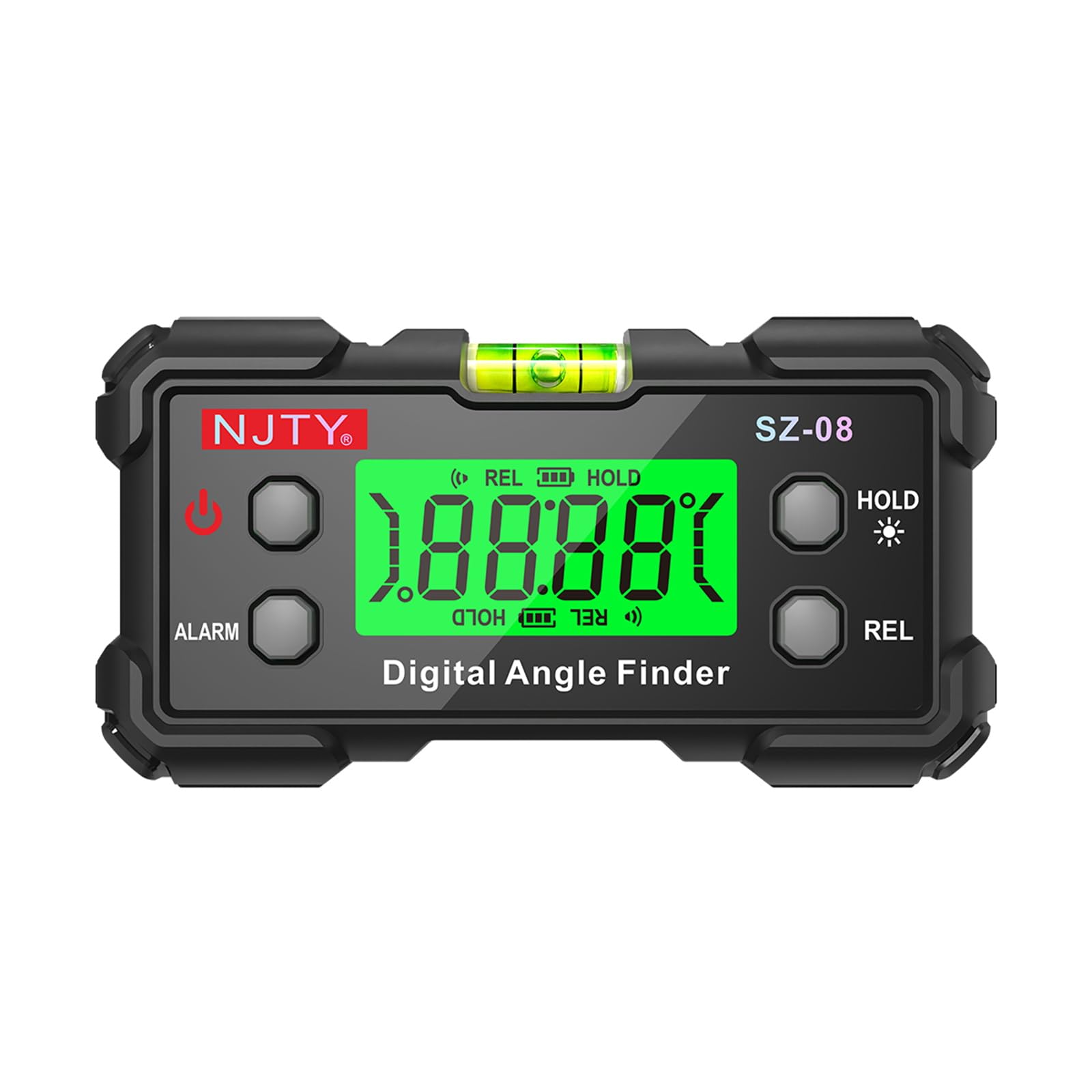
Figura 1: Oltreview of the NJTY Digital Inclinometer SZ-08 and its key features.
2. Contenuto della confezione
- 1 x NJTY Digital Inclinometer SZ-08
- 2 x AAA Batteries (may be included or require separate purchase)
- 1 x Manuale utente (questo documento)
3. Prodotto finitoview
Familiarize yourself with the components of your Digital Inclinometer:
- Display digitale: Backlit LCD for clear angle readings.
- Livella a bolla: High-sensitivity illuminated bubble for visual leveling guidance.
- Base magnetica: Dual-sided magnets for secure attachment to metal surfaces.
- Pulsante di accensione: Accende/spegne il dispositivo.
- Pulsante ATTESA: Blocca la misurazione corrente sul display.
- Pulsante REL: Alterna tra le modalità di misurazione assoluta e relativa.
- Pulsante ALLARME: Activates/deactivates the angle alarm function.
- Vano batteria: Located on the back for AAA battery installation.

Figura 2: dettagliata view of the inclinometer's display, bubble level, and battery compartment.
4. Impostazione
4.1 Installazione della batteria
- Individuare il coperchio del vano batteria sul retro del dispositivo.
- Using a small Phillips head screwdriver (not included), unscrew the cover.
- Inserire due batterie AAA, assicurandosi della corretta polarità (+/-).
- Riposizionare il coperchio del vano batteria e fissarlo con la vite.
4.2 Accensione/Spegnimento
- Per accendere, premere il Energia button. The backlit display will illuminate.
- Per spegnere, tenere premuto il pulsante Energia pulsante per circa 3 secondi.
- The device features an automatic power-off function after 5 minutes of inactivity to conserve battery life. The backlight will turn off after 3 minutes of inactivity.
5. Istruzioni per l'uso
5.1 Basic Angle Measurement
- Place the inclinometer on the surface you wish to measure.
- The digital display will show the angle relative to the horizontal plane (in Absolute mode) or a set reference (in Relative mode).
- Attendere qualche secondo affinché la lettura si stabilizzi.
- For visual confirmation, observe the illuminated bubble level.
5.2 Modalità di misurazione assoluta e relativa
The inclinometer supports two measurement modes:
- Modalità di misurazione assoluta: Measures the angle relative to a true horizontal (0°) or vertical (90°) plane. This is the default mode when the device is powered on.
- Relative Measurement (REL) Mode: Allows you to set any surface as a 0° reference point. Subsequent measurements will display the angle difference from this set reference.
Per passare da una modalità all'altra, premere il tasto REL button. When in REL mode, "REL" will be displayed on the screen.
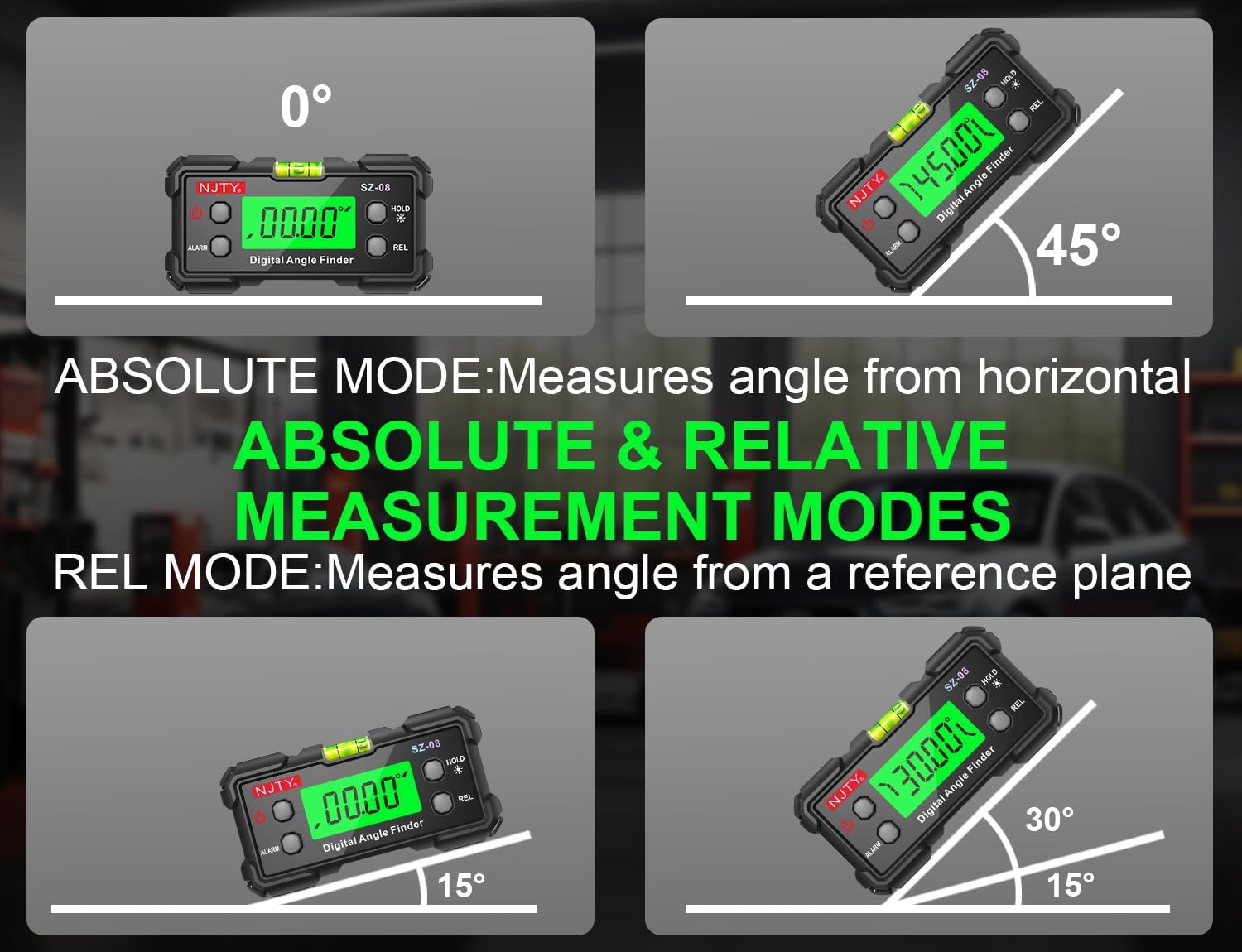
Figure 3: Illustration of Absolute and Relative Measurement Modes.
5.3 Funzione di conservazione dei dati
Per congelare la lettura corrente sul display, premere il tasto PRESA button. "HOLD" will appear on the screen. Press the PRESA nuovamente il pulsante per annullare la lettura e riprendere la misurazione in tempo reale.
5.4 Angle Alarm
The device can be set to emit an audible alarm when a specific angle is reached. Refer to the full manual for detailed instructions on setting the angle alarm threshold.
5.5 Automatic Flipping Display
The digital display automatically rotates to remain upright, regardless of the inclinometer's orientation. This ensures easy readability from any angle, including inverted positions.

Figure 4: Automatic Flipping Reading in various orientations.
5.6 Using the Magnetic Base
The inclinometer features strong magnets on its base, allowing it to securely attach to metal surfaces. This enables hands-free operation for tasks such as welding, machine installation, or working on metal frames. Ensure the surface is clean and flat for optimal magnetic adhesion.

Figure 5: Magnetic base for vertical and inverted measurements.
6. Manutenzione
- Pulizia: Pulire il dispositivo con un panno morbido e asciutto. Non utilizzare detergenti abrasivi o solventi.
- Magazzinaggio: Store the inclinometer in a dry, cool place away from direct sunlight and extreme temperatures. If storing for extended periods, remove the batteries to prevent leakage.
- Sostituzione della batteria: Replace batteries when the low battery indicator appears on the display or when the device fails to power on. Follow the battery installation steps in Section 4.1.
7. Risoluzione Dei Problemi
| Problema | Possibile causa | Soluzione |
|---|---|---|
| Il dispositivo non si accende. | Batterie scariche o installate in modo errato. | Controllare la polarità delle batterie o sostituirle con nuove batterie AAA. |
| Letture imprecise o incoerenti. | Device not calibrated; unstable surface; magnetic interference. | Ensure the device is on a stable, non-vibrating surface. If persistent, perform a user calibration (refer to advanced manual if available). Avoid strong magnetic fields. |
| Il display è scuro o tremolante. | Batteria scarica. | Sostituire le batterie. |
| Auto power-off occurs too quickly. | Funzionamento normale (5 minuti di inattività). | This is a power-saving feature. Ensure you are actively using the device or press a button periodically to reset the timer. |
8. Specifiche
| Numero di modello | SZ-08 |
| Campo di misura | 0-90° x 4 (360° total coverage) |
| Precisione | ±0.3° |
| Risoluzione | 0.05° |
| Display | Backlit LCD with auto-flip orientation |
| Fonte di alimentazione | 2 batterie AAA |
| Spegnimento automatico | 5 minutes (backlight auto-off after 3 minutes) |
| Dimensioni | Circa 10 x 6.6 x 4.3 cm (4 x 2.6 x 1.7 pollici) |
| Peso | Circa 142 g (5 once) |
| Base | Dual-sided magnetic attachment |
9. Garanzia e supporto
For warranty information, technical support, or service inquiries, please refer to the documentation provided with your purchase or visit the official NJTY websito. Conserva la ricevuta d'acquisto come prova d'acquisto.


