
Ulefone RugKing Pad Pro
Ulefone RugKing Pad Pro Android 16 Rugged Tablet User Manual
Model: RugKing Pad Pro | Brand: Ulefone
1. Introduzione
This manual provides essential instructions for setting up, operating, and maintaining your Ulefone RugKing Pad Pro rugged tablet. Please read this manual thoroughly before using the device to ensure proper function and longevity.
2. Contenuto della confezione
Verifica che tutti gli articoli siano presenti nella confezione del prodotto:
- Ulefone RugKing Pad Pro Tablet x 1
- AC Charger (100~240V) x 1
- Type-C Data Cable (100 cm) x 1
- Protective Film (Pre-installed) x 1
- Metal Pry Opener x 1
- Portable Strap x 1
- Viti x 2
- Manuale utente multilingue x 1
- Charging Instruction Card x 1
- Safety Warning Declaration x 1

Figure 2.1: Contents of the Ulefone RugKing Pad Pro package.
3. Prodotto finitoview
The Ulefone RugKing Pad Pro is a rugged tablet designed for durability and performance. Familiarize yourself with its physical components.
3.1 Componenti fisici
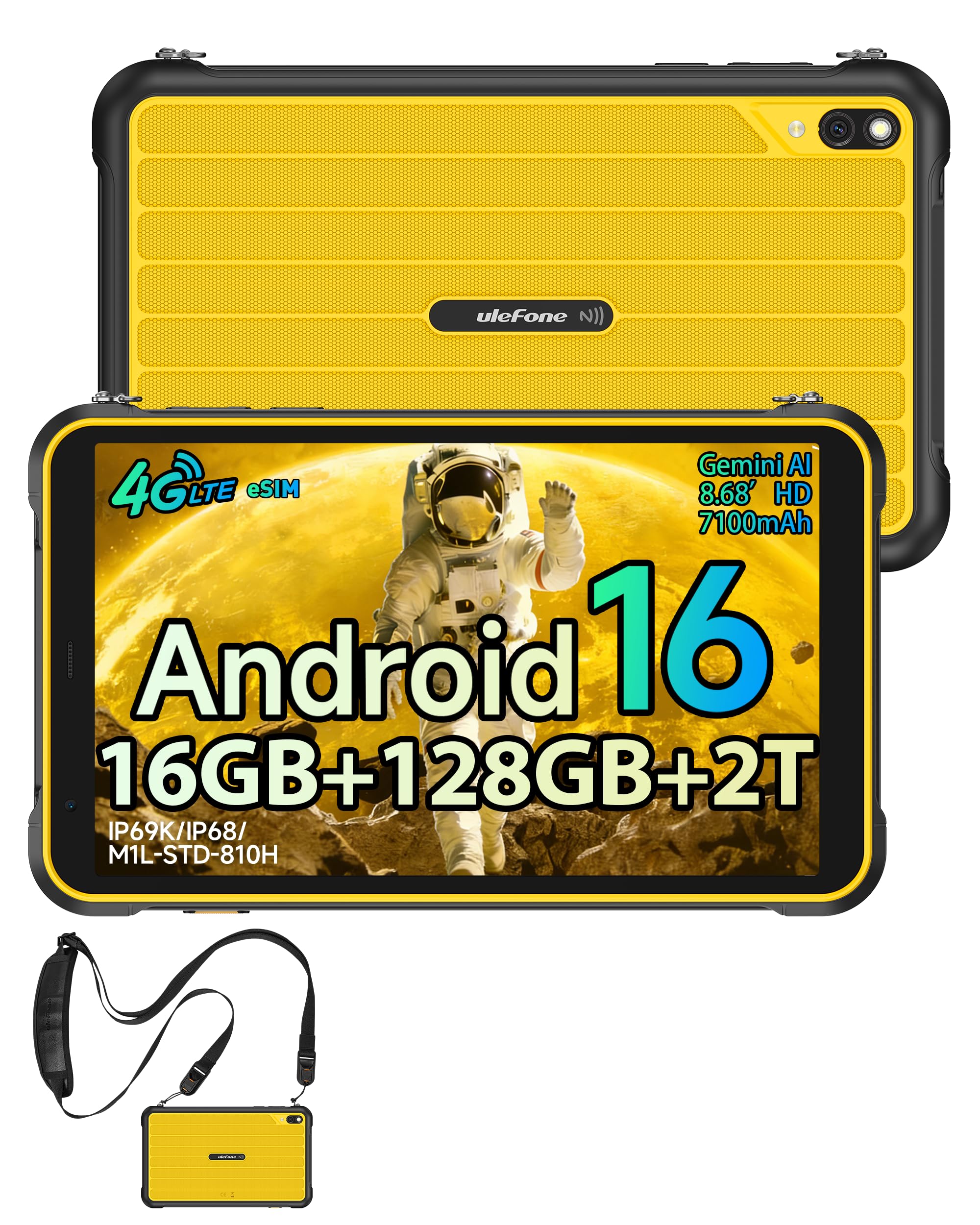
Figura 3.1: Fronte view of the Ulefone RugKing Pad Pro.

Figura 3.2: lato view con pulsanti e porte.
- Display: 8.68-inch, 90Hz refresh rate, Corning Gorilla Glass.
- Pulsante di accensione: Situato sul lato, serve per accendere/spegnere o riattivare/sospendere il dispositivo.
- Pulsanti del volume: Regola i livelli audio.
- Porta USB di tipo C: Per la ricarica e il trasferimento dei dati.
- Griglie degli altoparlanti: Doppi altoparlanti stereo per l'uscita audio.
- Telecamera: 16MP rear camera, 8MP front camera.
- Torcia elettrica: Integrated 133 lumen Super Torch.
- Slot per scheda SIM/MicroSD: Supports dual SIM and up to 2TB microSD expansion.
- Connettore di espansione uSmart: For compatible peripherals like endoscopes.
- Jack per cuffie da 3.5 mm: Per accessori audio.
4. Impostazione
4.1 Accensione iniziale
- Premere e tenere premuto il tasto Pulsante di accensione until the Ulefone logo appears.
- Segui le istruzioni sullo schermo per selezionare la lingua, la regione e connetterti a una rete Wi-Fi.
- Accedi con il tuo account Google o creane uno nuovo per accedere al Google Play Store e ad altri servizi.
4.2 SIM Card and eSIM Setup
The RugKing Pad Pro supports dual physical SIM cards and eSIM functionality for 4G LTE connectivity.

Figure 4.1: Triple card slot for SIM and MicroSD.
4.2.1 Physical SIM Card Installation
- Individuare il vassoio della scheda SIM sul lato del tablet.
- Use the provided metal pry opener to eject the tray.
- Place your Nano-SIM cards into the designated slots.
- Reinserire con cautela il vassoio nel tablet.
4.2.2 Attivazione eSIM
To activate eSIM, navigate to Impostazioni > Rete e Internet > SIM and follow the instructions to add a new mobile plan. You will typically need a QR code or activation code from your network provider.

Figure 4.2: eSIM connectivity feature.
5. Istruzioni per l'uso
Sistema operativo Android 16 5.1
The RugKing Pad Pro runs on Android 16, offering a dynamic and fluid user interface with enhanced security and usability features. Enjoy desktop-like window views for multitasking and smarter notification management.

Figura 5.1: Interfaccia utente di Android 16.
5.2 Visualizzazione e interazione
The 8.68-inch display with a 90Hz refresh rate provides smooth navigation and streaming. With 860 nits peak brightness, the screen is readable even in bright sunlight. Corning Gorilla Glass offers enhanced scratch resistance.

Figure 5.2: Display features including 90Hz refresh rate and Gorilla Glass.
5.2.1 Modalità guanto
For use in cold environments or industrial settings, enable Glove Mode in settings to allow touch input while wearing gloves. Note that some leather gloves may not be compatible due to material differences.

Figure 5.3: Tablet operation with gloves enabled.
5.3 Camera and Flashlight
The tablet features a 16MP rear camera for clear photos and document scanning, and an 8MP front camera for video calls. The integrated 133 lumen Super Torch provides bright illumination in low-light conditions.

Figure 5.4: Camera and Super Torch features.
5.4 Connettività e navigazione
- 4G LTE: Stay connected with dual SIM or eSIM.
- NFC: Supports Google Pay and other NFC functions for identification and authentication.
- Posizione GPS: Integrated GPS, GLONASS, BeiDou, and Galileo for accurate navigation.
- Wifi: Supports 802.11b/g/n standards.
- Bluetooth: Per collegare accessori wireless.

Figure 5.5: NFC enabled device for various applications.

Figure 5.6: GPS navigation in a vehicle.
5.5 Funzioni speciali
- Chiave personalizzata: Assign specific functions to a programmable key for quick access.
- Identificazione facciale: Sblocca il tuo dispositivo tramite il riconoscimento facciale.
- FM Radio: Listen to FM radio without headphones.
- Connettore di espansione uSmart: Connect compatible external peripherals such as endoscopes (uSmart E01, E02) or digital microscopes (uSmart C01).

Figure 5.7: uSmart expansion connector and peripherals.
6. Caratteristiche di durata
The RugKing Pad Pro is built to withstand extreme conditions, certified with IP68, IP69K, and MIL-STD-810H standards.
- IP68: Dustproof and resistant to continuous immersion in water up to 2 meters for 30 minutes.
- IP69K: Protetto contro getti d'acqua ad alta pressione e ad alta temperatura.
- MIL-STD-810H: Military-grade standard ensuring reliable resistance to shocks, vibrations, and extreme temperatures.

Figure 6.1: Rugged design and certifications.

Figure 6.2: Dust, water, and drop resistance tests.
7. Gestione della batteria
The RugKing Pad Pro is equipped with a 7100 mAh battery, offering extended usage. It supports 492 hours of standby time or 10 hours of video playback on a single charge.
7.1 Ricarica
- Ricarica standard: Connect the provided Type-C cable and AC charger to the tablet.
- Ricarica del perno Pogo: The tablet is compatible with Pogo Pin charging docks (sold separately) for convenient charging.
- Ricarica inversa (OTG): Use the tablet as a power bank to charge other devices via an OTG cable (sold separately).

Figura 7.1: Capacità della batteria e metodi di ricarica.
8. Archiviazione e prestazioni
Powered by an Unisoc T7250 Octa-core processor, the RugKing Pad Pro handles complex applications and demanding tasks efficiently. It comes with 16GB RAM (8GB physical + 8GB virtual) and 128GB internal storage, expandable up to 2TB via microSD card.

Figure 8.1: Octa-core processor for uninterrupted flow.

Figure 8.2: Memory and storage specifications.
*MicroSD card is sold separately for storage expansion. Dynamic RAM activation is user-configurable in Settings.
9. Manutenzione
9.1 Pulizia del dispositivo
- Per pulire lo schermo e il corpo, utilizzare un panno morbido e privo di lanugine.
- Per sporco ostinato, leggermente dampLavare il panno con acqua. Evitare prodotti chimici aggressivi o materiali abrasivi.
- Prima di pulire con liquidi, assicurarsi che tutti i coperchi delle porte siano ben chiusi per mantenere la resistenza all'acqua.
9.2 Aggiornamenti software
Regularly check for software updates to ensure optimal performance, security, and access to new features. Navigate to Impostazioni > Sistema > Aggiornamento di sistema per verificare e installare gli aggiornamenti disponibili.
9.3 Gestione dell'archiviazione
Periodicamente riview il tuo memorizzato files and applications. Delete unnecessary data to free up space and maintain device speed. Utilize the microSD card slot for large media files.
10. Risoluzione Dei Problemi
| Problema | Soluzione |
|---|---|
| Il dispositivo non si accende. | Assicurarsi che la batteria sia carica. Collegare il caricabatterie e attendere qualche minuto prima di riprovare ad accendere. |
| Lo schermo non risponde. | Perform a forced restart by holding the Power button for 10-15 seconds. If the issue persists, ensure Glove Mode is not causing interference if not needed. |
| Impossibile connettersi al Wi-Fi. | Controlla se il Wi-Fi è abilitato nelle impostazioni. Riavvia il router e il tablet. Verifica la password del Wi-Fi. |
| Scheda SIM non rilevata. | Assicurati che la scheda SIM sia inserita correttamente nel vassoio. Riavvia il tablet. Controlla che la scheda SIM sia attiva con il tuo operatore. |
| La batteria si scarica rapidamente. | Reduce screen brightness, close unused apps, disable unnecessary connectivity features (Bluetooth, GPS, Wi-Fi) when not in use. Check for background app activity. |
11. Specifiche
| Caratteristica | Dettaglio |
|---|---|
| Nome del modello | Ulefone RugKing Pad Pro |
| Sistema operativo | Androide 16 |
| Processore | Unisoc T7250 Octa-core |
| Memoria RAM | 16 GB (8 GB fisici + 8 GB virtuali) |
| Memoria interna | 128 GB |
| Archiviazione espandibile | Fino a 2 TB tramite microSD |
| Dimensioni dello schermo | 8.68 pollici |
| Risoluzione dello schermo | 1400x800 pixel (HD+) |
| Frequenza di aggiornamento | Frequenza 90 Hz |
| Protezione dello schermo | Vetro Corning Gorilla |
| Telecamera posteriore | 16 MP |
| Fotocamera frontale | 8 MP |
| Registrazione video | Risoluzione Full HD 1080p |
| Capacità della batteria | 7100 mAh (polimero di litio) |
| Durata della batteria (media) | 13 Days (standby), 10 Hours (video playback) |
| Connettività | 4G LTE (Dual SIM, eSIM), Wi-Fi (802.11b/g/n), Bluetooth, NFC |
| Navigazione | GPS, GLONASS, BeiDou, Galileo |
| Valutazioni di durabilità | IP68, IP69K, MIL-STD-810H |
| Funzionalità di sicurezza | Identificazione facciale |
| Dimensioni (L x P x A) | Dimensioni: 20 x 10 x 1 cm |
| Peso | 450 grammi |
12. Garanzia e supporto
12.1 Informazioni sulla garanzia
The Ulefone RugKing Pad Pro comes with a Garanzia del produttore di 2 anniLa presente garanzia copre i difetti di materiali e fabbricazione in condizioni di normale utilizzo. Si prega di conservare la prova d'acquisto per eventuali reclami in garanzia.


Figure 12.1: Ulefone brand and 2-year warranty indication.
12.2 Assistenza clienti
For technical assistance, warranty claims, or further inquiries, please contact Ulefone customer support. A service center is available in Europe.
- Refer to the official Ulefone websito per i contatti.
- Consult the "Multilingual User Manual" included in your package for additional information.
- The tablet includes a "Service Center 2.0" application for intelligent support.
Ask a question about this manual
Ask about setup, troubleshooting, compatibility, parts, safety, or missing instructions. Manuals+ will review the question and use this page’s manual context to help answer it.