
Introduzione
This manual provides essential information for the proper setup, operation, maintenance, and troubleshooting of your Ulefone Rugking Pad 2 Pro. Please read it thoroughly before using your device to ensure optimal performance and longevity.
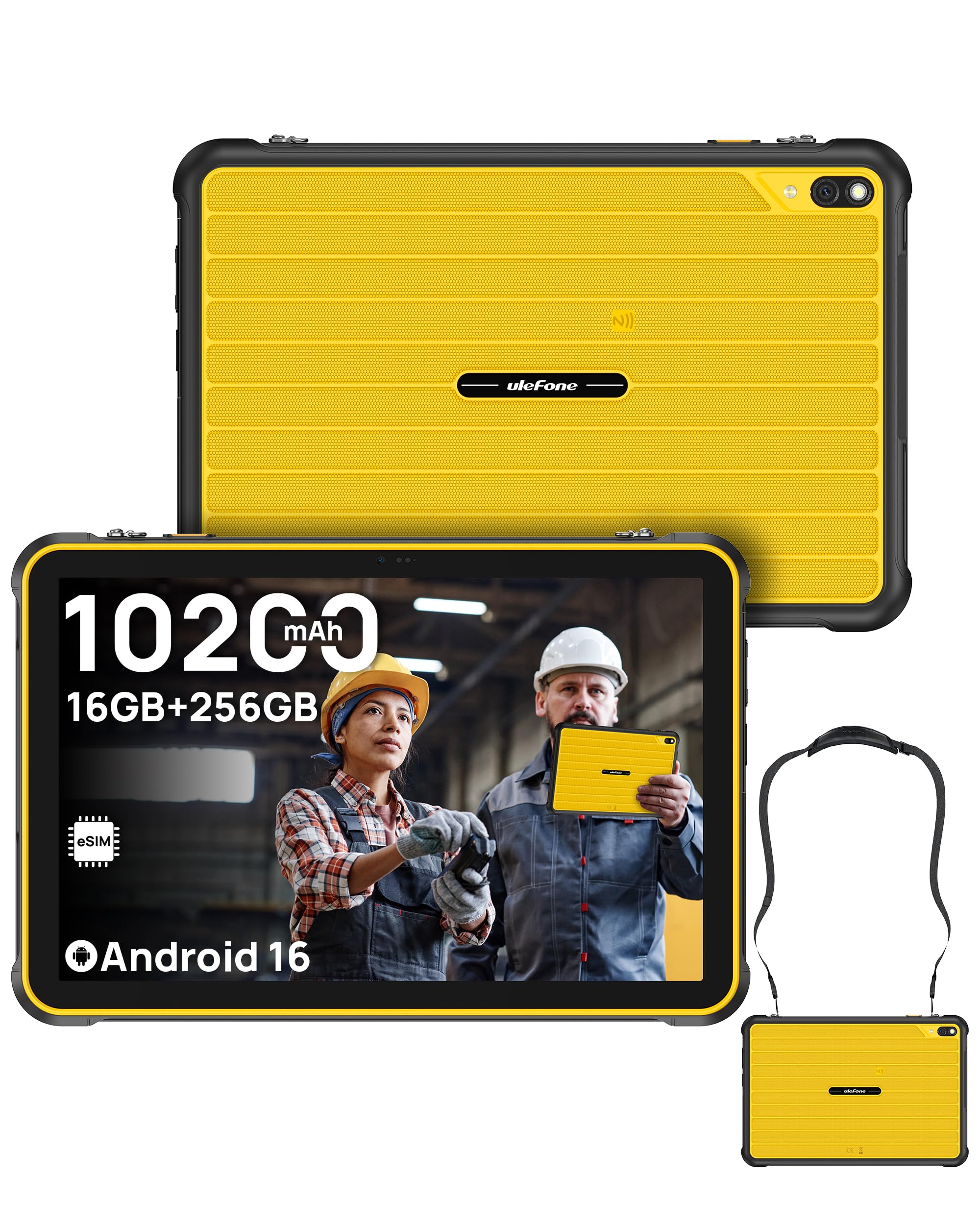
The Ulefone Rugking Pad 2 Pro, a rugged tablet designed for durability and performance.
Contenuto della confezione
Verifica che tutti gli articoli siano presenti nel tuo pacco:
- Ulefone Rugking Pad 2 Pro Tablet
- Caricabatterie CA (18 W)
- Cavo dati da tipo C a tipo C (100 cm)
- Cinturino indossabile
- Viti (x2)
- Pellicola protettiva (preinstallata)
- Metal Pry Opener
- Manuale utente multilingue
- Scheda di istruzioni per la ricarica
- Safety Prompt Statement

Illustration of the Ulefone Rugking Pad 2 Pro and its included accessories.
Impostare
1. Installazione della scheda SIM e della scheda MicroSD
The Rugking Pad 2 Pro supports dual Nano SIM cards and one MicroSD card for expanded storage. Use the provided metal pry opener to access the card slot.
Official Ulefone Rugking Pad 2 Pro Unboxing Video, demonstrating SIM and MicroSD card installation.
2. Attivazione dell'eSIM
The device features a built-in eSIM for convenient global connectivity. To activate, navigate to the network settings on your tablet and follow the on-screen instructions to download a local data plan. Nota: Confirm eSIM support and eligibility with your cellular carrier before activation, as service varies by region. This device is not compatible with AT&T or Cricket.

Visual representation of eSIM technology for instant setup and worldwide access.
3. Accensione iniziale e configurazione di base
- Tenere premuto il pulsante di accensione finché non viene visualizzato il logo Ulefone.
- Segui le istruzioni sullo schermo per selezionare la lingua, connetterti a una rete Wi-Fi e configurare il tuo account Google.
- Review e accettare i termini e le condizioni per completare la configurazione iniziale.
Istruzioni per l'uso
1. Sistema operativo Android 16
Your tablet runs on the Android 16 operating system, offering a seamless and intuitive user experience. Navigate through apps, customize settings, and access various features with ease.

The Android 16 OS provides a smart, safe, and seamless user interface.
2. Prestazioni e archiviazione
Equipped with a Unisoc T7250 Octa-core Processor, 16GB RAM (8GB physical + 8GB adjustable virtual RAM), and 256GB internal storage (expandable up to 2TB via MicroSD), the tablet delivers responsive performance for multitasking and amplascia spazio al tuo files.

Details on the Octa-Core Processor, 16GB RAM, and 256GB ROM with 2TB expandability.
3. Display and Durability
The 10.1-inch HD+ display (1280 x 800 resolution) offers clear visuals with a 90Hz refresh rate and 600 nits maximum brightness. The screen is protected by Corning Gorilla Glass 3, providing enhanced resistance against drops and scratches.

The 10.1-inch HD+ display with 90Hz refresh rate and 600 nits brightness.

Corning Gorilla Glass 3 and in-depth wear resistance features for enhanced durability.
4. Robustezza e protezione
The Rugking Pad 2 Pro is certified IP68, IP69K, and MIL-STD-810H, ensuring protection against dust, water submersion, high-pressure water jets, shocks, vibrations, and extreme temperatures. This makes it suitable for demanding environments.

The tablet's certifications for extreme durability against water, dust, and drops.
5. Camera and Lighting
Capture moments with the 48MP rear camera and 8MP front camera. The integrated 120LM Super Torch provides powerful illumination for low-light conditions.

Details on the 48MP rear camera and 8MP front camera capabilities.

The 120 Lumens Super Torch provides powerful light for various situations.
6. Audio e connettività
Experience rich sound with dual stereo speakers. Connectivity options include Dual 4G, Wi-Fi, Bluetooth, NFC, and GPS (GPS + GLONASS + Galileo + BeiDou + QZSS). A 3.5mm headphone jack and headset-free FM radio are also available.

The tablet features dual stereo speakers for enhanced audio experience.

NFC-enabled for contactless payments, 4G LTE for constant connectivity, and a 3-card slot.
7. Batteria e ricarica
The tablet is equipped with a large 10200mAh battery, providing extended usage times. It supports 18W dock charging (dock sold separately) and can reverse charge other devices.

The 10,200mAh massive battery ensures long-lasting power.

The tablet supports Pogo Pin Dock Charging for instant power (dock sold separately).
8. Funzionalità aggiuntive
- Connettore di espansione uSmart: Integrated connector for stable connection with uSmart accessories like endoscopes (E01/E02) and microscopes (C01), sold separately.
- Cinturino portatile: Features metal connection loops for the included wearable strap, allowing for secure and effortless carrying.
- Water-Lock Mode: Disables the touchscreen in wet conditions to prevent accidental touches.
- Modalità guanto: Enhances touchscreen sensitivity for use with gloves.
- Chiave personalizzata: Pulsante programmabile per un rapido accesso alle funzioni.
- Sblocco facciale e ID impronta digitale: Autenticazione biometrica sicura e pratica.
- Widevine L1: Supports high-definition streaming from platforms like Netflix and Hulu.
- Cassetta degli attrezzi per esterni: A suite of utility apps for outdoor activities.

The uSmart Expansion Connector allows for stable integration with peripherals like endoscopes and microscopes (sold separately).

The exclusive portable strap provides secure and effortless carrying.

Sopraview of additional features including Widevine L1, Custom Key, Face Unlock, Fingerprint ID, Outdoor Toolbox, Gloves Mode, 3.5mm Headphone Jack, Headset-free FM Radio, and GPS.
Official Ulefone Rugking Pad 2 Pro Product Overview video, highlighting key features and design.
Manutenzione
1. Pulizia del tablet
Due to its rugged design and IP68/IP69K ratings, the tablet can be cleaned with water. Ensure all port covers are securely closed before exposing the device to liquids. Use a soft, damp panno per pulire lo schermo e la carrozzeria. Evitare prodotti chimici aggressivi o materiali abrasivi.
2. Cura della batteria
- Evitare di scaricare completamente la batteria frequentemente.
- Do not expose the tablet to extreme temperatures (hot or cold) for prolonged periods, as this can degrade battery life.
- Use only the provided charger or a compatible 18W charger.
3. Aggiornamenti software
Regularly check for and install software updates to ensure your device has the latest features, security patches, and performance improvements. You can usually find this option in the tablet's settings under "System" or "About tablet".
Risoluzione dei problemi
If you encounter issues with your Ulefone Rugking Pad 2 Pro, refer to the following common solutions:
- Il dispositivo non si accende: Assicurarsi che la batteria sia carica. Collegare il tablet al caricabatterie e attendere qualche minuto prima di provare ad accenderlo di nuovo.
- Il touchscreen non risponde: Restart the device by holding the Power button. If the issue persists in wet conditions, ensure Water-Lock Mode is not active or try cleaning the screen.
- Problemi di connettività (Wi-Fi/4G): Check network settings. For 4G, ensure your SIM/eSIM is active and has a valid data plan. For Wi-Fi, try restarting your router.
- Le app si bloccano o hanno prestazioni lente: Close background applications. Clear app caches or reinstall problematic apps. If performance remains slow, consider a factory reset (back up your data first).
- La fotocamera non funziona: Assicurati che l'app della fotocamera abbia le autorizzazioni necessarie. Riavvia il dispositivo.
For more complex issues or if the problem persists, please contact Ulefone customer support.
Specifiche
| Caratteristica | Dettaglio |
|---|---|
| Marca | Ulefone |
| Nome del modello | Ulefone Rugking Pad 2 Pro 256GB |
| Sistema operativo | Androide 16 |
| Processore | Unisoc T7250 Octa-core, 1.8 GHz |
| Memoria RAM | 16 GB (8 GB fisici + 8 GB virtuali) |
| Capacità di archiviazione | 256 GB (espandibile fino a 2 TB) |
| Dimensioni dello schermo | 10.1 pollici |
| Risoluzione dello schermo | 1280 x 800 HD+ Pixels |
| Frequenza di aggiornamento dello schermo | Frequenza 90 Hz |
| Max Display Brightness | 600 lendini |
| Tipo di visualizzazione | LCD |
| Telecamera posteriore | 48 MP |
| Fotocamera frontale | 8 MP |
| Risoluzione di acquisizione video | Risoluzione Full HD 1080p |
| Capacità della batteria | 10200 mAh |
| Ricarica | 18W (Dock Charging supported, dock sold separately) |
| Connettività | 4G LTE, Wi-Fi, Bluetooth, NFC, USB, Built-in eSIM |
| Navigazione | GPS, GLONASS, Galileo, BeiDou, QZSS |
| Durata | IP68, IP69K, MIL-STD-810H |
| Audio | Dual Speakers, 3.5mm Headphone Jack, Headset-free FM Radio |
| Dimensioni (L x P x Spessore) | 9.69" x 6.44" x 0.5" (12.65mm thickness) |
| Caratteristiche speciali | 120LM Super Torch, Water-Lock Mode, Glove Mode, Custom Key, Face Unlock, Fingerprint ID, Widevine L1, uSmart Expansion Connector |
Informazioni sulla garanzia
The Ulefone Rugking Pad 2 Pro comes with a Garanzia di 1 anno dalla data di acquisto. La presente garanzia copre difetti di fabbricazione e malfunzionamenti in condizioni di normale utilizzo. Non copre danni causati da uso improprio, incidenti, riparazioni non autorizzate o modifiche.
Please retain your proof of purchase for warranty claims. For detailed terms and conditions, refer to the warranty card included in your package or visit the official Ulefone websito.
Supporto
For technical assistance, product inquiries, or warranty service, please contact Ulefone customer support through the following channels:
- Ufficiale Websito: Visita il sito ufficiale di Ulefone websito per FAQ, download di software e informazioni di contatto.
- Supporto via e-mail: Fare riferimento alla scheda di garanzia o al sito ufficiale websito per l'indirizzo email del servizio clienti.
- Risorse online: Check for updated manuals or troubleshooting guides on the Ulefone support page.