
1. Per iniziare
1.1 Disimballaggio del dispositivo
Carefully unpack your realme 16 Pro+ 5G Smartphone and check for the following items:
- Smartphone realme 16 Pro+ 5G
- Cavo USB
- Custodia per telefono
- Guida rapida
- Espulsore del vassoio SIM
1.2 Addebito iniziale
Before first use, it is recommended to fully charge your device. Connect the USB cable to the smartphone's USB Type-C port and the other end to the 80W SuperVOOC charger. The device supports 80W fast charging, allowing for rapid power replenishment.
1.3 Installazione della scheda SIM
Per installare la scheda SIM:
- Individuare il vassoio della scheda SIM sul lato del telefono.
- Inserire lo strumento di espulsione del vassoio SIM nel piccolo foro accanto al vassoio e premere delicatamente finché il vassoio non fuoriesce.
- Inserisci la/le tua/e scheda/e Nano-SIM nell'apposito alloggiamento con i contatti dorati rivolti verso il basso. Assicurati che siano orientati correttamente.
- Spingere con cautela il vassoio nella fessura finché non scatta in posizione.
2. Impostazione
2.1 Accensione/spegnimento
To power on, press and hold the Power button until the realme logo appears. To power off, press and hold the Power button, then select 'Power off' from the options on the screen.
2.2 Configurazione iniziale del dispositivo
Alla prima accensione, il dispositivo ti guiderà attraverso la procedura di configurazione iniziale:
- Selezione della lingua: Scegli la tua lingua preferita.
- Connessione Wi-Fi: Connettersi a una rete Wi-Fi per l'accesso a Internet.
- Account Google: Accedi con il tuo account Google o creane uno nuovo. Questo è essenziale per accedere ai servizi Google e al Play Store.
- Trasferimento dati: Possibilità di trasferire dati da un vecchio dispositivo.
2.3 Sicurezza biometrica
The realme 16 Pro+ 5G supports Face Recognition for secure unlocking. During setup, you will have the option to configure this feature. Follow the on-screen instructions to register your face for quick and secure access.
3. Utilizzo del dispositivo
3.1 Visualizzazione
The device features a 144Hz AMOLED display, providing smooth visuals and vibrant colors. Navigate the interface using touch gestures. The high refresh rate enhances the experience for scrolling, gaming, and video playback.
Fotocamera a 3.2°
The realme 16 Pro+ 5G is equipped with a 200MP rear main camera and a 50MP front camera. Open the Camera application to access various modes including Photo, Video, Portrait, and more. Utilize the high-resolution sensors for detailed images and videos.
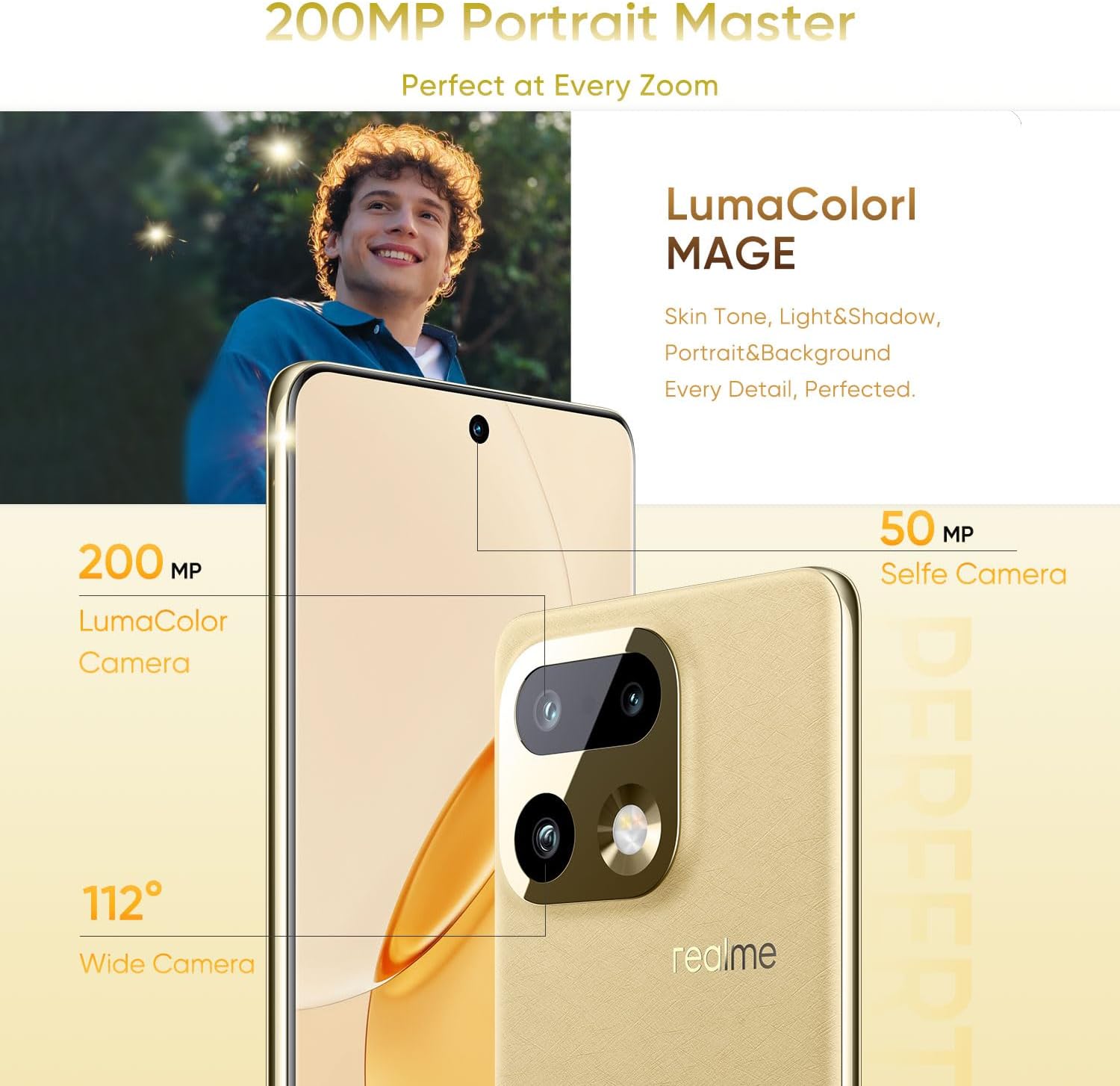
Immagine: Oltreview of the realme 16 Pro+ 5G camera system, showing the 200MP main camera and 50MP selfie camera with LumaColorl MAGE technology.

Image: The AI Instant Clip feature for one-tap video creation and AI Framing for smart framing and auto-zoom.

Image: The 50MP selfie camera and 200MP HI-RES mode for detailed group portraits, enhanced by AI Perfect Shot and AI Ultra Clarity.
3.3 Batteria e ricarica
The device is powered by a 7000mAh battery. For optimal charging, use the provided 80W SuperVOOC charger. This technology allows for rapid charging, reaching 48% in approximately 10 minutes and a full charge in about 35 minutes. The battery also supports reverse charging and bypass charging.

Image: Details of the 7000mAh Titan Battery, highlighting 80W Ultra Charge, Reverse Charge, Bypass Charge, and 6 Years Battery Health.
3.4 Prestazioni
The realme 16 Pro+ 5G integrates the Qualcomm Snapdragon 7 Gen 4 chipset and Rocket LPDDR5X memory, ensuring smooth multitasking, efficient gaming, and fast data processing. This configuration provides a responsive user experience for demanding applications and daily tasks.

Image: Visual representation of 12GB Dynamic RAM and 512GB ROM for enhanced multitasking capabilities.
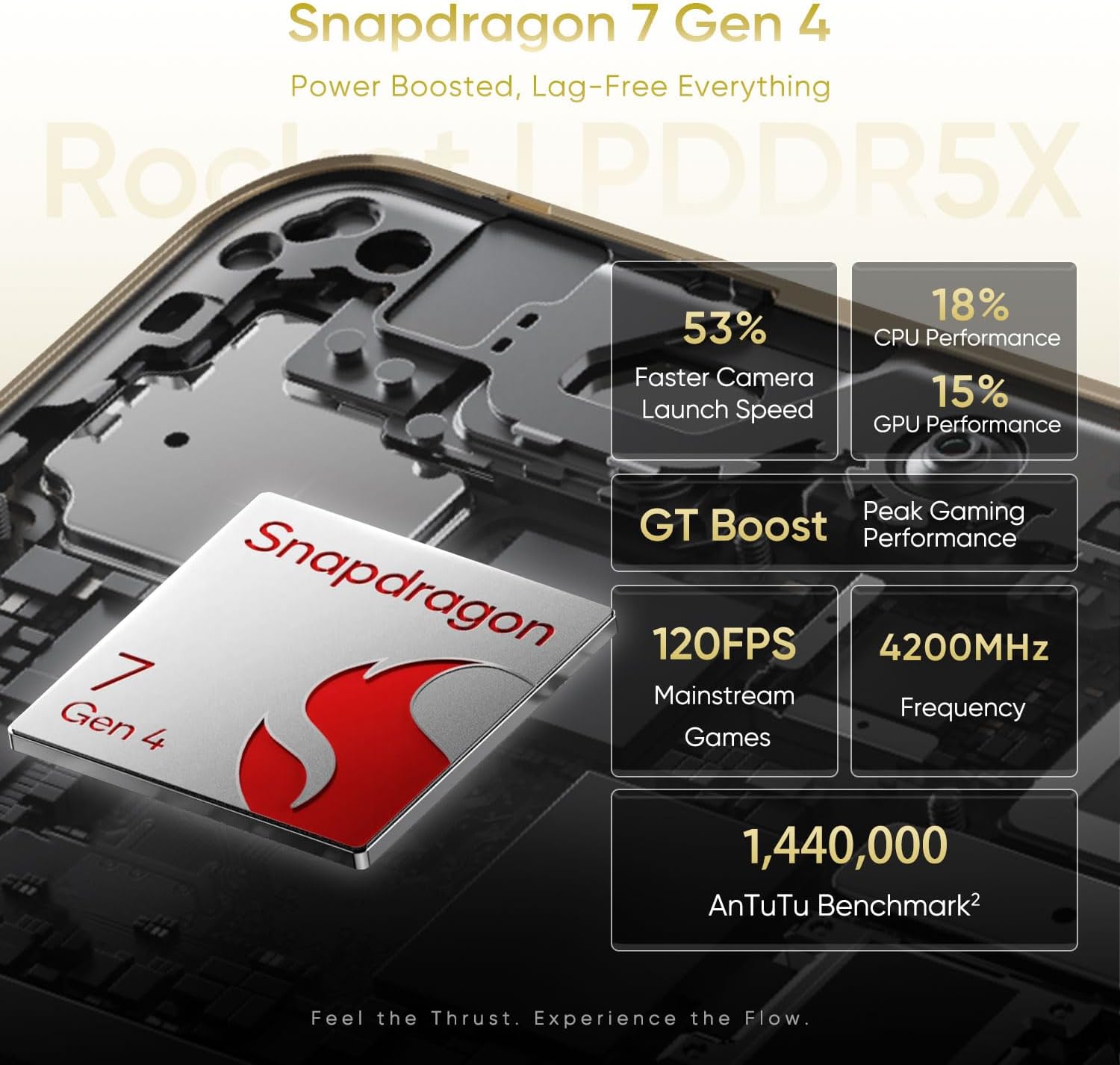
Image: Performance metrics for the Snapdragon 7 Gen 4, including faster camera launch speed, CPU/GPU performance, and gaming benchmarks.
3.5 Resistenza all'acqua e alla polvere
The device features an IP69 rating for water and dust resistance. This means it is protected against high-pressure water jets and dust ingress, offering durability in various environments. While resistant, avoid intentional submersion or exposure to extreme conditions.
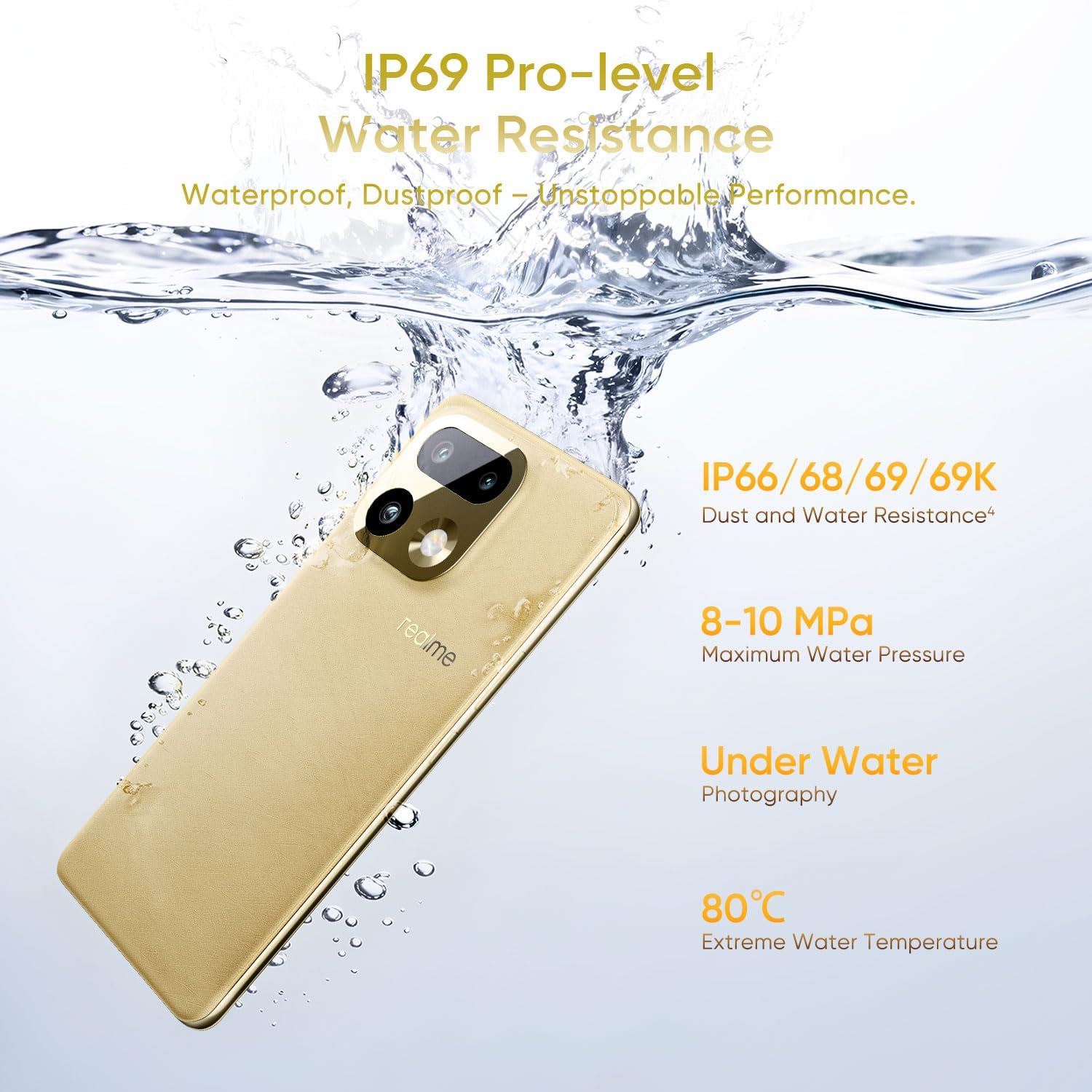
Image: The realme 16 Pro+ 5G submerged in water, illustrating its IP69 Pro-level Water Resistance, capable of withstanding high water pressure and extreme temperatures.
3.6 Connettività
The realme 16 Pro+ 5G supports 5G cellular technology for high-speed mobile data. It also includes Bluetooth, USB Type-C, and Wi-Fi for various connectivity needs.
4. Manutenzione
4.1 Aggiornamenti software
Controlla e installa regolarmente gli aggiornamenti software per garantire prestazioni ottimali, sicurezza e accesso alle nuove funzionalità. Vai a Impostazioni > Info sul telefono > Aggiornamento software per verificare la disponibilità di aggiornamenti.
4.2 Pulizia
Per pulire il dispositivo, utilizzare un panno morbido e privo di lanugine. Evitare l'uso di prodotti chimici aggressivi o materiali abrasivi, che possono danneggiare lo schermo o la finitura. Per le macchie ostinate, utilizzare un panno leggermenteampimmergi il panno nell'acqua.
4.3 Cura della batteria
Per prolungare la durata della batteria:
- Evitare temperature estreme.
- Non lasciare il dispositivo completamente carico o completamente scarico per periodi prolungati.
- Utilizzare il caricabatterie e il cavo originali.
5. Risoluzione Dei Problemi
Questa sezione affronta i problemi più comuni che potresti incontrare.
5.1 Il dispositivo non si accende
- Assicurarsi che la batteria sia carica. Collegare il dispositivo al caricabatterie per almeno 15 minuti.
- Per forzare il riavvio, tenere premuto il pulsante di accensione per 10-15 secondi.
5.2 Problemi di addebito
- Verificare che il caricabatterie e il cavo USB siano collegati saldamente.
- Prova a utilizzare una presa di corrente diversa.
- Ispezionare la porta di ricarica per verificare che non vi siano detriti o danni.
5.3 Problemi di connettività di rete
- Controlla se la modalità aereo è disattivata.
- Riavviare il dispositivo.
- Assicurati che la tua scheda SIM sia inserita correttamente e attiva.
- Ripristina le impostazioni di rete (Impostazioni > Sistema > Opzioni di ripristino > Ripristina Wi-Fi, dispositivi mobili e Bluetooth).
6. Specifiche
| Marca | reale |
| Nome del modello | realme 16 Pro+ |
| Sistema operativo | Androide 16 |
| Modello CPU | Qualcomm Snapdragon 7 Gen 4 |
| Velocità della CPU | 2.8 GHz |
| Dimensione della memoria RAM installata | 12 GB |
| Capacità di archiviazione della memoria | 512 GB |
| Tipo di visualizzazione | AMOLED |
| Frequenza di aggiornamento | Frequenza 144 Hz |
| Risoluzione massima dello schermo | 1280*2800 pixel per pollice |
| Risoluzione del sensore fotografico anteriore | 50 MP |
| Rear Facing Camera Photo Sensor Resolution | 200 MP |
| Capacità della batteria | 7000 milioneamp Ore |
| Tecnologia di ricarica | SuperVOOC da 80 W |
| Livello di resistenza all'acqua | IP69 resistente all'acqua |
| Tecnologia cellulare | 5G |
| Tecnologia di connettività | Bluetooth, USB di tipo C, Wi-Fi |
| Funzione di sicurezza biometrica | Riconoscimento facciale |
| Peso dell'articolo | 120 grammi |
7. Garanzia e supporto
7.1 Informazioni sulla garanzia
The realme 16 Pro+ 5G Smartphone comes with a Garanzia del produttore di 1 anni. This warranty covers defects in materials and workmanship under normal use. For specific terms and conditions, please refer to the warranty card included in your product packaging or visit the official realme websito.
7.2 Assistenza clienti
For technical assistance, troubleshooting, or warranty claims, please contact realme customer support through their official website or the contact information provided in your Quick Start Guide. Ensure you have your device's model number and purchase details ready when contacting support.