
1. Introduzione
This manual provides detailed instructions for the installation, operation, and maintenance of your RAINPOINT WiFi Water Timer (Model HTV145FRF) and its accompanying WiFi Gateway (Model HWG023WBRF). This smart watering system is designed to automate your garden, lawn, or yard irrigation, offering convenience and water efficiency.
1.1 Cosa c'è nella scatola
- 1x RAINPOINT WiFi Water Timer (HTV145FRF)
- 1x RAINPOINT WiFi Gateway (HWG023WBRF) with antenna
- 1x Type-C USB cable for Gateway
- 1x Power Adapter for Gateway
- 1x Manuale utente
- Guida rapida di 1x
- Additional accessories: Teflon tape, extra filter, extra O-rings
Note: 4 new AA (1.5V) alkaline batteries are required for the timer and are not included.
2. Impostazione
Before starting, ensure your smartphone is connected to a 2.4GHz WiFi network. Keep your WiFi hose timer, WiFi gateway, smartphone, and router close to each other to ensure a strong WiFi signal during setup.
2.1 Installazione dell'app
Download the "RainPoint Home" app from your device's app store. You can search for "RainPoint Home" or scan the QR codes provided in the Quick Guide or User Manual.
After installation, open the app and either register a new account or log in with an existing one. Agree to the User Agreement and Privacy Policy.
2.2 Connecting the WiFi Gateway
- Power on the WiFi Gateway with the Type-C USB cable and power adapter. Place it close to your router and the timer.
- Press and hold the button on the Gateway until the WiFi connecting indicator light flashes BLUE quickly.
- Open the RainPoint Home app, select "Add Device", find "HWG023WBRF" under the "Hub" category, and follow the app instructions to complete the connection.
Video: Demonstrates the process of installing the RainPoint Home app and connecting the WiFi Gateway to your home network.
2.3 Collegamento del timer per l'acqua
- Insert 4 new AA alkaline batteries (not included) into the battery compartment of the timer.
- In the RainPoint Home app, tap the Gateway icon on the homepage to enter the Gateway homepage. Tap "Add Device" and then "Add New Devices" to add the WiFi timer.
- Find and select "HTV145FRF" under the "Controller" category to add it.
- Press and hold the button on the timer until the RED LED indicator flashes rapidly (2 times per second). Then click "Next" in the app, and it will start pairing the timer automatically.
Video: Illustrates how to install batteries in the water timer and connect it to the previously set up WiFi Gateway via the app.
2.4 Installazione fisica
Attach the timer inlet parallel to your outdoor faucet/spigot. Hand tighten only to prevent damage. From the timer outlet, connect a drip irrigation system or a garden hose.

Image: The RAINPOINT WiFi Water Timer securely attached to an outdoor faucet, ready for hose connection.
Avvertimento:
- Il timer WiFi può essere utilizzato solo per l'acqua fredda.
- The WiFi timer uses a 433MHz RF connection to communicate with the WiFi Hub, and must be within a 820ft range, line of sight, of the WiFi Hub. If there are walls, iron gates, or bushes blocking, please shorten the distance between them to better receive the signal.
- Soil will absorb WiFi and RF signals; the best location of the timer is on the faucet 4 to 8 feet (1.2 to 2.4 meters) above the ground.
- Non collocare il timer WiFi in un pozzetto sotterraneo o in qualsiasi altro luogo in cui il segnale WiFi e RF sia ostruito.
- In caso di gelo, il timer dell'acqua deve essere rimosso dal rubinetto e posizionato correttamente al coperto per evitare qualsiasi pericolo di congelamento.
3. Operating the RAINPOINT WiFi Water Timer
Once connected, you can program and control your timer using the RainPoint Home app.
3.1 Multiple Watering Plans & Modes
The app allows you to set up to 6 watering plans with 3 distinct watering modes:
- Irrigazione normale: Continuous one-time irrigation. Set a start time and duration (1 minute to 12 hours).
- Irrigazione a intervalli: Intermittent water spraying realized by switching valves on and off at intervals. Useful for cooling, dust removal, or water-saving irrigation. Set run time (5 seconds to 60 minutes) and interval (5 seconds to 60 minutes).
- Ciclo e ammollo: Splits the total watering time into multiple short cycles with breaks in between to allow the soil to absorb water and improve watering efficiency. Set cycle duration (1 minute to 12 hours) and soak duration (1 minute to 12 hours).
You can tailor your watering routine with 5 frequency options: every day, odd days, even days, interval (every 2-30 days), or custom (e.g., every Monday).

Image: An illustration of the RainPoint Home app interface displaying various custom watering options and modes.
3.2 Irrigazione manuale
You have two ways to manually water without interrupting your scheduled plans:
- Pulsante Timer: Press the button on the timer unit to manually start or stop watering.
- Controllo app: Use the "Manual" section in the app to set a duration for immediate watering.

Image: A visual guide demonstrating both the physical button and app control for manual watering.
3.3 Weather-Based Watering & Seasonal Adjustment
The watering schedule can be automatically adjusted based on local weather data (weather, soil moisture, temperature, humidity). This helps prevent over-watering or under-watering.
- Ritardo pioggia: Automatically delays watering by 1-30 days during rainy periods.
- Regolazione stagionale: Automatically adjusts watering duration monthly based on a percentage you set (10%-200%), eliminating the need for repeated manual adjustments.

Image: Depicts the weather-based watering features, including rain delay, temperature adjustments, and humidity response.
3.4 Scene intelligenti
Create custom smart scenes to automate your irrigation system further. For example, you can set a scene to water when soil moisture falls below a certain threshold (requires a compatible soil moisture sensor, sold separately).
Video: Demonstrates how to connect the timer and an optional soil moisture sensor to the Gateway and set up smart scenes for automated watering based on soil conditions.
3.5 Controllo vocale
The WiFi irrigation controller is compatible with Alexa and Google Assistant, allowing you to control your watering system using voice commands.
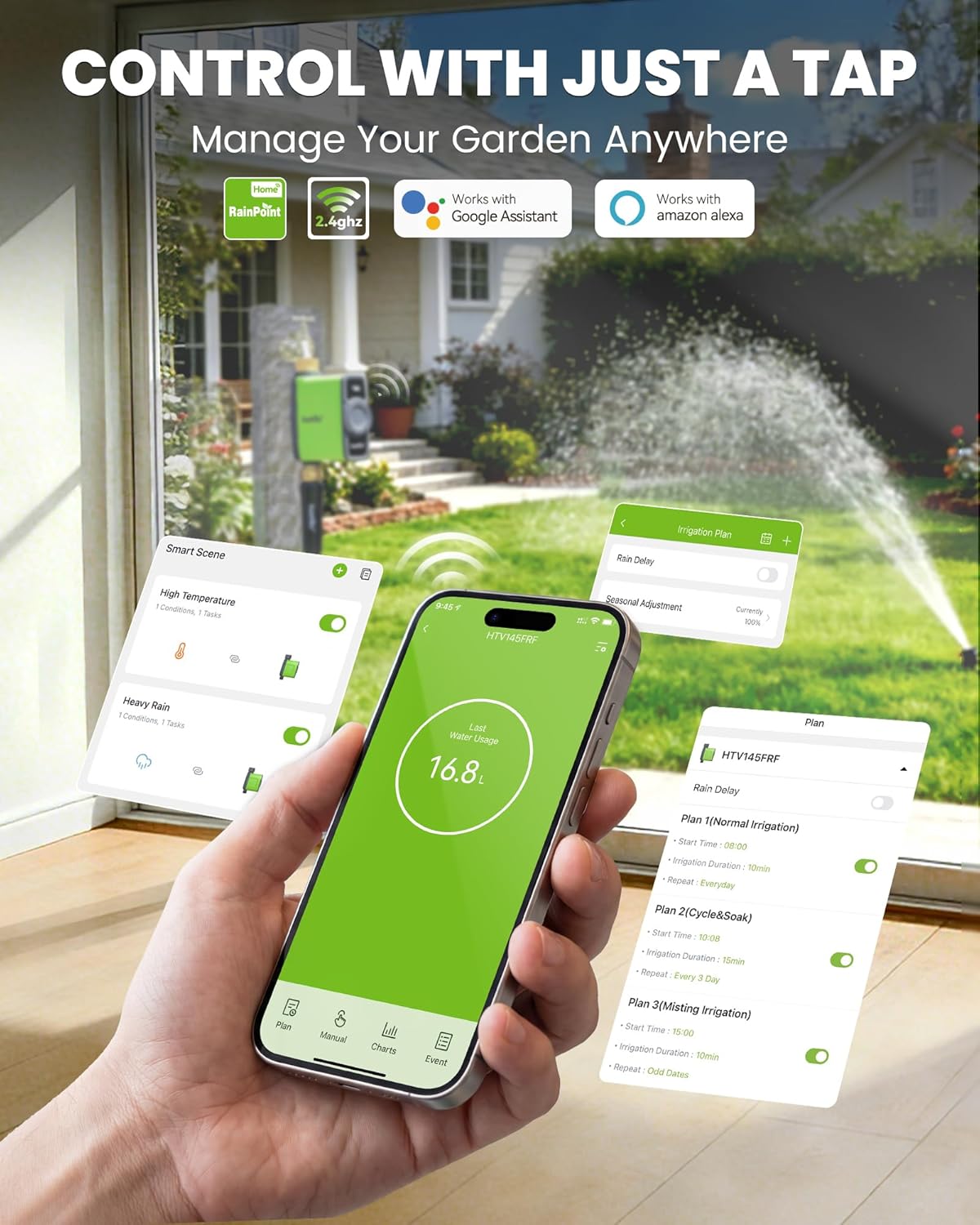
Image: The RainPoint Home app interface with icons for Google Assistant and Amazon Alexa, indicating voice control compatibility.
3.6 Water Usage Tracking & Alerts
The built-in high-precision water flow meter tracks water usage for the last day, past 30 days, and 12 months with an error of ±5%. This data helps you create efficient watering schedules and manage water consumption.
24-hour flow monitoring provides instant notifications if the smart water timer fails to open or close, or goes offline.

Image: The RainPoint Home app displaying water usage data in chart format, with options to view 30-day or 12-month history.
4. Manutenzione
4.1 Sostituzione della batteria
The timer requires 4 AA alkaline batteries. Replace them when the low battery alert is received via the app to ensure continuous operation.
4.2 Pulizia del filtro
The smart hose timer features a built-in metal filter to resist clogging. Periodically check and clean the filter to maintain optimal water flow and prevent blockages.
4.3 Rimessaggio invernale
During freezing weather, remove the water timer from the tap and store it indoors in a dry, protected area to prevent damage from freezing temperatures.
5. Risoluzione Dei Problemi
- Nessun flusso d'acqua: Ensure the outdoor faucet is fully open. Check battery level in the app. Verify the timer is correctly installed and not clogged.
- Weak Signal/Disconnection: Ensure the Gateway is within 820ft line-of-sight of the timer and your WiFi router. Reduce obstructions like walls or metal gates. Ensure your phone is connected to a 2.4GHz WiFi network during setup.
- Il timer non risponde: Check battery level. Reset the timer by pressing and holding the button until the LED flashes rapidly, then re-pair with the Gateway.
- Perdita: Ensure all connections are hand-tightened. Use Teflon tape and check O-rings for proper sealing. The durable brass inlet and outlet are designed for enhanced leak-proof performance.
- Problemi dell'app: Ensure the RainPoint Home app is updated to the latest version. For iOS, requirement is 11.0 or later. For Android, requirement is OS 6.0 or later.
6. Specifiche
6.1 WiFi Water Timer (HTV145FRF)
- Range Between Gateway And Timer: Una distanza aperta fino a 250 m/820 piedi
- Pressione dell'acqua di lavoro: da 0.5 bar a 8 bar (7.25-116 PSI)
- Portata d'acqua: 5-35 L/min (1.32-9.25 GAL/min)
- Intervallo di temperatura di lavoro: 3°C-50°C (37.4°F-122°F)
- Offerto da: 4 * AA alkaline batteries (not included)
- Livello di impermeabilità: Grado di protezione IP65
- Ingresso acqua: NH (US) for 3/4" faucets, BSP (EU) for 3/4" or 1" faucets
- Uscita acqua: For 3/4" standard garden hose
- Materiale: Ingresso e uscita in ottone
- Dimensioni del prodotto: 4.7"P x 3.4"L x 7"A
6.2 WiFi Gateway (HWG023WBRF)
- Distance Between Gateway And Router: 220 m (722 piedi)
- Offerto da: Alimentatore plug-in di tipo C
- Intervallo di temperatura di lavoro: 3°C-40°C (37.4°F-104°F)
- Banda di frequenza Wi-Fi: 2.4GHz (Only Support 2.4GHz WiFi)
7. Garanzia e supporto
The RAINPOINT WiFi Water Timer comes with a 1-year manufacturer's warranty.
For any questions, technical support, or warranty claims, please refer to the contact information provided in your User Manual or visit the official RAINPOINT websito.
You can also find setup videos and customer support resources online.