
1. Introduzione
This manual provides detailed instructions for the LIGE FV21-F Smart Watch. Please read this guide thoroughly to ensure proper usage, optimal performance, and longevity of your device. This smartwatch is designed to enhance your daily life with health monitoring, fitness tracking, and smart communication features.
2. Cosa c'è nella scatola
Upon unboxing your LIGE FV21-F Smart Watch, verify that all the following items are included:
- Smartwatch (LIGE FV21-F)
- Cavo di ricarica
- Watch Strap (Black Mesh)
- Additional Watch Strap (Apricot Silicone)
- Strumenti di impostazione dell'orologio
- Smartwatch Manuals (this document)
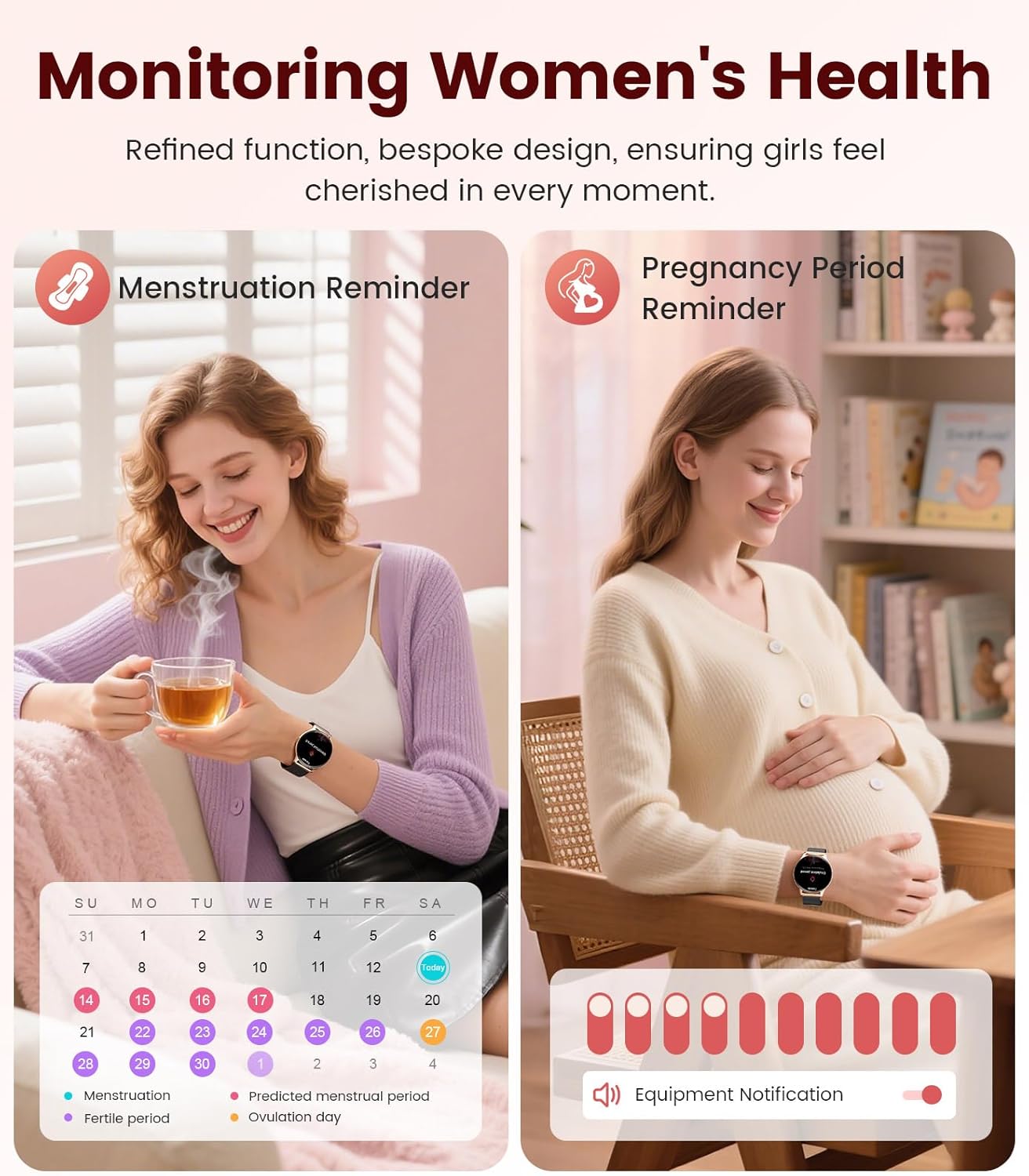
Image: Contents of the LIGE FV21-F Smart Watch package, showing the watch, charging cable, and two interchangeable bands.
3. Guida all'installazione
3.1 Attaching the Watch Straps
Your LIGE FV21-F Smart Watch comes with two interchangeable straps: a black mesh band and an apricot silicone band. To attach a strap:
- Locate the spring bar on the back of the watch strap.
- Align one end of the spring bar with the lug hole on the watch case.
- Push the spring bar inward and slide the strap into place between the lugs.
- Release the spring bar, ensuring both ends are securely seated in the lug holes.
- Gently pull the strap to confirm it is firmly attached.
Video: Demonstrates how to attach and change the watch straps, as well as initial setup and pairing with a smartphone.
3.2 Ricarica dello Smart Watch
Before first use, fully charge your smartwatch. Use the provided magnetic charging cable.
- Collegare l'estremità USB del cavo di ricarica a un adattatore di alimentazione (non incluso) o alla porta USB di un computer.
- Place the magnetic end of the charging cable onto the charging contacts on the back of the smartwatch. The magnets will align it correctly.
- The watch screen will display a charging indicator. A full charge typically takes approximately 2-3 hours.
Image: The LIGE FV21-F Smart Watch being charged using its magnetic charging cable.
3.3 Download e associazione dell'app
To unlock the full functionality of your smartwatch, download the companion app, "FitCloudPro," and pair it with your smartphone.
- Scarica l'App: Scan the QR code displayed on the watch screen (access via Settings > QR Code) or search for "FitCloudPro" in your smartphone's app store (App Store for iOS, Google Play Store for Android).
- Abilita Bluetooth: Assicurati che il Bluetooth sia abilitato sul tuo smartphone.
- Apri l'app e associa: Open the FitCloudPro app, navigate to the "Device" section, and tap "Add Device" or "Search Now". Select "FV21" from the list of discovered devices.
- Conferma associazione: A pairing request will appear on both your phone and watch. Confirm the pairing on both devices.
- Consenti notifiche: Grant necessary permissions for notifications (calls, messages, apps) when prompted by the app.

Image: The FitCloudPro app interface on a smartphone and the QR code on the smartwatch for easy app download and pairing.
4. Istruzioni per l'uso
4.1 Navigazione di base
- Schermo tattile: Scorri verso sinistra/destra, verso l'alto/verso il basso per navigare nei menu e nelle schermate. Tocca per selezionare.
- Pulsante laterale: Premere per riattivare lo schermo, tornare alla schermata iniziale o accedere all'elenco delle app.
- Schermata di riattivazione: Raise your wrist or press the side button to activate the display.
4.2 Personalizzazione dei quadranti dell'orologio
The LIGE FV21-F offers over 200 customizable watch faces. You can also upload your own photos.
- On the watch, long-press the home screen to access watch face options, then swipe to select.
- In the FitCloudPro app, go to "Watch Face Store" to browse and sync new faces.
- To use a custom photo, select "Watch Face DIY" in the app, choose a photo, adjust its position, and sync to your watch.

Image: The smartwatch displaying a custom watch face, demonstrating the personalization options available through the app.
4.3 Caratteristiche di comunicazione
- Rispondere/effettuare chiamate: Once paired via Bluetooth, you can answer incoming calls directly from your watch or dial numbers using the watch's dial pad.
- Notifiche dei messaggi: Receive notifications for SMS, emails, and various social media apps (WhatsApp, Facebook, Instagram, etc.) directly on your wrist. Ensure app permissions are granted.
- Assistente vocale: Utilizza l'assistente vocale integrato per comandi e informazioni rapidi.

Image: The smartwatch displaying an incoming call and message notifications, highlighting its communication capabilities.
5. Monitoraggio della salute
The LIGE FV21-F Smart Watch provides comprehensive health tracking features to help you monitor your well-being.
- Monitoraggio della frequenza cardiaca: Tiene traccia in modo continuo della tua frequenza cardiaca durante tutto il giorno.
- Monitoraggio del sonno: Analizza i tuoi schemi di sonno, inclusi sonno profondo, sonno leggero e orari di veglia.
- Monitoraggio dell'ossigeno nel sangue (SpO2): Misura i livelli di saturazione dell'ossigeno nel sangue.
- Women's Physiological Cycle Monitor: Provides reminders and tracking for menstrual and pregnancy periods.
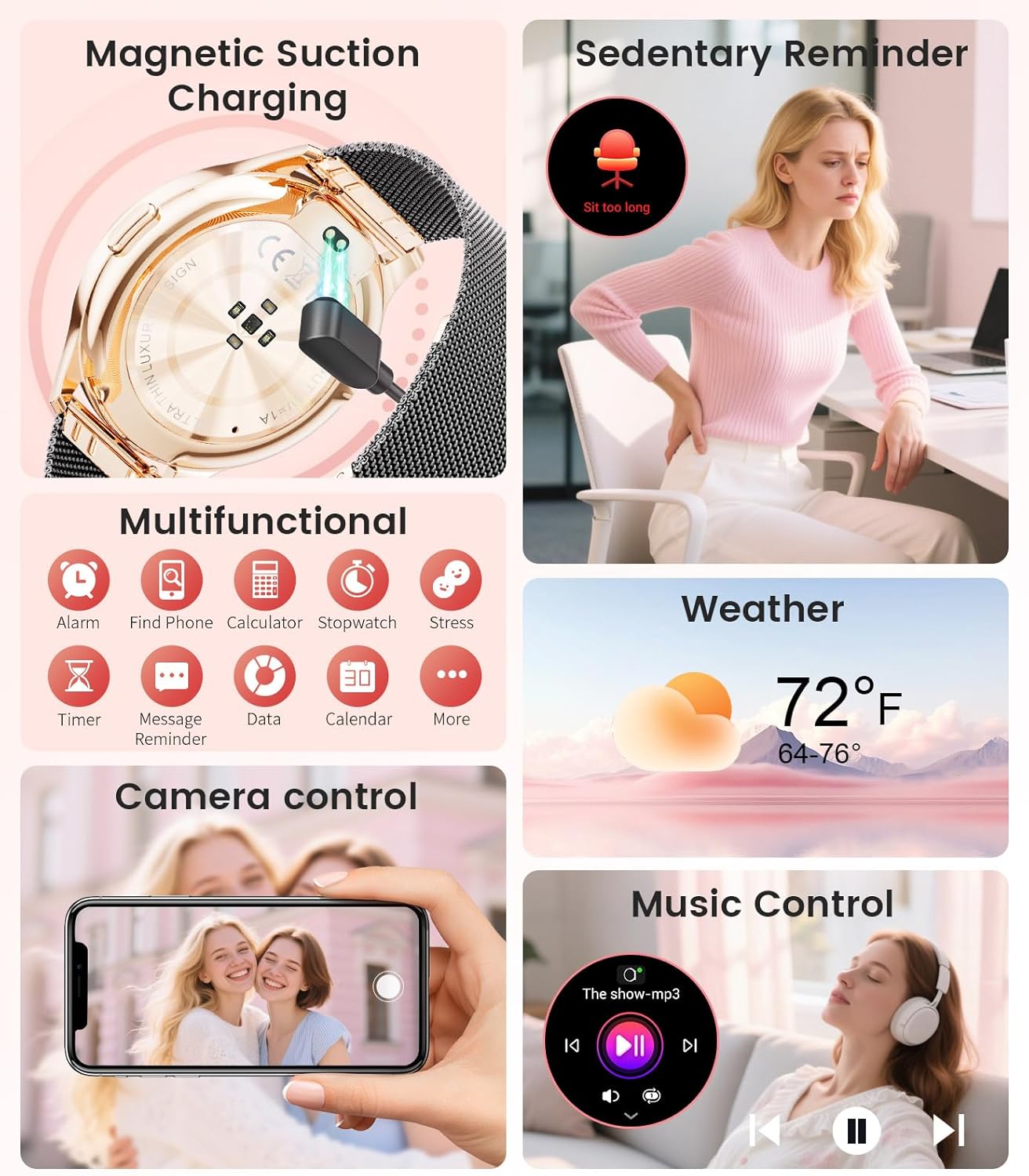
Image: The smartwatch interface showing women's health tracking features, including menstruation and pregnancy reminders.

Image: A user sleeping while wearing the smartwatch, with an inset showing the sleep tracking data on the watch face.
6. Fitness Tracking (120+ Sport Modes)
The LIGE FV21-F Smart Watch supports over 120 sport modes to track your activities, including walking, running, cycling, yoga, and more. It records steps, distance, calories burned, and heart rate during workouts.
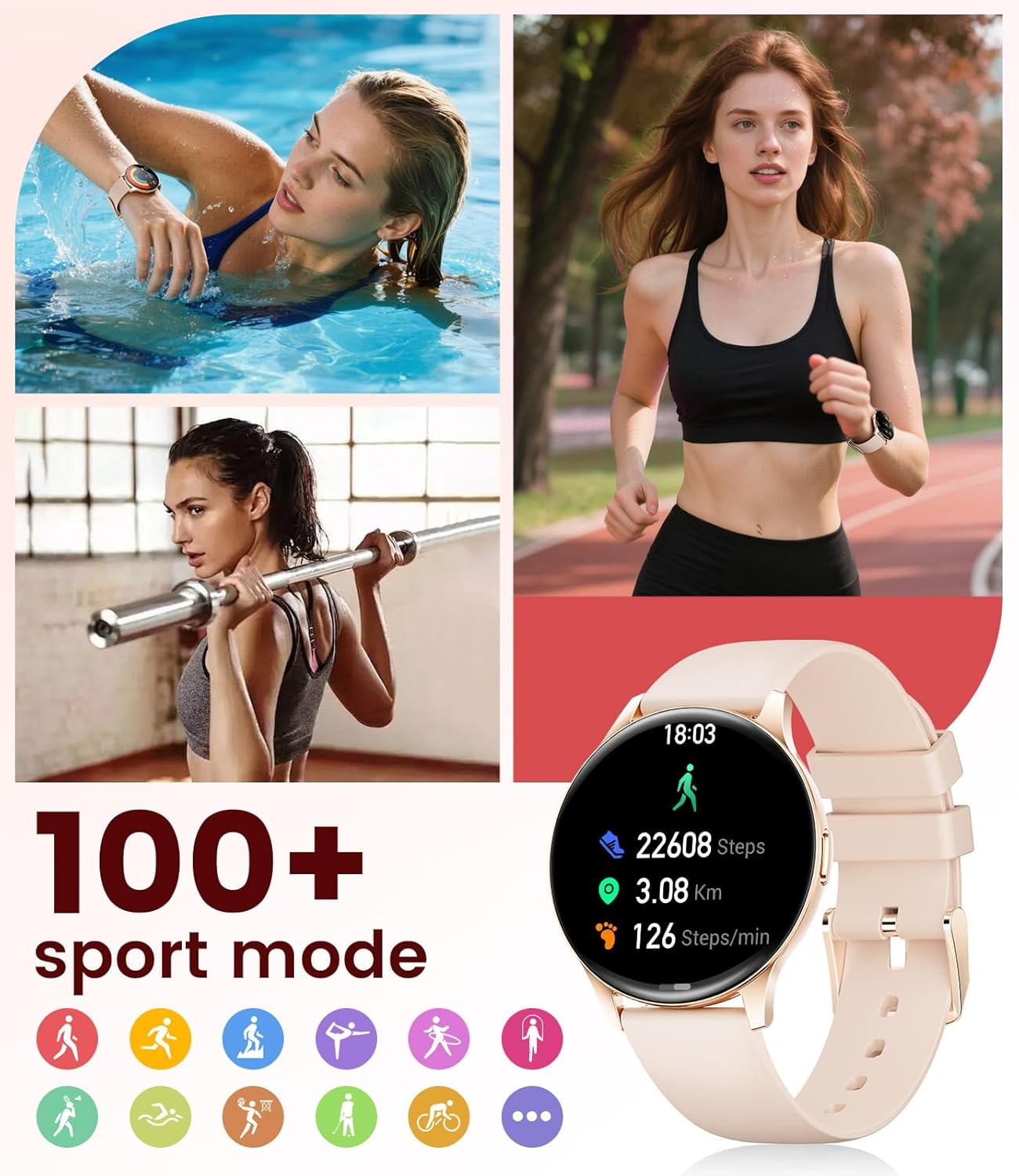
Image: The smartwatch showing different sport modes and real-time fitness data like steps, distance, and calories.
7. Altre funzioni intelligenti
Oltre alla salute e al fitness, il tuo smartwatch offre numerose comode funzioni intelligenti:
- Controllo della musica: Controlla la riproduzione musicale sul tuo smartphone direttamente dall'orologio.
- Controllo della telecamera: Utilizza il tuo orologio come otturatore remoto per la fotocamera del tuo telefono.
- Visualizzazione meteo: Ricevi aggiornamenti meteo in tempo reale.
- Allarmi e promemoria: Imposta sveglie, promemoria per la sedentarietà e promemoria per bere acqua.
- Trova telefono: Localizza il telefono smarrito attivando un allarme dall'orologio.
- Calcolatrice e cronometro: Basic utility tools available on your wrist.

Image: The smartwatch screen showing icons for music control, weather forecast, camera remote, and other utility features.
8. Specifiche
Detailed technical specifications for the LIGE FV21-F Smart Watch:
| Caratteristica | Dettaglio |
|---|---|
| Nome del modello | FV21-F |
| Display | 1.43" HD Curved AMOLED (466x466) |
| Compatibilità del sistema operativo | Android 4.4+ e iOS 9.0+ |
| Connettività | Bluetooth |
| Capacità della batteria | 1000 milioneamp Ore (polimero di litio) |
| Resistenza all'acqua | IP68 Waterproof (up to 50 meters) |
| Capacità di archiviazione della memoria | 256 MB |
| Tipo di materiale del cinturino | Acciaio inossidabile, silicone |
| Metriche misurate | Heart Rate, Sleep Duration, Blood Oxygen |
| Input dell'interfaccia umana | Schermo tattile |
| GPS | Tramite Smartphone |
9. Manutenzione
To ensure the longevity and optimal performance of your LIGE FV21-F Smart Watch, follow these maintenance guidelines:
- Pulizia: Regularly wipe the watch screen and straps with a soft, dry cloth. For silicone straps, a mild soap and water solution can be used, ensuring to rinse thoroughly and dry completely.
- Evitare prodotti chimici aggressivi: Do not use abrasive cleaners, solvents, or strong chemicals, as these can damage the watch's finish and internal components.
- Ricarica: Use only the provided magnetic charging cable. Avoid exposing the charging contacts to moisture or corrosive substances.
- Magazzinaggio: Quando non lo si utilizza per lunghi periodi, conservare l'orologio in un luogo fresco e asciutto, lontano dalla luce solare diretta e da temperature estreme.
- Esposizione all'acqua: While IP68 waterproof, avoid prolonged submersion in hot water, steam, or high-pressure water jets. Dry the watch thoroughly after exposure to water.
Video: The smartwatch being rinsed under tap water, showcasing its IP68 water resistance. Ensure to dry the watch after such exposure.
10. Risoluzione Dei Problemi
If you encounter issues with your LIGE FV21-F Smart Watch, refer to the following common solutions:
- L'orologio non si accende: Assicurati che l'orologio sia completamente carico. Collegalo al caricabatterie per almeno 30 minuti.
- Impossibile associare il telefono:
- Assicurati che il Bluetooth sia attivato sul tuo telefono e che l'orologio si trovi nel raggio d'azione.
- Riavvia sia il telefono che l'orologio.
- Svuota la cache Bluetooth del telefono e riprova ad associarlo.
- Ensure the FitCloudPro app has all necessary permissions.
- Notifiche non ricevute:
- Check app permissions for notifications in your phone settings and within the FitCloudPro app.
- Assicurarsi che l'orologio sia correttamente connesso tramite Bluetooth.
- Disable and re-enable notifications in the FitCloudPro app.
- Dati sanitari imprecisi:
- Assicurati che l'orologio sia indossato comodamente al polso, né troppo stretto né troppo largo.
- Pulisci il sensore sul retro dell'orologio.
- Note that health data is for reference and not for medical diagnosis.
- Durata breve della batteria:
- Ridurre la luminosità dello schermo e il tempo di accensione dello stesso.
- Disattivare il monitoraggio continuo della frequenza cardiaca se non necessario.
- Limita il numero di app che inviano notifiche all'orologio.
Se il problema persiste, contattare l'assistenza clienti.
11. Garanzia e supporto
The LIGE FV21-F Smart Watch comes with a Garanzia di 2 anno dalla data di acquisto, coprendo i difetti di fabbricazione. La presente garanzia non copre danni causati da uso improprio, incidenti, modifiche non autorizzate o normale usura.
For technical support, warranty claims, or any other inquiries, please contact LIGE customer service through the retailer where you purchased the product or visit the official LIGE websito per le informazioni di contatto.
We are committed to ensuring your satisfaction and providing a delightful experience with your LIGE Smart Watch.