
1. Introduzione
Grazie per l'acquistoasing the Sharp PS-916 Bluetooth Party Speaker System. This system includes two identical portable Bluetooth speakers designed to deliver powerful audio with versatile connectivity options. Please read this manual carefully before using the product to ensure proper operation and to maximize your listening experience.
Contenuto della confezione:
- 2 x Sharp PS-916 Party Speakers
- 1 x Cavo di ricarica
- 1 x telecomando
- 1 x Manuale utente

Image: The Sharp PS-916 system includes two speakers for a complete stereo experience.
2. Impostazione
2.1 Charging the Speakers
The PS-916 speakers are equipped with rechargeable batteries, providing up to 12 hours of playback. Before initial use, fully charge both speakers.
- Connect the charging cable to the DC IN port on the rear of each speaker.
- Plug the other end of the charging cable into a suitable power adapter (not included) or USB power source.
- La spia di carica si illuminerà. Cambierà colore o si spegnerà una volta completata la carica.
2.2 Accensione/Spegnimento
To power on or off each speaker, press and hold the ON/STAND BY INPUT pulsante situato sul pannello di controllo.
2.3 Accoppiamento Bluetooth (singolo altoparlante)
- Ensure the speaker is powered on and in Bluetooth mode. The Bluetooth indicator will flash, indicating it is ready for pairing.
- Sul tuo dispositivo mobile, attiva il Bluetooth e cerca i dispositivi disponibili.
- Select "Sharp PS-916" from the list of devices.
- Una volta effettuata la connessione, l'indicatore Bluetooth smetterà di lampeggiare e rimarrà fisso.
2.4 Accoppiamento True Wireless Stereo (TWS) (due altoparlanti)
TWS allows you to connect two PS-916 speakers wirelessly for a stereo sound experience.
- Power on both PS-916 speakers.
- Ensure neither speaker is currently connected to a Bluetooth device.
- Su uno degli altoparlanti (questo sarà l'altoparlante principale), premere il tasto TWS button. The speaker will enter TWS pairing mode.
- The primary speaker will automatically search for the secondary speaker. Once connected, you will hear an audible confirmation, and the TWS indicator lights on both speakers will illuminate.
- Ora collega il tuo dispositivo mobile all'altoparlante principale tramite Bluetooth come descritto nella sezione 2.3. L'audio verrà riprodotto in stereo da entrambi gli altoparlanti.
3. Operativo
3.1 Pannello di controllo Sopraview

Image: Main control panel for the Sharp PS-916 speaker.
- ON/STAND BY INPUT: Power on/off, switch input modes (Bluetooth, USB, TF, AUX, FM).
- PLAY/PAUSE (►/∕∕): Riproduci o metti in pausa la riproduzione audio.
- PRECEDENTE (◀◀): Passa alla traccia precedente.
- NEXT (▶▶): Passa alla traccia successiva.
- MANOPOLA DEL VOLUME: Ruotare per regolare il volume principale.
- TWS: Initiate or disconnect True Wireless Stereo pairing.
- EQUALIZZATORE: Cycle through preset equalizer modes.
- BASSO: Activate or deactivate bass boost.
- LEGGERO: Change or turn off the LED light effects.
- MIC CONTROL: Adjust microphone volume or echo (if applicable).
3.2 Porte di ingresso
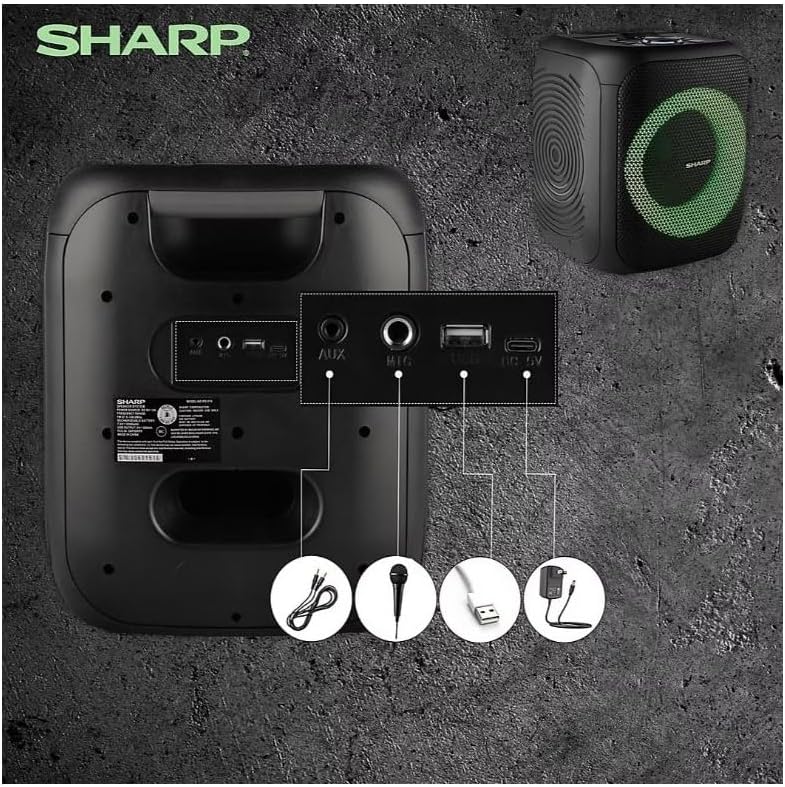
Image: Rear panel with various input and charging ports.
- INGRESSO AUX: Collegare dispositivi audio esterni tramite un cavo audio da 3.5 mm.
- INGRESSO MICROFONO: Connect a microphone (sold separately) for karaoke or announcements.
- USB: Inserire una chiavetta USB per la riproduzione audio.
- CARTA TF: Inserire una scheda TF (microSD) per la riproduzione audio.
- DC IN: Connect the charging cable to power and charge the speaker.
3.3 Playing Audio from USB/TF Card
- Insert a USB flash drive or TF card into the corresponding port.
- Premere il tasto ON/STAND BY INPUT button repeatedly until the display shows the USB or TF mode.
- La riproduzione inizierà automaticamente. Utilizzare il RIPRODUCI/PAUSA, PRECEDENTE, E PROSSIMO pulsanti per controllare la riproduzione.
3.4 Utilizzo dell'ingresso AUX
- Connect one end of a 3.5mm audio cable to the AUX IN port on the speaker.
- Collegare l'altra estremità al jack delle cuffie o all'uscita audio del dispositivo esterno.
- Premere il tasto ON/STAND BY INPUT button repeatedly until the display shows AUX mode.
- Controlla la riproduzione e il volume dal tuo dispositivo esterno.
3.5 Funzionamento della radio FM

Image: The PS-916 features an integrated FM Tuner.
- Premere il tasto ON/STAND BY INPUT button repeatedly until the display shows FM mode.
- Premere e tenere premuto il tasto RIPRODUCI/PAUSA pulsante per eseguire la scansione automatica e salvare le stazioni FM disponibili.
- Utilizzare il PRECEDENTE E PROSSIMO pulsanti per navigare tra le stazioni salvate.
3.6 Effetti di luce LED
Premere il tasto LEGGERO button to cycle through different LED light modes or to turn the lights off.
4. Manutenzione
4.1 Pulizia
- Prima di pulirlo, spegnere sempre l'altoparlante e scollegarlo dalla fonte di alimentazione.
- Utilizzare un panno morbido e asciutto per pulire le superfici esterne.
- Non utilizzare detergenti liquidi, spray o solventi, poiché potrebbero danneggiare la finitura o i componenti interni.
4.2 Conservazione
- Conservare gli altoparlanti in un luogo fresco e asciutto, lontano dalla luce solare diretta e da temperature estreme.
- Se si conserva la batteria per un periodo prolungato, caricarla a circa il 50% ogni pochi mesi per mantenerla in buone condizioni.
5. Risoluzione Dei Problemi
If you encounter issues with your Sharp PS-916 speakers, please refer to the following common problems and solutions:
| Problema | Possibile soluzione |
|---|---|
| L'altoparlante non si accende. | Assicurarsi che la batteria sia carica. Collegare il cavo di ricarica e riprovare. |
| Nessun suono dall'altoparlante. | Controlla il livello del volume sia sull'altoparlante che sul dispositivo collegato. Assicurati che sia selezionata la modalità di ingresso corretta. |
| Il dispositivo Bluetooth non riesce ad associarsi. | Ensure the speaker is in Bluetooth pairing mode (indicator flashing). Move your device closer to the speaker. Disconnect from other Bluetooth devices. |
| L'associazione TWS non riesce. | Ensure both speakers are powered on and not connected to any other Bluetooth devices. Try initiating TWS pairing again. |
| Suono distorto. | Riduci il volume sia dell'altoparlante che del dispositivo collegato. Assicurati che la sorgente audio non sia distorta. |
6. Specifiche
| Caratteristica | Dettaglio |
|---|---|
| Marca | Affilato |
| Nome del modello | PS-916 |
| Configurazione degli altoparlanti | 8" Woofer, 1" Tweeter (per speaker) |
| Potenza di uscita massima | 400 Watt (per altoparlante) |
| Potenza di uscita RMS | 40 Watt (per altoparlante) |
| Tecnologia di connettività | Bluetooth |
| Ingressi aggiuntivi | USB, TF Card, 3.5mm AUX, Microphone Input |
| Durata della batteria | Fino a 12 ore |
| Caratteristiche speciali | True Wireless Stereo (TWS) Pairing, Bass Boost, LED Light Effects, FM Tuner |
| Colore | Nero |
| Peso dell'articolo | 6.5 libbre (per altoparlante) |
| Codice UPC | 728434122111 |
| Codice GTIN | 728434122111 |
7. Garanzia e supporto
7.1 Informazioni sulla garanzia
This Sharp PS-916 product comes with a 90-day limited warranty. This warranty covers manufacturing defects under normal use. It does not cover damage caused by misuse, accidents, unauthorized modifications, or normal wear and tear.
7.2 Assistenza clienti
For technical assistance, warranty claims, or further inquiries, please refer to the contact information provided with your purchase documentation or visit the official Sharp support websito.